
Enabling Conversion Tracking in SureForms
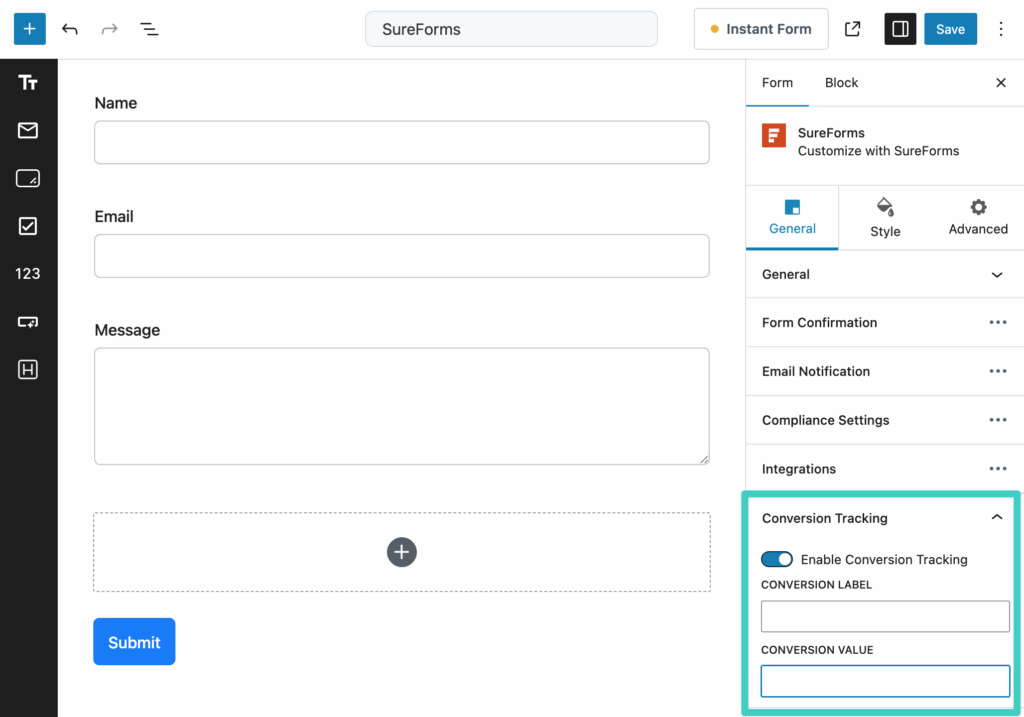
- Edit your form, Find the "Conversion Tracking" settings section
- Click the toggle to enable Conversion Tracking
- (Optionally) Enter a custom label and value
- (Optionally) Enter your Google Ads conversion ID
Sending Enhanced Conversion Data in SureForms
If you have enabled an ad platform and the respective Enhanced Conversions setting for it, then you will see additional options in SureForms email fields. When checked, this field will be used to securely include the submitted email address as enhanced conversion data.
If no field is selected, Conversion Bridge will fallback to the first email field found in the form.

Including Conversion Journey in Emails
To include the Conversion Journey in the any of the emails (recommend only Admin notification emails), you can insert the {conversion_journey} template tag within the content of the email you would like it to appear.

Pass UTM Parameters and Ad Click IDs into SureForms
You can capture a visitor's UTM parametersUTM parameters are tags added to a link that show where traffic comes from and which campaigns lead to real conversions. or ad click IDs (like Google's gclid) directly in a SureForms submission. Add a Hidden Field to your form, then set its default value to a Conversion Bridge tag, like {cb_gclid} or {cb_utm_source}. Keep in mind the Hidden Field block requires SureForms Pro, though the Conversion Bridge tags themselves work on SureForms free too, so you can still use them in other field defaults or your email notifications without upgrading.
Once a hidden field is on your form, Conversion Bridge fills it in at submission. The value gets saved with the entry and passed along to notifications, your CRM, or any connected webhook. Ad click IDs only fill in when the visitor has given marketing consent. UTM parameters don't need consent on their own, but Conversion Bridge only remembers them from page to page once the visitor has accepted your banner, so before that they only fill in on the page that has them in the URL. See Pass UTM Parameters and Ad Click IDs into Forms for the full list of supported tags.