
Ecommerce Tracking
Complete ecommerce data for WordPress
Every order. Every line item. Every coupon, tax line, and shipping cost. Sent to your analytics and ad platforms in the exact format each one expects — with zero setup.
Why It Matters
Why complete ecommerce data?
Maximize revenue insight
Page views tell you who visited. Ecommerce data tells you who bought, what they bought, and how much they spent — the only numbers that actually matter for revenue decisions.
Know what really sells
Per-product revenue, top categories, average order value, and discount usage — reported by your analytics platform automatically. Make merchandising decisions backed by data, not guesses.
Smarter ad campaigns
Ad platforms use purchase value, item categories, and AOV to decide who sees your ads. Send them the full picture and they spend less finding more buyers like your best customers.
Every detail of every order
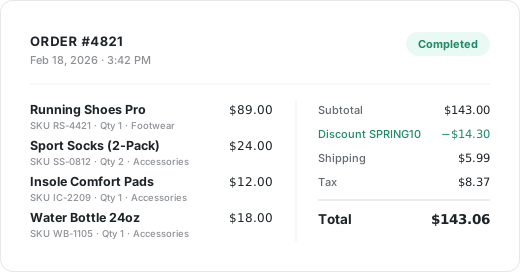
When a customer checks out, Conversion Bridge captures the full order — not just a flat purchase total. Every field below is sent to your connected platforms automatically, formatted exactly as each one requires.
No code, no data layer setup, no Google Tag Manager triggers. Connect your platforms once, and every future order is tracked in full.
- Order ID
- Order Total
- Currency
- Line Items
- Item Names
- SKUs
- Categories
- Quantities
- Per-Item Price
- Variants
- Coupons
- Discount Amount
- Tax
- Shipping
- Payment Method
- Customer ID
How It Works
Built for every type of WordPress commerce
Purchases, memberships, donations, bookings
Conversion Bridge tracks every kind of revenue event on your WordPress site — not just shopping carts. Product purchases, recurring subscriptions, donations, course enrollments, ticketed events, and appointment bookings are all captured with the same level of detail as a WooCommerce order.
WooCommerce purchase — $129.00
MemberPress signup — $19/mo
GiveWP donation — $50.00
FluentBooking appointment — $75.00
Formatted for every platform
Google Analytics 4 wants items arrays. Meta Pixel wants contents. Pinterest, TikTok, Microsoft Ads — each one has its own format. Conversion Bridge handles the translation so each platform receives data in exactly the shape it expects.
Every currency, tracked accurately
Orders are sent to your analytics and ad platforms in the currency they were placed in — not converted, not mashed into a single total. Reports stay accurate even when you sell across regions.
WooCommerce stores using Google Analytics 4 also get refund events fired automatically when an order is refunded, so reported revenue keeps up with returns.
Order #4128 — $189.00 USD
Order #4129 — €74,50 EUR
Order #4130 — £52.00 GBP
Order #4131 — ¥9,800 JPY
Why Conversion Bridge
The old way vs. the new way
The old way
- A flat purchase value
The basic ecommerce snippet sends a single number — the order total. No items, no categories, no coupons. Your analytics knows revenue happened, but not what was sold. - Manual data layer setup
Building a proper data layer means writing code in your theme or wiring up complex Google Tag Manager triggers. One plugin update later and the whole thing breaks. - Different setup for every platform
Each ad platform expects ecommerce data in its own format. Configuring item arrays, contents arrays, and line items separately is hours of work and a lot of room for mistakes. - Refunds and multi-currency forgotten
Most basic setups never send refund events, so reported revenue overstates reality. Multi-currency stores end up with totals mashed together in one currency.
With Conversion Bridge
- The full order, every time
Items, SKUs, categories, quantities, coupons, tax, shipping, currency — all sent automatically the moment an order completes. - Zero data-layer work
Your commerce plugin is detected automatically. No theme edits, no GTM, no JavaScript — just enable the platform and tracking starts. - One setup, every platform
Connect Google Analytics, Meta, TikTok, Pinterest, Microsoft Ads — each one receives the same order data formatted exactly the way it expects. - Refunds and currencies handled
Refund events fire automatically when you process a refund. Multi-currency orders are tracked in the order's actual currency, so reports stay accurate.
Plans & Pricing
One plugin Every conversion Setup in minutes
Starting at only $79/year, every plan includes all integrations & features
- 14-day money back guarantee
- Premium 1-on-1 support
- No tag manager needed
Common questions
Yes, Conversion Bridge is a WordPress plugin and only works on WordPress-powered websites.
Yes! I am very proud of the quality and speed of support offered should you run into any issues.
Conversion Bridge supports 71 plugins, 19 analytics platforms, and 11 ad platforms. If what you need is not yet supported, send a request and I will take a look — I am always looking to grow the integration list.
Yes! Agencies are highly encouraged to check out our Agency Partner Program where you can get a free license for your own site and earn money by referring new clients to Conversion Bridge.
Yes, but using GTM will require additional setup and configuration. Conversion Bridge is a much easier way to setup analytics and ad platform conversion tracking.
Conversion Bridge can be considered a GTM replacement — one that is much easier to setup, more accurate in tracking, gives you more insights, and works directly with the analytics platforms, ad platforms and plugins in use on your WordPress website.
Yes! At any time you can upgrade to a pricing plan that includes more sites.
Absolutely. Conversion tracking is not just for ad campaigns — it is how you figure out what is actually working in your business. Without it, you are guessing which pages, emails, blog posts, and organic traffic sources are driving signups and sales.
Conversion Bridge tracks form submissions, memberships, downloads, and purchases across your WordPress site, so you can confidently decide where to spend your time, what content to double down on, and what to cut — whether you ever run a paid ad or not.
Yes. Conversion Bridge integrates with many consent management platforms, so tracking respects visitor consent decisions before anything fires.

Hi, I’m Derek. I’ve been building WordPress plugins for over a decade, and my goal with Conversion Bridge is to make analytics and conversion tracking setup as painless as possible. If the FAQ didn’t cover it — pre-sales, an integration you wish existed, or you’re stuck on setup — send it over. I read every message.