
Conversion Bridge integrations with several core WordPress features:
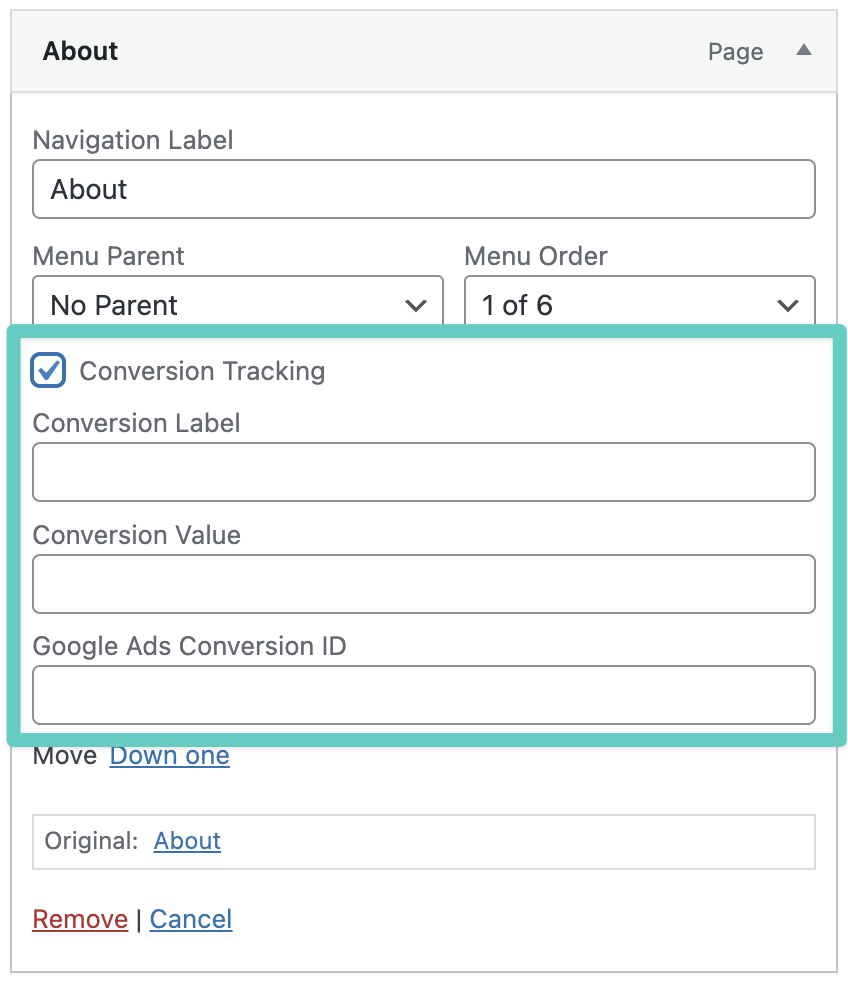
Menu Item Click Tracking
In WordPress Menus, you can add click tracking to any menu item... with a single click!
Search Conversion Tracking in WordPress
Searches are tracked when a default WordPress search results page is shown as determined by is_search(). The keyword searched is sent to your analytics platform as metadata (if your platform supports it). If you have a plugin/theme which handles search results differently, Conversion Bridge will not be able to track those searches.
Login Conversion Tracking in WordPress
A login will be tracked in the default WordPress login screen for non-admins or a plugin that uses default WordPress functions to record a login action which fires the wp_login hook. Most plugins that create custom login forms should work.
Registration Conversion Tracking in WordPress
This feature tracks registrations made using the default WordPress registration system. If you are using a plugin for a custom registration process, be sure to check our integrations page to see if it is included.
Phone Link Click Tracking
Tracks clicks on phone links (tel: links) anywhere on your site. When a visitor clicks a phone number link, a conversion event is fired. This is useful for tracking how often visitors tap or click to call your business.
The default label is "Phone Click" and can be customized in the integration settings.
Email Link Click Tracking
Tracks clicks on email links (mailto: links) anywhere on your site. When a visitor clicks an email address link, a conversion event is fired. This helps you measure how often visitors reach out via email directly from your site.
The default label is "Email Click" and can be customized in the integration settings.