
The Fluent Community integration tracks community signups, course enrollments, and course completions from the Fluent Community plugin. Fluent Community is a comprehensive learning management system (LMS) and community platform for WordPress.
This integration automatically tracks:
- Community signups: When users sign up for your community
- Course enrollments: When users enroll in courses
- Course completions: When users complete courses
Setup Instructions
Step 1: Enable the Integration
- In your WordPress admin, go to Settings → Conversion Bridge → Integrations
- Find FluentCommunity in the list of available integrations
- Enable the integration by checking the checkbox
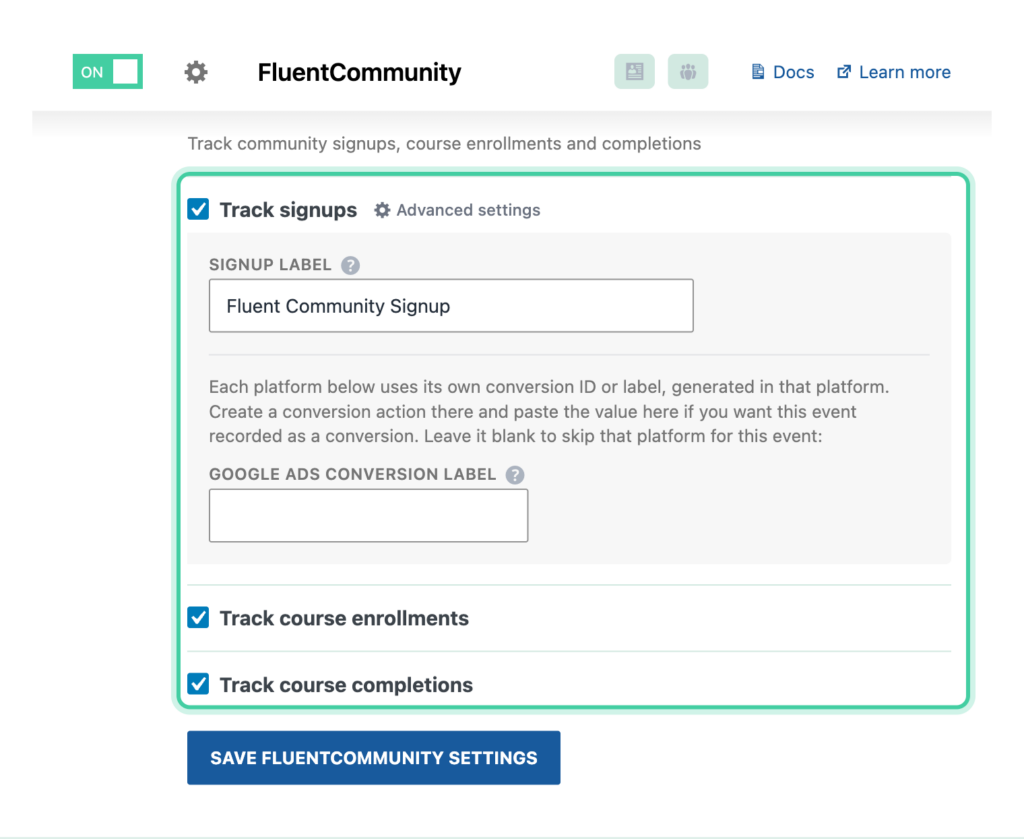
Step 2: Configure Event Tracking
Configure which events you want to track:
- Track signups: Enable to track community signups
- Optionally customize the Signup label (default: "Community Signup")
- Track course enrollments: Enable to track when users enroll in courses
- Optionally customize the Enrollment label (default: "Course Enrollment")
- Supports
%title%placeholder for course name - Track course completions: Enable to track when users complete courses
- Optionally customize the Completion label (default: "Course Completion")
- Supports
%title%placeholder for course name - Include current logged in user course info: Enable to send user course information as user properties (see User Info below)
Step 3: Save Settings
Click Save Changes to activate the integration.
How It Works
Community Signup Tracking
When a user signs up for your community:
- Signup Process: Fluent Community processes the signup
- Redirect Filter: Conversion Bridge intercepts the redirect URL
- Event Tracking: A registration event is tracked with user information
- Event Data: The event includes:
- User email address
- First name
- Last name
Course Enrollment Tracking
When a user enrolls in a course:
- Enrollment Created: Fluent Community creates the enrollment and fires the
fluent_community/course/enrolledhook - Event Tracking: Conversion Bridge tracks the enrollment event
- Event Data: The event includes:
- User email address
- First name
- Last name
- Course ID
- Course name
Only new enrollments are tracked, not updates to existing enrollments.
Course Completion Tracking
When a user completes a course:
- Course Completed: Fluent Community marks the course as completed and fires the
fluent_community/course/completedhook - Event Tracking: Conversion Bridge tracks the completion event
- Event Data: The event includes:
- User email address
- First name
- Last name
- Course ID
- Course name
Tracked Data
Signup Event
The community signup event includes:
- Event Type: Registration event
- Label: Customizable label (default: "Community Signup")
- Customer Data (if enhanced conversions enabled):
- Email address
- First name
- Last name
Enrollment Event
The course enrollment event includes:
- Event Type: Enrollment event
- Label: Customizable label with optional course name (default: "Course Enrollment")
- Customer Data (if enhanced conversions enabled):
- Email address
- First name
- Last name
- Course Information:
- Course ID
- Course name
Completion Event
The course completion event includes:
- Event Type: Completion event
- Label: Customizable label with optional course name (default: "Course Completion")
- Customer Data (if enhanced conversions enabled):
- Email address
- First name
- Last name
- Course Information:
- Course ID
- Course name
User Info
When User info is enabled for a platform, Conversion Bridge sends user properties about the logged-in user's course enrollment status:
- is_member: Whether the user is enrolled in any active courses ("yes" or "no")
- memberships: Comma-separated list of enrolled course names
These user properties are sent with all events for logged-in users and can be used to:
- Segment users by enrollment status in analytics platforms
- Create custom dimensions in Google Analytics
- Target users based on course enrollment in ad platforms
User Info Example
If a user is enrolled in "WordPress Basics" and "Advanced PHP", the user properties would be:
is_member: "yes",
memberships: "WordPress Basics, Advanced PHP"
Enhanced Conversions
When enhanced conversions is enabled for a platform, Conversion Bridge automatically includes customer email, first name, and last name data with all events. This data is sent to platforms that support enhanced conversions (such as Google Ads and Meta Ads) to improve conversion tracking accuracy and attributionThe process of determining which channels, campaigns, or actions contributed to a conversion, helping you understand what influenced a visitor’s decision to take action..
Enhanced conversion data is only sent to platforms that support it and is handled according to each platform's privacy requirements.
Custom Event Labels
You can customize event labels to better identify events in your analytics platforms. Enrollment and completion labels support the %title% placeholder for the course name:
- Signup Label: Default is "Community Signup"
- Enrollment Label: Default is "Course Enrollment" (supports
%title%) - Completion Label: Default is "Course Completion" (supports
%title%)
Example Labels:
Community Signup(default)Course Enrollment: %title%Completed: %title%
Headless Mode Support
The integration includes special support for Fluent Community's headless mode:
- Tracking Scripts: Conversion Bridge scripts are automatically enqueued in the portal head and footer
- Event Tracking: Events are properly rendered in headless mode
- Platform Scripts: All platform scripts (GA4, Facebook, etc.) are also output correctly
This ensures tracking works seamlessly whether you're using Fluent Community's standard mode or headless mode.