
Analytics
Complete analytics plugin for WordPress
Advanced configuration for 19 analytics platforms. Set up accurate tracking in minutes instead of days — no code, no tag manager.
19 Analytics Platforms
Enable multiple platforms at once — each gets data formatted to its exact requirements, without hours of per-platform setup.


















Advanced Configurations
Unlock each platform's full tracking capabilities from one simple settings screen. The kind of setup that would normally require a developer — done in a few clicks.
Google Analytics 4
Plausible Analytics
Microsoft Clarity
PostHog
Fathom Analytics
Run Multiple Platforms
Run several analytics platforms side-by-side. Test privacy-friendly options without abandoning your current setup — every platform gets full tracking, configured once.
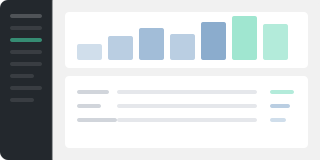
Dashboards in Admin
See your key metrics right inside the WordPress admin. A custom GA4 dashboard plus embedded views from many alternative platforms — no daily trips to separate analytics sites.
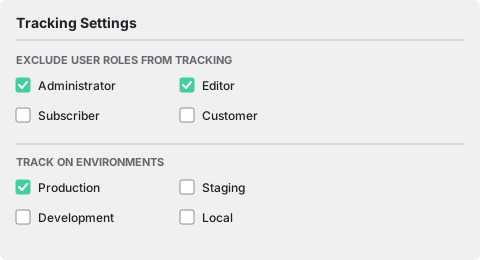
Track Specific Roles & Environments
Exclude admins, editors, and staging sites from tracking with a few clicks. Clean data means better decisions — without a developer writing custom filters.
Privacy Friendly
Works with many popular consent platforms — tracking only fires after visitors approve. GDPR-friendly by default, no extra configuration on your end.














































































Integrations
Your entire stack, connected
WordPress plugins on one side, analytics and ad platforms on the other — Conversion Bridge links them together. Without code or headaches.
Why Conversion Bridge
The old way vs. the new way
The old way
- Copy & paste tracking tags
Paste a basic snippet into your theme header. Get pageviews — but no conversion data, no ecommerce tracking, no form submissions. - Google Tag Manager
Spend hours configuring triggers, tags, variables, and data layers. Debug with preview mode. Hope nothing breaks on the next update. - Multiple plugins for each platform
Install separate plugins for GA4, Meta pixel, TikTok pixel, each with different settings screens and compatibility issues. - Hire a developer
Pay someone to write custom code for event tracking, ecommerce data layers, and platform-specific integrations. Then pay again when something changes.
With Conversion Bridge
- Paste your tracking ID
Enter your GA4 Measurement ID, pixel ID, or API key. That's the only "code" you touch. - Toggle on your plugins
WooCommerce, Gravity Forms, MemberPress — flip a switch and conversion data flows to every platform automatically. - One plugin, every platform
Enable 19 analytics and 11 ad platforms simultaneously. Each gets data formatted to its exact requirements. - Done in minutes
No developer, no tag manager, no code. Conversion Bridge costs less than the developer time it replaces.
Plans & Pricing
One plugin Every conversion Setup in minutes
Starting at only $79/year, every plan includes all integrations & features
- 14-day money back guarantee
- Premium 1-on-1 support
- No tag manager needed
Common questions
Yes, Conversion Bridge is a WordPress plugin and only works on WordPress-powered websites.
Yes! I am very proud of the quality and speed of support offered should you run into any issues.
Conversion Bridge supports 71 plugins, 19 analytics platforms, and 11 ad platforms. If what you need is not yet supported, send a request and I will take a look — I am always looking to grow the integration list.
Yes! Agencies are highly encouraged to check out our Agency Partner Program where you can get a free license for your own site and earn money by referring new clients to Conversion Bridge.
Yes, but using GTM will require additional setup and configuration. Conversion Bridge is a much easier way to setup analytics and ad platform conversion tracking.
Conversion Bridge can be considered a GTM replacement — one that is much easier to setup, more accurate in tracking, gives you more insights, and works directly with the analytics platforms, ad platforms and plugins in use on your WordPress website.
Yes! At any time you can upgrade to a pricing plan that includes more sites.
Absolutely. Conversion tracking is not just for ad campaigns — it is how you figure out what is actually working in your business. Without it, you are guessing which pages, emails, blog posts, and organic traffic sources are driving signups and sales.
Conversion Bridge tracks form submissions, memberships, downloads, and purchases across your WordPress site, so you can confidently decide where to spend your time, what content to double down on, and what to cut — whether you ever run a paid ad or not.
Yes. Conversion Bridge integrates with many consent management platforms, so tracking respects visitor consent decisions before anything fires.

Hi, I’m Derek. I’ve been building WordPress plugins for over a decade, and my goal with Conversion Bridge is to make analytics and conversion tracking setup as painless as possible. If the FAQ didn’t cover it — pre-sales, an integration you wish existed, or you’re stuck on setup — send it over. I read every message.