
Ad Platforms
Ad pixel tracking for WordPress
Pixel tracking and enhanced conversion data for 11 ad platforms. Ad platforms optimize on the conversions they can see, so track every sale and they stop spending your budget on clicks that never buy.
11 Ad Platforms
Send conversion data to every ad platform simultaneously, each formatted to its requirements.











Multiple Ad Platforms At Once
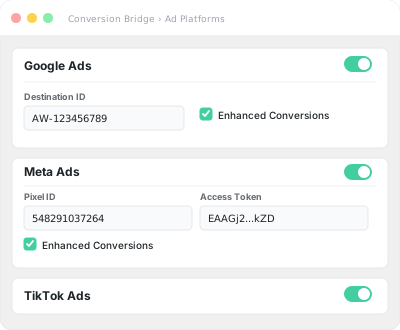
One setup sends conversions to every enabled ad platform at once. Track all your campaigns accurately without juggling separate plugins or tag configurations.
Google Ads
Meta Ads
TikTok Ads
LinkedIn Ads
Better attribution with enhanced conversions
Securely hash and send first-party customer data alongside conversion events from every integration. Ad algorithms can then match more conversions back to the ads that drove them, so they find more of the people who convert and waste less budget on those who never will.
Comprehensive Data
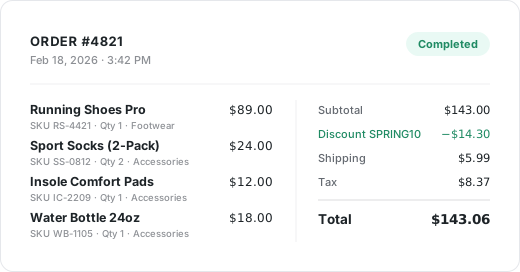
Every data point your plugins have — order values, product names, categories, quantities, coupons — automatically pulled and formatted to each ad platform's requirements. The more they know about what a real customer looks like, the less budget they waste finding the next one.
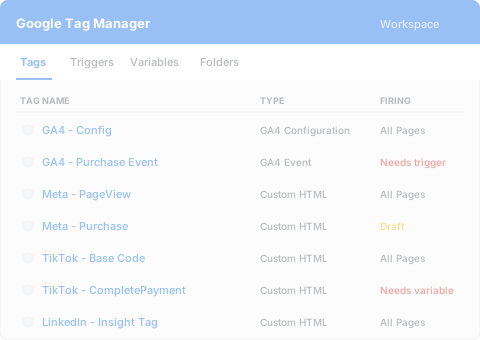
Replaces Google Tag Manager
GTM eats days of developer time and still often misses the data ad platforms need. Conversion Bridge handles pixels and conversions directly — more accurate tracking, set up in minutes instead of days.
Privacy Friendly
Works with many popular consent platforms — ad pixels only fire after visitors approve. GDPR-friendly by default, no extra configuration on your end.
Server-side tracking
Send conversions straight from your server through each platform's Conversions API, bypassing browser limits and ad blockers. You recover the conversions a browser pixel would have lost, in both your reporting and your ad platform's optimization.






















































































Integrations
Your entire stack, connected
WordPress plugins on one side, analytics and ad platforms on the other — Conversion Bridge links them together. Without code or headaches.
Why Conversion Bridge
The old way vs. the new way
The old way
- Copy & paste pixel code
Paste a basic pixel snippet in your header. Track pageviews — but miss purchase values, product data, and enhanced conversions. - Google Tag Manager
Spend hours configuring tags, triggers, data layers, and custom variables for each ad platform. Debug in preview mode. Hope nothing breaks. - Separate plugin per platform
Install a different plugin for each ad platform, each with different UIs, compatibility issues, and update cycles. - Missing conversion data
Basic setups miss order values, product details, and customer data. Your ad platforms can't optimize without complete information.
With Conversion Bridge
- Paste your pixel ID
Enter your pixel or conversion ID for any supported platform. That's the only setup needed. - All conversions, automatically
Purchases, form submissions, signups — every conversion fires to every enabled ad platform with full order data included. - Enhanced conversions built in
For supported platforms, first-party customer data is automatically hashed and sent to improve attribution accuracy. - Spend less, sell more
Complete conversion data lets ad platforms optimize on what actually happened instead of guessing. They stop paying for clicks that never buy, and one smarter campaign can earn back the cost.
Plans & Pricing
One plugin Every conversion Setup in minutes
Starting at only $79/year, every plan includes all integrations & features
- 14-day money back guarantee
- Premium 1-on-1 support
- No tag manager needed
Common questions
Yes, Conversion Bridge is a WordPress plugin and only works on WordPress-powered websites.
Yes! I am very proud of the quality and speed of support offered should you run into any issues.
Conversion Bridge supports 77 plugins, 19 analytics platforms, and 11 ad platforms. If what you need is not yet supported, send a request and I will take a look — I am always looking to grow the integration list.
Yes! Agencies are highly encouraged to check out our Agency Partner Program where you can get a free license for your own site and earn money by referring new clients to Conversion Bridge.
Yes, but using GTM will require additional setup and configuration. Conversion Bridge is a much easier way to setup analytics and ad platform conversion tracking.
Conversion Bridge can be considered a GTM replacement — one that is much easier to setup, more accurate in tracking, gives you more insights, and works directly with the analytics platforms, ad platforms and plugins in use on your WordPress website.
Yes! At any time you can upgrade to a pricing plan that includes more sites.
Absolutely. Conversion tracking is not just for ad campaigns — it is how you figure out what is actually working in your business. Without it, you are guessing which pages, emails, blog posts, and organic traffic sources are driving signups and sales.
Conversion Bridge tracks form submissions, memberships, downloads, and purchases across your WordPress site, so you can confidently decide where to spend your time, what content to double down on, and what to cut — whether you ever run a paid ad or not.
Yes. Conversion Bridge integrates with many consent management platforms, so tracking respects visitor consent decisions before anything fires.

Hi, I’m Derek. I’ve been building WordPress plugins for over a decade, and my goal with Conversion Bridge is to make analytics and conversion tracking setup as painless as possible. If the FAQ didn’t cover it — pre-sales, an integration you wish existed, or you’re stuck on setup — send it over. I read every message.