

Skip to content

The best Site Kit by Google alternative

Site Kit is free, brings Google's tools into WordPress, and reports on a small set of plugins. Conversion Bridge covers many more integrations in more depth, so the same plugin works on every site you build. Site Kit fits a simple site living entirely inside Google. Conversion Bridge is for professional marketers and site owners who need one plugin that handles whatever comes up.

Site Kit by Google logo
Conversion Bridge logo

Quick compare

Site Kit by Google compared with Conversion Bridge
Capability Site Kit by Google Conversion Bridge
Supported Google services Analytics, Ads, Search Console, AdSense, PageSpeed, Tag Manager Google Analytics 4, Google Ads
Analytics dashboard in WordPress admin Basic visitors, time on page, top content Full interactive dashboard with conversion data focus
Installs the Google tag without editing code Yes Yes
Form plugins that can fire conversions 3 form plugins 18 form plugins
Ecommerce plugins that can fire conversions 2 ecommerce plugins 10 ecommerce plugins
Membership, course, booking and donation plugins No 18 plugins
Where conversion events can be sent GA4 and Google Ads GA4 + 18 analytics, Google Ads + 10 ad platforms
Hashed customer details sent for matching Yes Yes
Server-side conversion events No Meta Ads, Pinterest Ads, Reddit Ads, OpenAI Ads, Snapchat Ads, and Awin
Consent handling Google consent mode Google consent mode + 14 consent banner integrations
Conversion journey stored in WordPress No Yes
Price Free Paid license

Picking one

Which is right for you

Choose Site Kit by Google when
  • Google is the whole picture

    Analytics and Google Ads are the only places your data needs to go.

  • You only need basic Search Console data in WordPress

    Keyword and click data sitting next to the posts it belongs to.

  • You run AdSense

    Earnings in the same dashboard as everything else.

  • Your events come from a plugin it supports

    One of the eight on its list.

Note: Search Console, AdSense, PageSpeed Insights are all fuller in Google's own interfaces than in a dashboard widget. Site Kit saves you the trip, but doesn't bring enough value for serious marketers to be worthwhile.

Choose Conversion Bridge when
  • You advertise beyond Google

    One event reaches every platform you have connected, at the same time.

  • Your stack is wider than eight plugins

    71 integrations across forms, ecommerce, memberships, courses, bookings and donations.

  • You want conversions matched to real people

    Hashed email, name, phone and address sent to your ad platforms.

  • You want the path to the sale

    Every conversion stores the pages that visitor saw before it.

  • You run campaigns and care about UTMs

    UTM values and ad click IDs saved onto the orders or form entries, with UTM reports and a link builder in WordPress.

  • You want GA4 data without the GA4 interface

    An easy to use dashboard in WordPress admin that you can filter by conversion event, compare against the previous period, and trim to just the sections you use.

For agencies

One plugin on every project

On a new build you pick the stack. On a site you have taken over, you inherit it. Either way every project has its own needs, and sooner or later one of them has to track conversions from a plugin Site Kit does not cover.

Conversion Bridge covers 71 integrations, so the same plugin goes on every project. Your team learns one tool and sets it up the same way each time, instead of a different approach depending on what the client happens to be running.

In detail

Where they differ

What you see in WordPress

Site Kit by Google

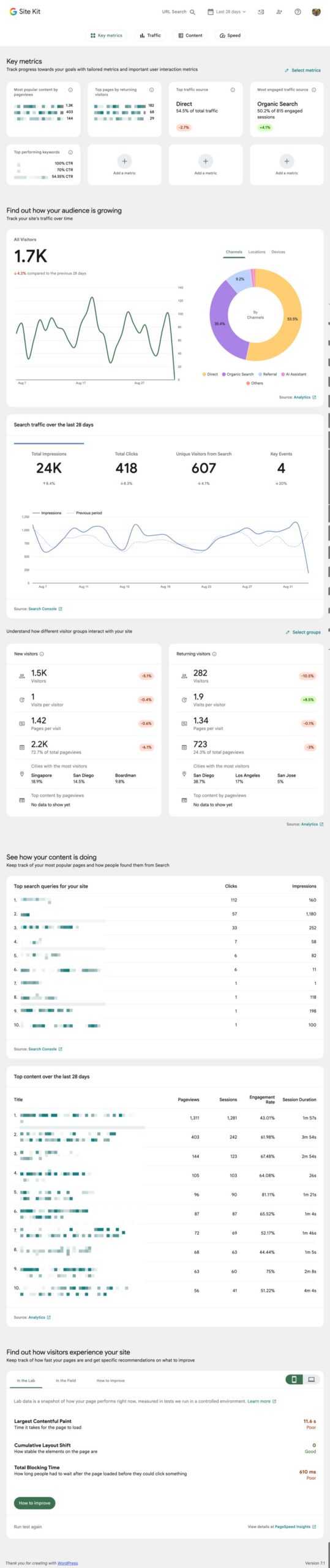
Site Kit brings basic reporting into your dashboard: Search Console keywords and clicks, PageSpeed scores, AdSense earnings, and an Analytics widget.

Conversion Bridge

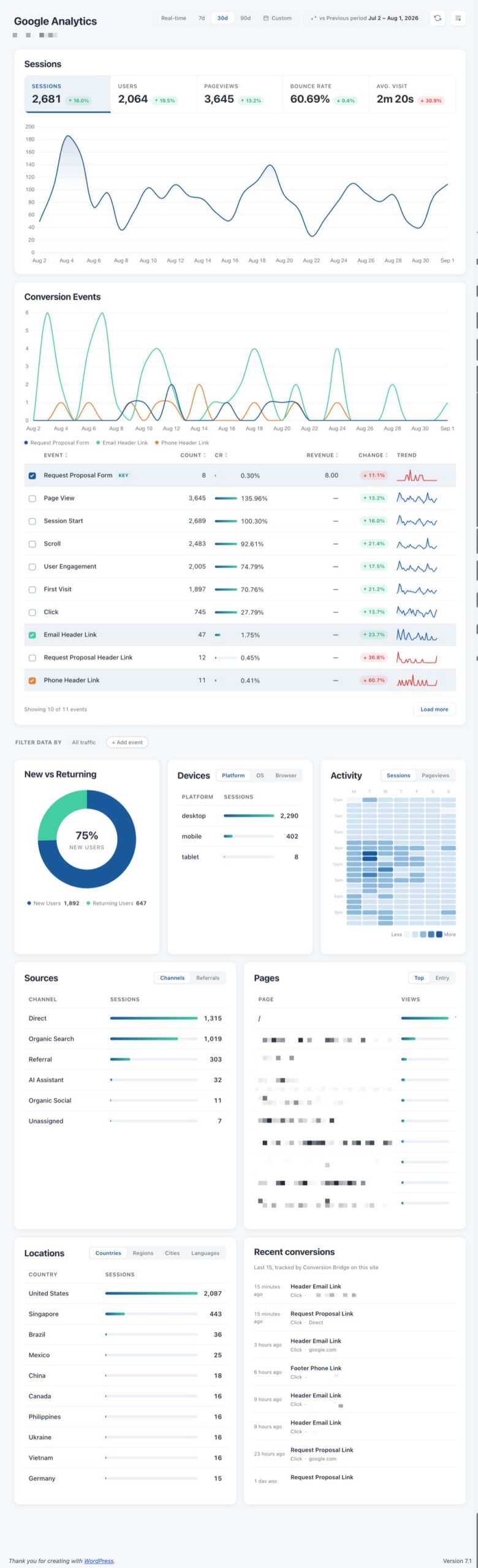
A full analytics dashboard: sessions, users, pageviews, bounce rate and revenue, with sources, top pages, devices, locations and activity by hour with an added emphasis on understanding your conversions and what is driving those conversions most.

Answers what is converting, not just who visited

Which plugins can fire conversions

Site Kit by Google

Only 8: Contact Form 7, WPForms, Ninja Forms, WooCommerce, Easy Digital Downloads, MailChimp, OptinMonster and Popup Maker.

Conversion Bridge

71 integrations that cover 18 form plugins, 10 ecommerce plugins, and 18 membership, course, booking and donation plugins, plus popups, newsletters and affiliates.

Whatever your site runs, it is probably already covered

Where conversions can go

Site Kit by Google

Google Analytics and Google Ads. Site Kit is a Google plugin and its conversion events stay inside Google, which is fine if Google is the only place you advertise.

Conversion Bridge

An event is detected once and sent to every platform you have connected at the same time: 19 analytics platforms and 11 ad platforms. Adding additional platforms later does not mean setting your tracking up again.

One setup covers every platform you add later

Matching conversions to people

Site Kit by Google

Site Kit places the Google tag, then enhanced conversions is something you switch on inside Google Ads rather than in the plugin. It applies to Google only.

Conversion Bridge

Enhanced conversions can send hashed customer details, meaning email, name, phone and address, to your ad platforms. The hashing happens before anything leaves your site.

Your ads can find more of the people who actually buy

Server-side events

Site Kit by Google

Site Kit offers Google tag gateway, which serves Google's tag from your own domain. That helps the tag load, but it is not the same as sending a conversion server to server.

Conversion Bridge

Some platforms can receive conversions straight from your server, so the event still arrives when a browser pixel would have been blocked: Meta Ads, Pinterest Ads, Reddit Ads, OpenAI Ads, Snapchat Ads, and Awin.

Server events are matched against the pixel so nothing is counted twice.

Tracking keeps working when the pixel is blocked

The path before a conversion

Site Kit by Google

Google Analytics gives you aggregated paths, how visitors move through a site in general, not the route the person who bought actually took.

Conversion Bridge

Every conversion gets that one visitor's journey attached to it: the pages they viewed before converting, sitting on the order or entry in WordPress rather than in a separate report.

The actual path one buyer took, not an average

Trying another analytics platform

Site Kit by Google

Site Kit connects Google Analytics. Looking at an alternative means adding it yourself and setting its events up separately, and Site Kit will not report on it.

Conversion Bridge

You can run more than one analytics platform at once and send the same conversions to all of them, so a privacy focused option can sit alongside Google Analytics on the same site while you compare the numbers.

Test an alternative without rebuilding anything

Campaign data in your own records

Site Kit by Google

Site Kit sends events to Google, so the campaign that brought someone in lives in Google Analytics. The order and the form entry in WordPress do not carry it.

Conversion Bridge

UTM values and ad click IDs are written into the form entry and the order itself, as real field data rather than a separate report.

They are filled in before the submission is handed on, so whatever the form feeds next, a CRM or an email tool, gets the campaign along with the lead.

The campaign follows the lead into your CRM

See it

The same job, side by side

The Google Analytics view inside WordPress

Site Kit by Google

Site Kit's Analytics widget in the WordPress dashboard, showing unique visitors, average time on page and top content

Conversion Bridge

The Conversion Bridge dashboard in WordPress, showing sessions, users, pageviews and revenue alongside conversion events, sources and top pages

Credit where it is due

What Site Kit by Google does well

Site Kit is a fast way to get Google's own numbers into WordPress. You connect your Google account, and Search Console, Analytics, PageSpeed Insights and AdSense start showing up on your dashboard. No copying property IDs, no pasting tags into your theme.

It also installs the Google tag for you, so Analytics and Google Ads start collecting without touching code. Recent versions added plugin conversion tracking, which can send events from a set of supported plugins including Contact Form 7, WPForms, Ninja Forms, WooCommerce and Easy Digital Downloads into Google Analytics and Google Ads.

Site Kit is built and maintained by Google, it's free, and it's on millions of sites. If Google is the only place your data needs to go, that's a strong combination and I'd have a hard time talking you out of it.

The verdict

Conversion Bridge is for marketers, agencies and site owners who want one plugin to do more

Site Kit is free and it covers Google well, and if Google is the whole picture it is a fine place to stop. But once you advertise on more than one platform, work across client sites running different plugins, or need conversions matched back to real people, that is a bigger job than a reporting widget. It is the job Conversion Bridge was built for.

Start Tracking Today

What changes once your conversions are tracked

Traffic reports tell you how many people showed up. They don't tell you what those people did, and that second question is usually the one you actually need answered.

Site Kit is great at the first question. It pulls Search Console and Analytics into your dashboard so you can see which posts get found and how many people read them. That's real, useful information, and it's free.

The second question needs something different. A conversion has to be detected at the moment it happens, inside the plugin where it happens, with the details attached: which form, which product, how much money. Then it has to be sent everywhere it needs to go. That's the job Conversion Bridge does.

An example of how this plays out

Say you sell a course. Someone finds a blog post from search, downloads a free guide through a WS Form opt-in, comes back a week later from a Facebook ad, and buys.

With Google-only tracking, the purchase shows up in Google Analytics and Google Ads. That's fine as far as it goes. But Meta never hears about the sale, so the ad that closed it looks like it did nothing, and the ad platform can't learn from it. The opt-in that started the whole thing may not be recorded as an event at all if the form plugin isn't one of the supported ones.

With Conversion Bridge, both events are detected once in WordPress and sent to every platform you've connected at the same time. The purchase carries the order value. Hashed customer details can go along with it so Meta and Google can match the conversion to the person who saw the ad. And the conversion journey shows you the blog post, the opt-in page, and the return visit that led to the sale.

Where each one belongs

Both plugins place the Google tag and both can send conversion events, so the difference is in scope. Site Kit is built around Google: it installs Google's tags, reports on a set of eight plugins, and sends those events to Google Analytics and Google Ads. Conversion Bridge is built around your WordPress site: it detects conversions from 71 plugins and sends them to every analytics and ad platform you've connected, Google included.

You can run both, and some sites do, but I wouldn't set out to. If two plugins both place the Google tag, every pageview gets counted twice, and it's easy to miss because the reports still look normal, only higher.

If you do want Search Console and AdSense numbers inside WordPress, connect only those two modules in Site Kit and leave Analytics and Google Ads unconnected. Site Kit then won't output the GA4 or Google Ads scripts, so there's only one of each on the page and Conversion Bridge handles the conversions.


Testimonials

Loved by WordPress professionals

Conversion Bridge has simplified website traffic and conversion tracking. Derek's response time when I have questions or feature requests is incredible. Conversion Bridge is now part of my plugin stack for every WordPress website.

Reuben Hochstetler
Reuben Hochstetler Touchdown Tech

It's been one of the best tools we've rolled out at our agency, huge time saver for us. Keep doing what you're doing 🙌

Richard Henney
Richard Henney

I really just love that I can trust that everything I might eventually need is getting synced back. Never felt confident with the other solutions I've tried 🥪

Ian Misner
Ian Misner KestrelWP

Solid tool and platform to getting analytics. I had some questions about how to see specific pieces of events in GA4 and how to past those to events from Conversion Bridge to GA4 and they knocked it out of the…

Derek Welton
Derek Welton Ironwood Manufacturing

The plugin was easy to install and setup, and does exactly as promised. And the support to deal with questions has been friendly, prompt and helpful!

Sean Craig
Sean Craig Impact Society

Conversion Bridge enabled us to centralize our analytics configuration, transforming a hodgepodge of separate implementations into a single hub that is easy to manage and maintain. For anyone looking to simplify their analytics setup while ensuring accuracy and consistency, Conversion …

Casey Burridge
Casey Burridge GravityKit

The huge painful amount of time and attention to detail it takes to setup conversion tracking with Google Tags for Gravity forms is crazy compared to the near 1 click install of ConvervsionBridge, the plugin will pay for itself in …

J
James Persson Unbranded Digital AU

Conversion tracking made easy! Conversion Bridge is super simple to setup, and offers some very useful features. Definitely worth the investment.

Elliot Sowersby
Elliot Sowersby Founder and Developer, RelyWP United Kingdom
Kane Mitchell
Kane Mitchell Mitchell Digital

Conversion Bridge is a game-changer for anyone serious about optimizing their WordPress site. It seamlessly integrates with all my marketing tools, allowing me to track traffic and conversions effortlessly. The setup was incredibly smooth, and the interface is user-friendly,…

Mark Westguard
Mark Westguard WS Form

Conversion Bridge has simplified website traffic and conversion tracking. Derek's response time when I have questions or feature requests is incredible. Conversion Bridge is now part of my plugin stack for every WordPress website.

Reuben Hochstetler
Reuben Hochstetler Touchdown Tech

It's been one of the best tools we've rolled out at our agency, huge time saver for us. Keep doing what you're doing 🙌

Richard Henney
Richard Henney

I really just love that I can trust that everything I might eventually need is getting synced back. Never felt confident with the other solutions I've tried 🥪

Ian Misner
Ian Misner KestrelWP

Solid tool and platform to getting analytics. I had some questions about how to see specific pieces of events in GA4 and how to past those to events from Conversion Bridge to GA4 and they knocked it out of the…

Derek Welton
Derek Welton Ironwood Manufacturing

The plugin was easy to install and setup, and does exactly as promised. And the support to deal with questions has been friendly, prompt and helpful!

Sean Craig
Sean Craig Impact Society

Conversion Bridge enabled us to centralize our analytics configuration, transforming a hodgepodge of separate implementations into a single hub that is easy to manage and maintain. For anyone looking to simplify their analytics setup while ensuring accuracy and consistency, Conversion …

Casey Burridge
Casey Burridge GravityKit

The huge painful amount of time and attention to detail it takes to setup conversion tracking with Google Tags for Gravity forms is crazy compared to the near 1 click install of ConvervsionBridge, the plugin will pay for itself in …

J
James Persson Unbranded Digital AU

Conversion tracking made easy! Conversion Bridge is super simple to setup, and offers some very useful features. Definitely worth the investment.

Elliot Sowersby
Elliot Sowersby Founder and Developer, RelyWP United Kingdom
Kane Mitchell
Kane Mitchell Mitchell Digital

Conversion Bridge is a game-changer for anyone serious about optimizing their WordPress site. It seamlessly integrates with all my marketing tools, allowing me to track traffic and conversions effortlessly. The setup was incredibly smooth, and the interface is user-friendly,…

Mark Westguard
Mark Westguard WS Form

Plans & Pricing

One plugin Every conversion Setup in minutes

Starting at only $79/year, every plan includes all integrations & features

View Plans & Pricing   Book demo
14-day money back guarantee Premium 1-on-1 support No tag manager needed