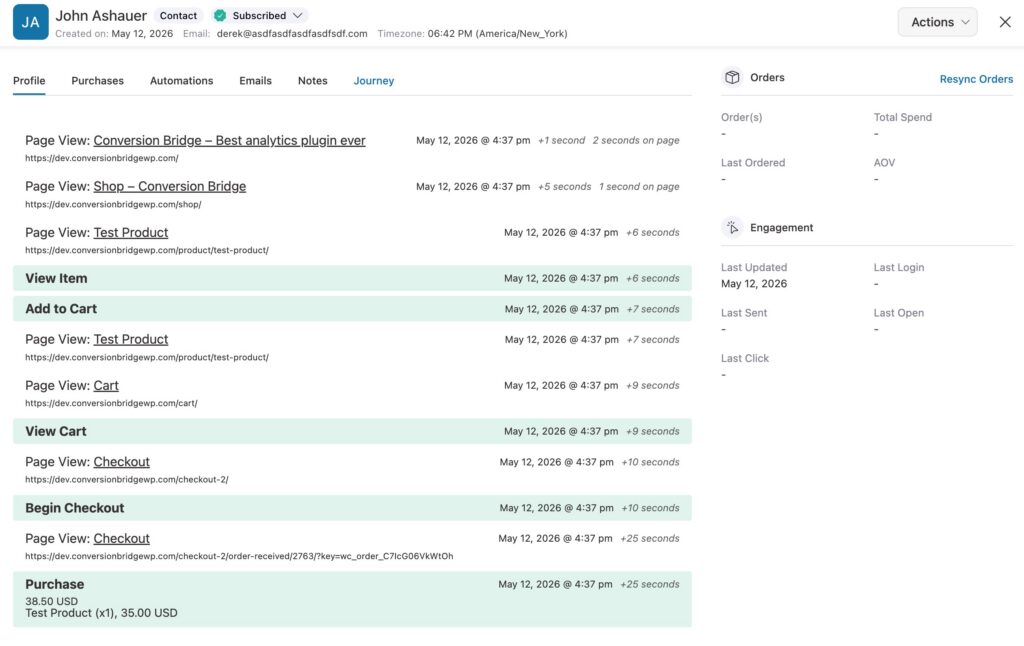
The FunnelKit Automations integration adds the visitor's full conversion journey to each contact record. Open any contact in FunnelKit (Autonami) and you can see exactly which pages they visited and which conversion events they triggered before becoming a contact.
Overview
Unlike most integrations, FunnelKit Automations does not collect form submissions or trigger conversion events on its own. It works as a CRM that receives contact data from other plugins (Fluent Forms, WooCommerce, custom integrations, and so on). This integration adds journey context directly inside the contact profile, so you can see how each contact found you without leaving the FunnelKit admin.
Setup Instructions
- In your WordPress admin, go to Settings > Conversion Bridge > Integrations.
- Find FunnelKit Automations in the list of available integrations.
- Enable the integration by clicking the toggle.
- Click Save Changes.
That's it -- no per-event configuration. As soon as the integration is enabled, every new or updated contact will have the visitor's conversion journey attached automatically.
How It Works
When a visitor becomes a FunnelKit contact (or an existing contact is updated for the first time), the integration links the visitor's current session to that contact record. From that point on, every page view and every conversion event for that visitor is part of their journey, and you can review the whole thing from inside the contact profile.
Logged-in administrators are excluded automatically so test activity doesn't get attached to your own contact data.
To view a contact's journey:
- In your WordPress admin, go to FunnelKit Automations > Contacts.
- Click any contact to open their profile.
- The conversion journey appears as a new section in the contact view.
Tracked Data
This integration doesn't track any new conversion events -- those still come from your forms, e-commerce plugins, and other integrations. What it does is connect the visitor's session to their FunnelKit contact record so the conversion journey can be displayed in the contact profile.
The journey includes every page the visitor viewed and every conversion event they triggered, from their very first visit through to the moment they became a contact.