
Blocks
Conversion Bridge allows you to enable conversion tracking on individual WordPress blocks. This feature lets you track when users interact with specific blocks on your site, such as clicking buttons, downloading files, or interacting with social embeds.
Instead of tracking all interactions globally, you can selectively enable conversion tracking on specific blocks, giving you granular control over which user actions are tracked as conversions.
Supported Blocks
The following WordPress blocks support individual conversion tracking:
Core WordPress Blocks
- Button Block (
core/button) - Track clicks on button blocks - File Block (
core/file) - Track downloads from file blocks - Site Logo Block (
core/site-logo) - Track clicks on your site logo - Site Title Block (
core/site-title) - Track clicks on your site title - Post Title Block (
core/post-title) - Track clicks on post titles - Read More Block (
core/read-more) - Track clicks on "Read More" links
WooCommerce Blocks
- Product Title Block (
woocommerce/product-title) - Track clicks on product titles
Social Embed Blocks
- All Embed Blocks (
core/embed/*) - Track interactions with social media embeds (Twitter, Instagram, Facebook, etc.)
How to Enable Block Conversion Tracking
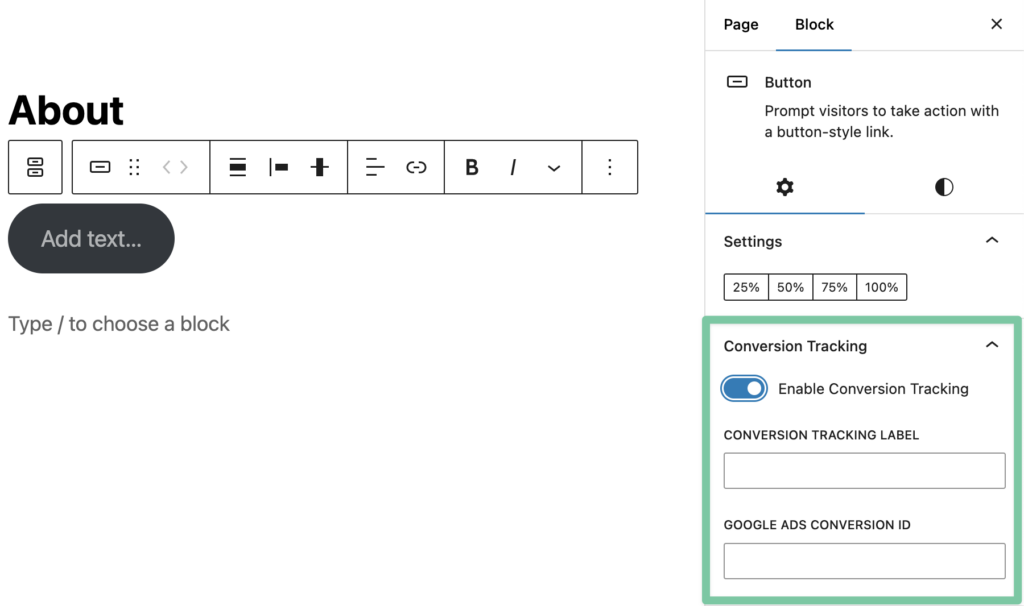
Step 1: Edit Your Block
- Navigate to the page or post where you want to enable conversion tracking
- Click on the block you want to track
- In the block settings panel on the right, look for the Conversion Tracking section
Step 2: Enable Conversion Tracking
- Check the Enable Conversion Tracking checkbox
- The conversion tracking options will appear below
Step 3: Configure Your Event
Configure the following options:
- Conversion Label (optional) - A custom label for this conversion event. If left empty, Conversion Bridge will automatically generate a label based on the block content (e.g., button text, file name, etc.)
- Platform-Specific Conversion IDs (optional) - For ad platforms that require conversion labels/IDs.
Step 4: Save Your Changes
Click Update or Publish to save your changes. The conversion tracking will be active immediately.
Still need help?
If you have not yet found your answer in the documentation articles, please contact support
Contact support