Conversion Bridge 1.16 is out, and I'm excited about this one. The Google Analytics dashboard inside your WordPress admin has been rebuilt from the ground up, conversion journeys can now be linked to user accounts, there's a new Overview report, three new platforms, and two new consent banners.
A New Google Analytics Dashboard You Can Filter by Conversion
Google Analytics 4 is a powerful analytics engine with an interface most site owners can't use. Back in the Universal Analytics days I could set it up for a client, send them the link, and that was the handover, because anyone could open it and understand what they were seeing. With GA4 that stopped. There are hour-long tutorials on just the basics, and if you're an agency that wants clients to see their own numbers, it usually means a separate reporting tool or a Looker Studio setup on top.
That's part of why the privacy-focused platforms like Plausible and Fathom took off, and honestly it was one of the reasons I built Conversion Bridge in the first place. But GA4 is free and most site owners want to keep using it, so what they need is a usable way to look at it.
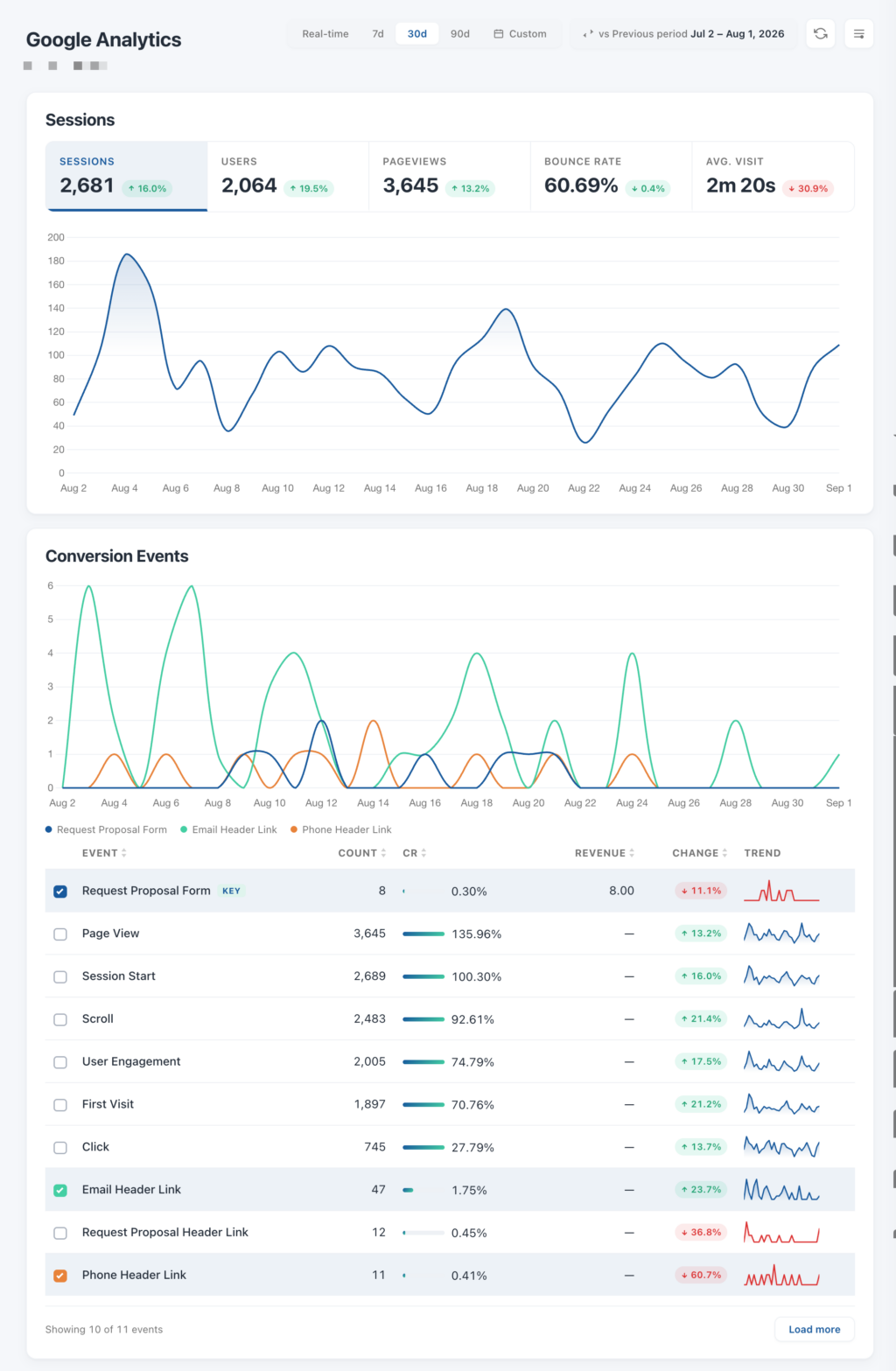
The rebuilt dashboard right inside your WordPress admin makes it very easy to work with GA4 data again. It starts with the things you'd expect from any modern analytics dashboard: sessions, users, pageviews, bounce ratePercentage of visitors who leave a website after viewing only one page without interacting further., and visit length over time. Under that is a table of every conversion event with its count, conversion rateImproves website performance by increasing the percentage of visitors who complete desired actions, such as purchases, sign-ups, or form submissions., revenue, change against the previous period, and a trend line.
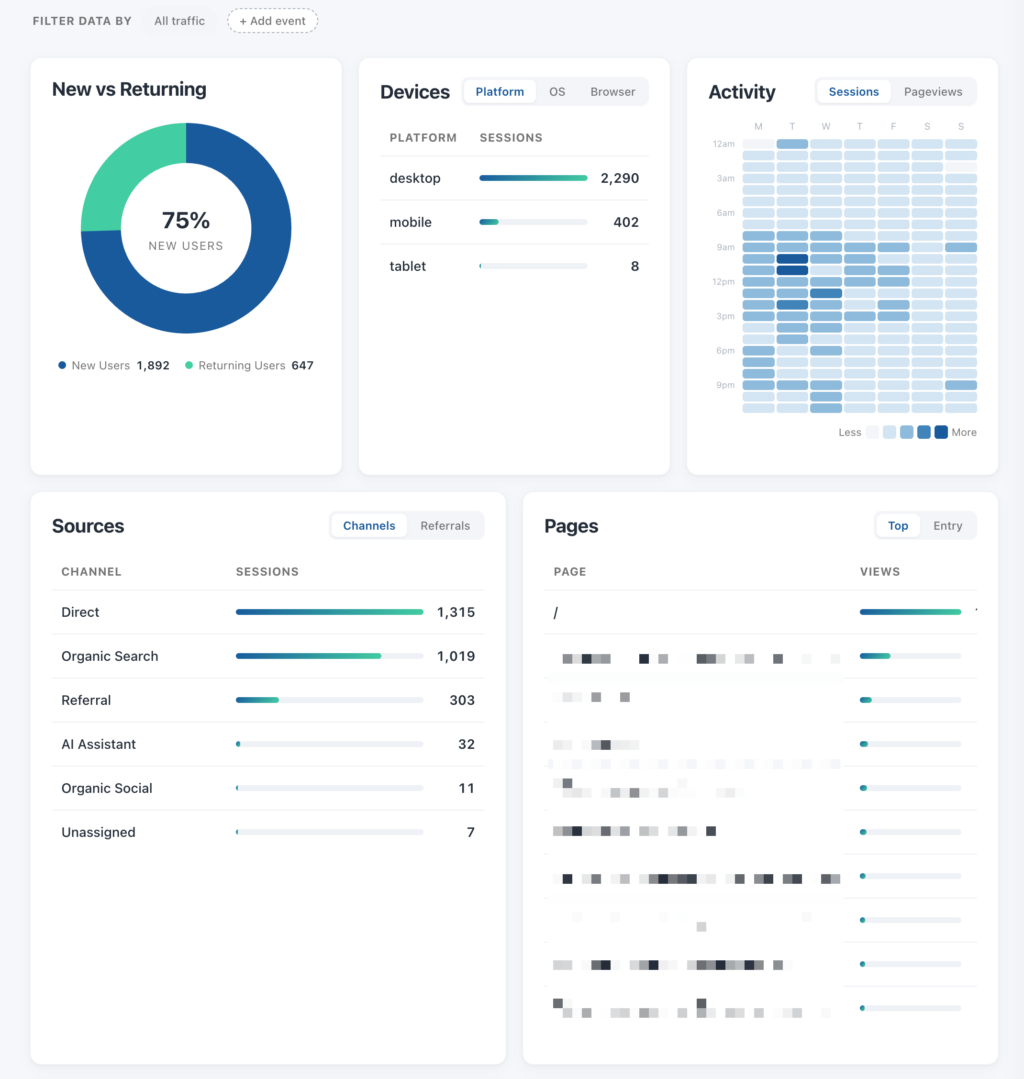
The part I'm most pleased with is the filter bar below that table. Pick a conversion event, say purchases, and the whole dashboard narrows to the visitors who did that. Sources become the sources that produced purchases. Pages become the pages your buyers looked at. Locations, devices, new versus returning, all of it now describes your customers rather than your traffic. "Where do my customers actually come from" is the question most people have, and in Google Analytics itself you'd have to build an exploration to answer it, and here it's one click.
Every number comes with a comparison. Pick 7, 30, or 90 days, or any custom range, and compare it against the previous period, the previous month, quarter, or year. There's an option to match days of the week too, so a Monday lines up with a Monday.
You can hide any card you don't use. The dashboard is turned on from the Google Analytics settings, the Google Analytics doc walks through each card, and I wrote a separate post on what a WordPress analytics dashboard should show you if you want the longer version.
Conversion Journeys Can Be Linked to User Accounts
Conversion journeys show the path a visitor took before they converted, and until now there was no way to start from a person and see everything they did. Turn on the new Link Journeys To Users option and your Users screen gets a Journeys column, with each profile listing that person's journeys. So when a customer emails about their order, you can go and look at what they saw first.
It's off by default, because linking includes the pages someone viewed before they logged in, and that's a real privacy tradeoff. Conversion Bridge now adds suggested wording to WordPress's Privacy Policy Guide (under Settings → Privacy) covering everything it tracks, and it plugs into WordPress's data export and erase requests too. An export includes a person's linked journeys, and an erase removes the link so the activity goes back to being anonymous.
A New Overview Report
Reports & Tools now opens on a new Overview report. Pick a date range and you get your conversions, the value behind them, your sessions, and your conversion rate, each compared against the period just before it. Under that, conversions over time with the previous period drawn behind, a breakdown by event type, your top traffic sources, your best converting landing pages, and your most recent conversions.
The comparison is the part I use most, because a number on its own doesn't tell you much. Forty conversions is either good news or bad news depending on what last month looked like, and now you can see both at once.
Everything links through to the fuller report with your date range and filters intact, so the numbers still line up when you dig in. It also uses the same figures as the weekly summary email, so those two can never disagree with each other.
Snapchat Ads and Awin
1.16 adds two new ad platforms, and they're quite different from each other.
Snapchat Ads comes with the Snap Pixel and the Conversions API, so conversions are sent from the browser and from your server, deduplicated so Snapchat counts each one once. Enhanced conversionsEnhanced conversions send customer details, like email and name, usually hashed, so ad platforms can match more conversions to the people who saw your ads. are supported, with everything hashed before it leaves your site.
Awin is a bit different, and it's the first affiliate networkA service that connects businesses with publishers who promote their products, tracks which referrals turn into sales, and handles the commission payments between them. Conversion Bridge supports. Sales are reported with the order total after discounts but without tax and shipping, which is what Awin expects so commission is calculated on what you actually sold. Sales are also reported straight from your server, so an ad blocker can't cost an affiliate a commission they earned. If your program pays per lead, you can turn that on too, with its own commission group.
Awin receives no personal data at all, which is unusual these days when so much of conversion tracking involves sending customer details somewhere.
Growify
Growify joins as an analytics platform. It's a marketing attributionThe process of determining which channels, campaigns, or actions contributed to a conversion, helping you understand what influenced a visitor’s decision to take action. tool built for ecommerce, pulling ad spend and sales together to show which campaigns actually make money.
Purchases go over with the full order behind them, including every product, and form submissions go over as leads, so your revenue and lead generation stay separate.
Concord and ConsentManager
Two more consent banners are supported. Concord works the way the other banners do, and it also handles Google Consent ModeA way for tracking scripts (like Google Analytics, Google Ads, and Meta) to respect a visitor's cookie consent choices while still collecting limited, privacy-safe data when consent is denied. natively if you'd rather it did.
ConsentManager is a bit different, because rather than supporting one company's banner it supports the two advertising privacy standards, IAB TCFA shared industry standard that records what a visitor agreed to and passes that decision to every advertising company involved, so consent only has to be collected once. and the Global Privacy Platform. So it works with ConsentManager itself and with other banners built on those standards. If it can't get a clear answer about whether someone consented, it doesn't track them, it waits, because a slow or unreadable signal isn't permission.
Trials Are Their Own Conversion Now
There's a new Trial event type, and it fixes something that has bugged me for a while.
Before, a free trial was recorded as a purchase worth nothing, so your purchase count included sales that never happened and all those zero-value purchases dragged your average order valueThe average amount of money a customer spends each time they place an order on your website. down.
Now a trial is its own event. Meta, TikTok, Snapchat, and OpenAI Ads all have a real trial event and get exactly that. The platforms that don't, like Google Analytics and Reddit, get a sign-up instead, which is the closest thing they offer.
Trials are sent with no value, deliberately. It's tempting to send the plan price, but that's money you haven't been paid and might never be.
If you were already tracking Freemius purchases, trial tracking switches on automatically to match, so nothing stops being tracked.
Faster Reports and a Lighter Front End
The Journeys screen, UTMUTM parameters are tags added to a link that show where traffic comes from and which campaigns lead to real conversions. Reports, and Top Landing Pages have been reworked for sites with a lot of data. The counting, sorting, and grouping now happen in the database rather than in PHP, backed by a new index on event time, so a site with years of tracked events opens its reports as quickly as a small one.
On the front end, Conversion Bridge's JavaScript is now minified, which roughly halves the size of what it loads on your site. There's nothing to turn on or configure, your pages just carry less weight.
More Control Over What Google Does With Your Data
There are three new Google settings, all optional and all off by default.
You can turn off Google Signals, turn off ad personalization across Analytics, Ads, and Tag Manager together, and turn on Restricted Data Processing for Google Ads.
These are separate from consent, which is about what a visitor agreed to. These apply to everyone, whatever they chose.
Other Updates
- The Journeys screen is redesigned, with the same date range picker and quick filters as the reports
- Umami can now load sessionA session is a single visit to your website: a group of a visitor's actions within one window of time. Most analytics reports are built on it. replays and heatmaps
- Easy Digital Downloads tracks price option selection, and a handful of add to cart, remove from cart, and product view bugs are fixed
- Reddit Ads is updated for Conversions API v3, with a Test ID field for Reddit's Event Testing tool
- OpenAI Ads sends phone, name, and region for matching
- Purchase events now include the payment method in the event metadata
- The weekly email counts every conversion rather than one per visitor, shows conversion value, and uses your site's timezone
- You can strip unknown query parameters from stored page URLs
- A reminder notice if a week goes by without any tracking set up
- Userbird, EchoDash, and Beam Analytics are removed, as those services shut down
There's a long list of smaller improvements and fixes in here too, including better matching for enhanced conversions across the ad platforms. The full list is in the changelog.
Updating
If you have an active license, head to Plugins in your WordPress admin and update.
Thanks for reading this far. If you run into anything or have an idea, get in touch. I read everything.