
Conversion Bridge works with ConsentManager to make sure your conversion tracking respects visitor consent choices. ConsentManager follows the two big advertising privacy standards, IAB TCF and the Global Privacy Platform, so this option also works with other banners built on those same standards.
Setup Instructions
Step 1: Set Up ConsentManager
- Create your banner in your ConsentManager account
- Add it to your site, either through the ConsentManager plugin or by pasting its script into your theme
- Make sure your banner is configured for the regions you serve, so visitors see the right choices for where they live
Step 2: Select ConsentManager in Conversion Bridge
- Go to Settings → Conversion Bridge → Options in your WordPress admin and find the Cookie Consent section
- Select ConsentManager (IAB TCF & GPP) as your cookie consent plugin
- Save your settings
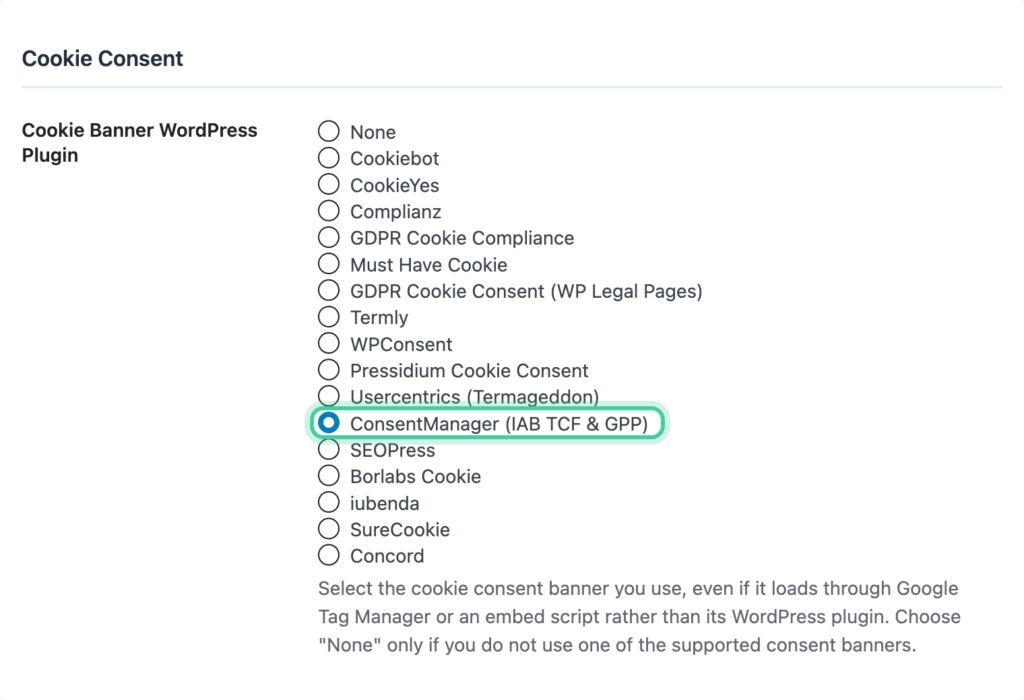
Because the banner can be delivered without a WordPress plugin, Conversion Bridge cannot detect it on its own. You do need to select it here.
Step 3: Configure Consent Signal Ownership
Consent signals tell each platform whether a visitor has given permission to be tracked. Both ConsentManager and Conversion Bridge can send these signals, but only one should do it for each platform — otherwise you get conflicts.
We recommend setting Conversion Bridge as the signal owner for all platforms. Conversion Bridge listens to the consent choices visitors make through ConsentManager and sends the right signals to every platform you have enabled. This ensures as much tracking as possible happens the moment consent is granted.
- Go to Settings → Conversion Bridge → Options, Cookie Consent section
- Set each platform to Conversion Bridge ownership
Learn more about how this works in the Consent Signal Ownership guide.
Step 4: Verify It Works
- Open your site in a private/incognito browser window
- You should see the ConsentManager banner
- Reject everything and confirm that no tracking fires
- Accept and confirm that tracking starts
You can add ?cb_console=1 to any page URL to see consent and tracking activity in your browser's developer console.
How It Works
- Conversion Bridge waits for a clear answer from the banner before any tracking runs.
- If it cannot get a clear answer, it keeps waiting rather than guessing. Tracking simply doesn't run. This is deliberate, so a visitor is never tracked because a signal was slow or unreadable.
- If a visitor allows measurement, your analytics platforms start tracking.
- If a visitor allows advertising, your ad platforms start tracking.
- If they reject, no tracking runs.
- If they reopen the banner and change their mind, tracking updates right away to match.
- Where a visitor lives changes how this works. In Europe, nothing runs until they actively agree. In parts of the United States, tracking is allowed unless they opt out of having their data sold or shared. Conversion Bridge follows whichever rules apply to that visitor.
- If more than one set of rules applies to the same visitor, Conversion Bridge only tracks when all of them allow it.
- A browser sending a Global Privacy Control signal is treated as opting out of marketing.
Consent Category Mapping
ConsentManager describes consent in terms of purposes rather than named categories. Conversion Bridge maps them like this:
| Visitor has allowed | Conversion Bridge Type | Examples |
|---|---|---|
| Measurement and product development | Analytics | Google Analytics, Plausible, Clarity, Hotjar |
| Personalized ads and content | Marketing | Google Ads, Meta Ads, TikTok Ads, LinkedIn Ads |
Storing information on the visitor's device is a requirement for both. If a visitor declines that, nothing is tracked regardless of the other choices.
The cb_session_id Cookie
If you list your cookiesA small piece of data stored in a user’s browser that helps websites remember user activity, preferences, or sessions across visits. in ConsentManager, you will find one named cb_session_id. That one belongs to Conversion Bridge.
Categorize it under measurement. It's a first-party cookie holding a random ID, it contains no personal information, and it's what connects the pages someone viewed to the conversion they complete later.
Conversion Bridge already waits for consent before setting it, so a visitor who declines never gets the cookie. If you'd rather not set a cookie at all, you can switch to fingerprinting instead.
See The cb_session_id Cookie (and How to Categorize It) for the full details.