If you run ads to a WordPress site, there's a good chance you're not seeing all the conversions you actually got. Not because they didn't happen, but because the browser never reported them. Most of the big ad platforms now offer a fix through something called a Conversions API. Which raises the obvious question: what is a Conversions API, actually?
I want to answer that in plain language: what it is, why it matters more every year, and how to set it up on WordPress without touching code. For the full picture of how Conversion Bridge does this, see the server-side tracking overview.
The problem with browser-only tracking
For a long time, conversion tracking worked one way: a small piece of code, usually called a pixel or a tag, ran in the visitor's browser and told the ad platform when something important happened. A purchase, a form submission, a sign-up. That pixel did all the reporting.
That approach is leaking badly now. Tracking pixels undercount conversions by 20 to 40% because of ad blockers and browser privacy features. Around 42.7% of internet users run some form of ad blocking. And on Safari, first-party cookiesA small piece of data stored in a user’s browser that helps websites remember user activity, preferences, or sessions across visits. set by browser JavaScript get capped at just 7 days, so a visitor who clicks your ad on Monday and buys the next week can't be connected back to that ad.
Here's what that looks like in practice. You spend money on ads, you make sales, but your ad platform only hears about some of them. It then optimizes toward the conversions it can see, which is an incomplete and slightly random slice of reality. You end up making budget decisions on bad data.
What a Conversions API actually is
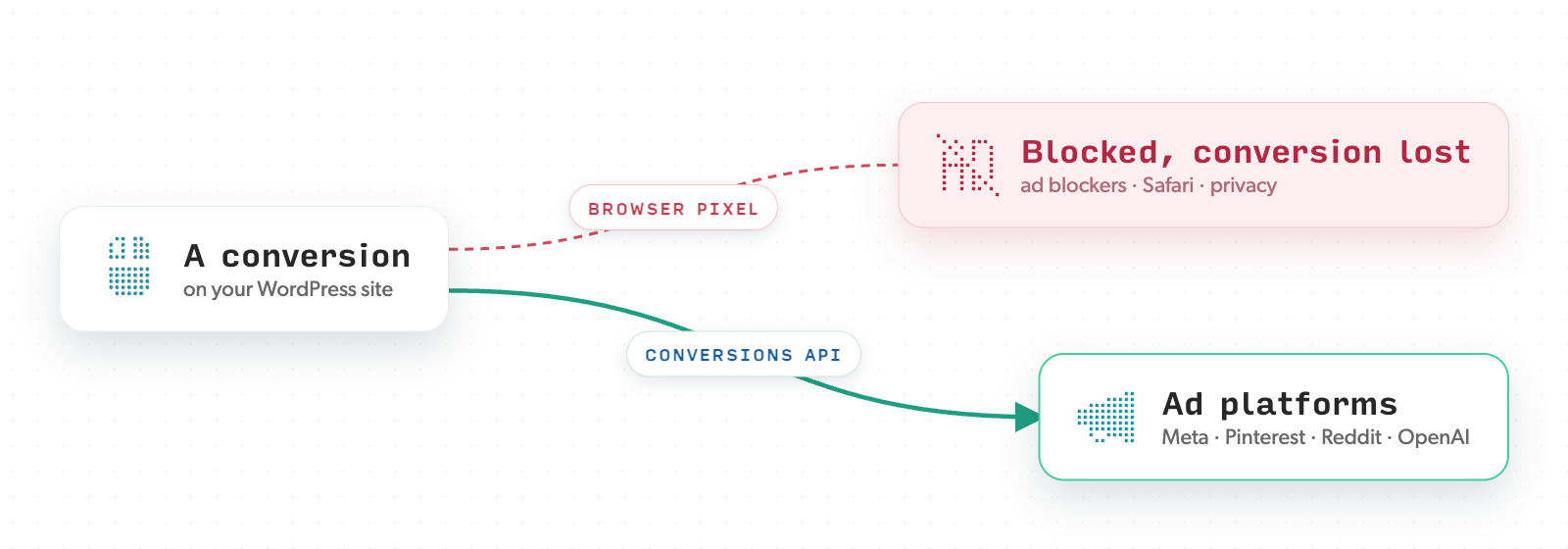
A Conversions API is a way for your website's server to send conversion data straight to the ad platform's server, skipping the browser entirely.
That's really the whole idea. Instead of relying on a visitor's browser to carry the message, your server sends it directly. Your server doesn't get blocked by ad blockers, it isn't affected by Safari's cookie limits, and it doesn't fail to load. So the conversions that browser tracking would have dropped still get through.
Each ad platform has its own version. Meta calls it the Conversions API, or CAPI. Pinterest, Reddit, and OpenAI Ads each have one too. The names differ, but the idea is the same: report from the server so you stop losing data.
Conversion Bridge supports server-side tracking through the Conversions API for Meta Ads, Pinterest Ads, Reddit Ads, OpenAI Ads, Snapchat Ads, and Awin.
Google Ads is the one I get asked about most, so I'll be straight about where it stands. Google doesn't make server-side conversion tracking practical for an individual site owner. It needs a Google Ads developer API key that Google doesn't readily hand out to regular advertisers. The only realistic way to offer it would be to route every site's conversions through one shared proxy running on a single key, which is a real system to build and run responsibly. It's something I'm actively researching a solution for. For now, Conversion Bridge tracks your Google Ads conversions in the browser.
Browser and server, working together
A common misunderstanding is that a Conversions API replaces the browser pixel. It usually doesn't. The two work together.
The browser reports what it can. The server reports the same events as a backup. Between them, they catch far more than either one alone. That's why server-side tracking can recover 20 to 40% of the conversions that pixels miss, with some setups going from around 60 to 70% capture up into the 90s.
That raises a fair question: if both are reporting, won't the same sale get counted twice?
How deduplication keeps it honest
This is where deduplicationDeduplication prevents the same conversion from being counted twice. It keeps your data accurate and is handled automatically by Conversion Bridge. comes in, and it's the part that makes server-side tracking safe to use.
When the browser and the server both report the same conversion, each one carries a matching ID. The ad platform sees those two reports, notices they share an ID, and understands they're the same event. It counts the conversion once. You get the reliability of two reporting paths without inflating your numbers.
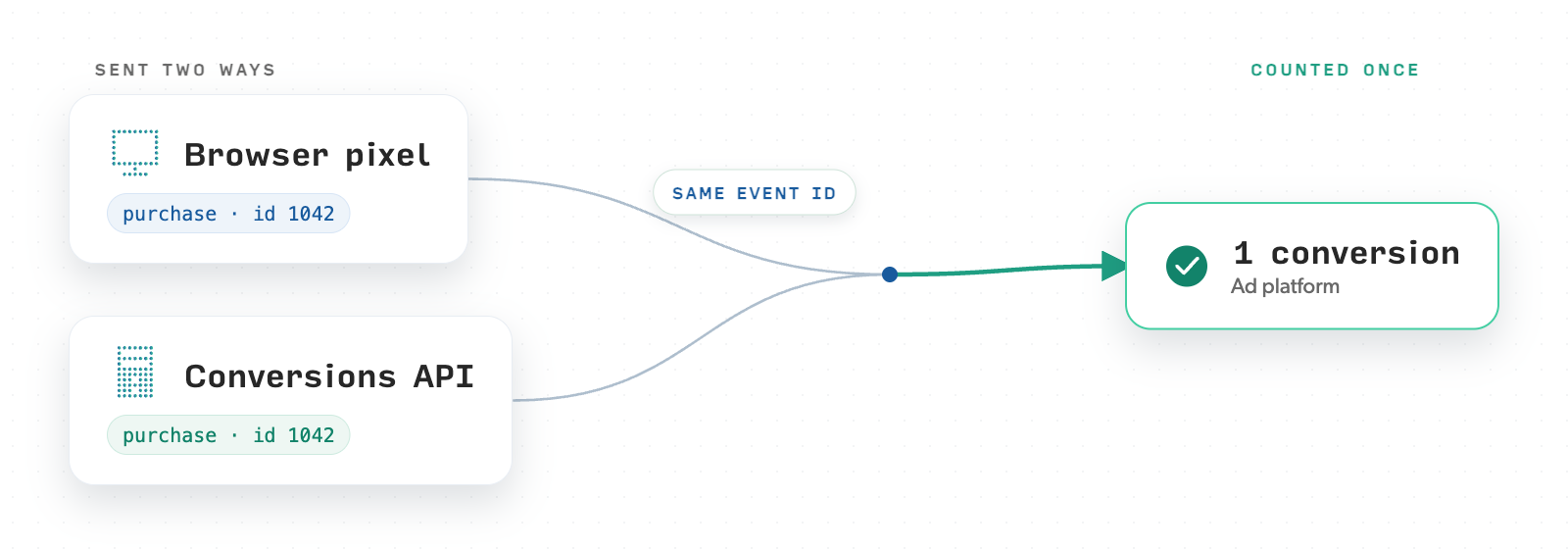
If deduplication isn't set up correctly, server-side tracking can actually make your data worse by double counting. So this piece matters a lot, and it's the piece most manual setups get wrong.
Conversion Bridge handles deduplication automatically. It sends a matching event ID on both the browser and server events, so every conversion is counted once, without you setting up anything.
Better matching, still private
There's a related idea worth understanding here: enhanced conversions. This is when you send along a customer detail your site already has, like the email entered at checkout, so the ad platform can match the conversion to one of its users. Sending first-party dataInformation collected directly from your website visitors, customers, or users—such as form submissions, purchase history, and behavior on your site. like this pushes match rates up toward 90%, compared to 60 to 70% when nothing extra is sent.
The platforms grade you on this, and each has its own name for it. Meta calls it Event Match Quality, a score from 0 to 10 shown next to each event in Events Manager. Pinterest and Reddit report it as an event match rate percentage. If you've ever opened Events Manager and wondered why your purchase event scores a 4 out of 10, this is what it's measuring: how much usable customer information arrived with the event. Sending enhanced data through the Conversions API is the main way that score goes up.
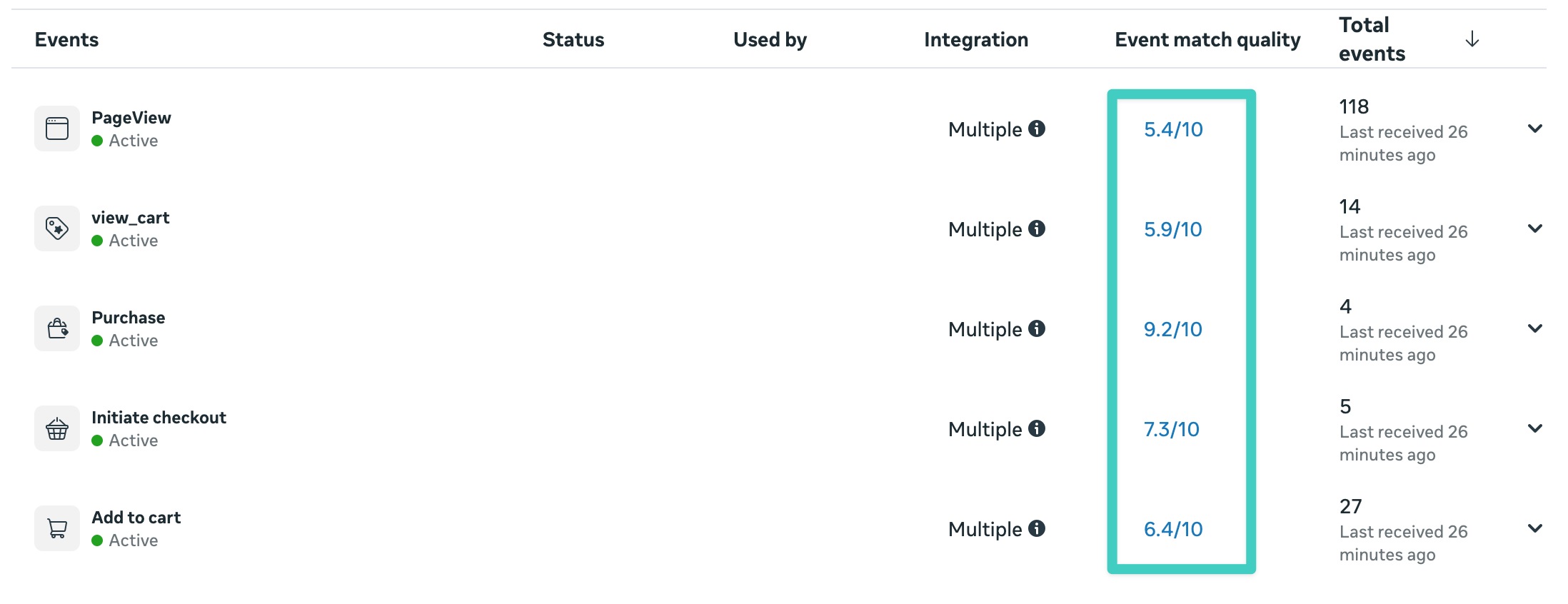
Notice how the scores climb as you move down the funnelRepresents the step-by-step process users take before completing a conversion, such as making a purchase or signing up.. PageView events are mostly anonymous, so they score lower. Purchase events arrive with the customer's checkout details, so they match best. That pattern is normal and healthy.
Enhanced conversions aren't unique to server-side tracking, though. The browser pixel can carry this data too, and Conversion Bridge sends it both ways. What server-side adds is reliability: when a browser event is blocked, the server-side copy still delivers that enriched data to the platform. So the strongest setup is enhanced data sent through both the pixel and the Conversions API, which is what Conversion Bridge does.
The privacy concern is understandable, so it's worth being clear. Conversion Bridge doesn't ship raw personal data. The customer's email and other details are hashed first, turned into an unreadable string, before anything leaves your site. The platform compares hashed values against hashed values. It's a match check, not a data handoff. That's what enhanced conversions are, and it's how you get better matching while keeping personal data protected.
Why this matters more every year
Browser tracking isn't getting more reliable. It's getting less reliable, on a fairly predictable schedule. More ad blocking, stricter browsers, tighter cookie rules, more privacy controls. Every one of those trends pulls conversions out of the browser's view.
Server-side tracking is the direction the whole industry is moving because it's the one path that doesn't depend on the browser cooperating. Meta even discontinued its separate Offline Conversions API in 2025, folding everything into the standard Conversions API. The platforms are consolidating around this approach, and they reward advertisers who use it with better optimization.
If you're spending real money on ads, the accuracy of your conversion data isn't a nice-to-have. It's what your ad platform uses to decide where your budget goes.
Setting it up on WordPress
The catch with server-side tracking has always been that it's genuinely technical to set up by hand. You're dealing with API tokens, server requests, event ID matching for deduplication, and data hashing. It's the kind of project that stalls for months.
That's the whole reason I built Conversion Bridge the way I did. You add your ad platform's access token in the settings, and it handles the rest: sending the server-side events, matching IDs for deduplication, and hashing customer data before it's sent. No code, no tag manager, no separate server to run.
It works across 71 WordPress plugins, so your store, your forms, and your bookings all report server-side once you've set up the platforms you use. And because it also tracks the full conversion journey, you can see the path a visitor took before converting, not just the final sale.
If you've been running ads and quietly wondering why your ad platform's numbers never quite match your actual sales, this is usually a big part of the answer. Browser tracking is missing conversions, and server-side tracking is how you get them back.
Happy tracking!