A lead lands in your CRM. You've got their name, their email, maybe what they asked about. What you usually don't have is the one thing that would tell you whether your marketing is working: where they actually came from. Was it the Google ad, the newsletter, the partner link, or something else entirely?
That answer is sitting right there in the UTM parametersUTM parameters are tags added to a link that show where traffic comes from and which campaigns lead to real conversions. when the visitor first arrives. The trouble is it almost never makes it into the form entry, so it never reaches your CRM. This post is about how to capture UTM parameters in your WordPress forms, so every lead carries its source with it, and what you can do once it does.
Why your CRM doesn't know where leads come from
When someone clicks a tagged link, the campaign details ride along in the URL as UTM parameters: utm_source, utm_medium, utm_campaign, and a couple more. Your analytics reads them and files the visit under the right campaign.
But your form doesn't. A standard contact or lead form captures the fields you put on it, name, email, message, and nothing else. The UTM data that was in the URL never gets written to the entry. So when that entry syncs to your CRM, the source is simply missing. Your CRM ends up full of leads with no idea which campaign earned them.
What UTMs actually tell you
UTMs are small tags added to the end of a link. A tagged link looks like yoursite.com/pricing?utm_source=google&utm_medium=cpc&utm_campaign=spring-sale. Each piece answers a different question about where the click came from.
- Source is the platform: google, facebook, newsletter.
- Medium is the type of link: cpc, email, social, referral.
- Campaign is the specific promotion: spring-sale, product-launch.
There are two more, term and content, mostly used for paid search keywords and A/B tests. If you want the full breakdown, here's a plain explainer of UTM parameters. For leads, source, medium, and campaign are the three that matter most.
Why forms are where attribution dies
A visitor rarely converts on the page they land on. They click your ad, arrive on a landing page with UTMs in the URL, then browse around. By the time they reach your contact form or your checkout, the URL is clean. The UTMs are long gone.
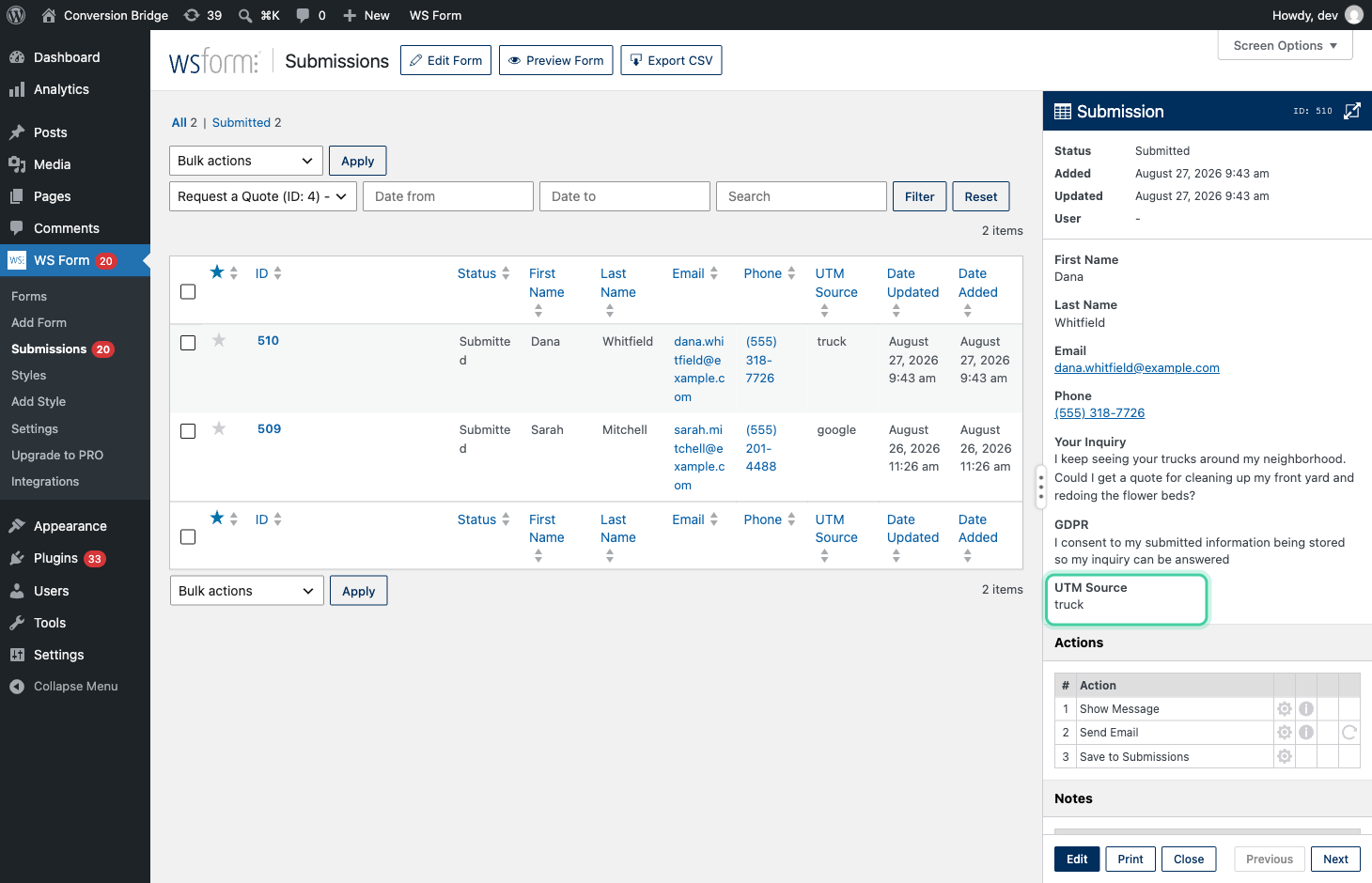
I worked with a landscaper where we came up with a clever version of this. They registered a separate custom domain and put it only on their trucks, and it redirected to their main site with a UTM tag attached, so any visit that started from a truck arrived tagged utm_source=truck. The catch was timing. Someone would spot a truck parked in their neighborhood, type the address in that evening, look around, then come back a couple of days later to request a quote. By then the truck tag was long gone from the URL, so the quote request landed with no source, and the trucks looked like they did nothing.
So even if you added hidden UTM fields to your form the usual way, reading them off the current URL, they'd come back empty. The campaign was in the URL two or three pages ago, not on the page where the form lives. That's why so many "we track UTMs on our forms" setups still end up with blank source data.
How Conversion Bridge carries the campaign into the conversion
Conversion Bridge records each visitor's journey as they move through your site, so it remembers the campaign they arrived from for the whole visit, not just the landing page. The UTM values from that first arrival are saved in your WordPress database as part of the visitor's sessionA session is a single visit to your website: a group of a visitor's actions within one window of time. Most analytics reports are built on it., and that same record powers the conversion journey view for every conversion.
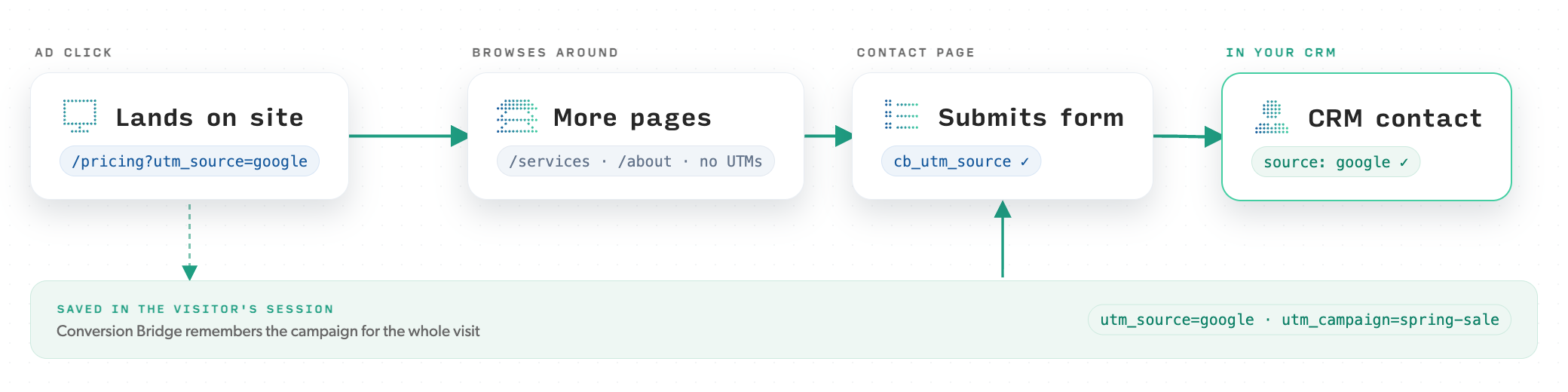
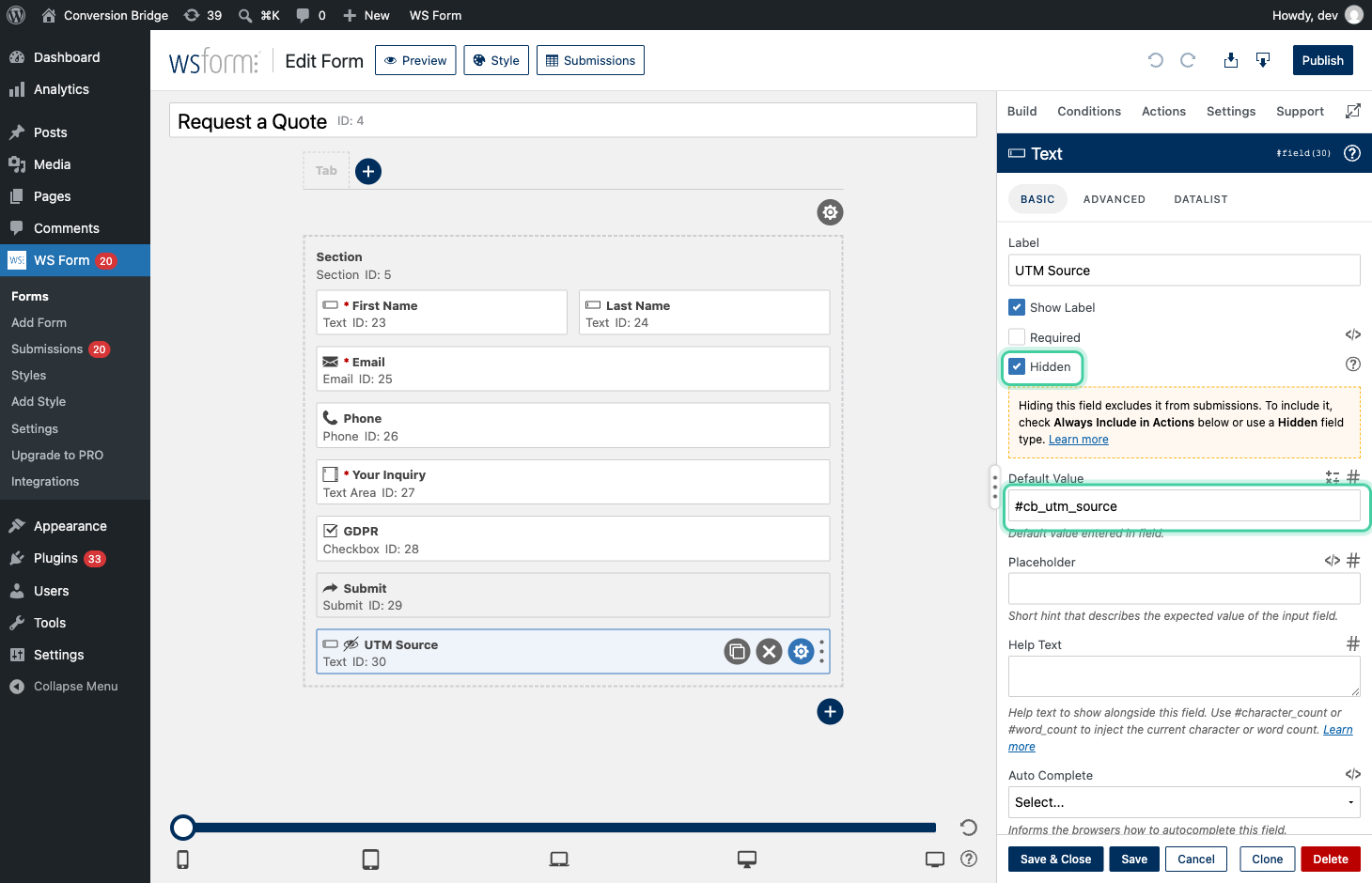
When that visitor submits a form, the saved campaign goes with it. For many form plugins, including WS Form, Gravity Forms and Fluent Forms, the UTM values are written to the entry automatically with nothing to add to the form. To get them into notification emails and CRM feeds, or on plugins that don't save them on their own, you add a hidden field, give it a tag like cb_utm_source or cb_utm_campaign, and the right value drops in at submission, even though the current page had no UTM in its URL. From there it flows into the entry, the notification emails, and any CRM or webhook feed you've connected. This works across the major WordPress form plugins, WS Form, Gravity Forms, WPForms, Fluent Forms, Contact Form 7, Forminator, and more. For that landscaper, it meant the quote request finally arrived stamped utm_source=truck, days after someone first spotted the truck down the street.
It's not just forms. Conversion Bridge also saves the UTM data (and ad click IDs) to your orders and transactions in WooCommerce, Easy Digital Downloads, GiveWP, FluentCart, MemberPress, and others, so ecommerce, membership, and donation conversions reach your CRM with their source attached too.
One more thing worth knowing if you run a consent banner: ad click IDs like Google's gclid and Meta's fbclid are treated as marketing data and only get captured and passed along once the visitor has granted marketing consent. UTMs don't need marketing consent, but they're only remembered from page to page once the visitor has accepted your banner, so before that they're only available on the page that has them in the URL.
First touch vs last touch: which campaign gets the credit
Some visitors arrive more than once from more than one campaign. Maybe they first found you through a Facebook ad, then came back a week later from a newsletter before finally converting. Which campaign should the lead be credited to?
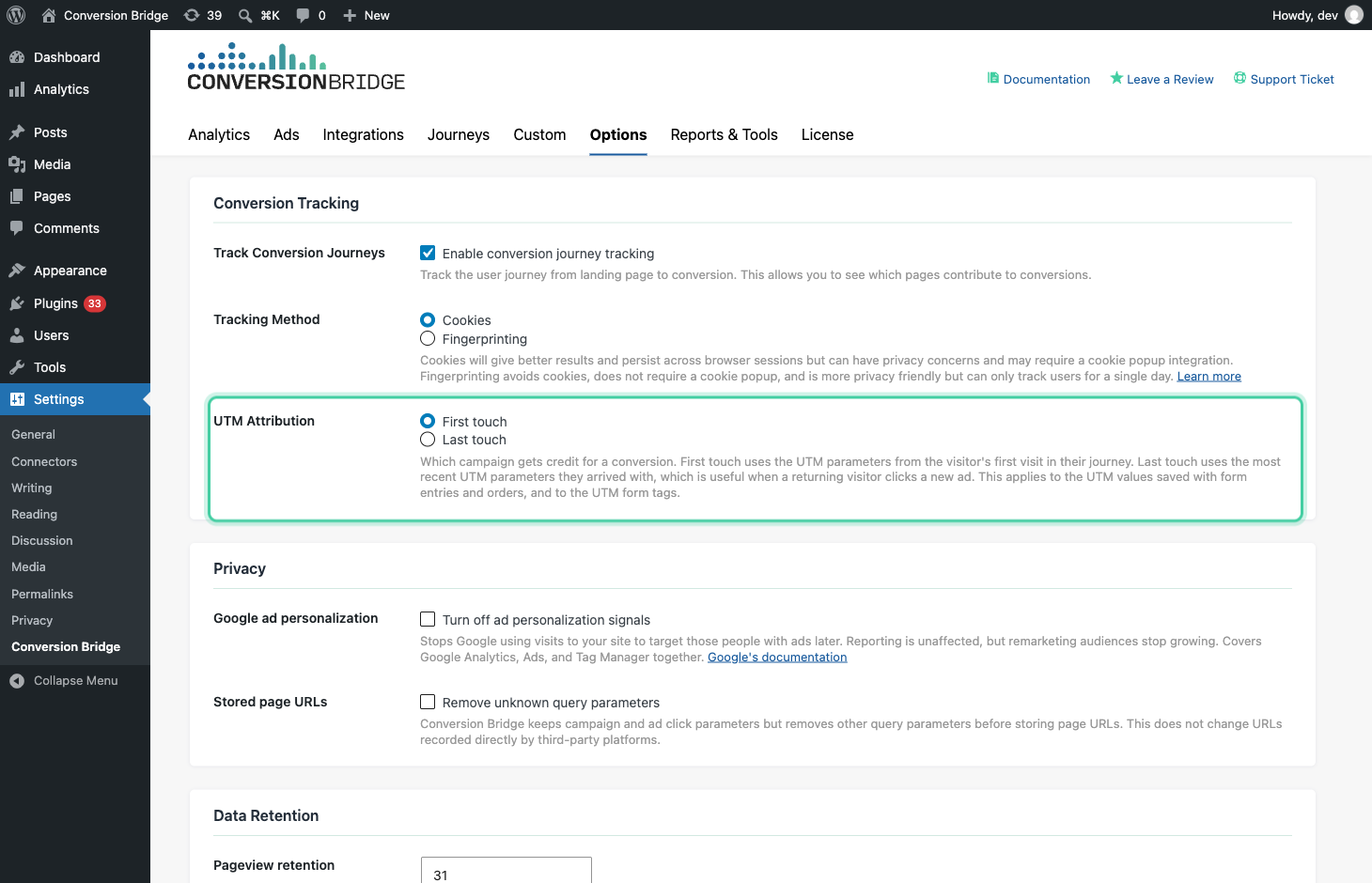
Conversion Bridge lets you decide with a single setting, UTM AttributionThe process of determining which channels, campaigns, or actions contributed to a conversion, helping you understand what influenced a visitor’s decision to take action., in the Conversion Tracking section under Settings → Conversion Bridge → Options. First touch, the default, credits the campaign that first brought the visitor to your site. Last touch credits the most recent one before they converted. First touch is better for understanding what introduces people to you; last touch is better for understanding what closes them. Whichever you pick is the value that gets saved with the entry or order. (Ad click IDs always use the last click, since that's the one the ad platform needs to match the conversion.)
What you can do with it in your CRM
Once the source rides along with every lead, your CRM stops being a list of names and starts being a map of what's working. A few things this opens up:
- Segment your follow-up by source. A lead from a comparison-page search is in a different headspace than one from a top-of-funnel social post. Now you can send each the right sequence.
- Route high-intent leads faster. Tag leads from your paid campaigns or a specific landing page and notify sales the moment one comes in, instead of treating every lead the same.
- Score leads by where they came from. If leads from a certain medium or campaign close at a higher rate, you can weight them and prioritize accordingly.
- Tie closed revenue back to the campaign. Because the source is stored on the record, you can look at which campaigns produced not just the most leads, but the most paying customers.
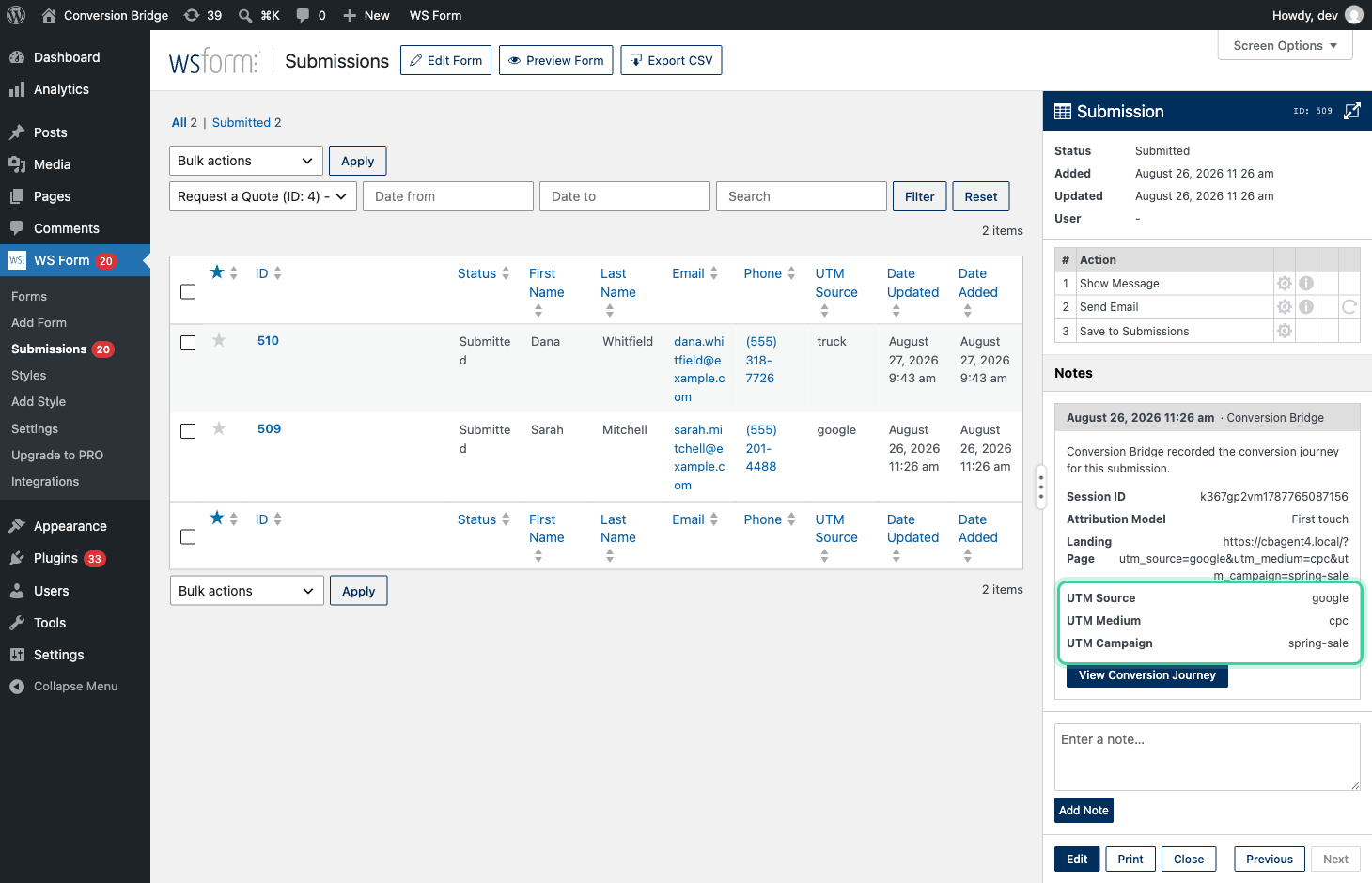
This is how that landscaper finally saw the trucks were pulling their weight. Once every quote request carried utm_source=truck, the leads that used to look like they came from nowhere lined up against the trucks that earned them. The same trick works for anything offline: a QR code on a flyer or a booth sign, each pointing at a URL with its own UTM, so you can tell which real-world effort actually sent someone who converted.
None of that is possible when the source field is blank. It all becomes possible the moment the campaign data is actually on the record.
How to capture UTM parameters in WordPress forms
Setting this up is mostly a matter of adding a hidden field to your form and giving it the right Conversion Bridge tag. The exact steps differ a little from one form plugin to the next, so rather than repeat them all here, the step-by-step guide to passing UTMs and click IDs into forms walks through each supported plugin and the tag syntax it uses.
Two habits make the data far more useful once it's flowing:
- Keep your UTM naming consistent. If one campaign uses
facebook, anotherFacebook, and a thirdmeta, your CRM reports will split one source into three. Pick a convention (lowercase works well) and stick to it in every link you tag. - Test the full path once. Click one of your own tagged links, browse to a different page, then submit the form. The entry should show the UTM values from the link you clicked, not blanks. That one test confirms the whole chain, from ad to CRM, works the way your real visitors use it.
The payoff is worth the few minutes it takes. Conversion Bridge already tracks conversions across 76 WordPress plugins and 11 ad platforms, and pairing that with the full conversion journey view means you can follow a lead from the first ad click all the way to a closed deal in your CRM.
If your CRM is full of leads you can't trace back to a campaign, this is where to start. The data was there the whole time. You just needed a way to carry it through.
Happy tracking!