Version 1.15 is here, and it's a big one. The headline change is one I've wanted to make for a long time: setting up form conversion tracking is now almost automatic. On top of that, support for OpenAI Ads, the Pinterest Conversions API, Fluent Booking integration, and a bunch of ways to carry your campaign data further than it could go before.
Let's run through what's new.
Form Conversion Tracking Is Now Automatic
Here's the change I'm most excited about. Setting up form tracking used to mean opening each form and turning things on one by one. If you had a dozen forms, that was a dozen trips through the settings.
Now it just works. When you enable a form plugin, Conversion Bridge tracks its submissions right away, and it sends enhanced conversions automatically by detecting the email, name, phone fields for you. You can set all of this up during the new onboarding flow, or any time from the Conversion Bridge settings, without ever opening an individual form.
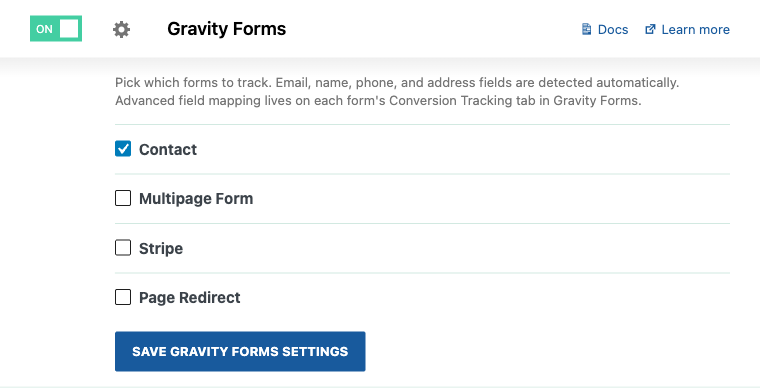
If you want more control, you still have it. You can map fields yourself, form by form, exactly like before, and your manual choices override the automatic detection. The difference is that manual mapping is now optional instead of required. For most sites, the automatic setup is all you'll ever need.
Making conversion tracking easy to set up has been my goal with Conversion Bridge since the start. Tracking setup is tedious, and that's a big reason people put it off or never get to it, so they end up making decisions without the data they need. Conversion Bridge already made it fast. For forms, 1.15 makes it a fraction of that. That's what I want being a Conversion Bridge customer to feel like: I keep working to make everything around the plugin easier, so you can get set up and get on with your business.
New Ad Platform: OpenAI Ads
Conversion Bridge now supports OpenAI Ads, the new advertising platform inside ChatGPT.
You add your OpenAI measurement pixel with no code, and Conversion Bridge formats your conversions as OpenAI's standard events automatically. If you add an API key, it also sends a server-side copy of each conversion through OpenAI's Conversions API, and the two are deduplicated so a conversion is never counted twice. That server-side copy keeps measuring even when a browser blocks the pixel.
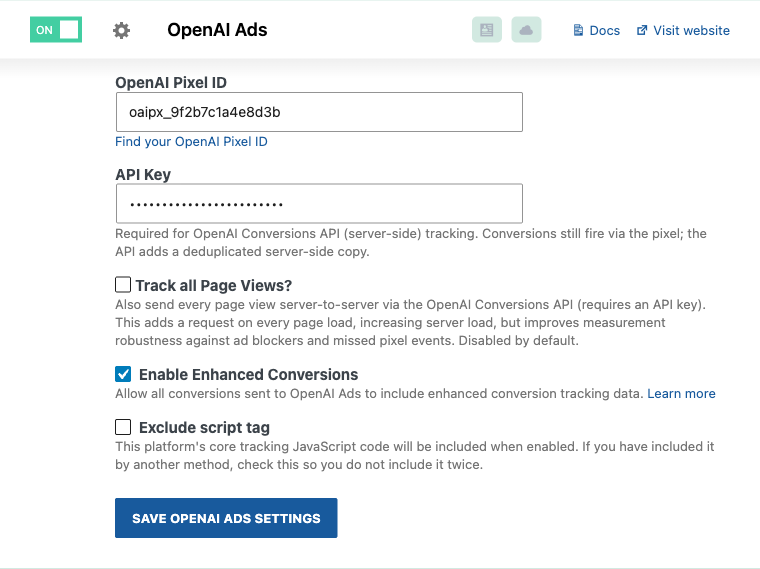
It supports enhanced conversions too, sending securely hashed email and a customer identifier so OpenAI can match more of your conversions back to the ads that drove them. If you're experimenting with ads in ChatGPT, you can now measure whether they actually lead to sales and sign-ups on your WordPress site.
Pinterest Conversions API
Pinterest Ads gets its own Conversions API in 1.15.
Until now, Pinterest tracking ran entirely in the browser, which means ad blockers and privacy settings could hide conversions from you. The Conversions API sends those events straight from your server instead. Add your Conversions API access token and Ad Account ID in the settings, and browser and server events are automatically deduplicated so nothing gets double counted.

Enhanced Match got better at the same time. Conversion Bridge now sends a securely hashed email with any event that has one, including form submissions, and the Conversions API adds hashed name, phone, and location data when it's available. It also captures the Pinterest click ID so more of your conversions get credited to the right ad.
New Integration: Fluent Booking
Fluent Booking is the scheduling plugin from the Fluent team, and Conversion Bridge now tracks its appointments.
Conversion Bridge tracks both completed bookings and started booking forms, and it sends the customer's email, name, and phone for enhanced conversions.
Free bookings are sent as leads, which fits consultations and discovery calls. Paid bookings include the amount and details so they count as real revenue. If a paid booking takes payment through Fluent Cart, that purchase is tracked by the Fluent Cart integration, so keep that one enabled too.
Carry Campaign Data Across Your Domains
A lot of WordPress sites send visitors to a separate domain to finish something, like a checkout, a booking, or a store on its own subdomain. When that happens, the campaign that brought the visitor in usually gets lost at the hop.
Cross-domain forwarding fixes that. Conversion Bridge can now add the visitor's UTM parametersUTM parameters are tags added to a link that show where traffic comes from and which campaigns lead to real conversions. and ad click IDs to links that point at your own other domains, so the attributionThe process of determining which channels, campaigns, or actions contributed to a conversion, helping you understand what influenced a visitor’s decision to take action. follows them across. Click IDs only forward when the visitor has given marketing consent. You pick which domains it applies to, so it only ever touches sites you own. Here's the full guide on how to set up cross-domain forwarding.

There's a second cross-domain improvement in 1.15, this one for Google Analytics. If you run the same GA4 property on more than one of your domains, Conversion Bridge can now keep it as a single GA4 session across them, so one visitor isn't counted as two. You turn it on in the Google Analytics settings and list your domains, and Conversion Bridge sets up GA4's cross-domain tracking for you, without touching the Google Analytics admin. The forwarding above carries your campaign data across; this keeps your GA4 sessions together.
First-Touch or Last-Touch Attribution
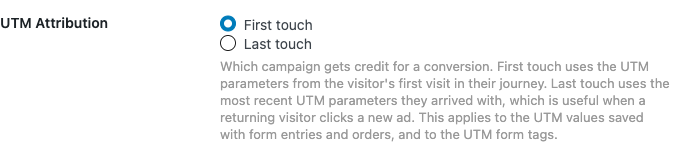
When Conversion Bridge records a conversion, it saves the campaign the visitor came from, their UTM parameters, right alongside it. Until now, that was always the campaign they first arrived with. That's first-touch attribution, and it's still the default.
Now you can choose last-touch instead, where Conversion Bridge saves the most recent campaign the visitor arrived from. This is handy when a returning visitor clicks a new ad before they convert, and you want that latest ad to get the credit.
The setting lives under Settings → Conversion Bridge → Conversion Tracking. It applies to the UTM values Conversion Bridge saves with your form entries and orders, the UTM form tags you can drop into your CRM and webhook feeds, and the UTM Reports inside Conversion Bridge. To be clear, this only changes Conversion Bridge's own records. Your analytics and ad platforms still read UTM parameters from the page and apply their own attribution.
Ad Click IDs in Your Forms and Orders
This release does a lot more with ad click IDs, the little identifiers (like gclid and fbclid) that ad platforms add to a link when someone clicks your ad. They're what let you import offline conversions later, so a sale that closes over the phone or days later still gets credited to the ad.
Conversion Bridge now captures more of them (Google, Microsoft, TikTok, LinkedIn, and Pinterest), saves them to your orders and transactions automatically across WooCommerce, Easy Digital Downloads, GiveWP, Fluent Cart, and more, and lets you pull them into a hidden form field so they flow into your CRM, Zapier, and webhook feeds. You can read the full guide on passing UTM parameters and ad click IDs into forms.
One important note if you run a consent banner: ad click IDs are treated as marketing data, so they're only captured and passed along once the visitor has agreed to marketing. If you don't have a consent banner set up, this doesn't change anything for you. UTM parameters don't need marketing consent, though like everything else in Conversion Bridge they're only remembered from page to page once the visitor has accepted your banner.
New Consent Options: SEOPress, iubenda, SureCookie, Borlabs Cookie, and the WP Consent API
Five more ways to make sure your tracking respects consent.
SEOPress, iubenda, SureCookie, and Borlabs Cookie all join as supported consent banners. iubenda supports per-purpose consent and hands Google Consent Mode off to its own setup, so Google's tags stay compliant the way iubenda expects. SureCookie reads its analytics and marketing categories directly, so your tags wait until the visitor agrees, and it supports Google Consent Mode too. Borlabs Cookie, a popular pick on German and EU sites, maps its Statistics and Marketing groups to your analytics and ad platforms, with Google Consent Mode support as well.
The WP Consent API is now a selectable option too. It's a shared standard that a growing number of consent banners support, so if your banner works with it, Conversion Bridge can read consent through the standard without a banner-specific integration.
Other Updates
A handful of smaller things worth knowing about:
- Google Analytics and Google Tag Manager now send form submissions as generate_lead by default on new installs, matching Google's recommended event name. Existing installs keep form_submit and can switch in each platform's settings.
- Conversion Journeys now flag when a visitor arrived from an ad click and show which ad platform.
- WooCommerce shop and category pages can now be tracked as a product-list view, so your platforms see which products a visitor browsed before clicking into one (GA4 view_item_list, Pinterest ViewCategory, Microsoft category pages). Off until you turn it on.
- The Dashboard widget now shows a "Setup not complete" notice, with quick links, when no platforms or no integrations are configured yet.
- PostHog now resets a visitor's identity on logout, so one person's activity doesn't merge onto a previous user's profile on a shared browser.
- Admin settings tabs now split cleanly between Analytics and Ads.
- A pile of Meta fixes around deduplicationDeduplication prevents the same conversion from being counted twice. It keeps your data accurate and is handled automatically by Conversion Bridge., so purchases and product views that used both the Pixel and Conversions API stop getting counted twice.
- License checks are more reliable, so premium tracking keeps running without interruption after a renewal.
How to Update
If you have an active license, head to Plugins in your WordPress admin and click Update Now on Conversion Bridge.
New to Conversion Bridge? Take a look at what it does and try it on your WordPress site.
Questions?
Reach out through the support system any time. I read every message.
Happy tracking!