
WP Simple Pay
Setting up conversion tracking in WP Simple Pay is...simple!
- In your WordPress admin, go to Settings > Conversion Bridge > Integrations
- Enable the WP Simple Pay integration by clicking the toggle button
- Edit your payment form in WP Simple Pay
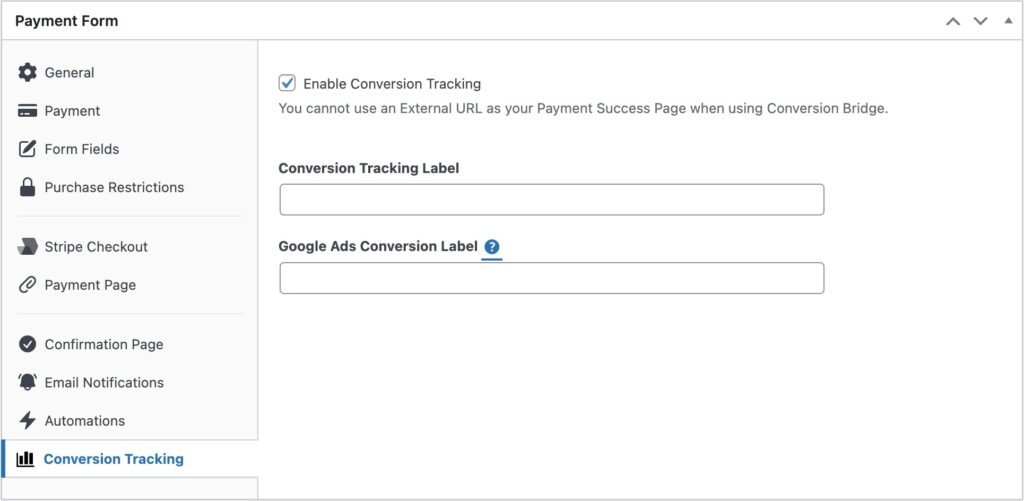
- Find the "Conversion Tracking" tab
- Check the option to enable conversion tracking
- (Optional) Enter any custom label you wish
Any platform specific fields will also be shown in this tab as well.
Enhanced Conversions
Conversion Bridge will automatically find any name or email fields within your payment forms. It will then use the submitted information from these fields to send any Enhanced Conversion data to supported ad platforms.
Conversion Journeys
You can include a Conversion Journey in the Payment Notification you receive on a successful payment. Use the {conversion-journey} smart tag in your email content and it will be replaced with the full journey details.
Video Walkthrough
Learn how to setup conversion tracking for WP Simple Pay in this short video:
Still need help?
If you have not yet found your answer in the documentation articles, please contact support
Contact support