
Most conversion tracking happens in the visitor's browser. A script loads on your site, the visitor buys something or submits a form, and the script tells the ad platform about it.
That script doesn't always get through. Ad blockers stop it. Browser privacy settings stop it. Another plugin throws a JavaScript error and everything after it stops running. When that happens, the conversion still occurred, but the ad platform never hears about it.
Server-side tracking sends a second copy of the event from your web server straight to the ad platform. Your server talks to their server, so nothing in the visitor's browser can block it. Most platforms call this a Conversions API, or CAPI.
Ad platforms Conversion Bridge supports for server-side tracking
Meta Ads, Pinterest Ads, Reddit Ads, OpenAI Ads, Snapchat Ads, and Awin
You'll see a cloud icon next to these platforms in Settings → Conversion Bridge → Platforms.
Nearly every ad platform offers server-side tracking in some form. The ones listed above let you generate your own credential from inside your own ads account, so your site can connect to them directly. Others only hand out a single developer-level key to approved partners, with no way for an individual site to connect on its own. As those platforms open things up, they get added here.
How to turn it on
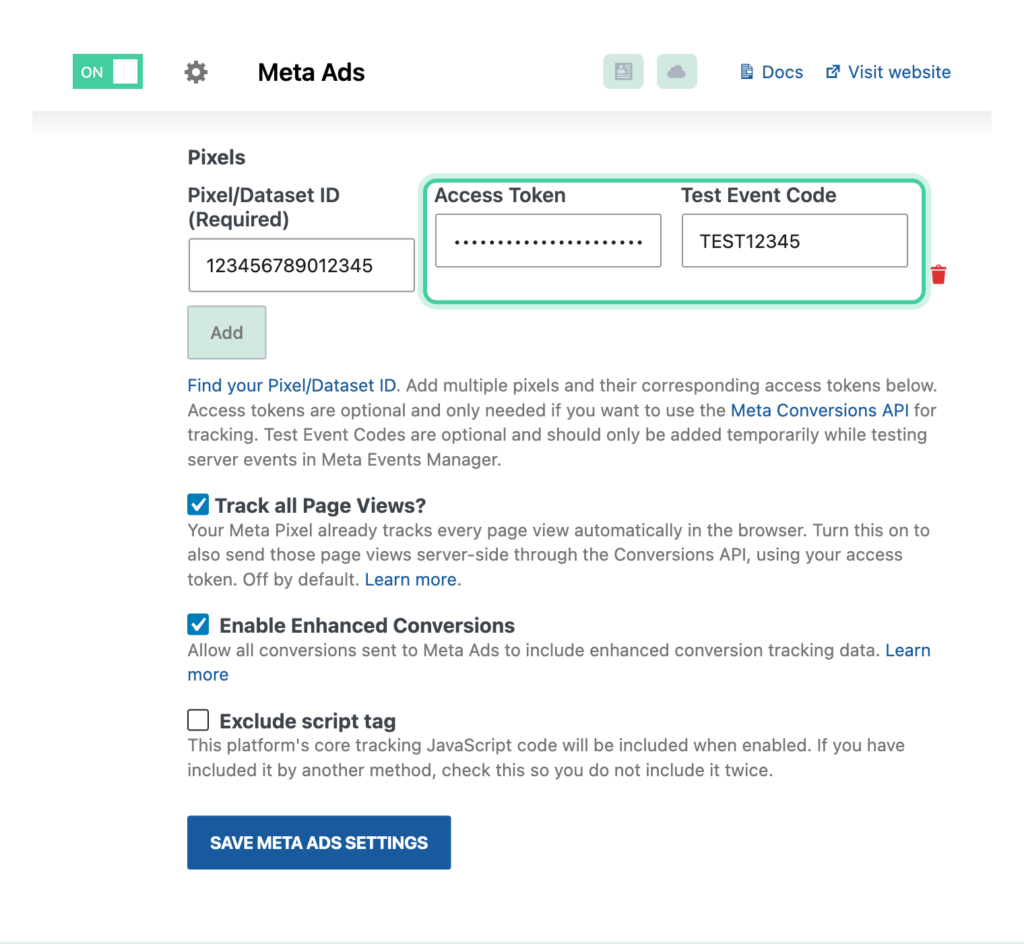
Server-side tracking stays off until you add credentials for the platform. Each platform has its own settings, right below the pixel or tag ID you already entered.
| Platform | What you add |
|---|---|
| Meta Ads | An Access Token on the pixel row |
| Reddit Ads | An API Key |
| OpenAI Ads | A Conversion Key |
| Pinterest Ads | A Conversions API Token and an Ad Account ID (both are required) |
| Snapchat Ads | An Access Token, along with your Snap Pixel ID |
Each platform's documentation walks through where to find the credential inside that platform's ads manager.
Meta, Pinterest, and Snapchat also have a test mode. Turn it on while you're setting things up so you can confirm events are arriving without adding them to your real reporting. Turn it back off when you're done, or your conversions won't be counted.
What gets sent server-side
Once the credentials are in place, every conversion event goes both ways. A purchase, a form submission, a signup, a custom event, all of them are sent from the browser and from your server.
Page views are the exception. They're off by default, because most platforms only want a page view reported on pages that matter, not on every page of your site. Each platform has a Track all Page Views checkbox if you want them counted. Reddit doesn't have this option and never sends page views server-side.
Your conversions won't be counted twice
Sending the same purchase two different ways sounds like a recipe for double counting. It isn't.
Every event carries a matching ID, and both copies use the same one. When the ad platform gets the browser copy and the server copy, it sees the same ID on both and counts one conversion. Whichever copy arrives first wins, and the other is ignored.
Conversion Bridge handles this for you. There's nothing to configure and no setting to get wrong.
Customer data and privacy
Server-side tracking carries the same customer data as enhanced conversions: things like email address, name, phone number, and general location. Names, emails, and phone numbers are hashed with SHA-256 before they leave your site, so the ad platform never receives the raw values.
The server copy can also include two things the browser copy can't send on its own: the visitor's IP address and their browser user agent. Platforms use those to match more conversions to the right person.
Because you're sending customer data to an advertising platform, your privacy policy should say so. The enhanced conversions documentation covers what to include.
How consent is handled
If you've selected a cookie banner plugin in Conversion Bridge, server-side events follow the visitor's choice. They're only sent after the visitor gives marketing consent. If consent is refused, nothing is sent and the reason is written to your log.
If you haven't selected a cookie banner plugin, server-side events are always sent.
This is separate from analytics consent. A visitor who allows marketing but refuses analytics will still have their conversions sent to your ad platforms.
Keep your saved tokens working when security keys change
Access tokens, API keys and Google connections are saved in an encrypted form, so they can't be read straight out of your database. Conversion Bridge uses your site's security keys in wp-config.php (LOGGED_IN_KEY and LOGGED_IN_SALT) to lock and unlock them.
If those keys ever change, the saved values can't be unlocked anymore. The field shows up empty in your settings, and the Health page shows an error for that platform. Some security plugins and hosts change these keys on a schedule, so tracking works for a while and then stops.
You can stop this by giving Conversion Bridge its own keys. Add these two lines to wp-config.php, above the line that says "That's all, stop editing":
define( 'CONVERSIONBRIDGE_ENCRYPTION_KEY', 'your current LOGGED_IN_KEY value' );
define( 'CONVERSIONBRIDGE_ENCRYPTION_SALT', 'your current LOGGED_IN_SALT value' );
Copy in the current values of LOGGED_IN_KEY and LOGGED_IN_SALT from the same file. That way everything you've already saved keeps working, and future changes to the WordPress keys won't touch Conversion Bridge. If a token already shows up empty, enter it again once after adding these lines.
FAQs
Do I need both the pixel and the API?
Yes, and that's the point. The pixel catches what it can from the browser, and the API catches what the browser missed. Running both is what makes your numbers more complete.
Will this slow down my site?
No. Server-side events are sent after the page has already been delivered to the visitor. Nobody waits on them.
Do I still need enhanced conversions if I'm using this?
They do different jobs. Enhanced conversions is about what customer data gets sent. Server-side tracking is about how the event reaches the platform. Using both gives you the most accurate reporting.
How do I know it's working?
Turn on test mode for the platform, complete a test conversion on your site, and check the platform's event tools. Meta shows this under Events Manager, Pinterest and Snapchat under their conversions setup pages. You can also turn on logging in Settings → Conversion Bridge → Advanced to see exactly what Conversion Bridge sent.