
Conversion Bridge connects your WordPress site to OpenAI Ads so your conversions are measured automatically. It adds the OpenAI measurement pixel to your site and can also send events server-side through OpenAI's Conversions API, with the two deduplicated so a conversion is never counted twice.
Where do I find my OpenAI Pixel ID?
Your Pixel ID identifies your OpenAI Ads measurement pixel, which OpenAI calls a Data Source.
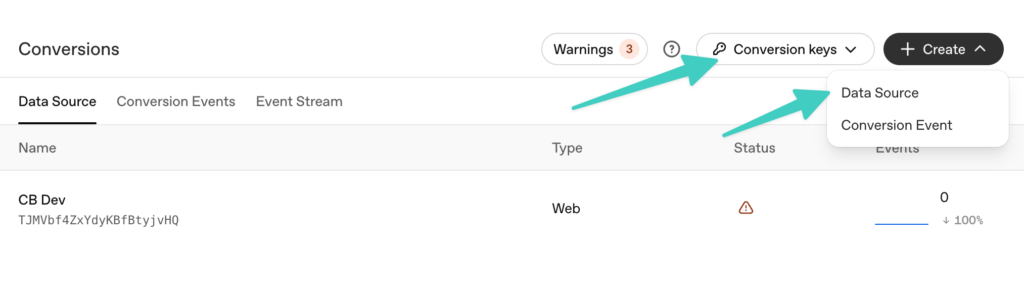
- Log in to your OpenAI Ads Manager
- Go to Tools > Conversions
- Click the Create button and choose Data Source
- Give it a name and set the Type to Web
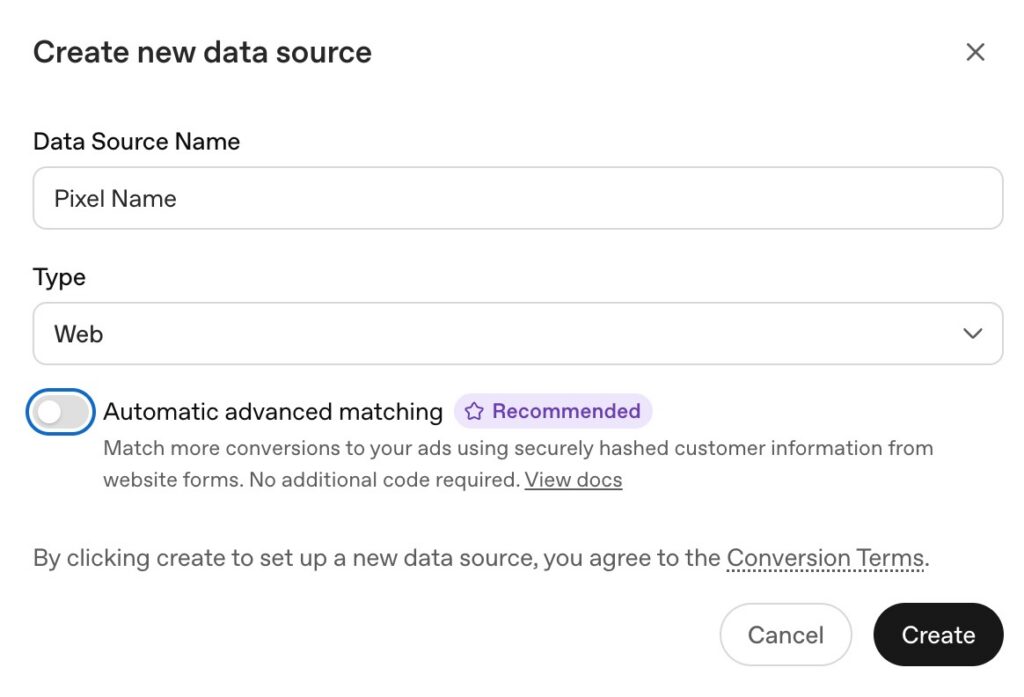
The setup window also has an Automatic advanced matching toggle. That is OpenAI's way of collecting hashed customer details from your site's forms on its own. Conversion Bridge already sends that customer data directly with each conversion (see Enhanced Conversions below), so you do not need it for anything Conversion Bridge tracks. Leaving it on is fine and may help match conversions from forms Conversion Bridge is not tracking.
Once created, your Pixel ID appears right below the data source name in the list on the Conversions page. Copy it and paste it into the Conversion Bridge settings. This is all you need to start tracking conversions through the pixel.
What is the Conversion Key?
The Conversion Key is optional and enables OpenAI's Conversions API for server-side tracking. Conversions still fire through the pixel without it. When you add the key, Conversion Bridge sends a second, server-side copy of each conversion and deduplicates it against the pixel event. This makes your tracking more reliable when browser events are blocked or missed.
Create one with the Conversion keys button at the top of the Conversions page (shown in the first screenshot above), then paste it into the Conversion Bridge settings.
Track all Page Views
By default, Conversion Bridge sends a page view through the pixel but does not send page views server-side. Enable this option to also send every page view through the Conversions API. This adds a server-to-server request on every page load, which increases server load, but it makes your page view measurement more robust against ad blockers and missed pixel events. It requires a Conversion Key. This option is off by default.
Enhanced Conversions
OpenAI Ads supports enhanced conversions. When a logged in user or a form submission provides them, Conversion Bridge attaches the visitor's email, phone number, first and last name, and a customer identifier. All of those are securely hashed before they leave your site, so OpenAI never receives the raw values. Conversion Bridge also sends the country, city, state or region, and postal code, which OpenAI accepts as plain text.
You do not have to fill in every field. Conversion Bridge sends whatever the conversion actually collected, and fills in the email and name from the WordPress profile when the visitor is logged in. The more it can send, the more of your conversions OpenAI can match back to the ads that drove them.