
Conversion Bridge allows you to embed some of the supported analytics platforms dashboards directly into your WordPress admin.
Each platform does this different so please follow the steps for the currently supported platforms:

Pirsch Analyics dashboard in WordPress admin
Who Can See the Dashboards
By default, only administrators can see the embedded dashboards. If you want to give clients or team members access without making them administrators, you can open it up by role.
- Go to Settings → Conversion Bridge → Options
- Find Analytics Dashboard Roles in the Admin section
- Check every role that should see the dashboards, for example Editor
- Save your settings
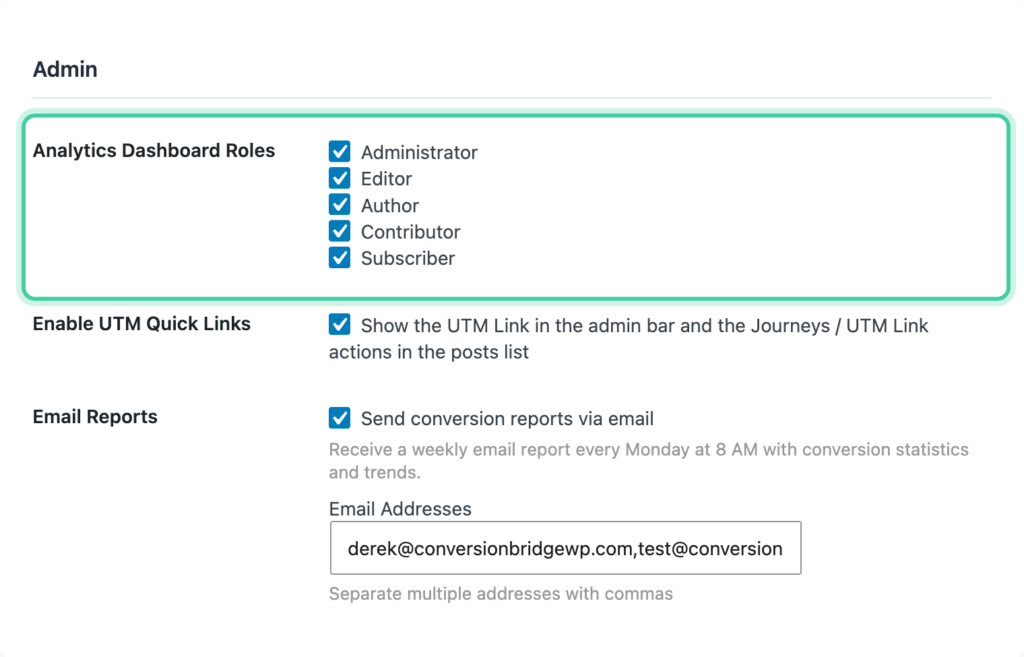
A few things to know:
- The setting applies to all embedded dashboards at once. You can't grant one platform's dashboard to a role and hold back another.
- The Analytics menu only appears for roles you've checked. Roles you haven't checked don't see the menu at all.
- The Journeys and tool links inside that same Analytics menu stay administrator-only, no matter which roles you check here.
If you gave a role access and it still gets a permissions error, make sure you're running Conversion Bridge 1.15 or later. Earlier versions built the menu but didn't grant access to the pages behind it.