Here's a scenario I hear about all the time: someone spends months setting up conversion tracking on their WordPress site. They finally have data flowing into their analytics and ad platforms. Then they realize they're supposed to have a cookie consent banner. They install one, and suddenly half their data disappears.
Sound familiar?
Privacy laws like GDPR, ePrivacy, and similar regulations around the world have fundamentally changed how we're allowed to track visitors. You can't just drop a Google Analytics tag on your site and call it a day anymore. And if you're running paid ads, the stakes are even higher because inaccurate conversion data means wasted ad spend.
But here's the good news: you absolutely can track conversions and stay compliant. You just need the right approach. Let me walk you through how it works and what your options are.
The Privacy Problem Is Real (and Expensive)
Let's start with why this matters beyond just "being a good person." The financial consequences of getting privacy wrong are significant.
Since GDPR took effect in 2018, European data protection authorities have imposed over EUR 4.5 billion in fines. And it's not just the tech giants getting hit. Small and medium businesses have been fined too, sometimes for something as simple as loading Google Analytics without proper consent.
The French data protection authority (CNIL) fined Google EUR 150 million specifically over cookie consent practices. The Austrian and Italian data protection authorities ruled that using Google Analytics without adequate safeguards violated GDPR. These aren't obscure edge cases. They set precedents that affect every website owner.
And the trend is accelerating. More countries are adopting GDPR-style laws. Brazil's LGPD, Canada's updated PIPEDA, US state-level privacy laws in California, Virginia, Colorado, Connecticut, and more. If your site has visitors from any of these regions, which it probably does, you need to care about consent.
What Consent Actually Means for Your Tracking
When someone lands on your site and hasn't interacted with a cookie consent banner yet, here's what you're legally required to do in most jurisdictions: nothing. As in, fire no tracking cookiesA small piece of data stored in a user’s browser that helps websites remember user activity, preferences, or sessions across visits.. Load no analytics scripts. Send no data to ad platforms.
That's the core of GDPR's consent requirement: you need explicit, informed consent before you can use cookies or similar technologies for analytics and advertising purposes.
This creates a real problem for conversion tracking. If a visitor clicks your Google Ad, lands on your site, sees the consent banner, and clicks "Reject All," you just lost that conversion data entirely. Your ad platform thinks the click didn't convert. Your analytics show a bounce. Your ROASMeasures how much revenue is earned for every dollar spent on advertising, helping you evaluate the effectiveness of your ad campaigns. numbers are wrong.
Consent rates vary widely by region, by industry, and by how a banner is designed. Industry reports regularly show somewhere between a quarter and half of European visitors decline cookies outright, which means you could be losing data on a large chunk of your traffic. Even in regions with higher acceptance rates, you're still dealing with a meaningful data gap.
I worked with a site owner last year who couldn't figure out why his Google Ads performance had tanked. Turns out, his developer had installed a consent banner but hadn't configured his tracking to respect it properly. His scripts were either being blocked entirely (losing all data) or firing before consent (creating legal risk). It was a mess.
The Old Way vs. The Right Way
The "old way" of handling consent was pretty crude: block all tracking scripts until someone clicks "Accept." Then load everything at once.
This approach has several problems:
You lose the initial pageview. By the time the visitor consents and your scripts load, they've already been on the page for a while. That first pageview is gone. If they navigate to another page quickly, you might miss it entirely.
Conversion events can fire before scripts are ready. If someone fills out a form while the consent banner is still showing, your tracking might miss the conversion even if they accept cookies afterward.
It's all-or-nothing. Either every platform loads or none of them. There's no granularity. Maybe the visitor is fine with analytics but not marketing cookies. The basic block/unblock approach can't handle that.
Google Consent Mode gets ignored. Google introduced Consent Mode specifically to model conversions even when users don't consent. But if you're just blocking and unblocking scripts, you're not taking advantage of it.
The right way handles consent at a much more granular level. And that's where things get interesting.
Google Consent Mode v2: Why It Matters
If you're using Google Analytics or Google Ads, Consent Mode v2 is something you need to understand. Google rolled this out and began requiring it for advertisers in the EEA who want to continue using audience features and remarketing.
Here's the simplified version: instead of completely blocking Google tags when a visitor hasn't consented, Consent Mode lets the tags load in a restricted state. They don't set cookies and don't collect personal data, but they can still send anonymized pings to Google. Google then uses machine learning to model the conversions it can't directly observe.
The result? You maintain better data coverage even with low consent rates. Google estimates that Consent Mode can recover a significant portion of conversions that would otherwise be lost to consent rejection.
But Consent Mode only works if your consent management and tracking are properly integrated. Your consent banner needs to communicate the visitor's consent state to Google's tags in a specific format. If you're manually managing scripts, getting this right is genuinely difficult.
Conversion Bridge supports Google Consent Mode v2 out of the box when paired with a compatible consent banner. No extra configuration needed. See supported consent banners
Platform-Level Consent: The Modern Approach
Here's something most people don't realize: the major ad and analytics platforms have built their own consent handling. GA4, Meta (Facebook), Google Ads, TikTok, and Microsoft all have native consent APIs.
What this means is that these platforms can load on the page and stay in a "restricted" mode until consent is granted. When it is, they immediately start tracking, no page reload required. When it isn't, they either do nothing or (in Google's case) send modeled pings.
This is a massive improvement over the block/unblock approach because:
- No scripts need to reload. The platform is already on the page, waiting. The moment consent is granted, tracking begins instantly.
- Consent Mode just works. When you let Google's tags handle consent natively, Consent Mode v2 is built right in.
- You lose less data. Because there's no delay between consent and tracking activation, you capture more events.
The catch? Not every platform supports native consent handling. Smaller analytics tools, niche ad platforms, and some behavior tracking tools still need the traditional block/unblock approach. So in practice, you often need both approaches running simultaneously, native consent for the platforms that support it, and script blocking for those that don't.
That's not easy to manage manually. Which brings me to how Conversion Bridge handles all of this.
How Conversion Bridge Makes Consent-Aware Tracking Simple
I built the consent system in Conversion Bridge specifically to solve this "two worlds" problem. It supports 17 cookie consent banner plugins and handles the technical complexity so you don't have to think about it.
Works With Your Existing Consent Banner
Conversion Bridge integrates with the most popular cookie consent solutions for WordPress, including Cookiebot, CookieYes, Complianz, Usercentrics, Termageddon, WPConsent, and more. You can see the full list on the cookie banner integrations page.
You don't need to replace your consent banner. Just tell Conversion Bridge which one you're using, and it handles the rest. When your banner fires a consent event (accept, reject, or granular category choices), Conversion Bridge listens for it and responds accordingly.
Smart Platform-Level Consent
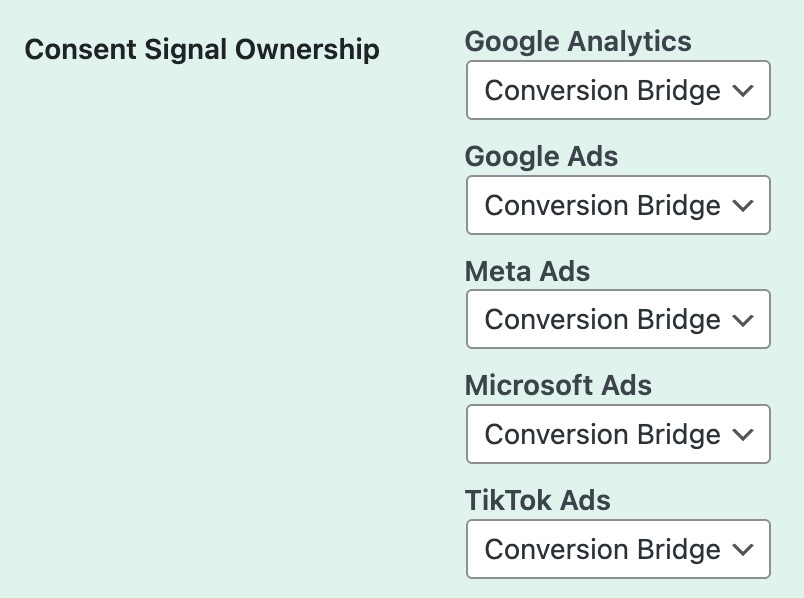
This is where things get really powerful. Conversion Bridge knows which platforms support native consent handling and which don't. For platforms like GA4, Meta, Google Ads, TikTok, and Microsoft, it lets them load normally and manages consent through their native APIs.
For platforms that don't have native consent handling, Conversion Bridge blocks their scripts until consent is granted, then releases them. Each platform gets the right treatment automatically based on its capabilities.
And it handles consent at the individual platform level, not just broad categories. If your consent banner reports that a visitor accepted Google Analytics but rejected Meta Pixel, Conversion Bridge will activate GA4 and keep Meta blocked. That kind of granularity matters for compliance.
Google Consent Mode v2 Built In
If your consent banner supports Google Consent Mode (several do, including Cookiebot, Complianz, and WPConsent), Conversion Bridge works with it automatically. Your Google tags load in restricted mode by default and upgrade to full tracking when consent is granted. No extra configuration needed.
This means you get the benefit of Google's conversion modeling even for visitors who don't consent. Your reported conversions will be more accurate, and your ad platform optimization will work better.
No Double-Firing, No Missed Events
One of the trickiest parts of consent-aware tracking is timing. What happens if consent is granted after a conversion event? What if a script loads twice? Conversion Bridge has built-in safeguards against these edge cases:
- One-shot guards prevent platform events from firing more than once per conversion
- Consent state tracking ensures notifications are sent once per category per page
- Queue-based event handling means conversion events are captured even before consent is resolved, and they're dispatched to the appropriate platforms the moment consent comes through
Privacy-First Analytics: You Have Options
If the whole consent-and-cookies situation gives you a headache, it's worth knowing that privacy-focused analytics platforms are growing fast. Tools like Plausible, Fathom, and Usermaven are designed to work without cookies, which means they often don't require consent at all under GDPR.
Conversion Bridge supports 19 analytics platforms, including these privacy-first options. You can run a cookie-free analytics platform for general traffic data and still use cookie-based platforms (like GA4 or ad pixels) with proper consent for deeper conversion tracking.
This "layered" approach is becoming popular: get baseline analytics from a privacy-friendly tool, and layer on consent-dependent platforms for users who opt in. You get complete visibility without sacrificing compliance.
Conversion Bridge supports 19 analytics platforms, from privacy-first tools like Plausible and Fathom to full-featured platforms like GA4. Mix and match to fit your compliance needs. View all platforms
What You Should Do Right Now
If you're not sure where you stand on privacy compliance and conversion tracking, here's a practical checklist:
1. Audit your current setup. What tracking scripts are on your site right now? Are any of them loading before consent is granted? Use your browser's developer tools to check what fires on a fresh visit before interacting with any consent banner.
2. Make sure you actually have a consent banner. It sounds obvious, but I still see WordPress sites running Google Analytics and Meta Pixel with zero consent mechanism. That's a liability.
3. Check that your consent banner and tracking actually talk to each other. Having a banner is not enough. If clicking "Accept" on the banner doesn't actually unblock your tracking scripts, you're collecting no data. If clicking "Reject" doesn't actually block them, you have a compliance problem.
4. Understand Google Consent Mode v2. If you're advertising in the EU/EEA with Google, this isn't optional. Without it, you lose access to audience features and remarketing. Make sure your setup supports it.
5. Consider platform-level consent. If you're using multiple analytics and ad platforms, make sure consent is handled individually for each one. Category-level consent (analytics vs. marketing) is a good start, but platform-level consent is the gold standard for compliance.
Conversion Bridge handles all of this out of the box. You pick your consent banner, connect your platforms, enable the integrations you need, and the consent layer works automatically. No custom JavaScript. No manual script blocking. No worrying about Consent Mode configurations.
If you're running a WordPress site with any kind of conversion tracking, getting this right is worth the effort. The regulatory environment is only getting stricter, consent rates aren't going up, and the platforms that handle consent natively will keep evolving. Building on a solid foundation now saves you headaches later.
Your tracking data is only valuable if it's both accurate and legal. You really can have both.
Frequently Asked Questions
Do I need a cookie consent banner if I only use privacy-friendly analytics like Plausible or Fathom?
In many cases, no. Cookie-free analytics tools that don't collect personal data or set cookies often don't require consent under GDPR. However, if you also run ad pixels (Meta, Google Ads, etc.), you still need consent for those. Check with a legal professional for your specific situation.
What happens to conversion data when a visitor rejects cookies?
With a basic setup, that conversion data is lost entirely. With Google Consent Mode v2, Google can model some of those lost conversions using machine learning. Conversion Bridge supports Consent Mode automatically when paired with a compatible banner, helping you recover data that would otherwise disappear.
Does Conversion Bridge work with my existing consent banner plugin?
Conversion Bridge integrates with many cookie consent banner plugins, including Cookiebot, CookieYes, Complianz, Usercentrics/Termageddon, WPConsent, and others. Check the integrations page for the full list.
What is platform-level consent and why does it matter?
Platform-level consent means each tracking platform (GA4, Meta, TikTok, etc.) is activated or blocked individually based on the visitor's consent choices, rather than broad categories like "analytics" or "marketing." This gives visitors more control and provides better compliance. Conversion Bridge handles this automatically.