
UTM parametersUTM parameters are tags added to a link that show where traffic comes from and which campaigns lead to real conversions. are short tags you add to the end of a link so your analytics can tell you where a visitor came from. Add them to the links you share in emails, ads, and social posts, and every click reports back with the source, the channel, and the campaign that earned it. This guide covers what each parameter means, how to build tagged links, the naming rules that keep your reports clean, and how Conversion Bridge captures UTM data and connects it to your conversions. None of it is specific to Google Analytics. It applies to any of the 19 analytics platforms Conversion Bridge supports.
What Are UTM Parameters?
UTM stands for Urchin Tracking Module. Urchin was the analytics software Google bought in 2005 and turned into Google Analytics, and the utm_ prefix stuck. Today nearly every analytics tool reads the same five parameters, so a link tagged for one platform works for all of them.
A tagged link looks like this:
https://example.com/spring-sale?utm_source=newsletter&utm_medium=email&utm_campaign=spring_sale
Everything after the ? is the tracking data. Each parameter is a name=value pair, and the & separates one pair from the next. The visitor lands on the same page either way. The only thing that changes is what your analytics learns about the click.
Without the tags, your analytics has to guess. A click from an email shows up as direct traffic, because email apps don't pass a referrer. A click from a Facebook post shows up as facebook.com, but you can't tell which post. With the tags, both clicks report exactly which campaign and which link brought them in.
The Five UTM Parameters
| Parameter | Answers | Examples |
|---|---|---|
utm_source |
Where did the click come from? | newsletter, facebook, google, partner_site |
utm_medium |
What kind of channel was it? | email, cpc, social, referral, affiliate |
utm_campaign |
Which campaign or promotion? | spring_sale, product_launch, welcome_series |
utm_term |
Which keyword or audience? | running+shoes, lookalike_buyers |
utm_content |
Which link or creative? | hero_button, text_link, video_ad_b |
Analytics platforms treat utm_source and utm_medium as required. Google's own Campaign URL Builder lists both as required, and if either is missing, most tools drop the whole set and file the visit under whatever the referrer says. utm_campaign isn't strictly required, but a source and medium with no campaign name is rarely worth much later.
utm_source
The specific site, app, or list that sent the click. Think of it as the name of the sender: newsletter, facebook, google, linkedin, partner_site. Keep it to the platform or property name and leave the type of traffic to the medium.
utm_medium
The category of the channel, and the parameter analytics tools use to group traffic into channels like Paid Search, Email, and Organic Social, so it pays to stick to the values they expect: email, cpc (paid clicks), paid_social, social, referral, affiliate, display. Made-up values like newsletter_blast or fb land in an "unassigned" bucket in most tools.
utm_campaign
The promotion or initiative the link belongs to: spring_sale, black_friday_2026, webinar_june. Use the same campaign name across every channel that promotes the same thing, so you can compare email against social against ads for that one campaign.
utm_term
Originally for the paid search keyword that triggered the ad. Ad platforms can fill it in automatically (more on that below). Outside of search ads, some people use it for the audience or ad set name. Skip it if it wouldn't answer a question you'd actually ask.
utm_content
Tells two links in the same campaign apart. A newsletter with a button and a text link pointing at the same page can use utm_content=button and utm_content=text_link. Ads use it for the creative name, so you can see which version got the clicks.
utm_id
A sixth parameter that Google Analytics added for a campaign ID, which lets you upload cost data against it. Conversion Bridge stores utm_id alongside the other five, so if your ad platform fills it in, you'll see it in your reports.
How Many UTM Parameters Should You Use?
Put source, medium, and campaign on every link you share outside your own site. Add term and content only when they'll answer a real question, like which ad creative or which button won. Three well-named parameters you can read later beat five you had to guess at.
How to Add UTM Parameters to a URL
The rules are the same everywhere:
- Start with the full page URL.
- Add
?before the first parameter. - Write each parameter as
name=value. - Separate parameters with
&. - Replace spaces with
_or-. Avoid other special characters.
If the page URL already has a ? in it (a search results page, a filtered category), use & for the first UTM parameter instead of a second ?.
The UTM Link Builder
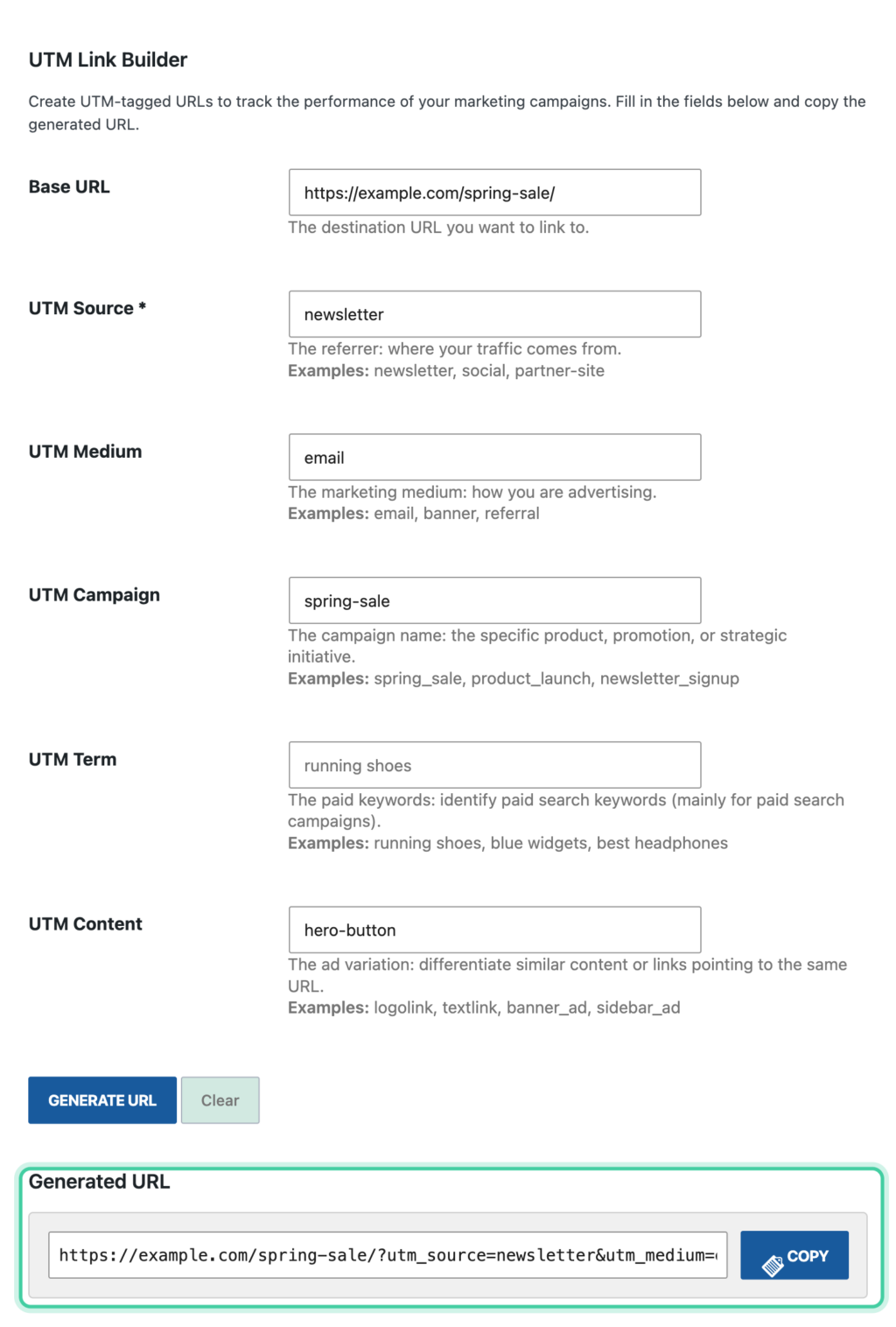
Conversion Bridge includes a UTM Link Builder so you don't have to type these by hand. You'll find it in a few places:
- Settings → Conversion Bridge → Reports & Tools
- Tools → UTM Link Builder in the WordPress admin menu
- The UTM Link button in the admin bar while viewing any page on your site, which pre-fills that page's URL
- The UTM Link quick action on any post or page in the admin list
Fill in the fields, copy the finished link, and you're done. The UTM Link Builder doc walks through each field.
Let the Ad Platforms Fill Them In
You don't need to build a separate link for every ad. Google Ads and Meta both offer placeholders that get replaced with the real campaign, ad set, and ad names when someone clicks.
In Google Ads, add a tracking template at the account level and every ad in the account gets tagged. Google calls the placeholders ValueTrack parameters, and a template looks like this:
{lpurl}?utm_source=google&utm_medium=cpc&utm_campaign={campaignid}&utm_content={creative}&utm_term={keyword}
In Meta Ads Manager, the URL parameters field at the ad level accepts its own placeholders:
utm_source=facebook&utm_medium=paid_social&utm_campaign={{campaign.name}}&utm_content={{ad.name}}&utm_term={{adset.name}}
Paste the placeholders into the URL parameters field, not into the website URL field, or Meta treats them as plain text. Once set, every new ad picks them up.
Naming Conventions That Keep Reports Clean
UTM values are case sensitive, and they're stored exactly as typed. utm_source=Facebook and utm_source=facebook show up as two separate rows in your reports, and so do spring-sale and spring_sale. That's true in Google Analytics, in the other analytics platforms, and in Conversion Bridge's own UTM Reports. Every variation splits your numbers a little further, and after a few months the "Facebook" row and the "facebook" row each look smaller than the truth. A few habits prevent this:
- Lowercase everything. It's the one rule that removes the most mess.
- Pick a separator and keep it. Underscores or dashes, either is fine. Mixing them isn't.
- Use the standard medium values (
email,cpc,paid_social,social,referral,affiliate) so your analytics can group channels correctly. - Reuse campaign names across channels. Same campaign name on the email, the social posts, and the ads.
- Keep a shared list. A simple spreadsheet of every campaign name and source you've used means the next person (or you, next month) copies instead of inventing a new spelling.
- Never put personal information in a UTM. No names, emails, or customer IDs. The values end up in your analytics, in server logs, and in the browser history of anyone who clicks.
UTM Parameters vs. Ad Click IDs
When you run ads, the ad platform adds its own tag to the URL. Google Ads appends gclid, Meta appends fbclid, and TikTok, Microsoft, LinkedIn, Pinterest, and the others each have their own. These ad click IDs exist so the ad platform can match a conversion back to the exact click, and they're what enhanced conversion features rely on.
Click IDs and UTM parameters do different jobs. A click ID tells the ad platform "this was your click" but tells your analytics almost nothing readable. A UTM tells your analytics the campaign and creative in plain words. So keep auto-tagging on for the ad platform, and add UTMs (with the placeholders above) for yourself. The two don't conflict as long as your UTMs are on the ad and not pasted into the same field twice.
Conversion Bridge captures ad click IDs alongside the UTM parameters when the visitor has given marketing consent, and it recognizes the platform from the click ID on its own. A visitor who arrives with a gclid shows up in Conversion Journeys as a Google Ads visit even if the ad had no UTMs at all. The UTMs are still what give you the campaign, ad set, and creative names.
Where to See Your UTM Data
Your analytics platform reports on UTMs under its traffic or acquisition section. In Google Analytics 4 that's Reports → Acquisition → Traffic acquisition, where the five parameters appear as session source, medium, campaign, term, and content. Matomo, Plausible, Fathom, Umami, and the other analytics platforms Conversion Bridge supports each have a campaign or sources report that reads the same parameters.
Conversion Bridge adds its own view on top. The UTM Reports tool shows sessions, conversions, and total conversion value broken down by source, medium, campaign, term, and content, with a trend over time and a source and medium combination table. You can filter by conversion type, switch between first touch and last touch, export to CSV, and click any row to see the actual journeys behind it. You'll find it under Settings → Conversion Bridge → Reports & Tools or Tools → UTM Reports.
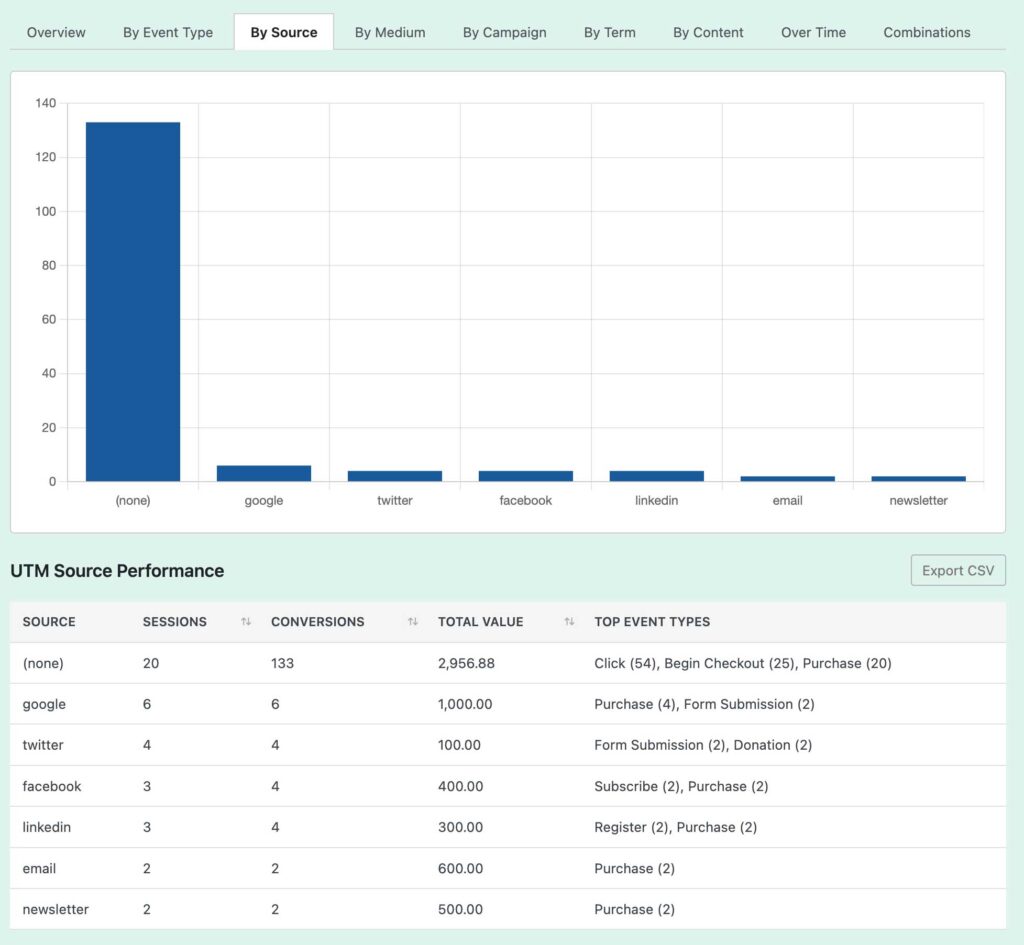
Your weekly report email also lists your top UTM sources by conversions, compared to the previous week.
Why Analytics Alone Loses the Campaign Before the Conversion
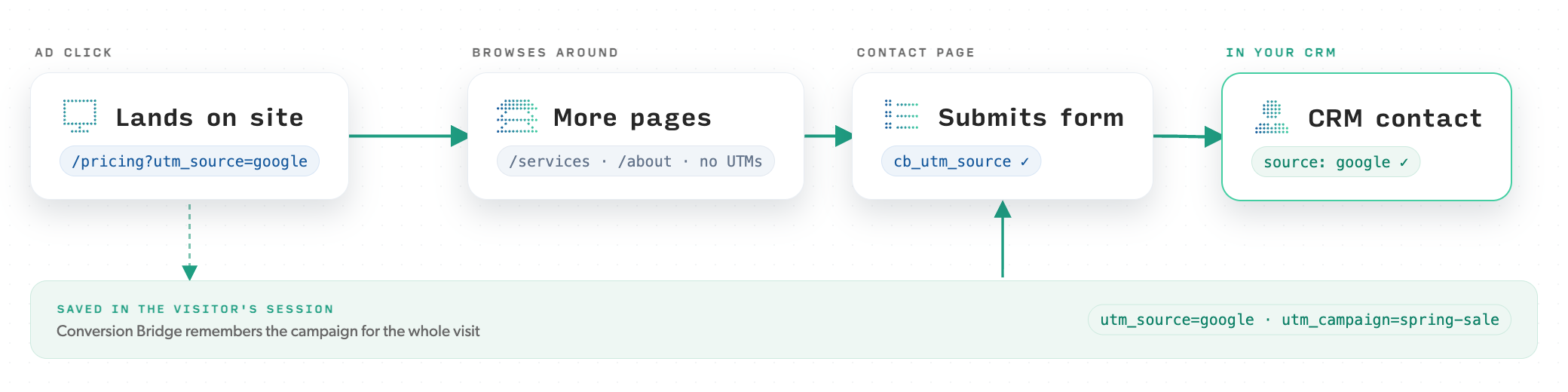
Most visitors don't convert on the page they land on. They click your link, read a couple of pages, maybe close the tab and come back two days later from a bookmark. The UTM parameters were only on that first URL, and by the time the order or form submission happens they're long gone. Analytics platforms handle this in different ways and with different time limits, and a return visit usually starts a new session with no campaign attached.
Conversion Bridge captures the UTM parameters the moment the visitor lands and stores them server-side in your WordPress database, tied to that visitor's conversion journey. When the conversion happens, on the fifth page or a week later, the original campaign is still attached to it. That's what lets UTM Reports show conversions and revenue per campaign, not just clicks. UTM data is kept for 365 days by default, adjustable in the data retention settings.
If a cookie banner is connected, the landing pageview (and its UTM parameters) is held in the visitor's browser until they accept, and only for the page they're on. A visitor who clicks to another page before accepting loses that held pageview, so the journey starts on the page where they accepted and the UTMs from the landing URL are not recorded. Nothing about the visit is stored, on the server or in the browser, until consent is given. If your audience doesn't require consent, use a cookie banner with geo-targeting or leave the Cookie Plugin setting empty.
First Touch vs. Last Touch
A visitor can arrive through more than one campaign before they convert. If they first arrive from a Facebook ad, come back a week later from your newsletter, and then buy, which campaign gets the credit?
- First touch credits the campaign that brought them in the first time (the Facebook ad). It tells you what creates awareness.
- Last touch credits the most recent campaign before the conversion (the newsletter). It tells you what closes.
Both views are useful, and the UTM Reports tool has a filter to switch between them.
The UTM Attribution Setting
Separate from the report filter, Conversion Bridge has a site-wide UTM AttributionThe process of determining which channels, campaigns, or actions contributed to a conversion, helping you understand what influenced a visitor’s decision to take action. setting under Settings → Conversion Bridge → Conversion Tracking. It decides which campaign's UTM values get saved with each conversion: the values written to your form entries and orders, and pulled into hidden form fields for your CRM.
- First Touch (default): saves the UTMs from the campaign the visitor first arrived from
- Last Touch: saves the UTMs from the most recent campaign before they converted
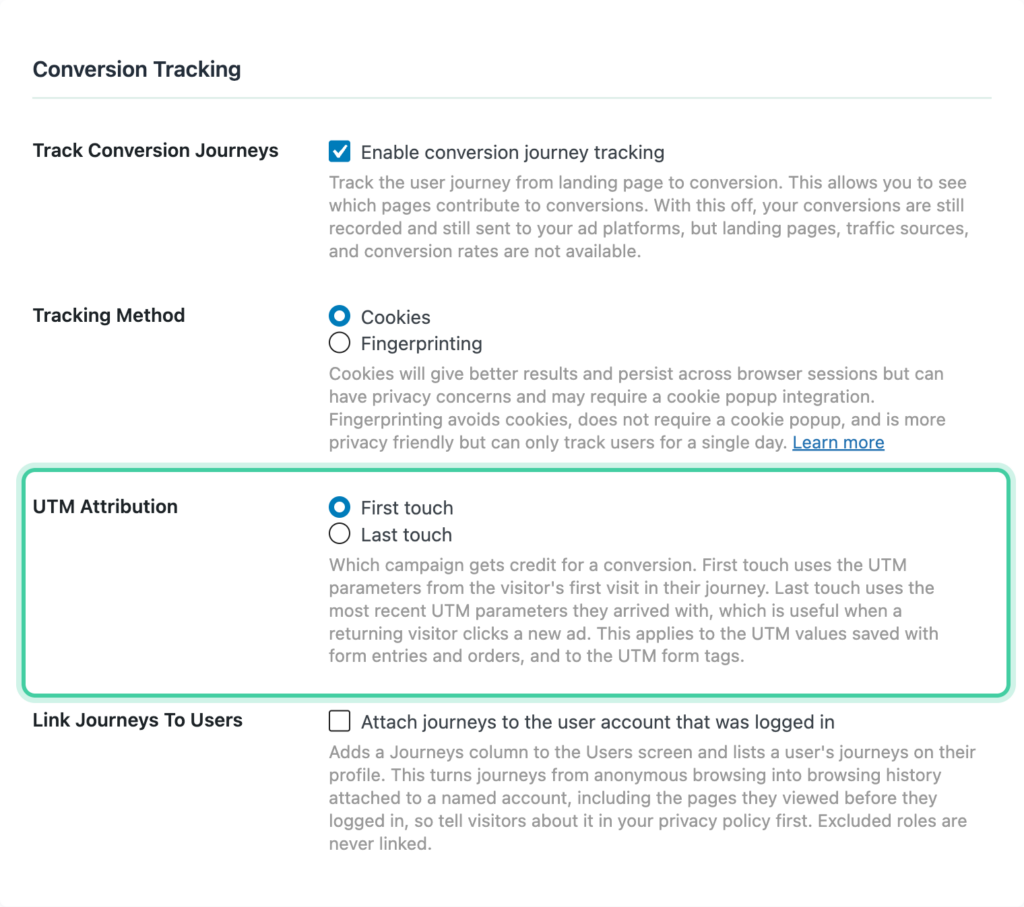
The report filter only changes how a report displays data after the fact. The site-wide setting decides what is permanently written to your entries, orders, and CRM feeds, so if you rely on UTM data flowing into your CRM, this is the one that governs what your CRM receives.
Getting UTMs Into Forms, Orders, and Your CRM
Conversion Bridge can save a visitor's UTM parameters (and, with marketing consent, their ad click IDs) directly to form submissions, notification emails, and any connected CRM or webhook feed. Because it remembers the campaign for the whole session, the data lands on the entry even when the visitor submits from a page whose URL has no UTM parameters. The same values are saved to orders and transactions in ecommerce, membership, and donation plugins.
Once the source is on the record, your CRM can segment follow-up by campaign, route leads by source, and tie revenue back to the campaign that earned it. The tags and setup steps for each form plugin are in Pass UTM Parameters and Ad Click IDs into Forms.
Forwarding UTMs to Your Other Domains
If your funnelRepresents the step-by-step process users take before completing a conversion, such as making a purchase or signing up. crosses to a second site you own, Conversion Bridge can append the visitor's UTM parameters and ad click IDs to links pointing at your other domains, so the campaign data survives the hop. Cross-Domain Forwarding covers the setup.
Common UTM Mistakes
Tagging links on your own site. If a visitor arrives from a Google ad and then clicks a homepage banner tagged utm_source=homepage, most analytics tools start a new session and credit "homepage" for anything that happens next, and the ad loses the conversion. Conversion Bridge's first-touch attribution keeps the original campaign, but your analytics platform won't. Use UTMs only on links that point to your site from somewhere else. For clicks within your site, track them as events instead.
Inconsistent spelling and case. Facebook, facebook, and FB count as three different sources, so follow the naming rules above.
Not tagging at all. Email clicks with no UTMs show up as direct traffic. Social clicks show up as the social network with no campaign. If you've ever wondered why direct traffic is so high, untagged links are usually part of the answer. What Direct / None Traffic Really Means goes deeper on that.
Changing names mid-campaign. Renaming spring_sale to spring-sale-2026 halfway through splits the campaign into two rows for good. Pick the name before the first link goes out.
Using medium for the source. utm_medium=facebook breaks channel grouping. Facebook is the source; paid_social or social is the medium.
Personal data in the URL. Customer names, emails, and IDs don't belong in a UTM.
UTM Checklist Before You Publish a Link
- The link points to your site from somewhere else, not from one of your own pages
utm_source,utm_medium, andutm_campaignare all present- Every value is lowercase
- The medium is one of the standard values
- The campaign name matches the one you used on the other channels
- The URL has one
?and&between the parameters - You clicked it once and the page loaded
- The values are in your shared list
Troubleshooting
No Data Showing
- Check the link format. A missing
?or a stray space is the usual cause. - Confirm Conversion Bridge tracking is enabled and conversions are showing in the Journeys tab.
- Give it time. The reports fill in as traffic arrives.
Unexpected "(none)" Values
"(none)" means the session had no UTM parameters on the pageview that got the credit. That's expected for direct traffic and organic search. It also happens when a visitor with a cookie banner clicked away from the landing page before accepting, as described above.
Numbers Don't Match
- First touch and last touch will give different numbers. Check which one the report is set to.
- Compare the same date ranges in both tools.
- Report data is cached for 15 minutes. Add
?refresh=1to the report URL to force a refresh.
Next Steps
- Build your first tagged link with the UTM Link Builder
- Add a tracking template to your ad accounts so every ad is tagged automatically
- Write down your naming conventions before the next campaign goes out
- Check UTM Reports in a week to see the first results
For more help, visit conversionbridgewp.com/docs or contact support.