
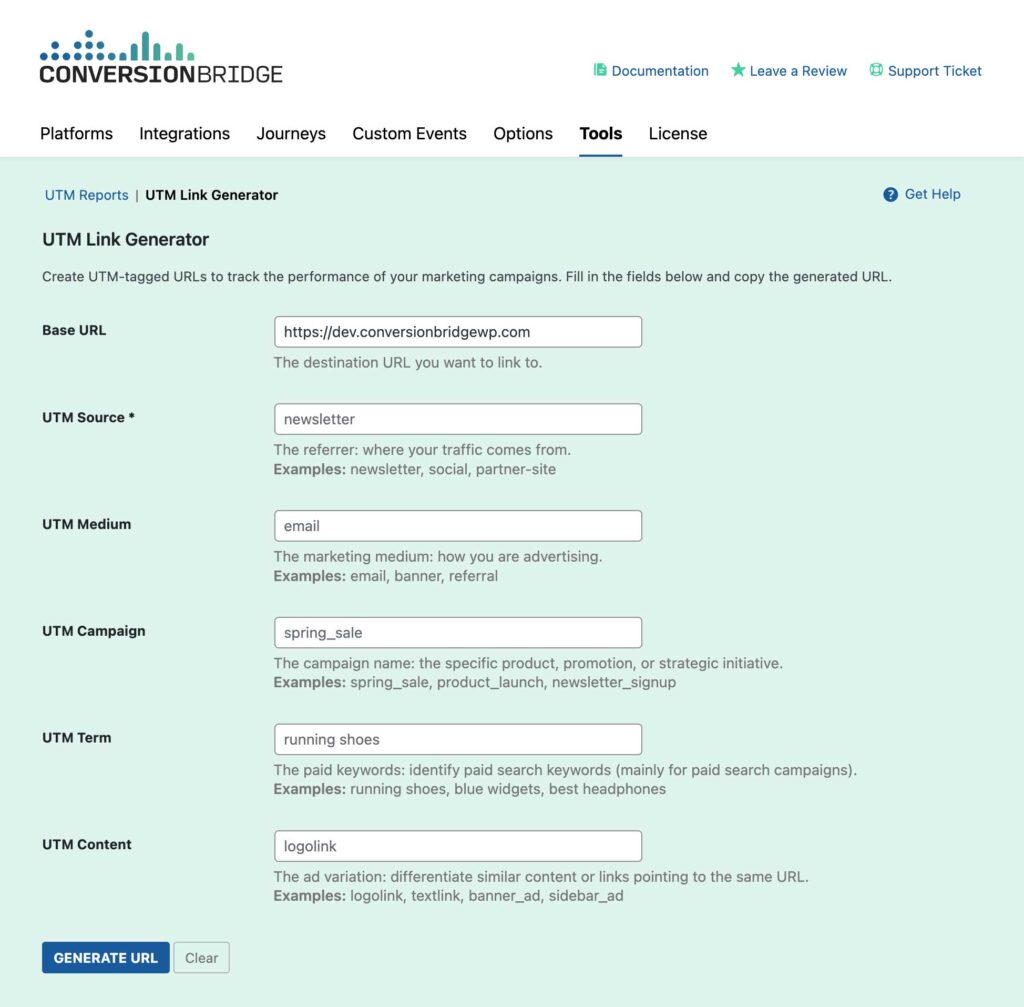
The UTM Link Builder is part of UTM tracking in Conversion Bridge. It makes it easy to create UTM-tagged URLs for your marketing campaigns. Instead of manually constructing URLs with UTM parametersUTM parameters are tags added to a link that show where traffic comes from and which campaigns lead to real conversions., this tool provides a simple form interface that generates properly formatted tracking URLs with all the necessary parameters.
What Are UTM Parameters?
UTM (Urchin Tracking Module) parameters are tags you add to URLs to track where your website traffic originates. They consist of five main parameters:
- utm_source: Identifies which site sent the traffic (e.g.,
google,facebook,newsletter) - utm_medium: Identifies what type of link was used (e.g.,
email,cpc,social,organic) - utm_campaign: Identifies a specific product promotion or strategic campaign (e.g.,
spring_sale,product_launch) - utm_term: Identifies search keywords (primarily used for paid search campaigns)
- utm_content: Identifies what specifically was clicked to bring the user to the site (e.g.,
logolink,textlink,banner_ad)
Why Use the UTM Link Generator?
Ease of Use
No need to manually construct URLs or remember parameter formatting. Simply fill in the form fields and the tool generates a properly formatted URL.
Error Prevention
The tool automatically handles URL encoding, parameter formatting, and ensures your URLs are valid. This prevents common mistakes like:
- Missing or incorrect parameter formatting
- Special character encoding issues
- Invalid URL structures
Time Savings
Generate multiple UTM-tagged URLs quickly without switching between different tools or manually typing parameters.
Consistency
Using the tool helps maintain consistent UTM parameter naming conventions across your campaigns, making it easier to analyze results in the UTM Reports tool.
Integration
The tool is integrated directly into your WordPress admin, and can be accessed from various places in Conversion Bridge, including from the admin bar when viewing your site.
Getting Started
Accessing the Tool
- Navigate to Settings → Conversion Bridge in your WordPress admin
- Click on the Tools tab
- Select UTM Link Generator from the tools list
Quick Access from Frontend
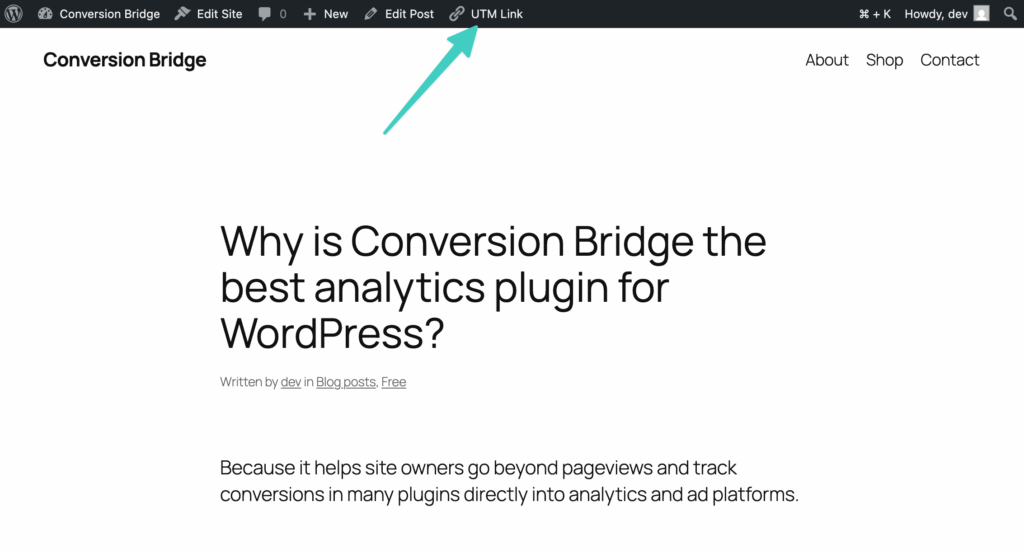
You can also access the UTM Generator directly from your website's frontend:
- While viewing any page on your site, look for the Conversion Bridge menu in the WordPress admin bar
- Click on UTM Generator
- The tool will open with the current page URL pre-populated in the Base URL field
Quick Access from Post/Page Lists
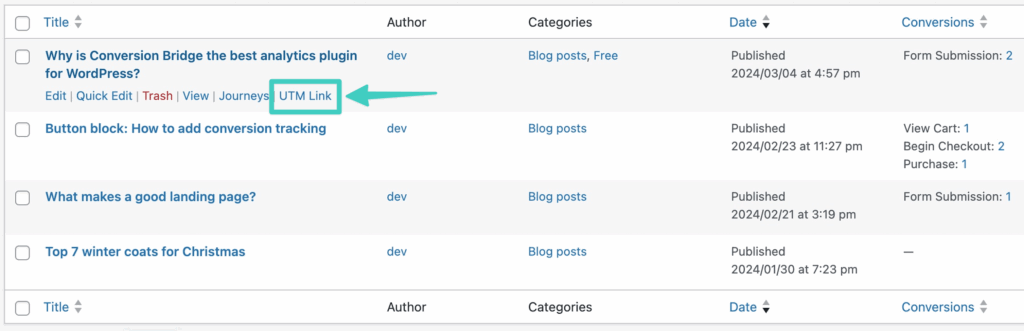
You can quickly generate UTM links for any published post or page directly from the WordPress admin:
- Navigate to Posts or Pages in your WordPress admin
- Find the post or page you want to create a UTM link for
- Hover over the post/page title to reveal the row actions
- Click on UTM Link in the quick actions menu
- The UTM Generator will open with that post/page URL pre-populated in the Base URL field
Note: The "UTM Link" quick action only appears for published posts and pages.
Using the UTM Link Generator
Step-by-Step Guide
- Enter Base URL
- The Base URL field is pre-populated with your site's home URL
- You can change this to any page on your site or any external URL
- Must be a valid URL format (e.g.,
https://example.com/page) - Fill in UTM Parameters
- UTM Source (Required): Enter where your traffic comes from
- UTM Medium: Enter the marketing medium
- UTM Campaign: Enter the campaign name
- UTM Term: Enter keywords (mainly for paid search)
- UTM Content: Enter content variation identifier
- Generate URL
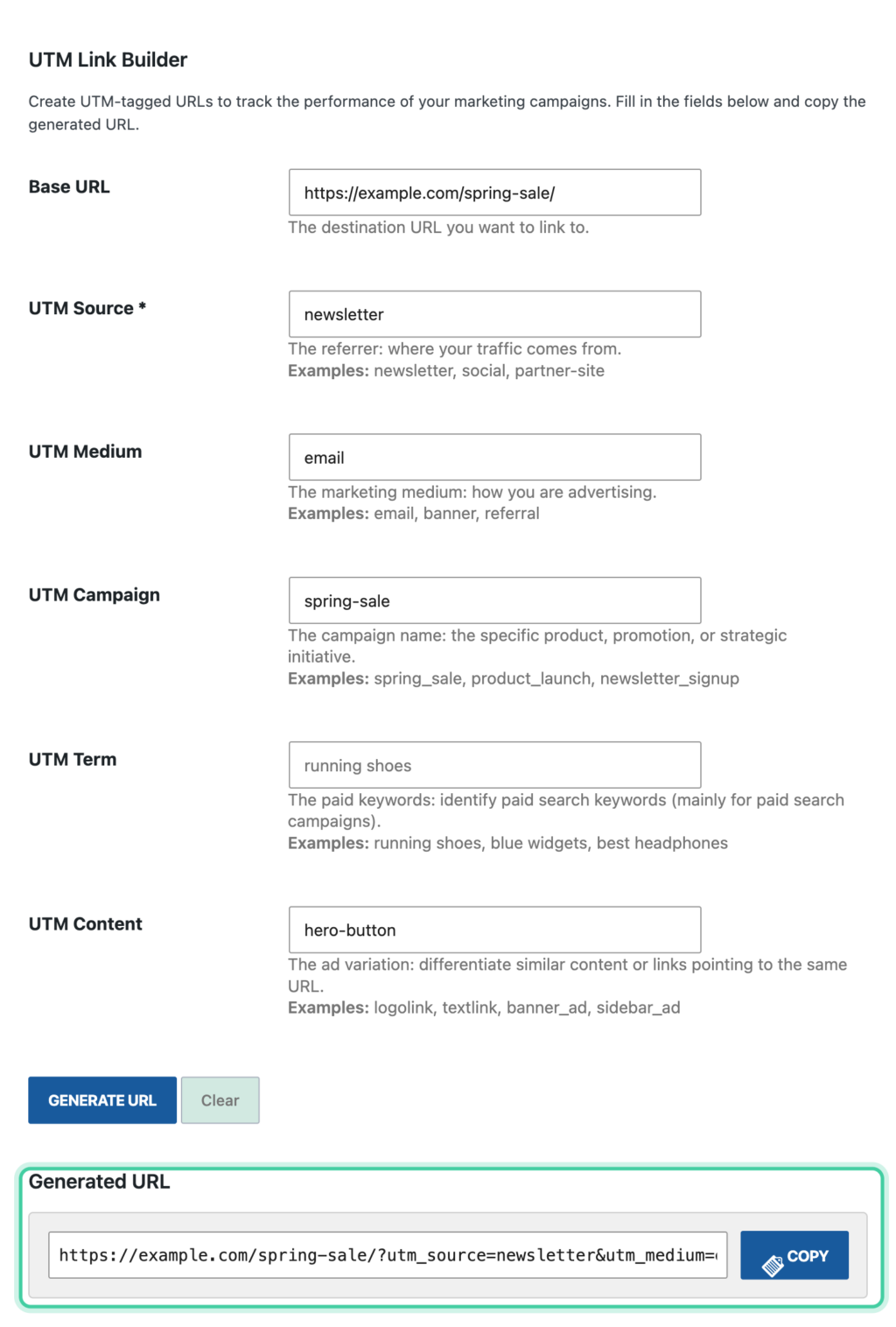
- Click the Generate URL button
- The generated URL will appear below the form
- Copy URL
- Click the Copy button to copy the generated URL to your clipboard
- The button will show "Copied!" confirmation
Understanding Each Field
Base URL
What it is: The destination URL you want to link to.
Examples:
https://yoursite.com/product-pagehttps://yoursite.com/landing-pagehttps://yoursite.com/blog/post-name
Tips:
- You can use any valid URL, including external sites
- The tool validates the URL format before generating
- If you access the tool from the frontend, the current page URL is automatically filled in
UTM Source (Required)
What it is: Identifies which site, platform, or source sent the traffic.
Common Examples:
google- Traffic from Googlefacebook- Traffic from Facebooknewsletter- Traffic from email newsletterpartner-site- Traffic from a partner websitetwitter- Traffic from Twitter/X
Best Practices:
- Use lowercase letters
- Use underscores or hyphens instead of spaces
- Be consistent with naming (e.g., always use
facebook, notFacebookorfb) - Keep it simple and descriptive
UTM Medium
What it is: Identifies the marketing medium or channel type.
Common Examples:
email- Email marketing campaignscpc- Cost-per-click advertising (Google Ads, etc.)social- Social media postsorganic- Organic social sharesreferral- Referral trafficaffiliate- Affiliate marketingbanner- Banner advertisementsdisplay- Display advertising
Best Practices:
- Use standard medium values when possible for consistency
- Match the actual marketing channel you're using
- Don't mix medium and source (e.g., don't use
facebookas medium iffacebookis your source)
UTM Campaign
What it is: Identifies a specific product promotion, strategic initiative, or campaign name.
Common Examples:
spring_sale_2024- A seasonal sale campaignproduct_launch- A product launch campaignnewsletter_signup- A newsletter signup campaignblack_friday- A Black Friday promotionwebinar_promotion- A webinar promotion campaign
Best Practices:
- Use descriptive names that clearly identify the campaign
- Include dates or version numbers if running multiple iterations
- Use underscores or hyphens instead of spaces
- Keep campaign names consistent across all links for the same campaign
UTM Term
What it is: Identifies paid search keywords (primarily used for paid search campaigns).
Common Examples:
running shoes- Keyword for a running shoes campaignblue widgets- Keyword for a product campaignbest headphones- Keyword for a comparison campaign
Best Practices:
- Primarily used for paid search campaigns (Google Ads, Bing Ads, etc.)
- Can be left blank for non-search campaigns
- Use the actual keyword that triggered the ad
- Keep terms consistent with your ad campaign keywords
UTM Content
What it is: Differentiates similar content or links pointing to the same URL (useful for A/B testingA method of comparing two versions of a webpage, email, or element to see which one performs better based on user behavior or conversion rates.).
Common Examples:
logolink- Link in a logotextlink- Text-based linkbanner_ad- Banner advertisementsidebar_ad- Sidebar advertisementcta_button- Call-to-action buttonheader_link- Link in header
Best Practices:
- Use for A/B testing different ad variations
- Identify different placements of the same link
- Helpful for testing which creative elements perform best
- Use descriptive names that identify the variation
Generated URL Format
The tool generates URLs in the following format:
https://yoursite.com/page?utm_source=value&utm_medium=value&utm_campaign=value&utm_term=value&utm_content=value
Notes:
- Parameters are automatically URL-encoded (special characters are properly formatted)
- Only parameters with values are included in the URL
- If the base URL already has query parameters, new UTM parameters are appended with
& - If the base URL has no query parameters, UTM parameters are added with
?
Features
URL Validation
The tool validates that:
- The base URL is in a valid format
- The URL uses proper protocol (http:// or https://)
- The URL structure is correct
If an invalid URL is entered, an error message will be displayed.
Automatic URL Encoding
All parameter values are automatically URL-encoded, so you don't need to worry about:
- Special characters (spaces, ampersands, etc.)
- International characters
- Proper formatting
One-Click Copy
The generated URL can be copied to your clipboard with a single click:
- Click the Copy button
- The button shows "Copied!" confirmation
- The URL is ready to paste wherever you need it
Keyboard Shortcuts
- Press Enter in any form field to generate the URL
- This allows for quick URL generation without clicking the button
Pre-populated URLs
When accessing the tool from:
- The frontend admin bar: The current page URL is pre-populated
- Direct links: URLs can be passed via query parameter (
utm_base_url)
Use Cases
Email Marketing Campaigns
Scenario: Creating links for a newsletter campaign
Example:
- Base URL:
https://yoursite.com/special-offer - Source:
newsletter - Medium:
email - Campaign:
monthly_newsletter_jan2024 - Content:
cta_button
Generated URL:
https://yoursite.com/special-offer?utm_source=newsletter&utm_medium=email&utm_campaign=monthly_newsletter_jan2024&utm_content=cta_button
Social Media Campaigns
Scenario: Creating links for a Facebook post promoting a sale
Example:
- Base URL:
https://yoursite.com/sale - Source:
facebook - Medium:
social - Campaign:
spring_sale_2024 - Content:
post_link
Generated URL:
https://yoursite.com/sale?utm_source=facebook&utm_medium=social&utm_campaign=spring_sale_2024&utm_content=post_link
Paid Search Campaigns
Scenario: Creating links for Google Ads campaign
Example:
- Base URL:
https://yoursite.com/product - Source:
google - Medium:
cpc - Campaign:
product_launch_q1 - Term:
best product - Content:
ad_variation_a
Generated URL:
https://yoursite.com/product?utm_source=google&utm_medium=cpc&utm_campaign=product_launch_q1&utm_term=best%20product&utm_content=ad_variation_a
A/B Testing
Scenario: Testing different ad variations
Example 1 - Variation A:
- Base URL:
https://yoursite.com/landing - Source:
google - Medium:
cpc - Campaign:
summer_promo - Content:
banner_red
Example 2 - Variation B:
- Base URL:
https://yoursite.com/landing - Source:
google - Medium:
cpc - Campaign:
summer_promo - Content:
banner_blue
This allows you to track which variation performs better in your UTM Reports.
Best Practices
Consistent Naming Conventions
Sources:
- Use lowercase consistently
- Avoid variations (e.g., don't mix
facebook,Facebook, andfb) - Use underscores or hyphens instead of spaces
Mediums:
- Use standard values (
email,cpc,social, etc.) - Match the actual marketing channel
- Don't duplicate source information in medium
Campaigns:
- Use descriptive, unique names
- Include dates or version numbers for recurring campaigns
- Keep names consistent across all links for the same campaign
Required vs. Optional Parameters
Required:
- UTM Source: Always required for meaningful tracking
Recommended:
- UTM Medium: Highly recommended for proper categorization
- UTM Campaign: Essential for campaign-level analysis
Optional:
- UTM Term: Only needed for paid search campaigns
- UTM Content: Useful for A/B testing and content variation tracking
URL Structure
- Keep base URLs clean and readable
- Let the tool handle parameter formatting
- Don't manually add UTM parameters to URLs that will go through the generator
Documentation
- Keep a record of your UTM parameter naming conventions
- Document campaign names and their purposes
- This helps maintain consistency across team members
Testing
- Always test generated URLs before using them in campaigns
- Click the generated URL to ensure it works correctly
- Verify parameters appear correctly in your analytics
Integration with UTM Reports
The URLs generated by this tool are automatically tracked by Conversion Bridge and can be analyzed in the UTM Reports tool.
Workflow:
- Generate UTM-tagged URLs using this tool
- Use the URLs in your marketing campaigns
- Analyze performance in the UTM Reports tool
This creates a complete tracking and analysis workflow within Conversion Bridge.
Tips and Tricks
Quick URL Generation
- Fill in the form fields
- Press Enter in any field to generate
- Click Copy to get the URL
Batch Generation
For multiple URLs:
- Generate first URL and copy it
- Click Clear to reset the form
- Change only the fields that differ (e.g., just the Content field for A/B testing)
- Generate and copy the next URL
- Repeat as needed
Pre-populating from Current Page
When viewing a page on your site:
- Click Conversion Bridge in the admin bar
- Select UTM Generator
- The current page URL is automatically filled in
- Just add your UTM parameters and generate
Consistent Campaign Naming
Create a naming convention document:
- Source naming standards
- Medium value standards
- Campaign naming patterns
- Content variation identifiers