You pull up your analytics report. You scroll to the traffic sources. And there it is again, sitting at the top of the list: direct / (none).
It's your biggest traffic source. It's been your biggest traffic source for months. And it tells you absolutely nothing.
"Direct" is supposed to mean someone typed your URL into their browser. Maybe they bookmarked your site. But you know that's not the full story, because your blog post about membership pricing got 200 "direct" visits last week. Nobody typed that URL from memory.
So what's really going on?
What direct / (none) actually means
When an analytics platform labels traffic as "direct / (none)," it's not making a confident statement. It's making an admission: I don't know where this visitor came from.
Most analytics platforms, including Google Analytics, classify a visit as "direct" when there's no referral information attached to it. No UTM parametersUTM parameters are tags added to a link that show where traffic comes from and which campaigns lead to real conversions.. No referrer header. No campaign data. Nothing for the platform to work with.
That happens more often than you'd think. Here are the most common reasons a visit loses its source data:
- Untagged links. You share a link in an email, a Facebook group, or a partner's newsletter without UTM parameters. The platform can't tell where the click came from.
- Messaging apps. Links shared in WhatsApp, Facebook Messenger, Slack, or iMessage often strip the referrer header. The visit arrives with no source attached.
- Email clients. Many desktop and mobile email apps don't pass referrer data when someone clicks a link.
- In-app browsers. When someone clicks a link inside Instagram, TikTok, or Facebook, the in-app browser often drops referral information.
- Redirects. URL redirects can strip UTM parameters if they're not configured to preserve them. One bad redirect in the chain and the attributionThe process of determining which channels, campaigns, or actions contributed to a conversion, helping you understand what influenced a visitor’s decision to take action. is gone.
- AI platforms. Traffic from ChatGPT, Claude, Google AI Overviews, and other AI tools often arrives without referrer headers. Your content might be getting recommended by AI, and you'd never know.
- Bookmarks and saved links. This is the one case where "direct" actually means direct. Someone saved your page and came back later.
The frustrating part is that analytics platforms treat all of these the same way. A bookmarked homepage visit and an untagged Facebook ad click both show up as "direct / (none)." One is real brand loyalty. The other is a campaign that should be getting credit.
How to read between the lines
You can't eliminate direct / (none) traffic entirely. But you can get a much better sense of how much of it is real versus misattributed.
The trick is looking at where direct traffic lands.
The landing page test
Think of your direct traffic in three layers:
Homepage and short URLs. If someone lands on your homepage or a URL they could realistically type or bookmark, that's probably genuine direct traffic. These visitors know your brand and came to you on purpose.
Category and section pages. Traffic landing on pages like /pricing/ or /features/ is a mixed bag. Some of it is real. Some of it is from untagged links.
Deep pages. This is where it gets revealing. If you see "direct" traffic landing on /blog/how-to-set-up-conversion-tracking-for-memberpress/, that visitor didn't type that URL. They clicked a link somewhere, and the source data got lost along the way. The deeper the page, the more likely the attribution is broken.
Pull up your landing page report and filter for direct traffic only. If most of it hits your homepage, your attribution is in decent shape. If a big chunk lands on deep blog posts, campaign pages, or product URLs, you've got a problem.
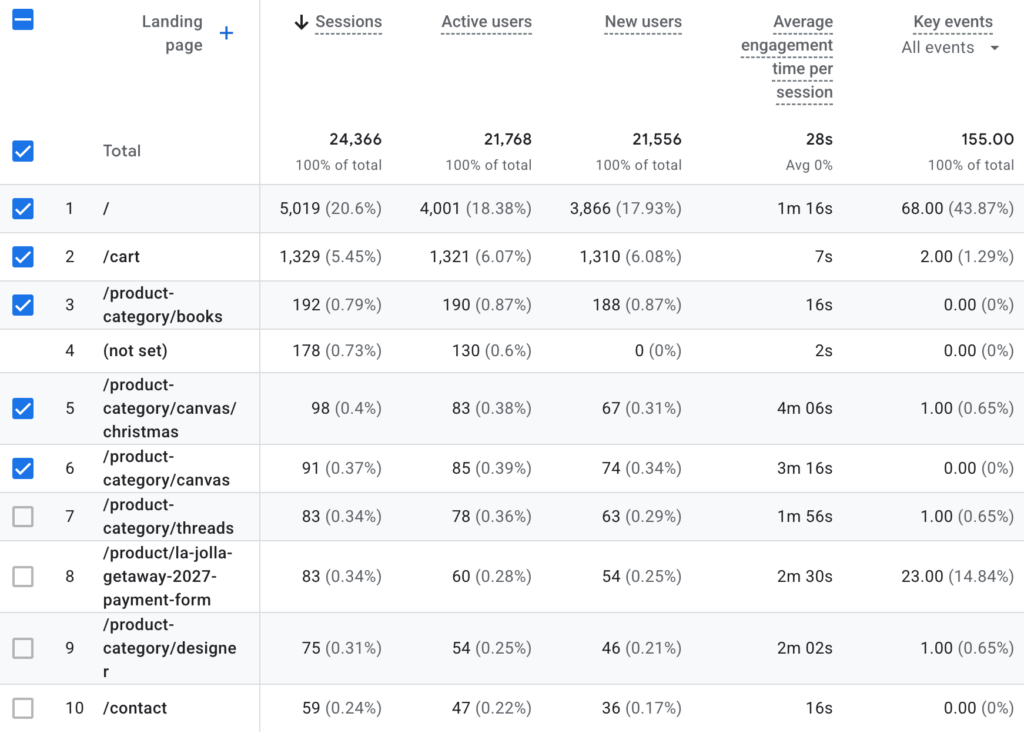
A GA4 landing page report filtered to direct / (none). Only a fifth of these visits hit the homepage.
The spike test
Another useful trick: compare your direct traffic over time with your marketing activity.
Did you send an email blast on Tuesday? Check if direct traffic spiked on Tuesday. Did you launch a Facebook campaign on Monday? Look for a corresponding jump. If your direct traffic spikes line up suspiciously well with your campaigns, those campaigns aren't getting the credit they deserve.
Why this matters more than you think
Here's where it stops being an analytics curiosity and starts costing you money.
When a campaign doesn't get credit for the conversions it drives, it looks like it's underperforming. And when a campaign looks like it's underperforming, you cut its budget. You shift spend to whatever channel does show results — even if that channel is just better at preserving attribution data, not actually better at driving sales.
I talked with a site owner a while back who was ready to cut his Facebook ad budget in half. His analytics showed that most of his sales came from "direct" traffic, not from Facebook. Why keep spending on ads that aren't converting?
Turns out, every link in his Facebook ads pointed straight to his site with no UTM parameters. Every single click from those ads showed up as "direct / (none)." The ads were working fine. His tracking wasn't.
This isn't unusual. In a real-world audit by Seer Interactive, direct traffic combined with self-referrals and mistagged links accounted for roughly 64% of a site's total traffic. Nearly two-thirds of their data was effectively unattributed. And most marketers know something is off — surveys consistently show that fewer than 1 in 5 say they're "very confident" in their attribution data.
Conversion Bridge includes UTM tracking with built-in UTM Reports that show exactly which sources, campaigns, and mediums drive your conversions — with both first-touch and last-touch attribution models.
What's making it worse
The direct / (none) problem isn't getting better. It's getting worse, and several trends are accelerating it.
Ad blockers are everywhere
Around 42.7% of internet users globally run ad blocking software. Many of these tools don't just block ads — they strip UTM parameters from URLs before the page even loads. They block tracking scripts entirely. They prevent cookiesA small piece of data stored in a user’s browser that helps websites remember user activity, preferences, or sessions across visits. from being set. A visitor can click your perfectly tagged campaign link and arrive at your site with zero attribution data.
AI traffic is exploding
AI tools are becoming a real traffic source, but most of that traffic is invisible to analytics. A 2026 benchmark report found that 70.6% of AI-referred traffic arrives without referrer headers. Your content might be getting recommended by ChatGPT or showing up in AI Overviews, and you'd never know — it all looks like direct / (none).
Cookie lifespans keep shrinking
Apple's Intelligent Tracking Prevention limits JavaScript-set first-party cookies to just 7 days. If someone clicks your tagged ad on Monday and comes back to buy on the following Tuesday, the cookie that connected them to your campaign may already be gone. The return visit shows up as direct.
Most link sharing happens in private channels
Roughly 80% of link sharing now happens in private messaging apps — WhatsApp, Messenger, iMessage, Slack. These channels almost never pass referral data. When your customer shares your product page with a friend in a text message, that friend's visit is invisible to your analytics.
Conversion Bridge works with 19 analytics platforms and 11 ad platforms. See the full list on the integrations page.
What you can do about it
You can't fix everything on this list. You can't control ad blockers or Apple's privacy policies. But you can dramatically reduce the amount of misattributed traffic by getting serious about one thing: tagging your links.
Tag every link you control
Every link you share outside your website should have UTM parameters. Every email link. Every social media post. Every partner mention. Every QR code. Every PDF download link. If you're putting a URL somewhere and hoping people click it, tag it.
The five standard UTM parameters are:
- utm_source — where the traffic comes from (e.g.,
newsletter,facebook,partner-site) - utm_medium — the channel type (e.g.,
email,social,referral) - utm_campaign — the specific campaign (e.g.,
spring-sale,onboarding-sequence) - utm_term — for paid search keywords (optional)
- utm_content — to differentiate similar links (e.g.,
header-linkvsfooter-link)
At minimum, use source, medium, and campaign on every link. That alone will reclaim a huge chunk of traffic from the direct / (none) bucket.
Conversion Bridge has a built-in UTM Link Builder right in your WordPress dashboard. You can generate tagged URLs without leaving your site — and there's a one-click "UTM Link" button on every published post.
Be consistent with your naming
UTM parameters are case-sensitive. utm_source=Facebook and utm_source=facebook show up as two different sources in your reports. Pick a naming convention (lowercase is simplest) and stick with it. Document it somewhere your team can reference.
Check your redirects
If you use URL shorteners, pretty links, or any kind of redirect, make sure they preserve UTM parameters. Test a tagged link through your redirect chain and verify the parameters survive all the way to the final URL. One misconfigured redirect can wipe out all your tagging work.
Watch for the pattern
Once you start tagging links consistently, keep an eye on your direct / (none) percentage. It should start dropping. If it doesn't — or if it's still above 25-30% of your total traffic — look at your landing page report for direct traffic. The deep pages getting "direct" visits will point you toward the channels that still need better tagging.
Use your data to connect the dots
Tagging links is only half the equation. You also need a way to see what those tagged campaigns actually produce. Not just clicks and pageviews, but real conversions — form submissions, purchases, signups, whatever matters to your business.
Conversion Bridge automatically captures UTM parameters alongside every conversion event tracked through its 71 WordPress plugin integrations. When someone clicks a tagged link, browses your site, and eventually converts, the UTM data is already attached. No extra configuration needed.
The UTM Reports tool breaks down your conversions by source, medium, campaign, term, and content — with both first-touch and last-touch attribution. You can see which campaigns actually drive results, not just traffic. And the Top Landing Pages report shows which entry pages lead to the most conversions, so you know where your tagged traffic converts best.
Stop guessing, start measuring
Direct / (none) traffic isn't going away. Some of it will always be genuinely direct, and some will always be unattributable thanks to privacy tools and platform restrictions.
But a lot of it is just untagged links. And that's entirely fixable.
Every link you share without UTM parameters is a conversion that your analytics platform can't credit to the right campaign. Every untagged email, social post, and partner link makes your direct / (none) bucket a little bigger and your marketing data a little less useful.
Start tagging. Check your reports. See what's actually working. If you're running a WordPress site and want to close the loop between your campaigns and your conversions, Conversion Bridge is a good place to start.