
Conversion Bridge 1.17 is out, and it's a big one. Google Ads conversions can now be sent from your own server, LinkedIn gets the same treatment with its Conversions API, there's a new Google Consent Mode setting, and six new integrations join the list.
Google Ads Server-Side Conversions
This is the feature I've been waiting the longest to share. Conversion Bridge can now send your Google Ads conversions from your website's server, alongside the Google tag in the visitor's browser.
When an ad blocker or a browser privacy setting stops the Google tag, Google Ads never hears about that sale or that lead. Your campaigns look worse than they are, and Google's bidding learns from fewer conversions than you actually got. With server-side turned on, the copy sent from your server still reaches Google. When both copies arrive, Google counts the conversion once, because they carry the same ID.
Meta, Pinterest, Reddit, Snapchat, and a few others already worked this way in Conversion Bridge, and the server-side tracking page lists them all. Google Ads was the one people asked about most, and it was also the hardest to get right, mostly because of how you sign in.
There are two ways to connect:
- Connect with Google is the recommended way. You click the button, sign in with the Google account you use for Google Ads, and pick your account. Google had to review and approve this sign-in before I could release it, and that approval just came through.
- Your own Google Cloud service account is there for agencies and anyone who'd rather not use the sign-in. It takes a bit more setup in Google Cloud, and the Google Ads doc walks through every step.
Either way, the conversions themselves go from your site straight to Google. They never pass through a Conversion Bridge server. Server-side uses the same conversion labels you already have, and it respects your cookie banner the same way the browser tag does. If you want the full picture of how it works without a Tag Manager server, I wrote it up in Google Ads server-side tracking on WordPress, and the Google Ads page covers everything else Conversion Bridge does for Google Ads.
Create or Choose Google Ads Conversion Actions from WordPress
Once server-side is connected, every Google Ads Conversion Label field in Conversion Bridge gets a Choose from Google Ads link. Click it and you can pick one of your existing conversion actions, or create a new one right there, without opening Google Ads in another tab.
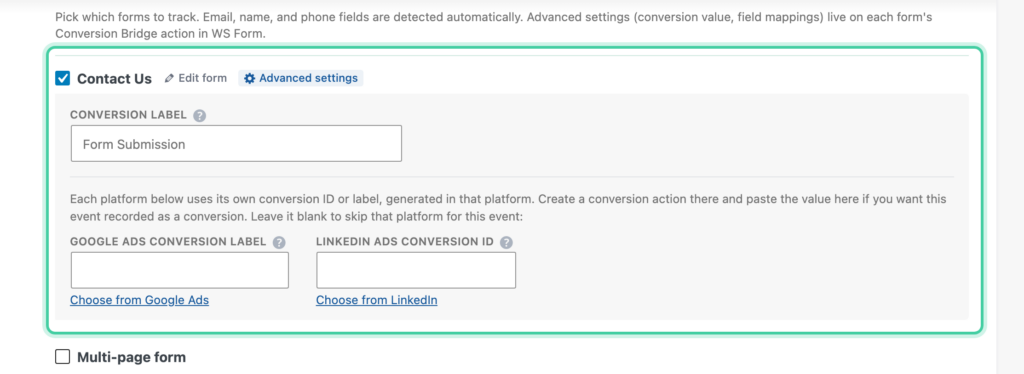
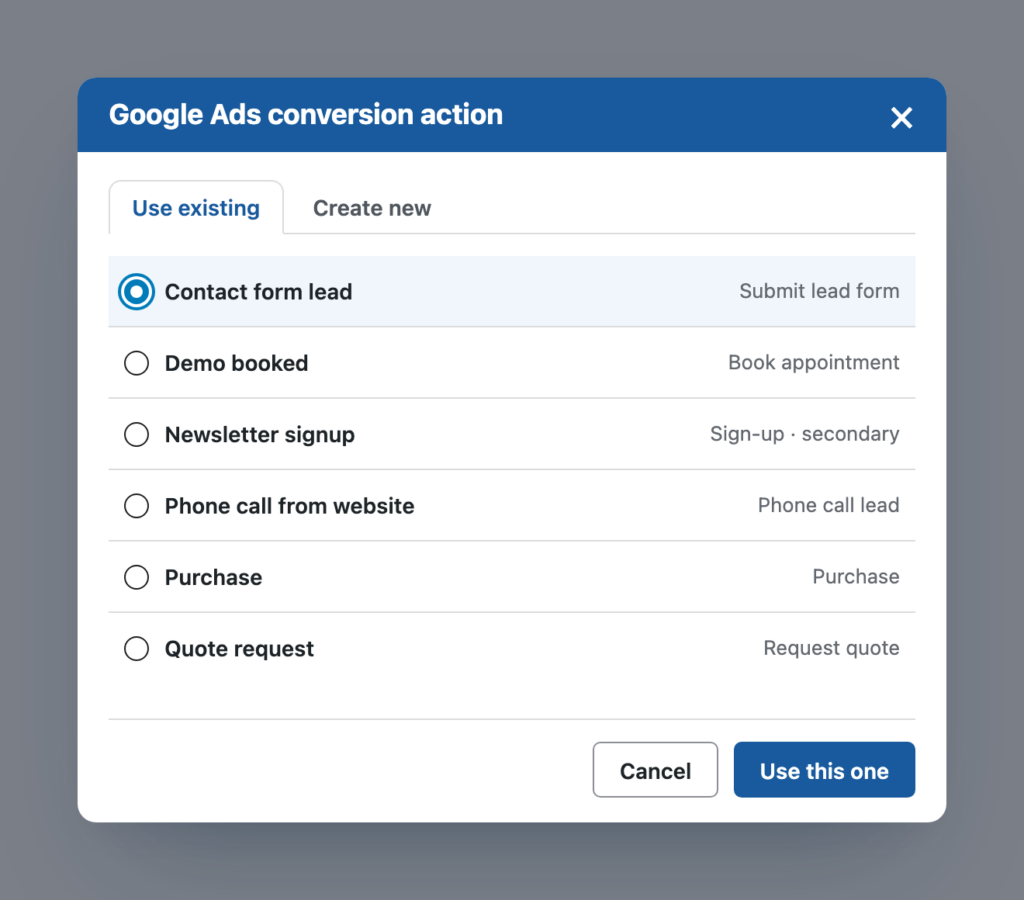
I added this because the label is buried a few screens deep inside a snippet of code, and it's easy to copy the wrong part. Now you pick it from a list.
LinkedIn Conversions API
LinkedIn now gets server-side tracking too, through its Conversions API. Like Google Ads, conversions are sent from your server as well as the browser, and LinkedIn counts them once.
LinkedIn is a little particular here, because it wants a separate conversion for the browser and the server. Doing that by hand means creating every conversion twice and keeping track of which ones belong together, so Conversion Bridge does it for you. Paste in an access token from Campaign Manager, then use Choose from LinkedIn under any LinkedIn Conversion ID field. Pick an existing conversion and Conversion Bridge creates its server twin, attached to the same campaigns, or create a brand new one and both are made at once.
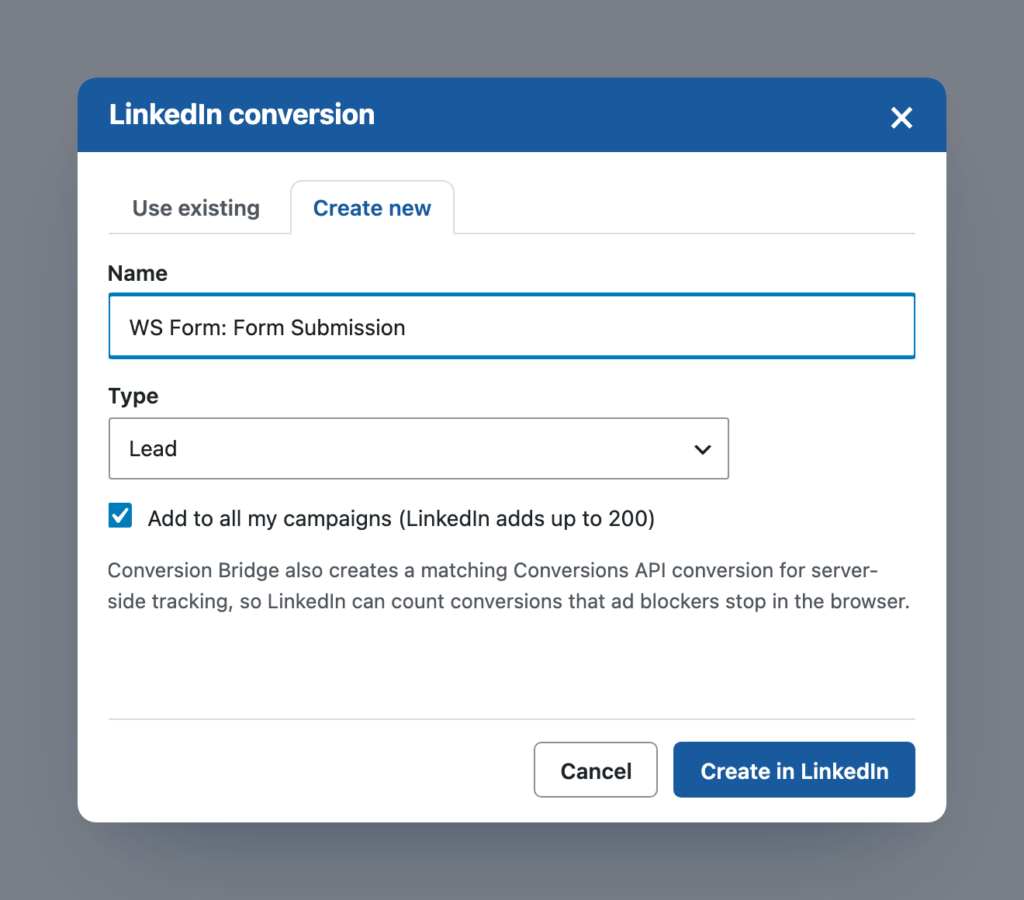
The LinkedIn Ads doc has the details, including where to find the access token. The LinkedIn Ads page has everything else.
Google Consent Mode Setting
If you use a cookie banner with Google Analytics or Google Ads, there's a new Google Consent Mode setting with two choices:
- Basic: Google Analytics and Google Ads wait until the visitor allows them. Nothing is sent to Google before that.
- Advanced: they load right away and send data without cookiesA small piece of data stored in a user’s browser that helps websites remember user activity, preferences, or sessions across visits. until the visitor allows them. Google uses those cookieless pings to estimate more of the conversions it would otherwise miss.
Basic is the default, and Advanced is there if you've decided you want Google's modeling and you're comfortable with what it sends. The doc covers exactly what goes to Google in each mode, so you can make that call with the facts in front of you.
Six New Integrations
HollerBox popups can track form submissions and button clicks as conversions. You choose which popups to track, so a newsletter opt-in and a sales popup can each be measured on their own.
Help Scout Beacon tracks when a visitor opens the Beacon, starts a chat, or sends a message. Support conversations often happen right before someone buys, so it's useful to see them in a conversion journey.
BookingPress tracks completed appointment bookings, which is the conversion that matters most for anyone taking bookings on their site.
Coupon Affiliates tracks affiliate registrations, and adds the referring affiliate to your WooCommerce purchases, even when the customer came in through a referral link and never typed a coupon.
ACF Forms tracks front-end forms built with acf_form(). These forms don't have a settings screen, so tracking is turned on with a small addition in your code, and the doc has copy-and-paste examples.
Divi 5 is supported, with conversion tracking on the Button, Call To ActionA prompt that encourages users to take a specific action, such as clicking a button, submitting a form, or making a purchase., Contact Form, and Email Optin modules. Divi 5 is a complete rewrite of Divi, so this is a separate integration from the Divi 4 one, and Conversion Bridge picks the right one for your site automatically.
Fast Page View Tracking
Busy sites can now turn on Fast page view tracking under Options, in the Performance section. Normally each page view that Conversion Bridge records loads all of WordPress, every plugin, and your theme, only to save one row. With this on, page views are recorded without loading all of that, which is much lighter on your server.
Conversions are still recorded exactly the same way as before. Some hosts block this kind of request, and if yours does, page views are recorded the normal way automatically, so there's nothing to break.
Separately, there's less work happening on every page in general. Conversion Bridge does much less on other plugins' background requests, like the WordPress heartbeat and cart updates, and the page view request is skipped entirely when neither Track Conversion Journeys nor server-side page views need it.
Pixel Helper & Tag Inspector
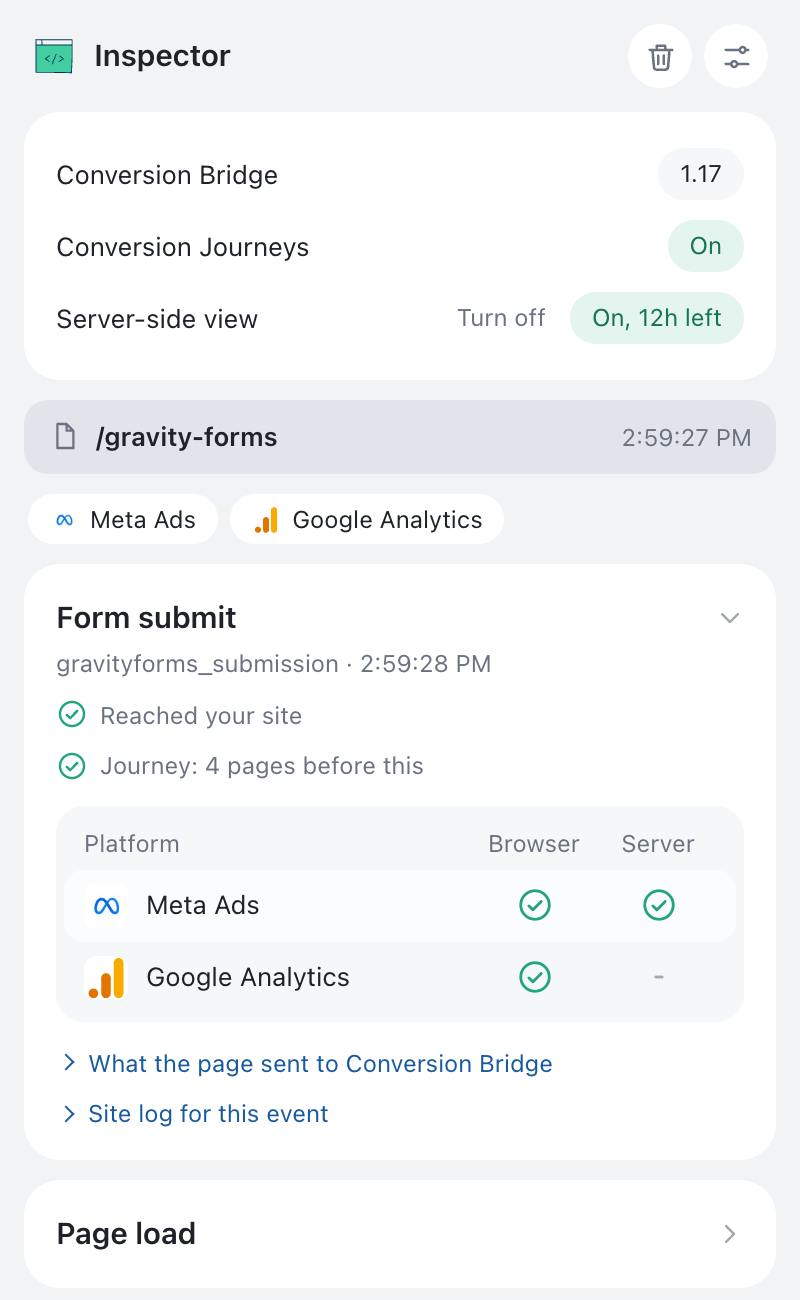
I built a free Chrome extension called Pixel Helper & Tag Inspector that shows what a page sends to analytics and ad platforms, all in one side panel, and it works on any website.
On sites running 1.17, it can also show what your site sent to each platform from the server, which a browser extension normally can't see at all. So when you set up the new Google Ads or LinkedIn server-side tracking, you can open the panel, submit a test form, and see both copies go out. The Pixel Helper doc explains how to read it.
Send Profit Instead of Revenue with WooCommerce
If you run Google Ads or Meta Ads with value-based bidding, you can now send each order's profit to your ad platforms instead of the order total. It uses the product costs you enter in WooCommerce's built-in Cost of Goods Sold feature.
A $300 order with a healthy margin is worth more to you than a $500 order that barely broke even, but if you send revenue, the ad platform thinks the $500 one is better, so sending profit lets the bidding learn from what each order actually made you.
Your analytics platforms still get the order total, so your revenue reports don't change. If you use a target ROASMeasures how much revenue is earned for every dollar spent on advertising, helping you evaluate the effectiveness of your ad campaigns., you'll want to lower it after switching, and the doc explains how much. The WooCommerce integration page has everything else it tracks.
Security Updates
A few changes make Conversion Bridge harder to misuse if something else on your site goes wrong:
- Platform and integration settings can only be saved by an admin
- Plugin updates must carry a valid signature before they install, so a tampered update can't be installed through Conversion Bridge
- The Google Analytics connection has better protection
Other Updates
- Freemius can be turned on from the integrations list, without any code
- The Google Ads Destination ID gets "AW-" added for you when you only enter the number
- Plausible Analytics uses Plausible's current tracking script when a Plugin Token is set
- Meta Conversions API, Snapchat, TikTok, and Google Tag Manager receive purchase amounts as numbers
- Pinterest uses the variation ID as the product ID when there is one, so events match your catalog
- Cookie banner fixes for Complianz, Borlabs Cookie, iubenda, Usercentrics, and banners using the WP Consent API
- Forminator conversions now track on themes that load jQuery in the footer, like Divi
- Phone numbers entered with a country code, like +44, no longer get your site's default country code added
There are plenty more fixes in this one, and the full list is in the changelog.
Updating
If you have an active license, head to Plugins in your WordPress admin and update. If you were waiting on Google Ads server-side, open your Google Ads settings in Conversion Bridge and click Connect with Google.
Thanks for reading this far, and happy tracking! If you run into anything or have an idea, get in touch. I read everything.