
Conversion Bridge works with SureCookie to make sure your conversion tracking respects visitor consent choices. When SureCookie is active, tracking only runs after a visitor gives permission through the consent banner.
Setup Instructions
Step 1: Set Up SureCookie
- Install and activate the SureCookie plugin
- Configure your consent banner so it includes these two categories:
- Analytics — for analytics platforms like Google Analytics, Plausible, and Clarity
- Marketing — for ad platforms like Google Ads, Meta Ads, and TikTok Ads
- Publish your consent banner so it appears on your site
Step 2: Select SureCookie in Conversion Bridge
- Go to Settings → Conversion Bridge → Options in your WordPress admin and find the Cookie Consent section
- Select SureCookie as your cookie consent plugin
- Save your settings
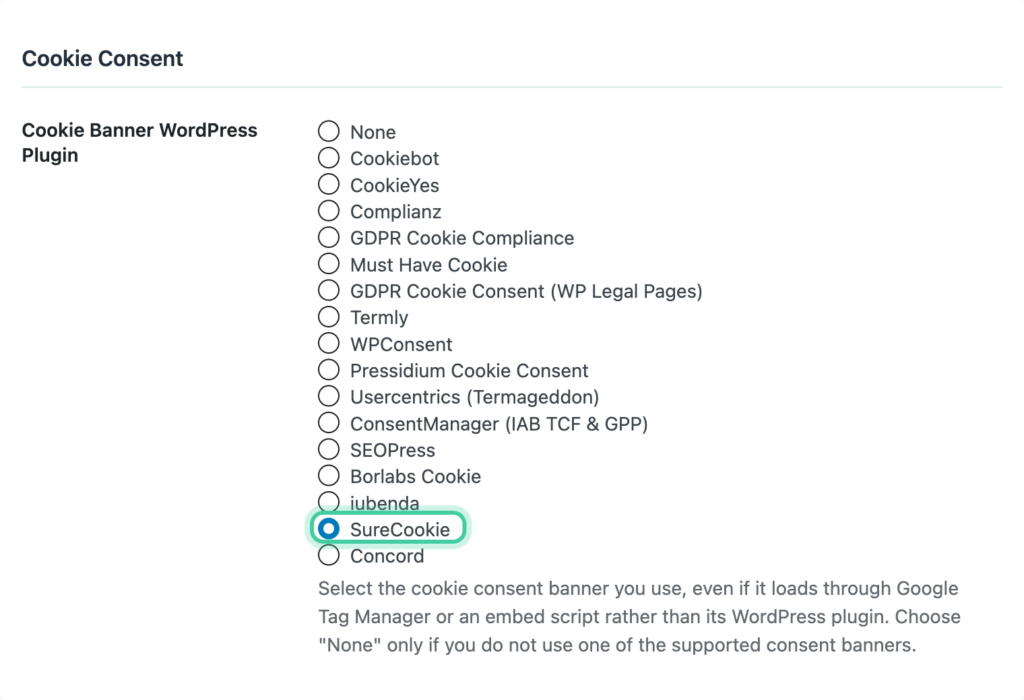
Step 3: Configure Consent Signal Ownership
Consent signals tell each platform whether a visitor has given permission to be tracked. Both SureCookie and Conversion Bridge can send these signals, but only one should do it for each platform — otherwise you get conflicts.
We recommend setting Conversion Bridge as the signal owner for all platforms. Conversion Bridge listens to the consent choices visitors make through SureCookie and sends the right signals to every platform you have enabled. This ensures as much tracking as possible happens the moment consent is granted.
- Go to Settings → Conversion Bridge → Options, Cookie Consent section
- Set each platform to Conversion Bridge ownership
- If SureCookie has Google Consent Mode enabled, we recommend disabling it and letting Conversion Bridge handle consent to ensure the most accurate conversion tracking setup
Learn more about how this works in the Consent Signal Ownership guide.
Step 4: Verify It Works
- Open your site in a private/incognito browser window
- You should see the SureCookie consent banner
- Reject all cookiesA small piece of data stored in a user’s browser that helps websites remember user activity, preferences, or sessions across visits. and confirm that no tracking fires
- Accept cookies and confirm that tracking starts
You can add ?cb_console=1 to any page URL to see consent and tracking activity in your browser's developer console.
How It Works
- When a visitor lands on your site, all tracking is paused until they respond to the consent banner.
- If they accept Analytics cookies, your analytics platforms start tracking.
- If they accept Marketing cookies, your ad platforms start tracking.
- If they reject cookies, no tracking runs.
- If they later change their preferences through SureCookie, tracking updates immediately to match.
- If your SureCookie banner uses an opt-out model, tracking runs by default and stops for any category a visitor declines.
Consent Category Mapping
SureCookie's cookie categories map to Conversion Bridge like this:
| SureCookie Category | Conversion Bridge Type | Examples |
|---|---|---|
| Analytics | Analytics | Google Analytics, Plausible, Clarity, Hotjar |
| Marketing | Marketing | Google Ads, Meta Ads, TikTok Ads, LinkedIn Ads |
Conversion Bridge reads these categories from SureCookie and applies them to all your enabled platforms automatically. SureCookie's Essential and Functional categories aren't used for conversion tracking.