Tracking a conversion by counting visits to a thank you page is the setup most people learn first. It's often used because it's the easiest way, and every ad platform and analytics tool shows you how to do it in a few minutes. But it's also the lowest bar you can clear and still call your tracking done, and these days that simply isn't enough. A page view only tells you someone loaded a page. It doesn't tell you a form was actually sent or an order was actually placed, and the difference shows up in your reports as extra conversions, missing conversions, and conversions with no value attached.
This matters more now than it used to. Ad platforms see less of what happens after someone clicks an ad, because of browser privacy changes, ad blockers and cookie banners, so they lean on the details you send with each conversion to figure out which ads are working. A page view can't send an order total, the customer's details or a unique ID, and those are exactly what Google Ads and Meta use to match conversions to clicks and optimize your campaigns.
I've been building WordPress sites for over 20 years, and this is a big part of why Conversion Bridge tracks conversions the way it does. Here are the reasons thank you page conversion tracking falls short, and what works better on a WordPress site.
How thank you page conversion tracking works
The idea is simple: when someone submits a form or finishes checkout, they get sent to a page like /thank-you/ or /order-received/, and you tell Google Ads, Meta, GA4 or whatever platform you use to count a conversion every time that page loads.
That rule is about the page, not about the person or the order. Anything that loads the page counts, and anything that happens without loading the page doesn't. Almost every problem below comes from that one fact.
Thank you pages count the same conversion more than once
A thank you page doesn't know whether it's being seen for the first time. A customer who refreshes the page, hits the back button and then forward again, or reopens the tab the next morning gets counted again each time. Some people bookmark their order confirmation so they can find it later, and every visit from that bookmark is another "sale."
Shared links do the same thing. A customer sends the confirmation page to a spouse or a coworker who approves the purchase, and that visit counts as a new conversion too.
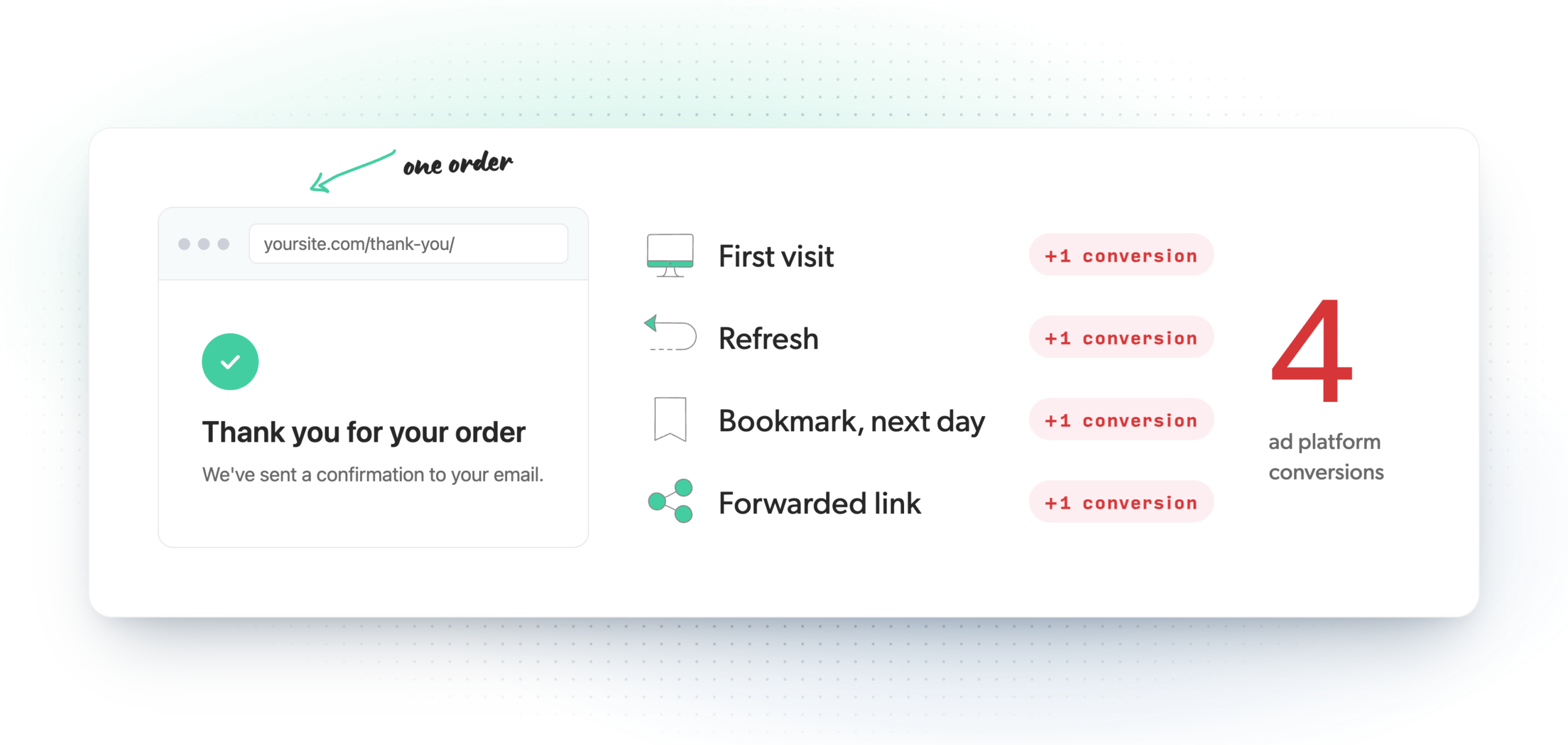
I've seen how much this adds up. On one client site, another marketing team had been counting thank you page views as their conversions, and they couldn't figure out why the tracked conversions never lined up with the actual form submissions. When we took over the site, we switched it to Conversion Bridge and looked through the conversion journeys. People were refreshing and reloading the thank you page far more often than I ever expected, and those reloads explained most of the extra conversions the old setup had been counting.
Google Ads has a setting that helps with part of this. If a conversion action is set to count "One" conversion per click, repeat loads from the same ad click only count once. That works well for leads, but it doesn't fit sales, where you want every order counted, and it doesn't help GA4, Meta or the other platforms you might be sending conversions to.
Bots, scanners and search engines can load the page
Real people aren't the only thing that loads web pages. Crawlers and scrapers follow every link they find, and if your thank you page is linked anywhere (a sitemap, a menu, a footer link left over from a theme), it can get visited by something that never filled out a form.
If the page isn't hidden from search engines, Google can index it too, and strangers then land on it straight from a search result and get counted as conversions. I've seen this happen on smaller sites. With only a handful of pages to choose from, Google started showing the thank you page in search results for a few searches, and every one of those visits showed up as a conversion.
Email can cause the same thing. If your confirmation email links back to the thank you page, company email security tools like Microsoft's Safe Links open links in messages to check them before the person ever does. Depending on how your tracking is set up, that check can look like a visit.
Your own visits count as well. You and your staff open the thank you page while testing a form, fixing a layout, or helping a customer, and each of those lands in your reports unless you've carefully excluded yourselves everywhere.
A page view has no order value or customer details
This is the reason I think matters most for anyone running ads. A page view says "a conversion happened" and nothing else. It doesn't know the order was $49 or $1,200, what was bought, or who bought it.
Without the value, Google Ads and Meta can't tell you which campaigns made money, and they can't optimize your bidding toward bigger orders. You can try to pass the total in the page address (/thank-you/?total=49), but anyone can edit that, and it gets messy fast.
Without customer details, you lose enhanced conversions. Ad platforms match conversions to the people who clicked your ads using details like email address, name and phone number (sent in a scrambled form, not as plain text). A page view has none of that, so fewer of your conversions get matched back to the ad that brought the person in.
Conversion Bridge can send enhanced conversions from your forms and checkouts without any code. It detects the email, name and phone fields on your forms for you. See how conversion tracking works.
There's no ID to stop duplicates
Ad and analytics platforms do have a way to throw out duplicate conversions, but it depends on an ID. If two conversions arrive with the same order number, Google Ads counts only the first one, and GA4 removes purchases that share a transaction ID for the same visitor. Meta's Conversions API works the same way with an event ID. There's more on how this works in the deduplication glossary entry.
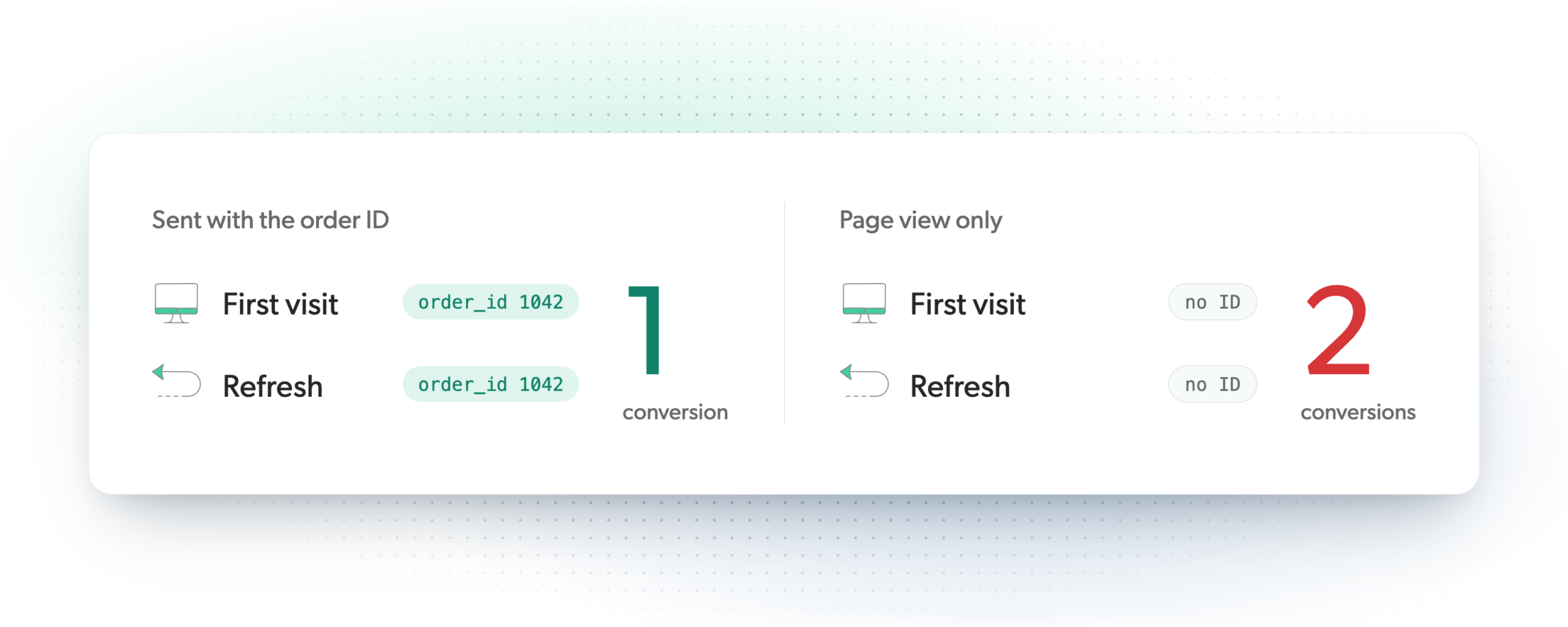
A plain page view doesn't carry an order number or entry ID, so the platforms have nothing to compare. Every refresh, shared link and scanner visit from the sections above goes through as a brand new conversion, and there's no way to clean it up afterward.
Redirecting forms just to track them makes your site worse
Most WordPress form plugins let you choose what happens after someone submits: show a "Thanks, we got your message" note right where the form was, or send them to another page. Gravity Forms, WPForms and most others offer both, and Contact Form 7 shows its message in place unless you add something extra to redirect. If a form shows a message and your tracking waits for a thank you page, that lead never shows up in your reports.
So a lot of sites redirect every form, and the reason usually isn't the visitor. It's the tracking. Think about a newsletter signup in a sidebar or footer. Someone types their email, and instead of a quick "You're in" and getting back to the article they were reading, they get sent off to a whole other page and have to find their way back. That's your tracking deciding how your site works, and it's backwards.
Redirecting forms to a thank you page was the lazy way to get conversion tracking working, and with Conversion Bridge it isn't needed anymore. The conversion is tracked from the form plugin itself, so you can show an inline message where that's better for the visitor, redirect where a next page actually helps them, and the tracking works the same either way.
And if several forms share the same thank you page, which is very common, every conversion looks the same in your reports. You can't tell whether the lead came from the contact form, the quote request or the newsletter signup.
Thank you page tracking vs tracking with the plugin
The better approach is to track the conversion together with the plugin that handles the form or the order. The plugin knows when an entry was saved or an order was created, and it has all the details from that submission, so tracking that works alongside it can count the conversion at the right moment and send what the ad platforms need.
| Thank you page view | Tracked with the plugin | |
|---|---|---|
| Refreshes, bookmarks and shared links | Counted again each time | Counted once |
| Bots, scanners and search visitors | Can be counted | Not counted (no form sent, no order placed) |
| Forms that show a message instead of a new page | Missed | Counted |
| Order value and products | Not included | Included |
| Customer details for enhanced conversions | Not included | Included |
| ID so platforms can remove duplicates | None | Order or entry ID |
| Which form it came from | Unclear if pages are shared | Form name included |
This is how Conversion Bridge works. Instead of watching for a page, it works with your form, store, membership and booking plugins (there are 71 of them). When the plugin says an entry or order went through, Conversion Bridge gathers the data from that submission, gives the conversion a unique ID, and makes sure it's only tracked once.
For a form, that means the conversion is recorded after the form plugin accepts the entry. A submission that fails validation, or one that Contact Form 7 blocks as spam, isn't counted. It works the same whether your form shows a message or redirects to a page, and the conversion carries the form's name, the entry ID, any value you set, and the customer details for enhanced conversions.
For a WooCommerce store, Conversion Bridge reads the order itself when the order confirmation loads. It sends the real order total, every product with its price and quantity, and the order number. After the first time, it marks the order as tracked, so a refresh, a bookmark or a forwarded link doesn't create a second sale.
Once a conversion is tracked, Conversion Bridge can send it to every platform you use at the same time, including GA4, Google Ads and Meta. See all the integrations.
When a thank you page is still fine
Thank you pages themselves aren't the problem. They're a good place to set expectations, offer a next step, or say thanks properly. If you don't run ads and only want a rough count of leads, counting page views is better than tracking nothing.
The trouble starts when you rely on those counts to decide where your ad money goes. That's when the extra conversions, the missing ones and the missing values start costing you, because the ad platforms are learning from numbers that don't match what actually happened on your site.
The main reason thank you page tracking is everywhere is that it's easy. I built Conversion Bridge so that proper conversion tracking is just as fast and simple to set up, with no code and no tag manager, so the easy way and the accurate way are now the same thing and there's really no excuse left for counting page views.
If you're curious how this looks on your own site, the integrations page lists every plugin Conversion Bridge can track from. Happy tracking!