






































































































Skip to content

Conversion tracking for WP Forms

Set up WP Forms conversion tracking in every analytics and ad platform you use, in minutes. Skip the developer fees, the tag-manager setup, and the hours of trial and error.

21 analytics platforms
+
8 ad platforms

Why Conversion Bridge

The old way vs. the new way

Tracking WP Forms without Conversion Bridge

A different plugin for every platform

Install one plugin for Google Analytics, another for Meta Ads, another for whichever platform you add next. Each has its own config and its own way of reading WP Forms.

Hand-wire every WP Forms event

Write custom JavaScript (or pay a developer) for every form submission, confirmation, and field interaction you want tracked.

Maintain the code forever

Every WP Forms update risks breaking your tracking. Every new platform means rebuilding your integration from scratch.

Discover broken tracking after the fact

Find out weeks later that WP Forms conversions never made it to your analytics. Rebuild reports, lose attribution.

Tracking WP Forms with Conversion Bridge

One plugin for every platform

Conversion Bridge sends WP Forms events into Google Analytics, Meta Ads, and every other analytics and ad platform you connect. No extra plugins needed.

Toggle on WP Forms

Flip one switch and WP Forms conversions start flowing to every platform, formatted exactly how each one expects.

Enhanced Conversions ready

Conversion Bridge hashes customer data from WP Forms and ships it to platforms like Google Ads and Meta for better attribution.

Live in minutes

No developer, no tag manager. Accurate WP Forms conversion tracking up and running today.

What you can track with WP Forms

Conversion Bridge captures these events from WP Forms and sends them to every analytics and ad platform that supports them.

Enhanced Conversions ship hashed first-party customer data to supported platforms automatically for improved attribution.

Start Tracking WP Forms

  • Purchase

    Order data with product details for detailed e-commerce tracking.

  • Login

    User login events to understand account engagement.

  • Donation

    Donation events with amount data for fundraising insights.

Features

Everything you need for WP Forms tracking

Page-by-page data

Conversion journeys for WP Forms

See the page-by-page path visitors take before completing a WP Forms conversion. Understand what actually drives results instead of guessing.

Learn more

Conversion Journey
×

Enhanced Conversions

Securely hash and send first-party customer data (email, phone, name, address) from WP Forms to your ad platforms. Sharper attribution means their algorithms find more real customers and waste less of your budget on clicks that never convert.

Learn more

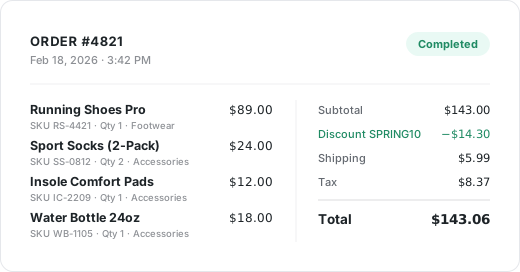
Detailed Commerce Data

Full order data from WP Forms with product details, order values, and item counts, collected and formatted exactly as each platform needs it.

See commerce tracking

Order receipt with detailed commerce data

Custom Event Tracking

Need to track something WP Forms doesn't emit on its own? Define a CSS selector or JavaScript event, attach custom values, and target specific pages. Perfect for setting up important conversion events on unique or custom aspects of your WordPress website.

Learn more

Conversion Bridge › Custom Events
Button Click: Get Started
Scroll Depth: 75%
Video Play: Demo

Privacy Friendly

Conversion Bridge respects user consent choices. It integrates with every major consent management platform so WP Forms tracking only fires after the visitor approves.

Learn more

Integrations

Your entire stack, connected

WordPress plugins on one side, analytics and ad platforms on the other — Conversion Bridge links them together. Without code or headaches.

67 plugin integrations
21 analytics platforms
+
8 ad platforms

Testimonials

Loved by WordPress professionals

Conversion tracking made easy! Conversion Bridge is super simple to setup, and offers some very useful features. Definitely worth the investment.

Elliot Sowersby
Elliot Sowersby Founder and Developer, RelyWP United Kingdom

The huge painful amount of time and attention to detail it takes to setup conversion tracking with Google Tags for Gravity forms is crazy compared to the near 1 click install of ConvervsionBridge, the plugin will pay for itself in

J
James Persson Unbranded Digital AU

The best analytics solution for WordPress. Never thought anyone would make it this easy to set up conversion tracking/integrate with FB Ads and G Ads in a matter of minutes. 👏

Alex Panagis
Alex Panagis ScaleMath

Conversion Bridge allowed us to replace three different plugins and over 50 lines of janky, conflicting code. Now, when we need to adjust our setup, we go to the CB dashboard and make a change. Easy! Derek is always…

Zack Katz
Zack Katz GravityKit

Conversion Bridge enabled us to centralize our analytics configuration, transforming a hodgepodge of separate implementations into a single hub that is easy to manage and maintain. For anyone looking to simplify their analytics setup while ensuring accuracy and consistency, Conversion

Casey Burridge
Casey Burridge GravityKit

I really just love that I can trust that everything I might eventually need is getting synced back. Never felt confident with the other solutions I've tried 🥪

Ian Misner
Ian Misner KestrelWP

It's been one of the best tools we've rolled out at our agency, huge time saver for us. Keep doing what you're doing 🙌

Richard Henney
Richard Henney

Works perfectly and delivers exactly as promised. The customer service is excellent—quick to respond and incredibly helpful. Highly recommended.

R
Richard

Solid tool and platform to getting analytics. I had some questions about how to see specific pieces of events in GA4 and how to past those to events from Conversion Bridge to GA4 and they knocked it out of the…

Derek Welton
Derek Welton Ironwood Manufacturing

Conversion Bridge has simplified website traffic and conversion tracking. Derek's response time when I have questions or feature requests is incredible. Conversion Bridge is now part of my plugin stack for every WordPress website.

Reuben Hochstetler
Reuben Hochstetler Touchdown Tech

Conversion tracking made easy! Conversion Bridge is super simple to setup, and offers some very useful features. Definitely worth the investment.

Elliot Sowersby
Elliot Sowersby Founder and Developer, RelyWP United Kingdom

The huge painful amount of time and attention to detail it takes to setup conversion tracking with Google Tags for Gravity forms is crazy compared to the near 1 click install of ConvervsionBridge, the plugin will pay for itself in

J
James Persson Unbranded Digital AU

The best analytics solution for WordPress. Never thought anyone would make it this easy to set up conversion tracking/integrate with FB Ads and G Ads in a matter of minutes. 👏

Alex Panagis
Alex Panagis ScaleMath

Conversion Bridge allowed us to replace three different plugins and over 50 lines of janky, conflicting code. Now, when we need to adjust our setup, we go to the CB dashboard and make a change. Easy! Derek is always…

Zack Katz
Zack Katz GravityKit

Conversion Bridge enabled us to centralize our analytics configuration, transforming a hodgepodge of separate implementations into a single hub that is easy to manage and maintain. For anyone looking to simplify their analytics setup while ensuring accuracy and consistency, Conversion

Casey Burridge
Casey Burridge GravityKit

I really just love that I can trust that everything I might eventually need is getting synced back. Never felt confident with the other solutions I've tried 🥪

Ian Misner
Ian Misner KestrelWP

It's been one of the best tools we've rolled out at our agency, huge time saver for us. Keep doing what you're doing 🙌

Richard Henney
Richard Henney

Works perfectly and delivers exactly as promised. The customer service is excellent—quick to respond and incredibly helpful. Highly recommended.

R
Richard

Solid tool and platform to getting analytics. I had some questions about how to see specific pieces of events in GA4 and how to past those to events from Conversion Bridge to GA4 and they knocked it out of the…

Derek Welton
Derek Welton Ironwood Manufacturing

Conversion Bridge has simplified website traffic and conversion tracking. Derek's response time when I have questions or feature requests is incredible. Conversion Bridge is now part of my plugin stack for every WordPress website.

Reuben Hochstetler
Reuben Hochstetler Touchdown Tech

Plans & Pricing

One plugin Every conversion Setup in minutes

Starting at only $79/year, every plan includes all integrations & features

View Plans & Pricing
14-day money back guarantee Premium 1-on-1 support No tag manager needed

WP Forms is a versatile WordPress plugin designed for crafting various types of forms with ease and efficiency. Catering to both basic and intricate form-building requirements, WP Forms stands out with its user-friendly interface and a wide array of features. From simple contact forms to more complex surveys and payment forms, it streamlines the form creation process for website owners and developers alike.

Key features of WP Forms include:

  • Simple Drag-and-Drop Builder: It allows easy creation of forms with a drag-and-drop interface, making it accessible for beginners without requiring coding skills.
  • Pre-Built Form Templates: WP Forms offers various pre-designed templates that can be customized, speeding up the form creation process.
  • Smart Conditional Logic: This feature enables forms to change based on user behavior, making them more interactive and tailored to individual users.
  • Mobile-Responsive Design: Forms created with WP Forms are responsive, ensuring they work well on all devices including smartphones and tablets.
  • Instant Notifications: The plugin provides instant email notifications to help you respond quickly to entries or leads.
  • Spam Protection: With features like smart CAPTCHA and honeypot, WP Forms helps in reducing spam submissions.
  • Payment Collection: Integration with popular payment gateways like PayPal and Stripe makes it easy to collect payments through forms.
  • Survey and Polls Creation: WP Forms supports the creation of surveys and polls, complete with reporting features to analyze data.
  • User Registration: It allows you to create user registration forms, making it useful for membership sites and forums.

When integrated with Conversion Bridge, you can elevate WP Forms functionality by enabling detailed tracking of form conversions. Understanding how visitors interact with forms is crucial for website owners. Conversion Bridge aids in this by providing insights into user engagement, lead generation, and conversion rates. This integration helps in identifying which forms are most effective and why, allowing for targeted optimizations. By analyzing this data, website owners can make informed decisions on form design and placement, leading to improved user experiences and potentially increased conversions. This combination of WP Forms and Conversion Bridge forms a powerful tool for any website looking to enhance its interaction with visitors and boost its online presence.