Your website has phone numbers and email addresses on it. People click them. But do you know how often? Do you know which pages drive the most calls? Which traffic sources bring the visitors who actually pick up the phone?
If you're running ads or investing in SEO, every phone call and email inquiry is a conversion. And if you're not tracking those clicks, you're flying blind on some of your most valuable leads.
The Invisible Conversions on Your WordPress Site
Here's something that surprises a lot of site owners: 88% of consumers who search for a local business on mobile call or visit that business within 24 hours. And click-to-call buttons increase conversions by 200%.
Those are real numbers. Phone calls from your website are some of the highest-intent actions a visitor can take. Someone who clicks your phone number is further along in their decision than someone who just browsed your pricing page.
The same goes for email links. When a visitor clicks a mailto: link on your contact page, they're reaching out directly. That's a lead. That's a conversion. And on most WordPress sites, it disappears into a black hole — no record in your analytics, no data flowing to your ad platforms, nothing.
I talked with a landscaping company owner last year who was spending $2,000 a month on Google Ads. He could see form submissions in his analytics, but he had no idea how many phone calls his ads were generating. Turns out, most of his leads were calling — not filling out forms. He was making budget decisions based on half the picture.
Why Phone and Email Click Tracking Matters
The gap between what happens on your site and what shows up in your analytics is costing you money. Here's how:
You Can't Optimize What You Can't Measure
If your Google Ads campaigns are driving phone calls, but you're only tracking form submissions, Google's algorithm is optimizing for the wrong thing. It's finding you more form-fillers when your best customers are the ones who call.
Same with Meta Ads. Without phone click data flowing back to Meta, the pixel can't learn who your real converters are. Your lookalike audiences are built on incomplete data.
Phone Calls Convert Better Than Forms
Research shows that roughly 40% of people who call from a website end up buying. Compare that to form submission conversion rates, which typically hover around 2-5%. A phone call is a much stronger buying signal than a form fill.
If you're not tracking phone clicks, you're undervaluing your best-performing pages and traffic sources.
Mobile Changes Everything
Over half your traffic is probably mobile. On a phone screen, tapping a phone number is the most natural action — easier than filling out a form on a tiny keyboard. Mobile pay-per-call campaigns convert 6-8% higher than standard pay-per-click campaigns.
Your mobile visitors are calling. The question is whether your analytics know about it.
How to Track Phone and Email Clicks on a WordPress Site
There are a few approaches, and they range from simple to complex.
The Manual Way: Google Tag Manager
You can set up click tracking through Google Tag Manager by creating triggers that fire on tel: and mailto: link clicks. This works, but it means:
- Setting up GTM if you haven't already
- Creating custom triggers and tags
- Testing that everything fires correctly
- Hoping nothing breaks when your theme updates
For one analytics platform, this is manageable. But if you're also sending data to Meta, TikTok, or LinkedIn Ads, you need separate configurations for each one.
The Simpler Way: Built-In WordPress Tracking
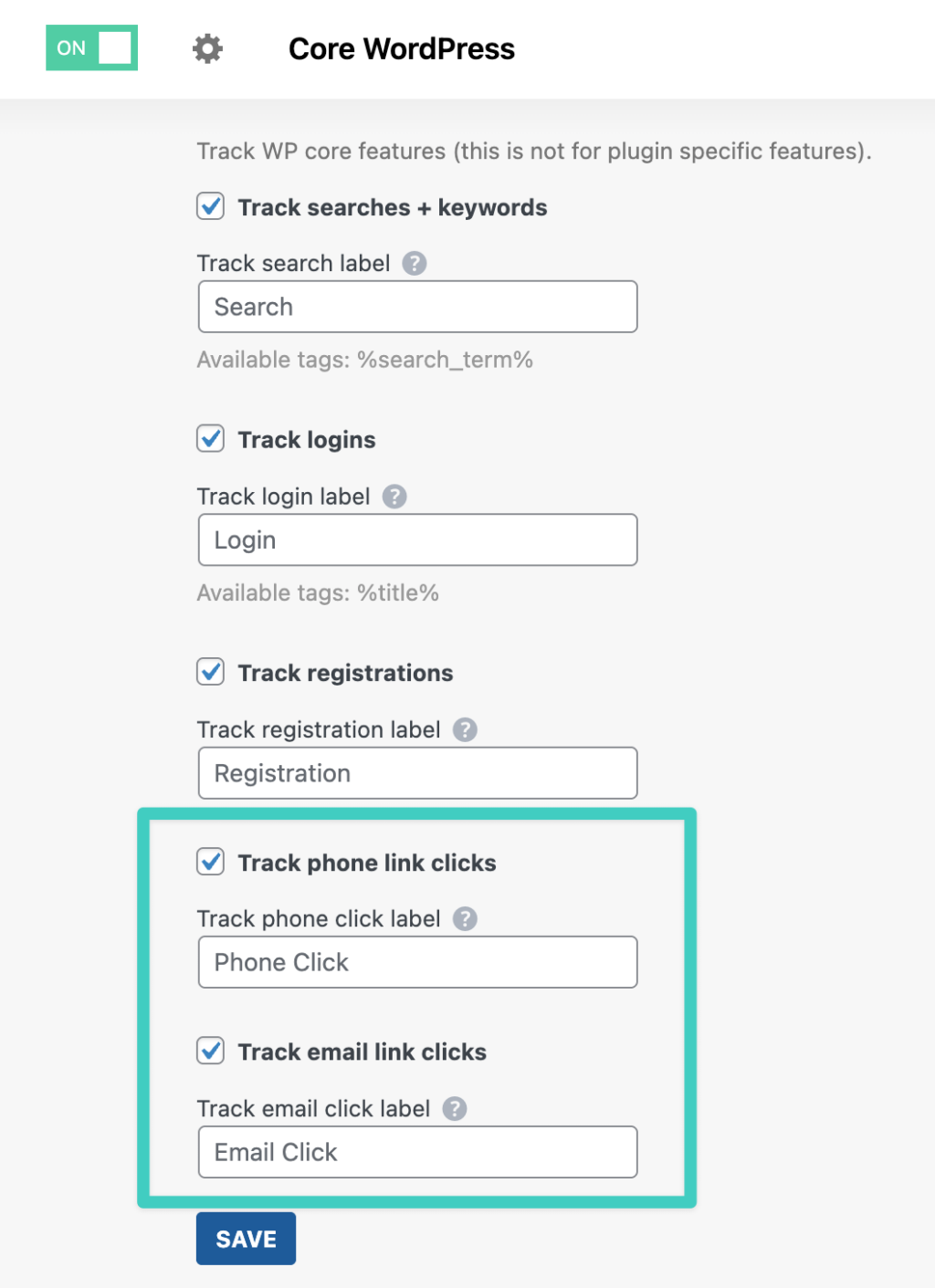
With Conversion Bridge, phone and email click tracking is built into the Core WordPress integration. You check a box, and every tel: and mailto: click on your site gets tracked and sent to all your connected platforms automatically.
That means one setup sends phone click data to Google Analytics 4, Google Ads, Meta Ads, and any other platform you've connected — all at once. No duplicate configurations. No tag manager gymnastics.
You can also customize the conversion label for each event type. Want to call it "Called Us" instead of "Phone Click"? Just type it in.
What You Can Do With Phone and Email Click Data
Once you're tracking these clicks, here's what opens up:
Identify Your Best-Performing Pages
Which pages drive the most phone calls? Is it your homepage, your service pages, or your contact page? You might be surprised. I've seen sites where a blog post about pricing generated more calls than the actual contact page.
Optimize Your Ad Spend
When phone click data flows back to your ad platforms, their algorithms get smarter. Google Ads can optimize for the visitors most likely to call. Meta can build better lookalike audiences based on people who actually reach out, not just people who visit.
Conversion Bridge sends phone and email click data to 11 ad platforms automatically, giving each platform the conversion data it needs to optimize your campaigns.
Track Across All Your Platforms
Most businesses use more than one analytics or advertising platform. Conversion Bridge supports 19 analytics platforms and 11 ad platforms, so your phone and email click data goes everywhere it needs to — from a single setup.
Connect Clicks to Traffic Sources
With conversion journeys, you can see the full path a visitor took before clicking your phone number. Did they come from a Google Ad? An organic search? A social media post? Now you know which channels drive actual inquiries, not just traffic.
Beyond Phone and Email: Other Click Tracking Options
Phone and email links are the most common "invisible conversions" on WordPress sites, but they're not the only ones. If you need to track other types of clicks or user actions, Conversion Bridge also offers:
- Menu item click tracking — track clicks on any WordPress menu item
- Custom events — track clicks on any element using CSS selectors, or fire events based on scroll depth, time on page, or custom JavaScript events
- Media tracking — track video plays, audio plays, and file downloads
Need to track something specific? Custom events let you track clicks on any element, scroll depth, time on page, and more — all without code.
Start Tracking What Matters
Every phone call and email click that goes untracked is a conversion you can't attribute. That means ad spend you can't justify, pages you can't optimize, and traffic sources you can't evaluate.
The fix is straightforward. If you're already using Conversion Bridge, enable phone and email click tracking in the Core WordPress integration settings. Two checkboxes, and you're done.
If you're not tracking these clicks yet, it's worth thinking about how many leads you're missing in your data. For a lot of service businesses, phone calls are the most valuable conversions on their site — and they're the ones most likely to be invisible.
Get started with Conversion Bridge and start seeing the full picture of what's working on your site.