Analytics Platform
The best WordPress plugin for Hotjar
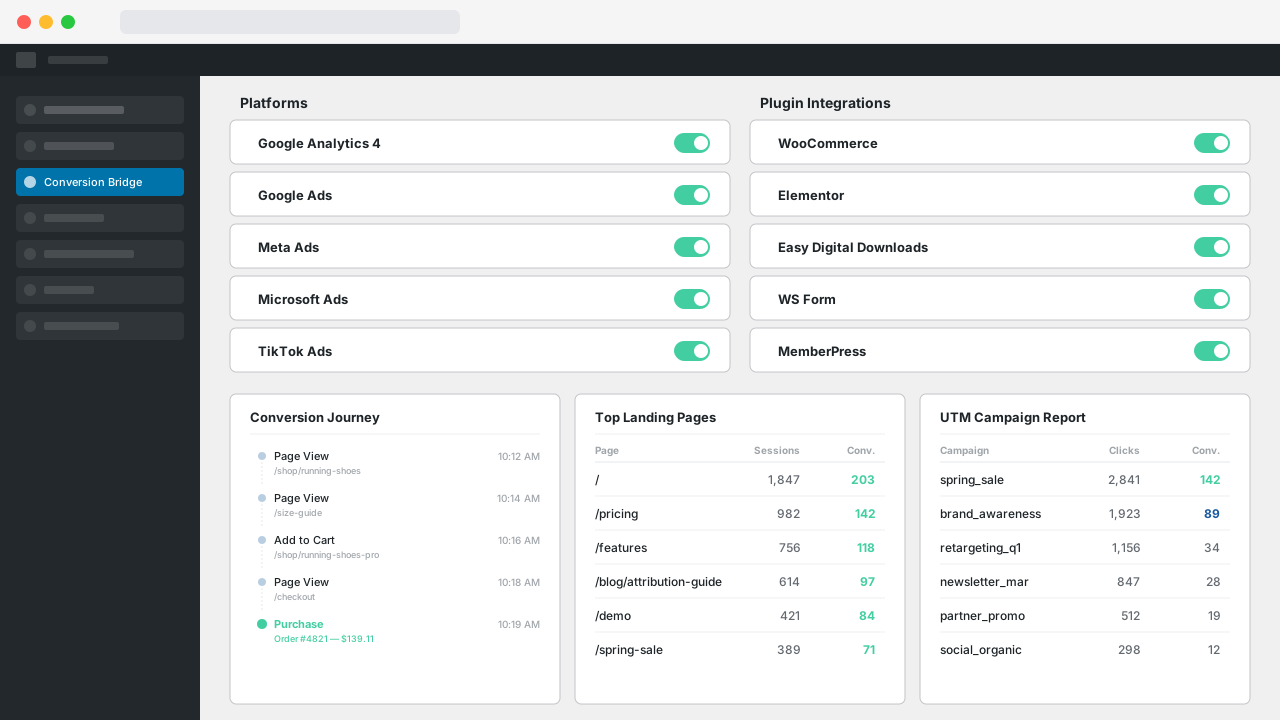
Go beyond a basic setup—Conversion Bridge makes it easy to add Hotjar to your site with advanced conversion tracking from 71 plugins.
Why Conversion Bridge
The old way vs. the new way
Copy & paste the Hotjar snippet
Get basic pageview data in Hotjar, but miss conversions, ecommerce events, and form submissions.
Wire up each event by hand
Write custom JavaScript (or pay a developer) every time you add a form, button, or checkout flow.
Juggle multiple plugins
One plugin for Hotjar, another for WooCommerce, another for forms. Conflicting settings and duplicate events.
Debug missing data in production
Find out weeks later that purchases never tracked. Rebuild reports, lose revenue attribution.
Paste your Hotjar ID
Drop in your tracking ID. Done. That's the only "code" you touch.
Toggle on your plugins
WooCommerce, Gravity Forms, MemberPress — flip a switch and Hotjar gets conversion data formatted exactly how it expects.
Track what actually matters
Purchases, form submits, button clicks, file downloads, video plays — captured accurately the moment they happen.
Up and running in minutes
No developer, no tag manager. A complete Hotjar setup in minutes.
Features
Comprehensive Hotjar WordPress Plugin with No-Code Conversion Tracking
Conversion Bridge makes Hotjar setup simple and helps you go beyond basic page view data to get detailed insights about your website visitors
Advanced Tag Setup
Pasting the basic tracking tag isn't enough. Conversion Bridge sets up Hotjar with user identification and event tracking that the basic snippet doesn't include.
Session Recording & Heatmaps
Hotjar automatically records user sessions and generates heatmaps. Conversion Bridge enhances this with user identification and custom events for better filtering.
User Identification
Automatically identify logged-in users with their unique ID, email, name, and role. Find and filter session recordings by specific users in Hotjar's dashboard.
Membership Data
Automatically include membership levels from integrated plugins in user profiles, so you can filter recordings by membership tier and understand how different segments interact with your site.
Custom Event Tracking
Track custom events to mark important moments in session recordings. Easily find sessions where specific actions occurred.
Types of Conversions Tracking Events in Hotjar
If you want to grow your website, setting up conversion tracking in Hotjar on your WordPress website is essential. It shows what's working, what's not, and how users interact with your content.
Conversion Bridge makes it simple to track important events from any of the 71 plugin integrations and your own custom events into Hotjar so you have the data to understand what is working for your site.
-
E-Commerce Events
Sends complete product data with conversion events
- Purchases
- Donations
- View Item
- Add to Cart
- Remove from Cart
- View Cart
- Begin Checkout
-
Form events
Better than automatic form tracking, ensure you get accurate tracking & collect form submission values
- Form Submissions
- Submission Values
- Registrations
- Email List Subscribes
-
Other Events
- Button Clicks
- File Downloads
- Enrollments
- Scroll
- Time on Page
- Phone Links
- Search Results
- Video Plays
- Image Clicks
- Popups Opened/Closed
- Custom JavaScript Events
How to Add Hotjar to WordPress
The easiest way to add Hotjar to WordPress is with a plugin that places the tracking code for you. With Conversion Bridge, you're done in minutes:
- Install and activate Conversion Bridge.
- Go to Settings → Conversion Bridge and enable Hotjar.
- Paste your Hotjar Site ID. You'll find it in Hotjar under Sites, listed next to your site name.
- Save. Hotjar starts recording sessions and building heatmaps right away.
You don't need to copy the full embed code from Hotjar. The Site ID is enough, and Conversion Bridge outputs the official tracking script in the right place on every page. The Hotjar setup guide walks through each step with details.
Hotjar WordPress Plugin
A good Hotjar plugin for WordPress should do more than paste the basic snippet into your header. That part is easy. The value comes from what WordPress knows about your visitors that Hotjar doesn't.
Here's what Conversion Bridge adds on top of the standard tracking script:
- User identification. Logged-in users are identified to Hotjar with their user ID, email, name, and role. That means you can search recordings in Hotjar by a specific user, like the customer who emailed you about a checkout problem.
- Membership and role data. If you run a membership plugin, membership levels are passed along too. Filter recordings by tier and see how paying members use your site differently than free visitors.
- Custom conversion events. When someone submits a form or completes a purchase in any of your connected plugins, Conversion Bridge fires a Hotjar event. Those events become filters, so you can watch only the sessions where a conversion happened.
- No double tracking. If another plugin or custom code already loads the Hotjar script, you can tell Conversion Bridge to skip adding it again.
Conversion Bridge connects Hotjar to 71 WordPress plugins, so events from your forms, checkout, and memberships flow in without writing any code.
Why the Basic Snippet Alone Isn't Enough
The standard Hotjar tracking code records sessions and builds heatmaps, and that's it. Every visitor is anonymous. Every recording looks the same in the list. When you want to find the session where someone abandoned checkout, you're scrolling through hours of footage hoping to spot it.
Identification and events fix that. Identified users mean you can jump straight to a specific person's sessions. Conversion events mean you can pull up only the recordings where a form was submitted, or filter the other way and watch sessions where visitors got close but never converted. That second group is usually where the real answers are.
I built the Hotjar integration this way because the recordings are only useful if you can find the right ones. Hotjar gives you the footage. WordPress knows who the people are and what they did. Conversion Bridge connects the two.
If you already use Hotjar alongside another analytics platform, that works too. Conversion Bridge sends the same conversion events to all 18 supported platforms at once, so Hotjar shows you the behavior while your analytics tool counts the numbers.
Features
Go beyond Hotjar
Conversion Bridge does more than just send data to Hotjar. Here's what else comes in the box.
Plugin Integrations
Track conversions from your WordPress plugins: ecommerce, forms, memberships, donations, and more. No code required.
Analytics Platforms
Set up analytics in minutes, not hours. Conversion Bridge costs less than the developer time it replaces.


Every Type of Conversion
Automatically track purchases, form submissions, button clicks, signups, downloads, and more across all the platforms you connect. No code, no tag manager.

Better attribution with enhanced conversions
Securely hash and send first-party customer data (email, phone, name, address) from any integration to your ad platforms. Their algorithms can then find more real customers and waste less of your budget on clicks that never convert.


Detailed Commerce Data
Full order data from your ecommerce, membership, donation, and other commerce plugins, collected and formatted exactly as each platform needs it.
No setup required — your commerce plugin is detected automatically and tracked correctly.
Custom Event Tracking
Track unique elements that don't fit an existing integration. Define a CSS selector or JavaScript event, attach custom values, and target specific pages.
Perfect for tracking button clicks, video plays, scroll depth, file downloads, and any other custom interaction on your site.
Page-by-page data
Conversion Journeys
See exactly what your customers did before and after converting, page by page. Understand behavior, improve funnels, and uncover what actually drives results instead of guessing.
Privacy Friendly
Conversion Bridge respects user consent choices. It integrates with every major consent management platform so tracking only fires after the visitor approves.
Tools & Reports
Make the most of your data
Dashboards in Admin
View your key metrics right inside WordPress. Track trends over time, see top converting pages, and understand what's working.
Weekly Email Reports
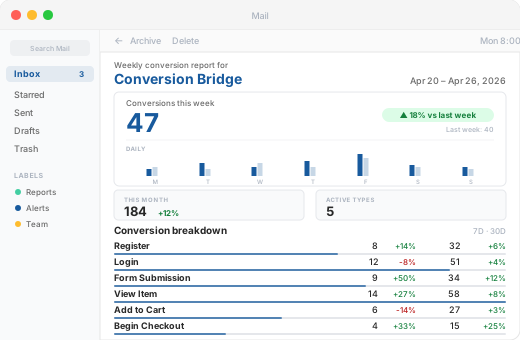
Get a weekly summary of conversions, revenue, and top-performing sources delivered straight to your inbox. Stay informed without logging in.
UTM Tracking & Reports
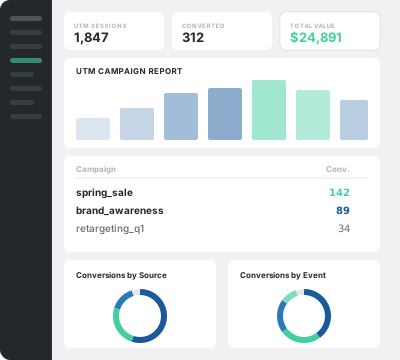
See which campaigns bring buyers, which landing pages convert, and build UTM links directly from your WordPress dashboard.
Top Landing Pages
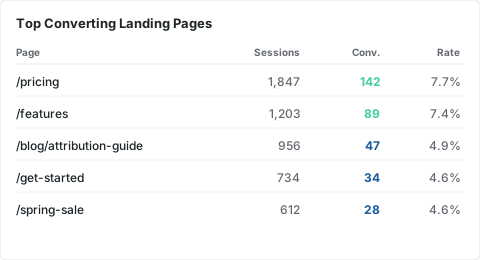
See which pages drive the most conversions, sessions, and revenue so you know where to focus your efforts.
Dashboard Widget
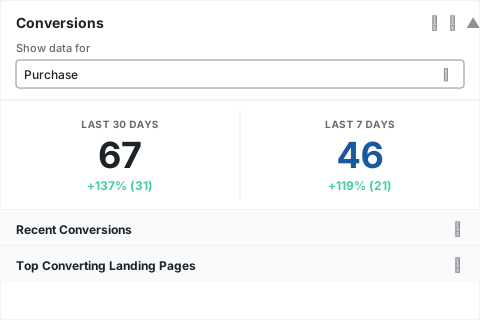
A quick-glance conversion summary right on your WordPress dashboard. See your numbers the moment you log in.
Form Abandonment Tracking Coming Soon
See which forms visitors start but never finish. Identify drop-off points and optimize your forms to capture more leads.
Integrations
Your entire stack, connected
WordPress plugins on one side, analytics and ad platforms on the other — Conversion Bridge links them together. Without code or headaches.
Testimonials
Loved by WordPress professionals
Conversion Bridge allowed us to replace three different plugins and over 50 lines of janky, conflicting code. Now, when we need to adjust our setup, we go to the CB dashboard and make a change. Easy! Derek is always…
Conversion Bridge allowed us to replace three different plugins and over 50 lines of janky, conflicting code. Now, when we need to adjust our setup, we go to the CB dashboard and make a change. Easy! Derek is always adding features and keeping on top of the latest trends. It’s great that I no longer need to.
Thanks, Conversion Bridge, for making script management simple!
Conversion Bridge enabled us to centralize our analytics configuration, transforming a hodgepodge of separate implementations into a single hub that is easy to manage and maintain. For anyone looking to simplify their analytics setup while ensuring accuracy and consistency, Conversion …
Conversion Bridge enabled us to centralize our analytics configuration, transforming a hodgepodge of separate implementations into a single hub that is easy to manage and maintain. For anyone looking to simplify their analytics setup while ensuring accuracy and consistency, Conversion Bridge is an ideal solution.
Conversion Bridge has simplified website traffic and conversion tracking. Derek's response time when I have questions or feature requests is incredible. Conversion Bridge is now part of my plugin stack for every WordPress website.
Prior to discovering Conversion Bridge we battled for almost 12-months with another well-known plugin that was supposed to resolve our Meta tracking issues. Yet, week after week after week, the leads and sales that we were seeing in our payment…
Prior to discovering Conversion Bridge we battled for almost 12-months with another well-known plugin that was supposed to resolve our Meta tracking issues.
Yet, week after week after week, the leads and sales that we were seeing in our payment system did not correlate to the conversions that Meta was showing. The discrepancy was almost catastrophic for our paid advertising campaigns and caused many, many days of lost time and frustration over many months trying to figure out what the problem was, tweaking and changing things, trying to with their support and watching endless YT vids to figure it out, but to no avail.
Then we discovered ConversionBridge. It is no exaggeration to say that this plugin has resolved our tracking issues almost overnight. It took 5 mins to set up with its one-click integrations.
We switched off the old PYS plugin and ran with ConversionBridge for a week. I held my breath during my weekly meeting with our Media Buyer as he checked the stats on Meta against our sales system. We both nearly fell off our chairs when leads and sales on our system matched conversions on Meta.
It has been several months since we switched over to Conversion Bridge and the story is still the same: It has resolved a 12 month battle almost overnight and has certainly resulted in many more sales now that Meta is finally receiving accurate data. I can't recommend it enough and urge anyone using any other 'pixel' plugin to switch to it immediately.
Conversion tracking made easy! Conversion Bridge is super simple to setup, and offers some very useful features. Definitely worth the investment.
Solid tool and platform to getting analytics. I had some questions about how to see specific pieces of events in GA4 and how to past those to events from Conversion Bridge to GA4 and they knocked it out of the…
Solid tool and platform to getting analytics. I had some questions about how to see specific pieces of events in GA4 and how to past those to events from Conversion Bridge to GA4 and they knocked it out of the park. Its nice to have a centralize location for sending data to analytics platforms.
The plugin was easy to install and setup, and does exactly as promised. And the support to deal with questions has been friendly, prompt and helpful!
I really just love that I can trust that everything I might eventually need is getting synced back. Never felt confident with the other solutions I've tried 🥪
Conversion Bridge is a game-changer for anyone serious about optimizing their WordPress site. It seamlessly integrates with all my marketing tools, allowing me to track traffic and conversions effortlessly. The setup was incredibly smooth, and the interface is user-friendly,…
Conversion Bridge is a game-changer for anyone serious about optimizing their WordPress site. It seamlessly integrates with all my marketing tools, allowing me to track traffic and conversions effortlessly. The setup was incredibly smooth, and the interface is user-friendly, making it easy to get up and running in no time. I highly recommend Conversion Bridge to anyone looking to take their WordPress site to the next level!
The best analytics solution for WordPress. Never thought anyone would make it this easy to set up conversion tracking/integrate with FB Ads and G Ads in a matter of minutes. 👏
Conversion Bridge allowed us to replace three different plugins and over 50 lines of janky, conflicting code. Now, when we need to adjust our setup, we go to the CB dashboard and make a change. Easy! Derek is always…
Conversion Bridge allowed us to replace three different plugins and over 50 lines of janky, conflicting code. Now, when we need to adjust our setup, we go to the CB dashboard and make a change. Easy! Derek is always adding features and keeping on top of the latest trends. It’s great that I no longer need to.
Thanks, Conversion Bridge, for making script management simple!
Conversion Bridge enabled us to centralize our analytics configuration, transforming a hodgepodge of separate implementations into a single hub that is easy to manage and maintain. For anyone looking to simplify their analytics setup while ensuring accuracy and consistency, Conversion …
Conversion Bridge enabled us to centralize our analytics configuration, transforming a hodgepodge of separate implementations into a single hub that is easy to manage and maintain. For anyone looking to simplify their analytics setup while ensuring accuracy and consistency, Conversion Bridge is an ideal solution.
Conversion Bridge has simplified website traffic and conversion tracking. Derek's response time when I have questions or feature requests is incredible. Conversion Bridge is now part of my plugin stack for every WordPress website.
Prior to discovering Conversion Bridge we battled for almost 12-months with another well-known plugin that was supposed to resolve our Meta tracking issues. Yet, week after week after week, the leads and sales that we were seeing in our payment…
Prior to discovering Conversion Bridge we battled for almost 12-months with another well-known plugin that was supposed to resolve our Meta tracking issues.
Yet, week after week after week, the leads and sales that we were seeing in our payment system did not correlate to the conversions that Meta was showing. The discrepancy was almost catastrophic for our paid advertising campaigns and caused many, many days of lost time and frustration over many months trying to figure out what the problem was, tweaking and changing things, trying to with their support and watching endless YT vids to figure it out, but to no avail.
Then we discovered ConversionBridge. It is no exaggeration to say that this plugin has resolved our tracking issues almost overnight. It took 5 mins to set up with its one-click integrations.
We switched off the old PYS plugin and ran with ConversionBridge for a week. I held my breath during my weekly meeting with our Media Buyer as he checked the stats on Meta against our sales system. We both nearly fell off our chairs when leads and sales on our system matched conversions on Meta.
It has been several months since we switched over to Conversion Bridge and the story is still the same: It has resolved a 12 month battle almost overnight and has certainly resulted in many more sales now that Meta is finally receiving accurate data. I can't recommend it enough and urge anyone using any other 'pixel' plugin to switch to it immediately.
Conversion tracking made easy! Conversion Bridge is super simple to setup, and offers some very useful features. Definitely worth the investment.
Solid tool and platform to getting analytics. I had some questions about how to see specific pieces of events in GA4 and how to past those to events from Conversion Bridge to GA4 and they knocked it out of the…
Solid tool and platform to getting analytics. I had some questions about how to see specific pieces of events in GA4 and how to past those to events from Conversion Bridge to GA4 and they knocked it out of the park. Its nice to have a centralize location for sending data to analytics platforms.
The plugin was easy to install and setup, and does exactly as promised. And the support to deal with questions has been friendly, prompt and helpful!
I really just love that I can trust that everything I might eventually need is getting synced back. Never felt confident with the other solutions I've tried 🥪
Conversion Bridge is a game-changer for anyone serious about optimizing their WordPress site. It seamlessly integrates with all my marketing tools, allowing me to track traffic and conversions effortlessly. The setup was incredibly smooth, and the interface is user-friendly,…
Conversion Bridge is a game-changer for anyone serious about optimizing their WordPress site. It seamlessly integrates with all my marketing tools, allowing me to track traffic and conversions effortlessly. The setup was incredibly smooth, and the interface is user-friendly, making it easy to get up and running in no time. I highly recommend Conversion Bridge to anyone looking to take their WordPress site to the next level!
The best analytics solution for WordPress. Never thought anyone would make it this easy to set up conversion tracking/integrate with FB Ads and G Ads in a matter of minutes. 👏
Plans & Pricing
One plugin Every conversion Setup in minutes
Starting at only $79/year, every plan includes all integrations & features
View Plans & PricingSide-by-side
Hotjar vs. other analytics platforms
| Hotjar | Google Analytics | Plausible Analytics | Fathom Analytics | Usermaven | |
|---|---|---|---|---|---|
| Pricing | $39/mo+ | Free | $9/mo+ | $15/mo+ | $14/mo+ |
| Free Trial | |||||
| Free Tier | |||||
| Real-Time Analytics | |||||
| Advanced E-commerce | |||||
| Heatmaps | |||||
| Session Recordings | |||||
| Conversion Journeys | |||||
| Search Console | |||||
| GDPR-Compatible | |||||
| Cookieless Tracking | |||||
| No Cookie Banner | |||||
| Consent Mode | |||||
| Funnels | |||||
| Custom Extensions | |||||
| Public Dashboards | |||||
| Multiple Sites | |||||
| Custom Domain | |||||
| White Label | |||||
| Developer API | |||||
| Two-Factor Auth | |||||
| Open Source | |||||
| Data Retention | 1 year | 26 months max | 3-5+ years | Forever | 2 years |
WordPress Conversion Tracking for Hotjar
- Conversion tracking for WooCommerce in Hotjar
- Conversion tracking for Easy Digital Downloads in Hotjar
- Conversion tracking for WS Form in Hotjar
- Conversion tracking for LifterLMS in Hotjar
- Conversion tracking for Fluent Forms in Hotjar
- Conversion tracking for Gravity Forms in Hotjar
- Conversion tracking for Formidable Forms in Hotjar
- Conversion tracking for WP Forms in Hotjar
- Conversion tracking for Ninja Forms in Hotjar
- Conversion tracking for Forminator in Hotjar
- Conversion tracking for Contact Form 7 in Hotjar
- Conversion tracking for Happy Forms in Hotjar
- Conversion tracking for Everest Forms in Hotjar
- Conversion tracking for Calculated Fields Form in Hotjar
- Conversion tracking for Quill Forms in Hotjar
- Conversion tracking for Form Maker by 10web in Hotjar
- Conversion tracking for JetFormBuilder in Hotjar
- Conversion tracking for Kali Forms in Hotjar
- Conversion tracking for LearnDash in Hotjar
- Conversion tracking for Sensei in Hotjar
- Conversion tracking for Charitable in Hotjar
- Conversion tracking for Fluent Booking in Hotjar
- Conversion tracking for BookingPress in Hotjar
- Conversion tracking for LatePoint in Hotjar
- Conversion tracking for Simply Schedule Appointments in Hotjar
- Conversion tracking for Groundhogg in Hotjar
- Conversion tracking for FluentCRM in Hotjar
- Conversion tracking for Mailster in Hotjar
- Conversion tracking for The Newsletter Plugin in Hotjar
- Conversion tracking for MailPoet in Hotjar
- Conversion tracking for Mailchimp for WordPress in Hotjar
- Conversion tracking for weForms in Hotjar
- Conversion tracking for Popup Builder in Hotjar
- Conversion tracking for Holler Box in Hotjar
- Conversion tracking for Thrive Leads in Hotjar
- Conversion tracking for IceGram in Hotjar
- Conversion tracking for WP Subscribe Pro in Hotjar
- Conversion tracking for Restrict Content Pro in Hotjar
- Conversion tracking for Paid Memberships Pro in Hotjar
- Conversion tracking for MemberMouse in Hotjar
- Conversion tracking for MemberPress in Hotjar
- Conversion tracking for UltimateMember in Hotjar
- Conversion tracking for Simple Membership in Hotjar
- Conversion tracking for SureMembers in Hotjar
- Conversion tracking for SureCart in Hotjar
- Conversion tracking for Ultimate Membership Pro in Hotjar
- Conversion tracking for BuddyBoss in Hotjar
- Conversion tracking for Profile Builder Pro in Hotjar
- Conversion tracking for Paid Member Subscriptions in Hotjar
- Conversion tracking for Sunshine Photo Cart in Hotjar
- Conversion tracking for WP Simple Pay in Hotjar
- Conversion tracking for ProfilePress in Hotjar
- Conversion tracking for WP User Frontend in Hotjar
- Conversion tracking for GiveWP in Hotjar
- Conversion tracking for Download Monitor in Hotjar
- Conversion tracking for Tutor LMS in Hotjar
- Conversion tracking for SliceWP in Hotjar
- Conversion tracking for Kadence in Hotjar
- Conversion tracking for ClickWhale in Hotjar
- Conversion tracking for WordPress Blocks in Hotjar
- Conversion tracking for AffiliateWP in Hotjar
- Conversion tracking for Solid Affiliate in Hotjar
- Conversion tracking for Leaky Paywall in Hotjar
- Conversion tracking for Bricks Builder in Hotjar
- Conversion tracking for Document Library Pro in Hotjar
- Conversion tracking for Beaver Builder in Hotjar
- Conversion tracking for Elementor in Hotjar
- Conversion tracking for Divi 4 in Hotjar
- Conversion tracking for SureForms in Hotjar
- Conversion tracking for Bricksforge Pro Forms in Hotjar
- Conversion tracking for Popup Maker in Hotjar
- Conversion tracking for Hustle by wpmudev in Hotjar
- Conversion tracking for Greyd Suite in Hotjar
- Conversion tracking for Breakdance in Hotjar
- Conversion tracking for Paymattic in Hotjar
- Conversion tracking for FluentCart in Hotjar
- Conversion tracking for Freemius in Hotjar
- Conversion tracking for Fluent Affiliate in Hotjar
- Conversion tracking for Fluent Community in Hotjar
- Conversion tracking for CheckoutWC in Hotjar
- Conversion tracking for Highlight and Share in Hotjar
- Conversion tracking for Bit Form in Hotjar
- Conversion tracking for FunnelKit Automations in Hotjar
- Conversion tracking for CartFlows in Hotjar