
WooCommerce profit tracking for ads means sending each order's profit to Google Ads, Meta and your other ad platforms, instead of the order total. When the platforms bid on conversion value, they then learn from how much each sale actually made you, so they lean toward the products and customers that make you money rather than the ones that just ring up big.
WooCommerce added a built-in Cost of Goods Sold feature in version 10.3, which means your store can finally know what each product costs you without an extra plugin. Conversion Bridge 1.17 uses those costs to send profit to your ad platforms, and the setup takes two settings once your costs are in.
Why send profit instead of revenue
Most stores send the order total as the conversion value, because that's what's easy to get. That works fine until your products have very different margins. A $500 order that barely breaks even and a $300 order with a healthy margin look like $500 and $300 to Google Ads, so Smart Bidding chases the $500 one.
Revenue tells the ad platform what sold, but not what you kept. If you use value-based bidding (target ROASMeasures how much revenue is earned for every dollar spent on advertising, helping you evaluate the effectiveness of your ad campaigns. in Google Ads, or value optimization in Meta Ads), the platform is trying to get you the most conversion value for your budget, so the value you send is what it's really optimizing for.
Profit-based bidding is sometimes called POAS, short for profit on ad spend. It's the same idea as return on ad spend (ROAS), measured on what you keep instead of what you take in.
Step 1: Turn on Cost of Goods Sold in WooCommerce
The profit number comes from the product costs you enter in WooCommerce, so that's the first step:
- Go to WooCommerce → Settings → Advanced → Features.
- Check Cost of Goods Sold and click Save changes.
- Edit your products and fill in the new Cost field. Variations can have their own cost or use the main product's cost.

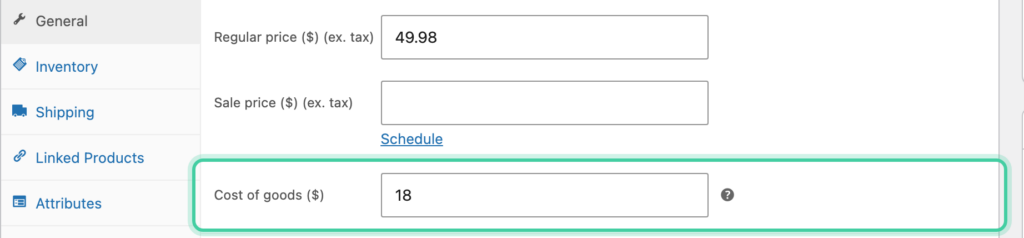
WooCommerce's Cost of Goods Sold documentation covers the field itself in more detail. The cost is saved on each order at checkout, so if you change a product's cost later, older orders keep the cost they were sold at.
If you sell a lot of products, filling in costs is the slow part, so start with your best sellers. Any order with a product that has no cost sends the order total instead of profit, and your best sellers are in the most orders.
Step 2: Choose profit in Conversion Bridge
Once Cost of Goods Sold is on, the WooCommerce settings in Conversion Bridge get a new choice:
- Go to Settings → Conversion Bridge → Integrations and open WooCommerce.
- Set Purchase value sent to ad platforms to Profit.
- Save.
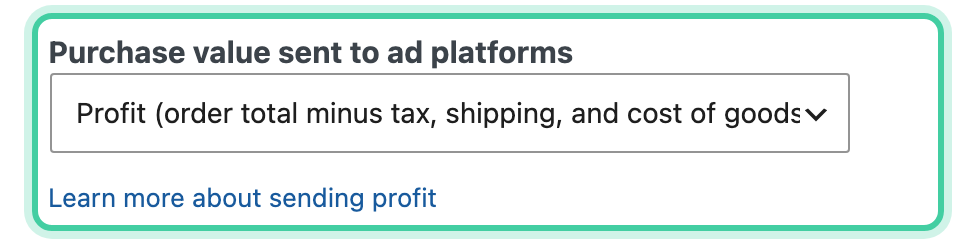
The Profit choice only shows up once WooCommerce's Cost of Goods Sold feature is turned on. The full details are in the WooCommerce doc.
Conversion Bridge tracks WooCommerce purchases, add to carts, checkouts and more for Google Ads, Meta and 11 ad platforms. See the WooCommerce integration.
How the profit is worked out
The profit Conversion Bridge sends is the order total, minus tax, minus shipping, minus the cost of every product in the order. Tax and shipping come out because neither one is money your store keeps.
| Amount | |
|---|---|
| Order total | $230 |
| Tax | −$20 |
| Shipping | −$10 |
| Product costs | −$60 |
| Profit sent to ad platforms | $140 |
A few rules keep the number honest:
- A product with no cost entered. WooCommerce treats a missing cost as $0, which would make that product look like pure profit. If any product in an order has no cost, Conversion Bridge sends the order total for that order instead.
- An order sold at a loss. Ad platforms don't accept negative values, so an order that lost money is sent as 0.
- Other events. Only the purchase changes. View product, add to cart and begin checkout still send product prices and cart totals.
I chose to send the whole order total when a cost is missing, because sending profit for some products and revenue for others would mix two kinds of numbers in one order, and I'd rather send a number I know is right.
Which platforms get profit
Profit goes to your ad platforms only. That includes Google Ads, Meta Ads, Microsoft Advertising, TikTok, Pinterest, Snapchat, Reddit, LinkedIn and X. When an ad platform also gets purchases server-side, the server copy sends profit too, so the browser and server copies match.
Your analytics platforms, including Google Analytics and Google Tag Manager, still get the order total, so your revenue reports don't change. Conversion Bridge's own reports and conversion journeys keep the order total too. Awin keeps the sale amount, since affiliate commission is paid on the sale.
Adjust your bidding targets after you switch
Once you switch to profit, the conversion value your ad platforms report drops a lot, because profit is only part of each order. If you use a target ROAS, lower it to match, or your campaigns will look like they stopped working and pull back on spending.
As a rough guide, a store with a 30% margin that targeted 500% ROAS on revenue would target about 150% on profit. Your margin won't be exactly the same on every order, so treat that as a starting point and adjust as the platform learns.
Two other things are worth doing when you switch:
- Expect a learning period. Changing what a conversion is worth is a big change to Smart Bidding. Pick a quiet week for the switch rather than the start of a sale.
- Set add to cart and begin checkout as secondary conversions in Google Ads if you track them. Otherwise bidding mixes profit from purchases with full cart totals from those events.
One thing to know about privacy
The profit is sent the same way any conversion value is, which means it's printed in the tracking code on the order received page, just like the order total is today. A curious customer who views the page source could see what an order made you. For most stores that's fine, but if your margins are something you keep private, it's worth knowing before you switch.
Is profit tracking worth it for your store?
If your products have very different margins and you run value-based bidding, I think it is. That's where revenue and profit point the ad platform in different directions. If every product has roughly the same margin, sending profit won't change much, since the platform would favor the same orders either way.
If you build stores for clients and run their shopping ads, this is a good one to raise with them. They know their costs better than anyone, and once the costs are in WooCommerce, the switch is one setting.
Profit tracking works for every ad platform Conversion Bridge supports, in the browser and server-side. See how Conversion Bridge handles ad tracking.
Happy tracking!