
Ad Platform
The best WordPress plugin for Meta Ads conversion tracking
Go beyond a basic pixel setup—Conversion Bridge makes it easy to send accurate Meta Ads conversion data from 71 plugins. Optimize ad spend and improve your return on investment.
 71 plugin integrations

Why Conversion Bridge
The old way vs. the new way
Paste the Meta Ads pixel snippet
Fire pageviews, but lose conversion events — the data that actually drives ad optimization and retargeting.
Build a custom Conversions API integration
Pay a developer to set up server-side events, hash customer data by hand, and keep it in sync every time your site changes.
Juggle multiple pixel plugins
One plugin for Meta Ads, another for WooCommerce events, another for forms. Conflicting pixels, duplicate events, inflated costs.
Burn ad spend on bad data
Learn weeks later that purchase values never made it to Meta Ads. Campaign optimization drifts, ROAS cratered.
Paste your Meta Ads Pixel ID
Drop in your Pixel ID. That's the only "code" you touch.
Toggle on your plugins
WooCommerce, Gravity Forms, MemberPress — flip a switch and Meta Ads gets purchase, lead, and signup events formatted exactly how it expects.
Sharper attribution, browser and server-side
Hashed customer data and server-side events sent to Meta Ads automatically, so it can match more of your sales to the ads that drove them.
Up and running in minutes
No developer, no tag manager. Accurate Meta Ads conversion tracking in minutes.
Features
Comprehensive Meta Ads WordPress Plugin with No-Code Conversion Tracking
Conversion Bridge makes Meta Ads setup simple and helps you optimize your paid advertising spend with comprehensive, detailed, accurate conversion tracking for Meta Ads
Multiple Pixel Support
Configure and manage multiple Meta Pixels simultaneously from a single WordPress installation. Each pixel can have its own access token for independent Conversions API tracking, making it easy to manage multiple ad accounts, clients, or business units.
E-commerce Tracking
Full support for tracking product views, add-to-cart actions, checkout initiation, and purchases with detailed item data including product IDs, quantities, and prices. Revenue values are automatically formatted with proper currency codes.
Conversions API (CAPI) Integration
Send conversion events directly from your server to Meta's servers, bypassing browser limitations and ad blockers. Server-side tracking provides more reliable attribution data and improved match rates for your ad campaigns.
Advanced Matching (Enhanced Data)
Automatically send hashed customer data (email, first name, last name, phone) to Meta for improved audience matching. When users are logged in or submit forms, their information is securely hashed using SHA-256 before being sent, increasing match rates while maintaining privacy.
Event Deduplication
Automatic event ID generation prevents duplicate conversions when using both the Pixel and Conversions API together. Each event is assigned a unique identifier that Meta uses to deduplicate browser and server events.
Standard Event Mapping
Automatically converts common WordPress actions to Meta's standard events: form submissions become Lead events, purchases become Purchase events, registrations become CompleteRegistration events, checkouts become InitiateCheckout, and more. This ensures optimal ad optimization without manual configuration.
Consent Mode Integration
Built-in support for cookie consent plugins. When consent is granted or revoked, the integration automatically calls `fbq('consent', 'grant')` or `fbq('consent', 'revoke')` to ensure GDPR compliance with your cookie banner.
Page View Tracking via API
Optional server-side page view tracking through the Conversions API. While disabled by default, this can be enabled to ensure page views are recorded even when the browser pixel is blocked.
Custom Event Support
Track any custom event with custom parameters. Events that don't match standard mappings are automatically sent as `trackCustom` events, giving you flexibility to track unique business actions.
User Data Enrichment
For logged-in users, automatically includes external user IDs along with hashed personal data. The integration also captures and forwards Facebook browser cookies (_fbp) and click IDs (_fbc) for improved attribution.
Types of Conversions Tracking Events in Meta Ads
If you want to grow your website, setting up conversion tracking in Meta Ads on your WordPress website is essential. It shows what's working, what's not, and how users interact with your content.
Conversion Bridge makes it simple to track important events from any of the 71 plugin integrations and your own custom events into Meta Ads so you have the data to understand what is working for your site.
-
E-Commerce Events
Sends complete product data with conversion events
- Purchases
- Donations
- View Item
- Add to Cart
- Remove from Cart
- View Cart
- Begin Checkout
-
Form events
Better than automatic form tracking, ensure you get accurate tracking & collect form submission values
- Form Submissions
- Submission Values
- Registrations
- Email List Subscribes
-
Other Events
- Button Clicks
- File Downloads
- Enrollments
- Scroll
- Time on Page
- Phone Links
- Search Results
- Video Plays
- Image Clicks
- Popups Opened/Closed
- Custom JavaScript Events
Meta Conversions API for WordPress
Conversion Bridge sends conversion events server-side from your WordPress site to Meta through the Conversions API. You paste in an access token from Meta Events Manager, and events go out from your server alongside the browser Pixel. No tag manager, no separate tracking server, no code.
Server-side events matter because browser tracking gets blocked. Ad blockers and privacy tools stop the Pixel from firing for a real share of your visitors. The Conversions API sends the same event from your server, so Meta still receives signal the browser lost. It won't recover everything, but it recovers conversions the Pixel alone would miss, which improves attribution and ad optimization.
How to Set Up the Facebook Conversion API on WordPress
Setup takes minutes. You need your Pixel ID and an access token from Meta.
- In WordPress, go to Settings → Conversion Bridge → Platforms and enable Meta Ads.
- In Meta Events Manager, open Data Sources, select your Pixel, and copy the Pixel/Dataset ID into Conversion Bridge.
- In the same Pixel's Settings, scroll to Conversions API and click "Generate access token." Paste it into Conversion Bridge.
- Optional: paste a Test Event Code from the Test Events tab to confirm server events are arriving, then remove it when done.
That's it. Once an access token is saved, conversion events are sent through the API automatically. You can also turn on API tracking for every pageview if you want full server-side coverage. The Meta Ads setup guide walks through each step with screenshots, including running multiple Pixels at once, each with its own access token.
Event Deduplication and Advanced Matching
When the Pixel and the Conversions API both report the same conversion, Meta needs to know it's one event, not two. Conversion Bridge handles this for you. Both copies share the same event ID, so Meta counts the conversion once.
Conversion Bridge also sends Advanced Matching data with server events. In the plugin this setting is called Enhanced Conversions, since it works the same way across every ad platform Conversion Bridge supports. Customer details like email, first name, last name, and phone are hashed with SHA-256 before they're sent, so Meta can match the conversion to a real ad click without receiving raw personal data. Facebook's own browser and click identifiers (_fbp and _fbc cookies) are forwarded too. All of this raises your Event Match Quality score in Events Manager, which means better attribution and lower costs per result.
Works With the Plugins You Already Use
Conversion Bridge connects 71 WordPress plugins to Meta, so purchases, form submissions, and signups become Meta standard events without any custom code. A WooCommerce purchase goes out as a server-side Purchase event with product IDs, quantities, and revenue attached. Form plugins send Lead events. Membership and registration plugins send CompleteRegistration. You enable the integration, and the events flow.
Features
Go beyond Meta Ads
Conversion Bridge does more than just send data to Meta Ads. Here's what else comes in the box.
Plugin Integrations
Track conversions from your WordPress plugins: ecommerce, forms, memberships, donations, and more. No code required.
Analytics Platforms
Set up analytics in minutes, not hours. Conversion Bridge costs less than the developer time it replaces.
Every Type of Conversion
Automatically track purchases, form submissions, button clicks, signups, downloads, and more across all the platforms you connect. No code, no tag manager.
Server-side tracking
Send conversions straight from your server to Meta Ads through its Conversions API, bypassing browser limits and ad blockers. The events still arrive when a browser pixel would have been blocked, and they're matched to the pixel so nothing is double-counted.
Better attribution with enhanced conversions
Securely hash and send first-party customer data (email, phone, name, address) from any integration to your ad platforms. Their algorithms can then find more real customers and waste less of your budget on clicks that never convert.
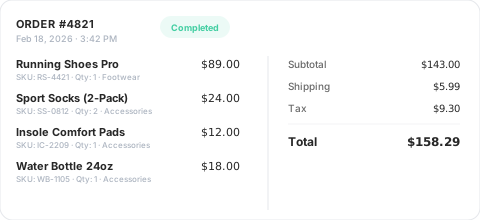
Detailed Commerce Data
Full order data from your ecommerce, membership, donation, and other commerce plugins, collected and formatted exactly as each platform needs it.
No setup required — your commerce plugin is detected automatically and tracked correctly.
Custom Event Tracking
Track unique elements that don't fit an existing integration. Define a CSS selector or JavaScript event, attach custom values, and target specific pages.
Perfect for tracking button clicks, video plays, scroll depth, file downloads, and any other custom interaction on your site.
Page-by-page data
Conversion Journeys
See exactly what your customers did before and after converting, page by page. Understand behavior, improve funnels, and uncover what actually drives results instead of guessing.
Privacy Friendly
Conversion Bridge respects user consent choices. It integrates with every major consent management platform so tracking only fires after the visitor approves.
Tools & Reports
Make the most of your data

Dashboards in Admin
View your key metrics right inside WordPress. Track trends over time, see top converting pages, and understand what's working.
Weekly Email Reports
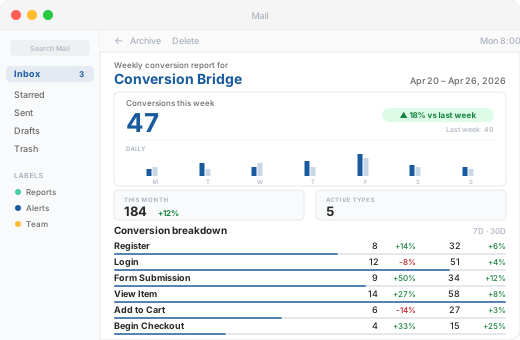
Get a weekly summary of conversions, revenue, and top-performing sources delivered straight to your inbox. Stay informed without logging in.
UTM Tracking & Reports
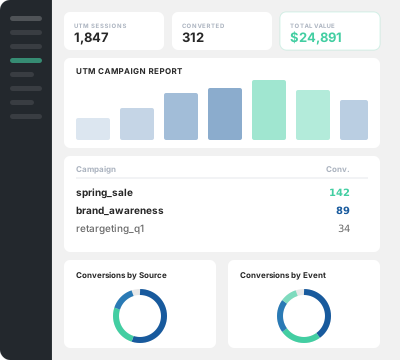
See which campaigns bring buyers, which landing pages convert, and build UTM links directly from your WordPress dashboard.
Top Landing Pages
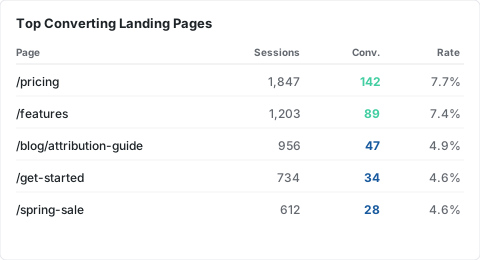
See which pages drive the most conversions, sessions, and revenue so you know where to focus your efforts.
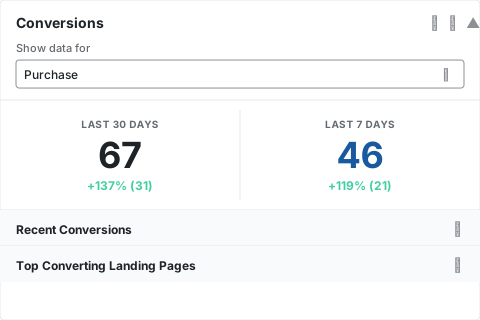
Dashboard Widget
A quick-glance conversion summary right on your WordPress dashboard. See your numbers the moment you log in.
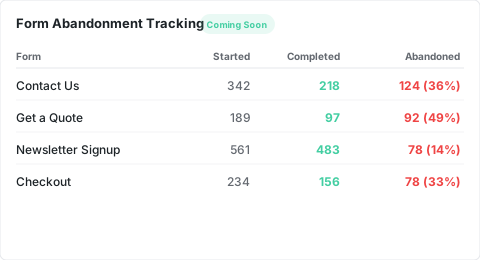
Form Abandonment Tracking Coming Soon
See which forms visitors start but never finish. Identify drop-off points and optimize your forms to capture more leads.
































































































Integrations
Your entire stack, connected
WordPress plugins on one side, analytics and ad platforms on the other — Conversion Bridge links them together. Without code or headaches.
71 plugin integrations
 19 analytics platforms
 11 ad platforms
Testimonials
Loved by WordPress professionals
Conversion Bridge is a game-changer for anyone serious about optimizing their WordPress site. It seamlessly integrates with all my marketing tools, allowing me to track traffic and conversions effortlessly. The setup was incredibly smooth, and the interface is user-friendly,…
Conversion Bridge is a game-changer for anyone serious about optimizing their WordPress site. It seamlessly integrates with all my marketing tools, allowing me to track traffic and conversions effortlessly. The setup was incredibly smooth, and the interface is user-friendly, making it easy to get up and running in no time. I highly recommend Conversion Bridge to anyone looking to take their WordPress site to the next level!

I really just love that I can trust that everything I might eventually need is getting synced back. Never felt confident with the other solutions I've tried 🥪

Conversion Bridge has simplified website traffic and conversion tracking. Derek's response time when I have questions or feature requests is incredible. Conversion Bridge is now part of my plugin stack for every WordPress website.


100% recommend. Conversion Bridge takes the pain out of conversion tracking. I am implementing this on all my client sites. Top-notch support as well!

The best analytics solution for WordPress. Never thought anyone would make it this easy to set up conversion tracking/integrate with FB Ads and G Ads in a matter of minutes. 👏

The huge painful amount of time and attention to detail it takes to setup conversion tracking with Google Tags for Gravity forms is crazy compared to the near 1 click install of ConvervsionBridge, the plugin will pay for itself in …
The huge painful amount of time and attention to detail it takes to setup conversion tracking with Google Tags for Gravity forms is crazy compared to the near 1 click install of ConvervsionBridge, the plugin will pay for itself in the first few days vs doing it the old way on time labour alone. Conversion tracking across Google Ads and Meta Advertising has been very reliable and constant updates from the team, they are quick to respond to if you have any queries. The documentation is well written and constantly improved to make the setup process as easy as possible for each integration, streamlining the workflow for myself and the team. Don't hesitate to sign up and support this valuable plugin for anyone running a modern revenue/data focused marketing agency on Wordpress. You will not be disappointed.
Conversion Bridge allowed us to replace three different plugins and over 50 lines of janky, conflicting code. Now, when we need to adjust our setup, we go to the CB dashboard and make a change. Easy! Derek is always…
Conversion Bridge allowed us to replace three different plugins and over 50 lines of janky, conflicting code. Now, when we need to adjust our setup, we go to the CB dashboard and make a change. Easy! Derek is always adding features and keeping on top of the latest trends. It’s great that I no longer need to.
Thanks, Conversion Bridge, for making script management simple!

Prior to discovering Conversion Bridge we battled for almost 12-months with another well-known plugin that was supposed to resolve our Meta tracking issues. Yet, week after week after week, the leads and sales that we were seeing in our payment…
Prior to discovering Conversion Bridge we battled for almost 12-months with another well-known plugin that was supposed to resolve our Meta tracking issues.
Yet, week after week after week, the leads and sales that we were seeing in our payment system did not correlate to the conversions that Meta was showing. The discrepancy was almost catastrophic for our paid advertising campaigns and caused many, many days of lost time and frustration over many months trying to figure out what the problem was, tweaking and changing things, trying to with their support and watching endless YT vids to figure it out, but to no avail.
Then we discovered ConversionBridge. It is no exaggeration to say that this plugin has resolved our tracking issues almost overnight. It took 5 mins to set up with its one-click integrations.
We switched off the old PYS plugin and ran with ConversionBridge for a week. I held my breath during my weekly meeting with our Media Buyer as he checked the stats on Meta against our sales system. We both nearly fell off our chairs when leads and sales on our system matched conversions on Meta.
It has been several months since we switched over to Conversion Bridge and the story is still the same: It has resolved a 12 month battle almost overnight and has certainly resulted in many more sales now that Meta is finally receiving accurate data. I can't recommend it enough and urge anyone using any other 'pixel' plugin to switch to it immediately.
Conversion Bridge enabled us to centralize our analytics configuration, transforming a hodgepodge of separate implementations into a single hub that is easy to manage and maintain. For anyone looking to simplify their analytics setup while ensuring accuracy and consistency, Conversion …
Conversion Bridge enabled us to centralize our analytics configuration, transforming a hodgepodge of separate implementations into a single hub that is easy to manage and maintain. For anyone looking to simplify their analytics setup while ensuring accuracy and consistency, Conversion Bridge is an ideal solution.

Conversion Bridge is a game-changer for anyone serious about optimizing their WordPress site. It seamlessly integrates with all my marketing tools, allowing me to track traffic and conversions effortlessly. The setup was incredibly smooth, and the interface is user-friendly,…
Conversion Bridge is a game-changer for anyone serious about optimizing their WordPress site. It seamlessly integrates with all my marketing tools, allowing me to track traffic and conversions effortlessly. The setup was incredibly smooth, and the interface is user-friendly, making it easy to get up and running in no time. I highly recommend Conversion Bridge to anyone looking to take their WordPress site to the next level!
I really just love that I can trust that everything I might eventually need is getting synced back. Never felt confident with the other solutions I've tried 🥪
Conversion Bridge has simplified website traffic and conversion tracking. Derek's response time when I have questions or feature requests is incredible. Conversion Bridge is now part of my plugin stack for every WordPress website.
100% recommend. Conversion Bridge takes the pain out of conversion tracking. I am implementing this on all my client sites. Top-notch support as well!
The best analytics solution for WordPress. Never thought anyone would make it this easy to set up conversion tracking/integrate with FB Ads and G Ads in a matter of minutes. 👏
The huge painful amount of time and attention to detail it takes to setup conversion tracking with Google Tags for Gravity forms is crazy compared to the near 1 click install of ConvervsionBridge, the plugin will pay for itself in …
The huge painful amount of time and attention to detail it takes to setup conversion tracking with Google Tags for Gravity forms is crazy compared to the near 1 click install of ConvervsionBridge, the plugin will pay for itself in the first few days vs doing it the old way on time labour alone. Conversion tracking across Google Ads and Meta Advertising has been very reliable and constant updates from the team, they are quick to respond to if you have any queries. The documentation is well written and constantly improved to make the setup process as easy as possible for each integration, streamlining the workflow for myself and the team. Don't hesitate to sign up and support this valuable plugin for anyone running a modern revenue/data focused marketing agency on Wordpress. You will not be disappointed.
Conversion Bridge allowed us to replace three different plugins and over 50 lines of janky, conflicting code. Now, when we need to adjust our setup, we go to the CB dashboard and make a change. Easy! Derek is always…
Conversion Bridge allowed us to replace three different plugins and over 50 lines of janky, conflicting code. Now, when we need to adjust our setup, we go to the CB dashboard and make a change. Easy! Derek is always adding features and keeping on top of the latest trends. It’s great that I no longer need to.
Thanks, Conversion Bridge, for making script management simple!
Prior to discovering Conversion Bridge we battled for almost 12-months with another well-known plugin that was supposed to resolve our Meta tracking issues. Yet, week after week after week, the leads and sales that we were seeing in our payment…
Prior to discovering Conversion Bridge we battled for almost 12-months with another well-known plugin that was supposed to resolve our Meta tracking issues.
Yet, week after week after week, the leads and sales that we were seeing in our payment system did not correlate to the conversions that Meta was showing. The discrepancy was almost catastrophic for our paid advertising campaigns and caused many, many days of lost time and frustration over many months trying to figure out what the problem was, tweaking and changing things, trying to with their support and watching endless YT vids to figure it out, but to no avail.
Then we discovered ConversionBridge. It is no exaggeration to say that this plugin has resolved our tracking issues almost overnight. It took 5 mins to set up with its one-click integrations.
We switched off the old PYS plugin and ran with ConversionBridge for a week. I held my breath during my weekly meeting with our Media Buyer as he checked the stats on Meta against our sales system. We both nearly fell off our chairs when leads and sales on our system matched conversions on Meta.
It has been several months since we switched over to Conversion Bridge and the story is still the same: It has resolved a 12 month battle almost overnight and has certainly resulted in many more sales now that Meta is finally receiving accurate data. I can't recommend it enough and urge anyone using any other 'pixel' plugin to switch to it immediately.
Conversion Bridge enabled us to centralize our analytics configuration, transforming a hodgepodge of separate implementations into a single hub that is easy to manage and maintain. For anyone looking to simplify their analytics setup while ensuring accuracy and consistency, Conversion …
Conversion Bridge enabled us to centralize our analytics configuration, transforming a hodgepodge of separate implementations into a single hub that is easy to manage and maintain. For anyone looking to simplify their analytics setup while ensuring accuracy and consistency, Conversion Bridge is an ideal solution.
Plans & Pricing
One plugin Every conversion Setup in minutes
Starting at only $79/year, every plan includes all integrations & features
View Plans & Pricing Book demoWordPress Conversion Tracking for Meta Ads
- Meta Ads conversion tracking for WooCommerce
- Meta Ads conversion tracking for Easy Digital Downloads
- Meta Ads conversion tracking for WS Form
- Meta Ads conversion tracking for LifterLMS
- Meta Ads conversion tracking for Fluent Forms
- Meta Ads conversion tracking for Gravity Forms
- Meta Ads conversion tracking for Formidable Forms
- Meta Ads conversion tracking for WP Forms
- Meta Ads conversion tracking for Ninja Forms
- Meta Ads conversion tracking for Forminator
- Meta Ads conversion tracking for Contact Form 7
- Meta Ads conversion tracking for Happy Forms
- Meta Ads conversion tracking for Everest Forms
- Meta Ads conversion tracking for Calculated Fields Form
- Meta Ads conversion tracking for Quill Forms
- Meta Ads conversion tracking for Form Maker by 10web
- Meta Ads conversion tracking for JetFormBuilder
- Meta Ads conversion tracking for Kali Forms
- Meta Ads conversion tracking for LearnDash
- Meta Ads conversion tracking for Sensei
- Meta Ads conversion tracking for Charitable
- Meta Ads conversion tracking for Fluent Booking
- Meta Ads conversion tracking for BookingPress
- Meta Ads conversion tracking for LatePoint
- Meta Ads conversion tracking for Simply Schedule Appointments
- Meta Ads conversion tracking for Groundhogg
- Meta Ads conversion tracking for FluentCRM
- Meta Ads conversion tracking for Mailster
- Meta Ads conversion tracking for The Newsletter Plugin
- Meta Ads conversion tracking for MailPoet
- Meta Ads conversion tracking for Mailchimp for WordPress
- Meta Ads conversion tracking for weForms
- Meta Ads conversion tracking for Popup Builder
- Meta Ads conversion tracking for Holler Box
- Meta Ads conversion tracking for Thrive Leads
- Meta Ads conversion tracking for IceGram
- Meta Ads conversion tracking for WP Subscribe Pro
- Meta Ads conversion tracking for Restrict Content Pro
- Meta Ads conversion tracking for Paid Memberships Pro
- Meta Ads conversion tracking for MemberMouse
- Meta Ads conversion tracking for MemberPress
- Meta Ads conversion tracking for UltimateMember
- Meta Ads conversion tracking for Simple Membership
- Meta Ads conversion tracking for SureMembers
- Meta Ads conversion tracking for SureCart
- Meta Ads conversion tracking for Ultimate Membership Pro
- Meta Ads conversion tracking for BuddyBoss
- Meta Ads conversion tracking for Profile Builder Pro
- Meta Ads conversion tracking for Paid Member Subscriptions
- Meta Ads conversion tracking for Sunshine Photo Cart
- Meta Ads conversion tracking for WP Simple Pay
- Meta Ads conversion tracking for ProfilePress
- Meta Ads conversion tracking for WP User Frontend
- Meta Ads conversion tracking for GiveWP
- Meta Ads conversion tracking for Download Monitor
- Meta Ads conversion tracking for Tutor LMS
- Meta Ads conversion tracking for SliceWP
- Meta Ads conversion tracking for Kadence
- Meta Ads conversion tracking for ClickWhale
- Meta Ads conversion tracking for WordPress Blocks
- Meta Ads conversion tracking for AffiliateWP
- Meta Ads conversion tracking for Solid Affiliate
- Meta Ads conversion tracking for Leaky Paywall
- Meta Ads conversion tracking for Bricks Builder
- Meta Ads conversion tracking for Document Library Pro
- Meta Ads conversion tracking for Beaver Builder
- Meta Ads conversion tracking for Elementor
- Meta Ads conversion tracking for Divi 4
- Meta Ads conversion tracking for SureForms
- Meta Ads conversion tracking for Bricksforge Pro Forms
- Meta Ads conversion tracking for Popup Maker
- Meta Ads conversion tracking for Hustle by wpmudev
- Meta Ads conversion tracking for Greyd Suite
- Meta Ads conversion tracking for Breakdance
- Meta Ads conversion tracking for Paymattic
- Meta Ads conversion tracking for FluentCart
- Meta Ads conversion tracking for Freemius
- Meta Ads conversion tracking for Fluent Affiliate
- Meta Ads conversion tracking for Fluent Community
- Meta Ads conversion tracking for CheckoutWC
- Meta Ads conversion tracking for Highlight and Share
- Meta Ads conversion tracking for Bit Form
- Meta Ads conversion tracking for FunnelKit Automations
- Meta Ads conversion tracking for CartFlows