
Conversion tracking for WS Form in Meta Ads
No-code setup of analytics and important conversion events from WS Form in Meta Ads—ready in under a minute.


Why Conversion Bridge
The old way vs. the new way
Without Conversion Bridge
Paste the Meta Ads snippet & hope
Basic pageview data lands in Meta Ads, but WS Form conversion events never fire.
Hand-wire every WS Form event
Write custom JavaScript (or pay a developer) for every form submission, confirmation, and field interaction you want tracked.
A different plugin for every platform
Install one plugin for Meta Ads, another for Google Analytics, another for whatever ad platform you run next—each with its own config, its own quirks, and its own way of reading WS Form.
Discover broken tracking after the fact
Find out weeks later that WS Form conversions never made it to Meta Ads. Rebuild reports, lose attribution.
With Conversion Bridge
Paste your Pixel ID
Drop in your Pixel ID. That's the only "code" you touch.
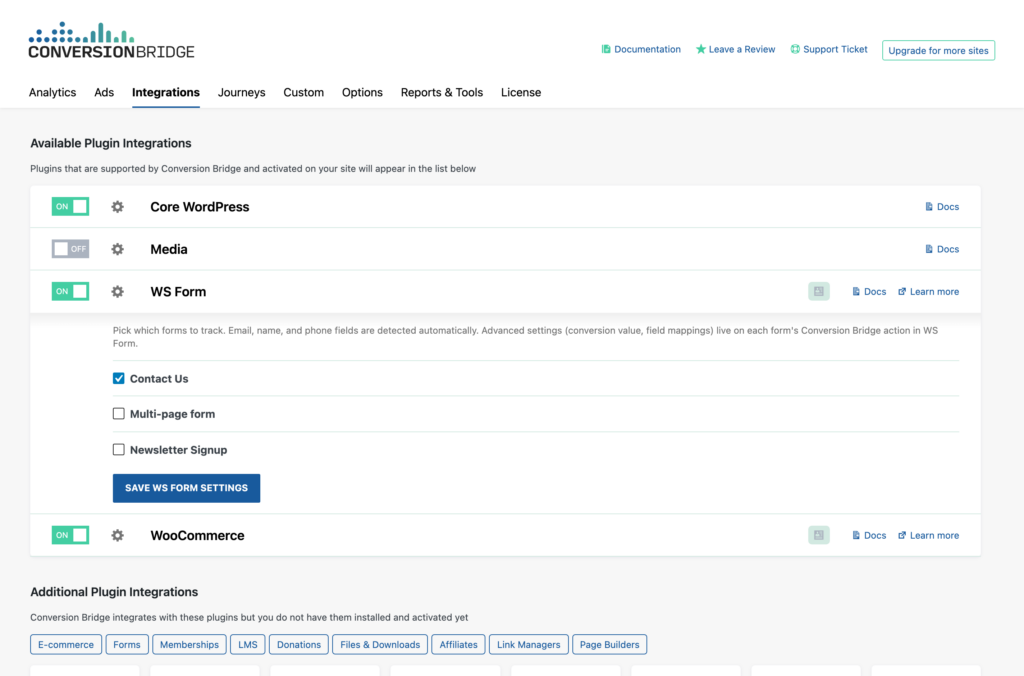
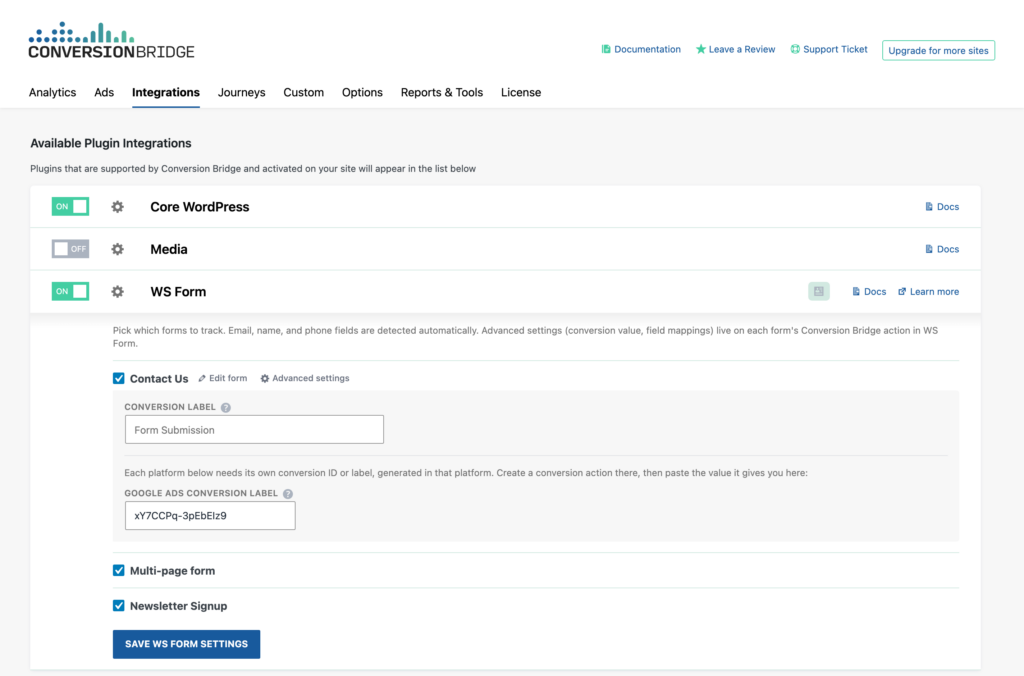
Toggle on WS Form
Flip one switch and Meta Ads starts receiving WS Form conversion data formatted exactly how it expects.
One plugin for every platform
Conversion Bridge sends WS Form events into Meta Ads and every other analytics and ad platform you use — no extra plugins needed.
Sharper attribution, browser and server-side
Hashed customer data and server-side events sent to Meta Ads automatically, so it can match more of your sales to the ads that drove them.
What you can track
WS Form conversions in Meta Ads
WS Form is a WordPress forms plugin. Here's what Conversion Bridge sends into Meta Ads.
Form Submissions
User form submissions with WS Form are tracked in Meta Ads, giving you key insights about how effectively your website turns visitors into leads or customers.
Registrations
When WS Form triggers a registration, a conversion is tracked in Meta Ads—giving you accurate measurement of which funnels grow your user base.
Logins
Track when users log in to better understand how they interact with their account.
Donations
Track donations from WS Form in Meta Ads so you can better understand where your organization's donors are coming from.
About the tools
The plugin & the platform
About WS Form
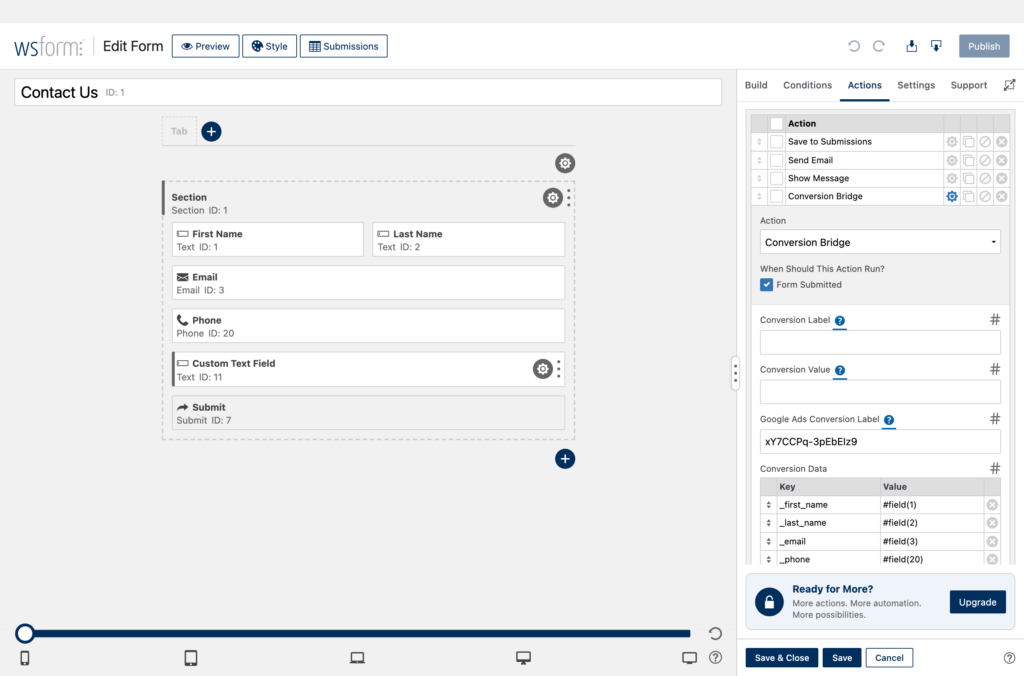
Track WS Form submissions as conversions across your analytics and ad platforms, with a toggle per form and name, email, and phone detected automatically for enhanced conversions. Every submission also stores the UTM campaign and ad click that earned it, ready for your CSV exports, email notifications, and CRM or webhook actions.
-
Enhanced conversions ready
Sends hashed first-party customer data (email, phone, name, address) so paid ad platforms like Google Ads and Meta can improve attribution accuracy.
About Meta Ads
Advertising on Meta platforms like Facebook and Instagram offers access to a vast audience and detailed targeting options, with various ad formats to choose from. Tracking conversions on your WordPress site is crucial for understanding the effectiveness of these ads, helping to allocate your budget wisely and optimize future ad strategies.
-
E-commerce ready
Full product, cart, and order details sent with every conversion event.
-
Conversions API
Server-side conversion events for accurate attribution even when pixels are blocked.
-
Event deduplication
Matches pixel and server events via event_id to prevent double-counting.
Platform features
What Meta Ads gives you
When you connect WS Form to Meta Ads through Conversion Bridge, here's what's at your fingertips.
Multiple Pixel Support
Configure and manage multiple Meta Pixels simultaneously from a single WordPress installation. Each pixel can have its own access token for independent Conversions API tracking, making it easy to manage multiple ad accounts, clients, or business units.
E-commerce Tracking
Full support for tracking product views, add-to-cart actions, checkout initiation, and purchases with detailed item data including product IDs, quantities, and prices. Revenue values are automatically formatted with proper currency codes.
Conversions API (CAPI) Integration
Send conversion events directly from your server to Meta's servers, bypassing browser limitations and ad blockers. Server-side tracking provides more reliable attribution data and improved match rates for your ad campaigns.
Advanced Matching (Enhanced Data)
Automatically send hashed customer data (email, first name, last name, phone) to Meta for improved audience matching. When users are logged in or submit forms, their information is securely hashed using SHA-256 before being sent, increasing match rates while maintaining privacy.
Event Deduplication
Automatic event ID generation prevents duplicate conversions when using both the Pixel and Conversions API together. Each event is assigned a unique identifier that Meta uses to deduplicate browser and server events.
Standard Event Mapping
Automatically converts common WordPress actions to Meta's standard events: form submissions become Lead events, purchases become Purchase events, registrations become CompleteRegistration events, checkouts become InitiateCheckout, and more. This ensures optimal ad optimization without manual configuration.
Consent Mode Integration
Built-in support for cookie consent plugins. When consent is granted or revoked, the integration automatically calls `fbq('consent', 'grant')` or `fbq('consent', 'revoke')` to ensure GDPR compliance with your cookie banner.
Page View Tracking via API
Optional server-side page view tracking through the Conversions API. While disabled by default, this can be enabled to ensure page views are recorded even when the browser pixel is blocked.
Custom Event Support
Track any custom event with custom parameters. Events that don't match standard mappings are automatically sent as `trackCustom` events, giving you flexibility to track unique business actions.
User Data Enrichment
For logged-in users, automatically includes external user IDs along with hashed personal data. The integration also captures and forwards Facebook browser cookies (_fbp) and click IDs (_fbc) for improved attribution.
Page-by-page data
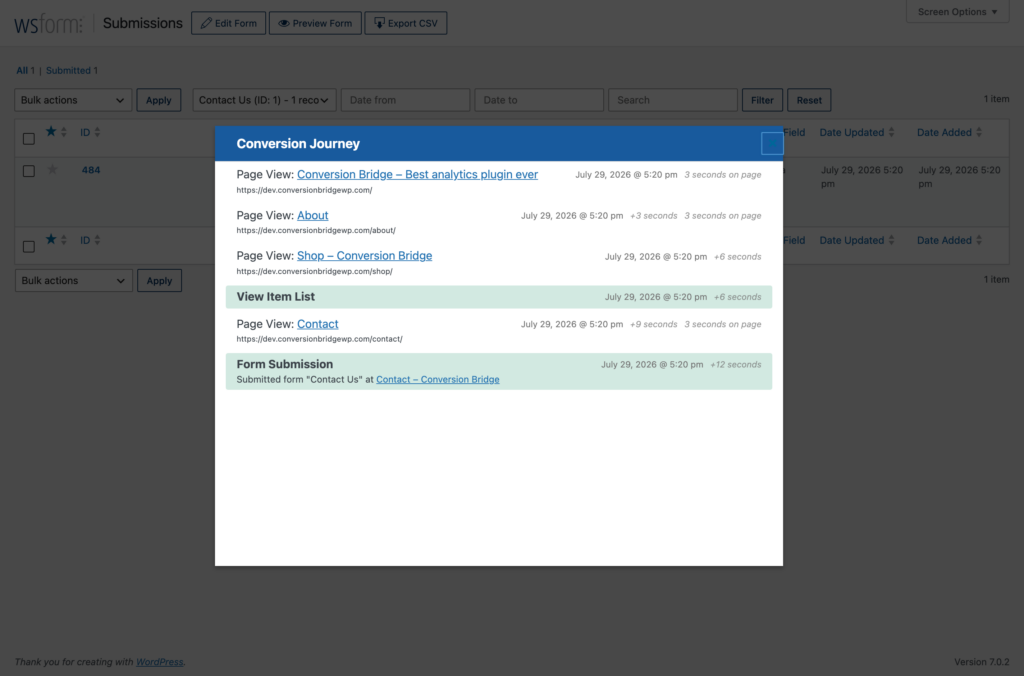
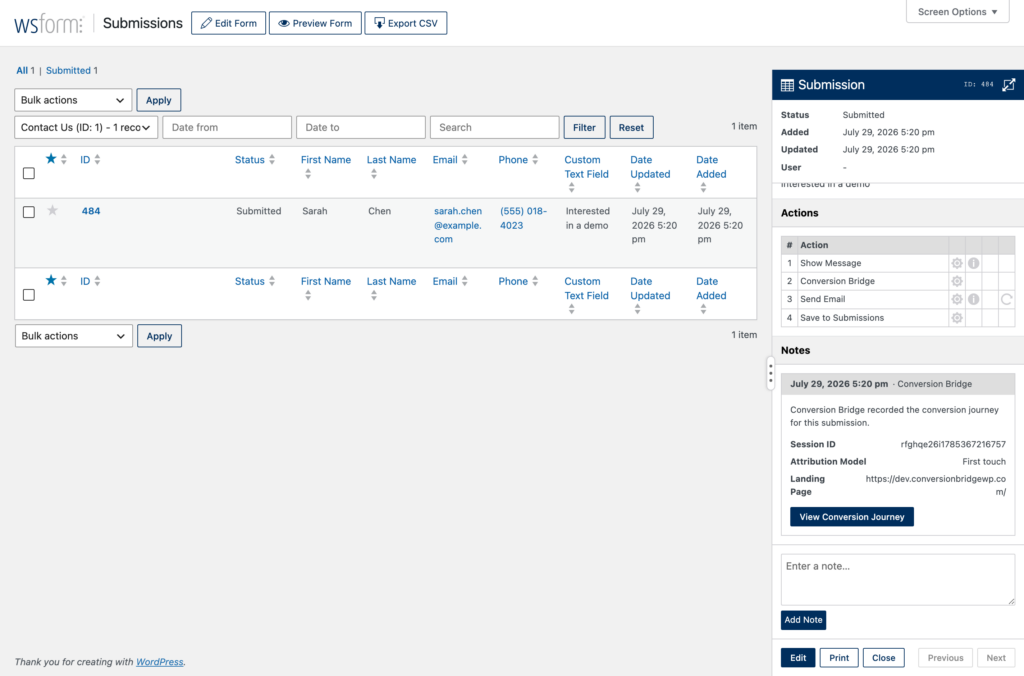
Conversion Journeys for WS Form
Conversion Bridge records the full page-by-page path every visitor takes before and after a WS Form conversion. See what actually drives results instead of guessing, right inside WordPress.
See it in action
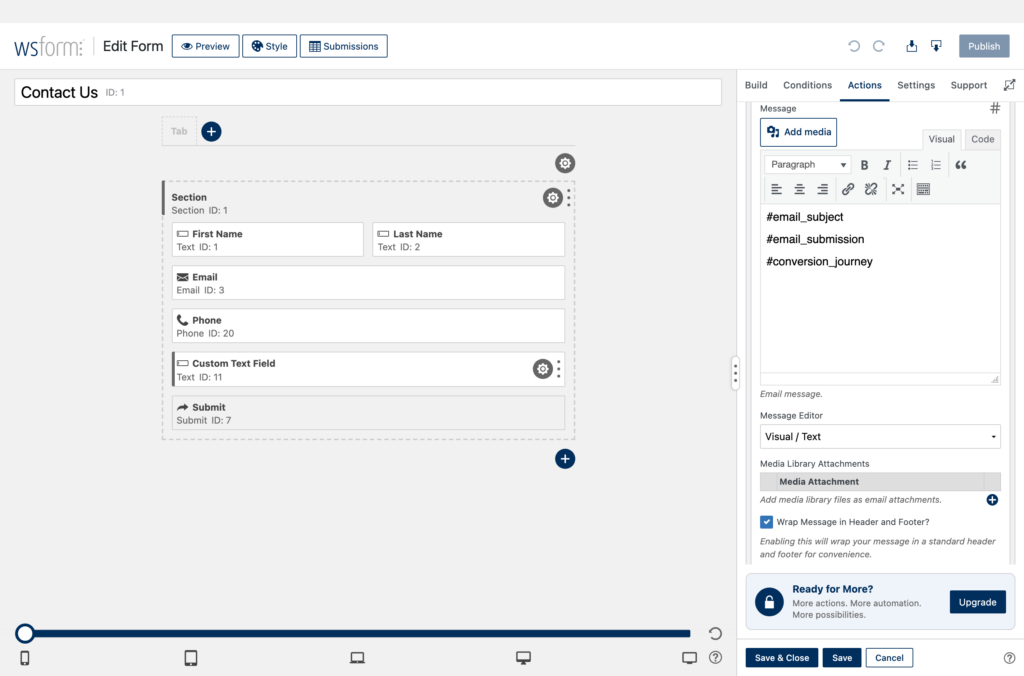
WS Form conversion tracking, step by step































































































Integrations
Your entire stack, connected
WordPress plugins on one side, analytics and ad platforms on the other — Conversion Bridge links them together. Without code or headaches.
Testimonials
Loved by WordPress professionals


Conversion tracking made easy! Conversion Bridge is super simple to setup, and offers some very useful features. Definitely worth the investment.

Conversion Bridge is a game-changer for anyone serious about optimizing their WordPress site. It seamlessly integrates with all my marketing tools, allowing me to track traffic and conversions effortlessly. The setup was incredibly smooth, and the interface is user-friendly,…
Conversion Bridge is a game-changer for anyone serious about optimizing their WordPress site. It seamlessly integrates with all my marketing tools, allowing me to track traffic and conversions effortlessly. The setup was incredibly smooth, and the interface is user-friendly, making it easy to get up and running in no time. I highly recommend Conversion Bridge to anyone looking to take their WordPress site to the next level!

Works perfectly and delivers exactly as promised. The customer service is excellent—quick to respond and incredibly helpful. Highly recommended.
It's been one of the best tools we've rolled out at our agency, huge time saver for us. Keep doing what you're doing 🙌

I really just love that I can trust that everything I might eventually need is getting synced back. Never felt confident with the other solutions I've tried 🥪

The huge painful amount of time and attention to detail it takes to setup conversion tracking with Google Tags for Gravity forms is crazy compared to the near 1 click install of ConvervsionBridge, the plugin will pay for itself in …
The huge painful amount of time and attention to detail it takes to setup conversion tracking with Google Tags for Gravity forms is crazy compared to the near 1 click install of ConvervsionBridge, the plugin will pay for itself in the first few days vs doing it the old way on time labour alone. Conversion tracking across Google Ads and Meta Advertising has been very reliable and constant updates from the team, they are quick to respond to if you have any queries. The documentation is well written and constantly improved to make the setup process as easy as possible for each integration, streamlining the workflow for myself and the team. Don't hesitate to sign up and support this valuable plugin for anyone running a modern revenue/data focused marketing agency on Wordpress. You will not be disappointed.
Conversion Bridge has simplified website traffic and conversion tracking. Derek's response time when I have questions or feature requests is incredible. Conversion Bridge is now part of my plugin stack for every WordPress website.

Conversion Bridge allowed us to replace three different plugins and over 50 lines of janky, conflicting code. Now, when we need to adjust our setup, we go to the CB dashboard and make a change. Easy! Derek is always…
Conversion Bridge allowed us to replace three different plugins and over 50 lines of janky, conflicting code. Now, when we need to adjust our setup, we go to the CB dashboard and make a change. Easy! Derek is always adding features and keeping on top of the latest trends. It’s great that I no longer need to.
Thanks, Conversion Bridge, for making script management simple!

Conversion Bridge enabled us to centralize our analytics configuration, transforming a hodgepodge of separate implementations into a single hub that is easy to manage and maintain. For anyone looking to simplify their analytics setup while ensuring accuracy and consistency, Conversion …
Conversion Bridge enabled us to centralize our analytics configuration, transforming a hodgepodge of separate implementations into a single hub that is easy to manage and maintain. For anyone looking to simplify their analytics setup while ensuring accuracy and consistency, Conversion Bridge is an ideal solution.

Conversion tracking made easy! Conversion Bridge is super simple to setup, and offers some very useful features. Definitely worth the investment.
Conversion Bridge is a game-changer for anyone serious about optimizing their WordPress site. It seamlessly integrates with all my marketing tools, allowing me to track traffic and conversions effortlessly. The setup was incredibly smooth, and the interface is user-friendly,…
Conversion Bridge is a game-changer for anyone serious about optimizing their WordPress site. It seamlessly integrates with all my marketing tools, allowing me to track traffic and conversions effortlessly. The setup was incredibly smooth, and the interface is user-friendly, making it easy to get up and running in no time. I highly recommend Conversion Bridge to anyone looking to take their WordPress site to the next level!
Works perfectly and delivers exactly as promised. The customer service is excellent—quick to respond and incredibly helpful. Highly recommended.
It's been one of the best tools we've rolled out at our agency, huge time saver for us. Keep doing what you're doing 🙌
I really just love that I can trust that everything I might eventually need is getting synced back. Never felt confident with the other solutions I've tried 🥪
The huge painful amount of time and attention to detail it takes to setup conversion tracking with Google Tags for Gravity forms is crazy compared to the near 1 click install of ConvervsionBridge, the plugin will pay for itself in …
The huge painful amount of time and attention to detail it takes to setup conversion tracking with Google Tags for Gravity forms is crazy compared to the near 1 click install of ConvervsionBridge, the plugin will pay for itself in the first few days vs doing it the old way on time labour alone. Conversion tracking across Google Ads and Meta Advertising has been very reliable and constant updates from the team, they are quick to respond to if you have any queries. The documentation is well written and constantly improved to make the setup process as easy as possible for each integration, streamlining the workflow for myself and the team. Don't hesitate to sign up and support this valuable plugin for anyone running a modern revenue/data focused marketing agency on Wordpress. You will not be disappointed.
Conversion Bridge has simplified website traffic and conversion tracking. Derek's response time when I have questions or feature requests is incredible. Conversion Bridge is now part of my plugin stack for every WordPress website.
Conversion Bridge allowed us to replace three different plugins and over 50 lines of janky, conflicting code. Now, when we need to adjust our setup, we go to the CB dashboard and make a change. Easy! Derek is always…
Conversion Bridge allowed us to replace three different plugins and over 50 lines of janky, conflicting code. Now, when we need to adjust our setup, we go to the CB dashboard and make a change. Easy! Derek is always adding features and keeping on top of the latest trends. It’s great that I no longer need to.
Thanks, Conversion Bridge, for making script management simple!
Conversion Bridge enabled us to centralize our analytics configuration, transforming a hodgepodge of separate implementations into a single hub that is easy to manage and maintain. For anyone looking to simplify their analytics setup while ensuring accuracy and consistency, Conversion …
Conversion Bridge enabled us to centralize our analytics configuration, transforming a hodgepodge of separate implementations into a single hub that is easy to manage and maintain. For anyone looking to simplify their analytics setup while ensuring accuracy and consistency, Conversion Bridge is an ideal solution.
Plans & Pricing
One plugin Every conversion Setup in minutes
Starting at only $79/year, every plan includes all integrations & features
- 14-day money back guarantee
- Premium 1-on-1 support
- No tag manager needed
Common questions
Yes, Conversion Bridge is a WordPress plugin and only works on WordPress-powered websites.
Yes! I am very proud of the quality and speed of support offered should you run into any issues.
Conversion Bridge supports [integration_count] plugins, [platform_count] analytics platforms, and [ad_platform_count] ad platforms. If what you need is not yet supported, send a request and I will take a look — I am always looking to grow the integration list.
Yes! Agencies are highly encouraged to check out our Agency Partner Program where you can get a free license for your own site and earn money by referring new clients to Conversion Bridge.
Yes, but using GTM will require additional setup and configuration. Conversion Bridge is a much easier way to setup analytics and ad platform conversion tracking.
Conversion Bridge can be considered a GTM replacement — one that is much easier to setup, more accurate in tracking, gives you more insights, and works directly with the analytics platforms, ad platforms and plugins in use on your WordPress website.
Yes! At any time you can upgrade to a pricing plan that includes more sites.
Absolutely. Conversion tracking is not just for ad campaigns — it is how you figure out what is actually working in your business. Without it, you are guessing which pages, emails, blog posts, and organic traffic sources are driving signups and sales.
Conversion Bridge tracks form submissions, memberships, downloads, and purchases across your WordPress site, so you can confidently decide where to spend your time, what content to double down on, and what to cut — whether you ever run a paid ad or not.
Yes. Conversion Bridge integrates with many consent management platforms, so tracking respects visitor consent decisions before anything fires.

Hi, I’m Derek. I’ve been building WordPress plugins for over a decade, and my goal with Conversion Bridge is to make analytics and conversion tracking setup as painless as possible. If the FAQ didn’t cover it — pre-sales, an integration you wish existed, or you’re stuck on setup — send it over. I read every message.
Track WS Form in other analytics platforms
- Conversion tracking for WS Form in Google Analytics
- Conversion tracking for WS Form in Plausible Analytics
- Conversion tracking for WS Form in Fathom Analytics
- Conversion tracking for WS Form in Pirsch Analytics
- Conversion tracking for WS Form in PostHog
- Conversion tracking for WS Form in Usermaven
- Conversion tracking for WS Form in Microsoft Clarity
- Conversion tracking for WS Form in Hotjar
- Conversion tracking for WS Form in Simple Analytics
- Conversion tracking for WS Form in AnalyticsWP
- Conversion tracking for WS Form in Koko Analytics
- Conversion tracking for WS Form in Active Analytics
- Conversion tracking for WS Form in Swetrix
- Conversion tracking for WS Form in Rybbit Analytics
- Conversion tracking for WS Form in Umami
- Conversion tracking for WS Form in Go Squared Analytics
- Conversion tracking for WS Form in Wide Angle Analytics
- Conversion tracking for WS Form in Growify
Track WS Form in ad platforms
- WS Form conversion tracking for Google Ads
- WS Form conversion tracking for Meta Ads
- WS Form conversion tracking for LinkedIn Ads
- WS Form conversion tracking for Microsoft Ads
- WS Form conversion tracking for Pinterest Ads
- WS Form conversion tracking for Reddit Ads
- WS Form conversion tracking for TikTok Ads
- WS Form conversion tracking for X (Twitter) Ads
- WS Form conversion tracking for OpenAI Ads
- WS Form conversion tracking for Snapchat Ads
- WS Form conversion tracking for Awin