
Conversion Bridge works with the SEOPress consent banner so your conversion tracking respects visitor consent choices. When the SEOPress banner is active, tracking is held until a visitor accepts through the banner.
Setup Instructions
Step 1: Set Up SEOPress
- Install the SEOPress plugin if you don't already have it
- Go to SEOPress → Analytics and turn on the option to disable tracking until user consent
- This enables the SEOPress consent banner on your site
Step 2: Select SEOPress in Conversion Bridge
- Go to Settings → Conversion Bridge → Options in your WordPress admin and find the Cookie Consent section
- Select SEOPress as your cookie consent plugin
- Save your settings
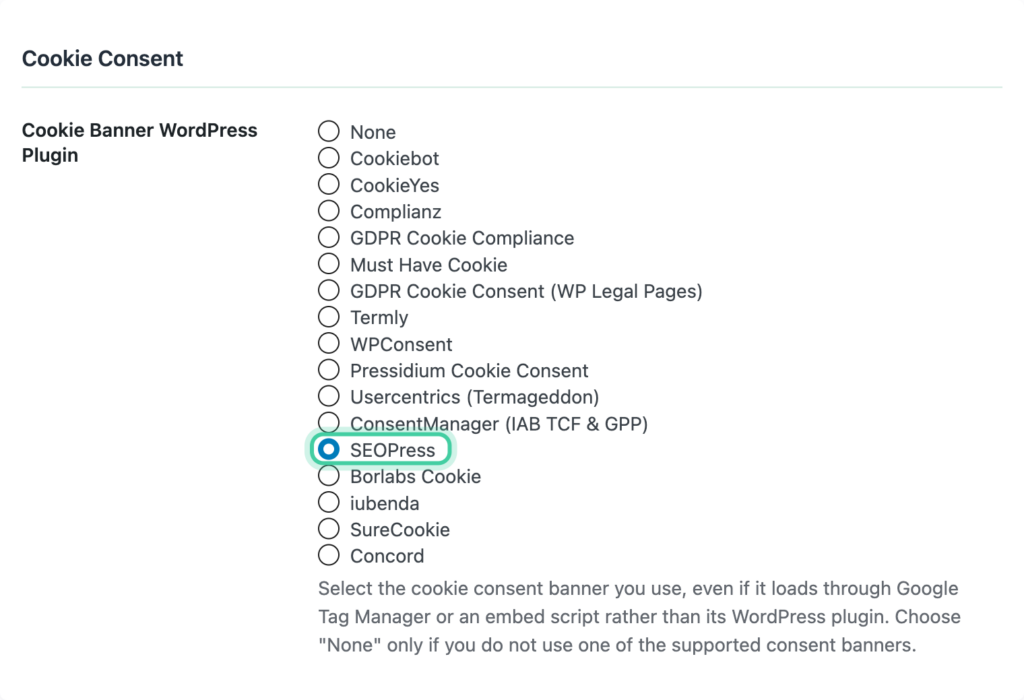
Conversion Bridge automatically detects SEOPress once its consent banner is active.
Step 3: Configure Consent Signal Ownership
Consent signals tell each platform whether a visitor has given permission to be tracked. Both SEOPress and Conversion Bridge can send these signals, but only one should do it for each platform — otherwise you get conflicts.
We recommend setting Conversion Bridge as the signal owner for all platforms. Conversion Bridge listens to the consent choices visitors make through SEOPress and sends the right signals to every platform you have enabled. This ensures as much tracking as possible happens the moment consent is granted.
- Go to Settings → Conversion Bridge → Options, Cookie Consent section
- Set each platform to Conversion Bridge ownership
Learn more in the Consent Signal Ownership guide.
Step 4: Verify It Works
- Open your site in a private/incognito browser window
- You should see the SEOPress consent banner
- Decline and confirm that no tracking fires
- Accept and confirm that tracking starts
You can add ?cb_console=1 to any page URL to see consent and tracking activity in your browser's developer console.
How It Works
- When a visitor accepts through the SEOPress banner, Conversion Bridge starts tracking with your analytics and ad platforms.
- When a visitor declines, no tracking runs.
- SEOPress uses a single accept/decline choice, so accepting turns on both your analytics and ad platform tracking together.
- Returning visitors who already made a choice keep that choice on their next visit.
Consent Category Mapping
SEOPress uses one overall consent choice rather than separate categories. Conversion Bridge maps it like this:
| SEOPress Choice | Conversion Bridge Types | Examples |
|---|---|---|
| Accept | Analytics + Marketing | Google Analytics, Plausible, Clarity, Google Ads, Meta Ads, TikTok Ads |
| Decline | None | No tracking runs |
Because SEOPress does not split consent into separate categories, accepting grants both analytics and marketing tracking at once.