You know what's worse than losing a customer? Losing a customer and having no idea why.
I've been working with WordPress store owners for a long time, and the pattern is always the same. They look at their WooCommerce analytics, see their overall conversion rateImproves website performance by increasing the percentage of visitors who complete desired actions, such as purchases, sign-ups, or form submissions. is low, and start guessing. Maybe the product pages need better images. Maybe the prices are too high. Maybe they need a different theme.
But here's what I've learned: most of the time, the problem isn't getting people interested in the product. It's getting them through the checkout. And unless you're tracking each step of that process, you're just throwing darts in the dark.
The Checkout Abandonment Problem Is Bigger Than You Think
Let's start with some numbers that might keep you up at night.
According to the Baymard Institute, the average online cart abandonment rate is 70.19%. That means roughly 7 out of every 10 people who put something in their cart on your site leave without buying.
Think about that for a second. Imagine a physical store where 7 out of 10 people walk up to the counter with items in hand, then just put everything down and walk out. You'd want to know exactly what went wrong, right?
The reasons vary. Baymard's research found that 48% of shoppers abandon because extra costs (shipping, taxes, fees) were too high. Around 26% abandoned because the site wanted them to create an account. About 25% said the checkout process was too long or complicated. And 22% couldn't see the total order cost upfront.
But here's the thing most people miss: these are general averages across all ecommerce. Your store's specific drop-off points might be completely different. Maybe your customers breeze through the shipping step but bail when they see the payment options. Maybe they start the checkout and abandon the moment they have to enter shipping info. You won't know until you actually measure each step.
Why "Overall Conversion Rate" Isn't Enough
Most WooCommerce store owners I talk to know two numbers: how many visitors they get and how many orders they receive. That gives them an overall conversion rate, and it's a start. But it's like a doctor checking only your heart rate and declaring you healthy.
An overall conversion rate hides the real story. Here's an example.
A store owner I helped recently had a 1.8% conversion rate, which is close to the ecommerce average. She was running Facebook ads, getting decent traffic, and people were adding products to their carts at a reasonable rate. But sales felt lower than they should be.
When we dug into the checkout funnelWhat it means: A checkout funnel is the series of steps a customer goes through between deciding to buy something and actually completing the purchase. Think of it like a real funnel: many people ente... step by step, we found the problem. About 40% of people who started checkout were dropping off at the shipping info step. Not at payment. Not at the final review. At shipping. It turned out her shipping calculator was showing unexpectedly high rates for certain zip codes due to a plugin misconfiguration. A simple settings change, and her conversion rate jumped to 2.6% within two weeks.
She never would have found that without step-by-step tracking. Her overall conversion rate told her "things could be better." The funnelRepresents the step-by-step process users take before completing a conversion, such as making a purchase or signing up. data told her exactly where to look and what to fix.
The Checkout Steps That Actually Matter
A typical WooCommerce checkout funnel has several distinct moments where a customer makes a decision to keep going or leave. Each one is a potential leak in your revenue bucket.
View Cart
This is the moment a customer reviews what's in their cart. It's the first real commitment signal after adding items. If you see a big drop between "add to cart" and "view cart," people might be using the cart as a wishlist, or your cart might be hard to find.
Begin Checkout
The customer clicked "Proceed to Checkout." They're telling you they intend to buy. This is a high-intent moment. The gap between "view cart" and "begin checkout" reveals how many people are interested but not ready to commit.
Add Shipping Info
Filling in shipping details is where things get real. This is one of the most common drop-off points. Customers encounter unexpected shipping costs, find the form too long, or realize shipping to their location isn't available. Research from the Baymard Institute found that checkout usability improvements alone can boost conversions by 35.26%, and many of those improvements center on simplifying the shipping step.
Add Payment Info
Selecting and entering a payment method is the next big trust moment. If customers leave here, it might signal trust issues (no familiar payment options, missing security badges) or friction (too many fields, no saved payment support).
Order Bumps and Coupon Activity
These are bonus signals that tell you about customer engagement during checkout. When someone accepts an order bump, they're highly engaged. When someone applies a coupon, that tells you about price sensitivity. Tracking coupon usage also helps you measure the effectiveness of your promotional campaigns.
Remove from Cart
This one gets overlooked, but it's valuable. If customers are removing items during checkout, it could mean they're adjusting their order to hit a free shipping threshold, they're having second thoughts about specific products, or they added things they didn't intend to.
The Problem with Standard WooCommerce Tracking
WooCommerce out of the box gives you order data. You know what sold, when it sold, and who bought it. But it doesn't tell you about the customers who almost bought.
Most analytics platforms can track page views, so you might get some rough idea of how many people visited the checkout page. But a WooCommerce checkout, especially a multi-step checkout, doesn't necessarily change the page URL at each step. The customer stays on the same page while progressing through tabs or sections. A standard analytics pageview can't see that.
Conversion Bridge's WooCommerce integration tracks real checkout events, not just pageviews. It fires events at each meaningful step of the customer's journey through your checkout, sending rich product and cart data to all your connected platforms.
This is especially true for modern optimized checkouts that use JavaScript-based step progression. The customer moves from shipping to payment to review, all on the same URL. Your analytics sees one pageview. The actual customer experience had three distinct decision points.
To properly track checkout steps, you need event-based tracking that fires at the right moments: when the customer advances from one step to the next, when they interact with coupon fields or order bumps, and when they add or remove items.
How to Set Up Step-by-Step WooCommerce Checkout Tracking
This is where I'll talk about how Conversion Bridge can help, because I built it specifically to solve problems like this.
WooCommerce Integration: The Foundation
The WooCommerce integration in Conversion Bridge can track the core ecommerce events that every store needs:
- Product page views with full product details (name, price, category, brand, SKU)
- Add to cart events, including which specific product and variant was added
- View cart with the complete cart contents and total value
- Begin checkout with all line items, cart value, and applied coupons
- Remove from cart when a customer takes something out
- Purchases with the full order details, individual line items, transaction IDs, and customer data
Each of these events sends rich data to your analytics and ad platforms. Not just "someone started checkout," but "someone started checkout with a Blue Widget ($49.99) and a Red Gadget ($29.99) for a total of $79.98." That level of detail matters for understanding your funnel and for feeding ad platforms the data they need to optimize.
CheckoutWC Integration: Granular Step Tracking
If you're using CheckoutWC to optimize your WooCommerce checkout (and honestly, if you care about conversions, an optimized checkout plugin is worth every penny), Conversion Bridge has a dedicated CheckoutWC integration that goes deeper.
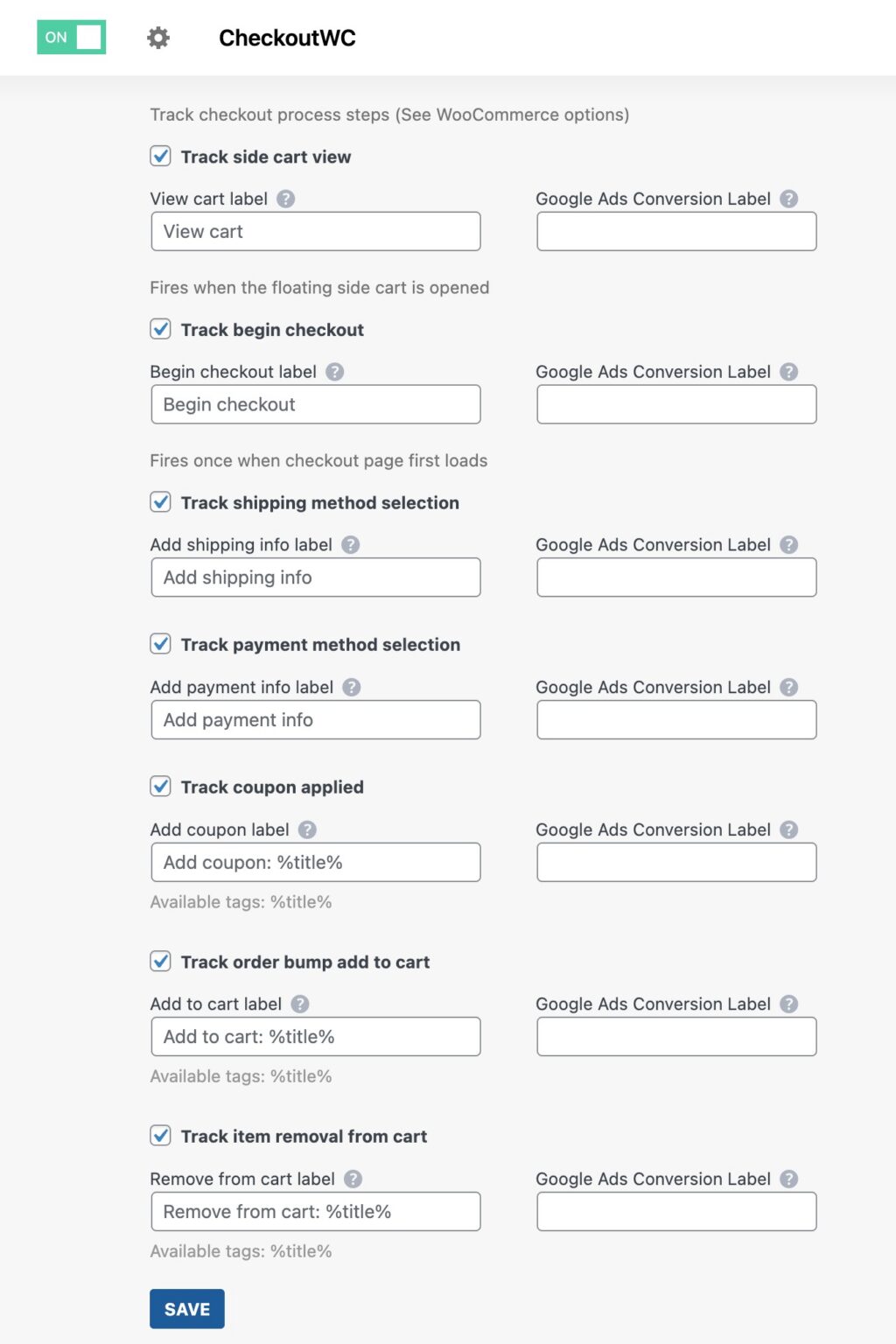
The CheckoutWC integration can track:
- Side cart views when the floating cart opens
- Begin checkout when the checkout page first loads
- Shipping method selection when the customer advances past the shipping step, capturing which shipping method they chose
- Payment method selection when the customer moves to the order review step, recording their chosen payment method
- Coupon applications each time a new coupon code is applied during checkout
- Order bump additions when a customer accepts an order bump offer during checkout
- Cart item removals when a customer removes an item during the checkout process
The key difference with the CheckoutWC integration is that it hooks into the actual step progression. When CheckoutWC moves the customer from the shipping step to the payment step, Conversion Bridge fires an add_shipping_info event with the selected shipping tier. When they advance to the order review, it fires an add_payment_info event with the payment method. These aren't page views. They're meaningful behavioral signals tied to specific checkout interactions.
And because these events include the full cart contents, cart value, and contextual data (like the specific shipping method or payment type), the data that flows to your analytics platforms is detailed enough to act on.
Conversion Journeys: See the Full Picture
Here's something I'm particularly proud of: When a WooCommerce order comes in, Conversion Bridge saves the customer's entire conversion journey directly to the order. Right in your WooCommerce admin, you can see the page-by-page path each customer took before they bought.
The WooCommerce orders list also shows Journey and UTMUTM parameters are tags added to a link that show where traffic comes from and which campaigns lead to real conversions. columns, so you can quickly scan your orders and see which marketing channels and campaigns are driving real revenue, not just traffic.
This is powerful because it connects the dots between your marketing and your sales. You can see that a customer came from a Facebook ad, landed on a blog post, browsed three product pages, started checkout, left, came back from an email two days later, and completed the purchase. That's the kind of insight that changes how you think about attributionThe process of determining which channels, campaigns, or actions contributed to a conversion, helping you understand what influenced a visitor’s decision to take action. and ad spend.
Turning Checkout Data into Revenue
Having checkout step data is one thing. Using it is where the money is.
Find Your Biggest Leak
Look at where the largest percentage of customers drop off. If you're losing 50% of people between "begin checkout" and "add shipping info," that's your first priority. Common fixes for shipping step drop-offs include:
- Showing estimated shipping costs earlier (on product or cart pages)
- Offering free shipping thresholds
- Reducing the number of required fields
- Providing more shipping options
If the drop-off is between "add payment info" and "purchase," consider adding trust signals, more payment options, or buy-now-pay-later integrations.
Measure the Impact of Changes
This is where most store owners fail. They make changes but don't measure the before and after. With step-by-step tracking in place, you can see exactly how a change affects each step of your funnel.
Switched to a new checkout layout? Compare the shipping step completion rate before and after. Added a new payment option? Track whether the payment step drop-off decreased. Implemented an order bump? See how many customers are engaging with it and what that does to your average order valueThe average amount of money a customer spends each time they place an order on your website..
Optimize Your Ad Platform Signals
When you're running ads on platforms like Meta, Google Ads, TikTok, or any of the other 11 ad platforms Conversion Bridge supports, checkout step events give those platforms more signal to optimize with.
Instead of just telling Meta "this person bought something," you're also telling it "this person added to cart, began checkout, entered shipping info, and completed the purchase." The algorithm uses those intermediate signals to better understand your funnel and find more people likely to convert. It's the difference between giving the algorithm one data point and giving it five.
Conversion Bridge sends these checkout events to all your connected platforms simultaneously, with the enhanced matching data (email, name, phone, address) that platforms like Meta's Conversions API and Google's Enhanced Conversions need for accurate attribution.
Conversion Bridge sends checkout step events to all 11 supported ad platforms simultaneously, including Meta's Conversions API and Google's Enhanced Conversions. More signal means better optimization and lower cost per acquisition.
Use UTM Data to Connect Marketing to Checkout Behavior
With UTM tracking and conversion journeys built into the WooCommerce orders table, you can answer questions like: Do customers from Google Ads complete checkout at a higher rate than those from Facebook? Do email campaign visitors skip the cart and go straight to checkout? Which landing pages produce customers who are most likely to accept order bumps?
This kind of cross-referencing between marketing source and checkout behavior is how you make smarter decisions about where to spend your ad budget.

Getting Started
If you're running a WooCommerce store and you don't have step-by-step checkout tracking in place, you're making decisions about your checkout based on incomplete data.
Here's how I'd approach it:
- Start with the WooCommerce integration basics. Enable purchase tracking, add-to-cart, and begin checkout events. This gives you the fundamental funnel data.
- Add the CheckoutWC integration if you're using it. The step-level tracking (shipping info, payment info, coupons, order bumps) gives you the granular data you need to identify and fix specific drop-off points.
- Connect your analytics and ad platforms. Conversion Bridge works with 19 analytics platforms and 11 ad platforms, so your checkout data flows everywhere you need it.
- Let the data accumulate for a week or two. You need a reasonable sample size before drawing conclusions.
- Identify your biggest funnel leak and fix it. Then measure the impact. Repeat.
If you want to take a closer look, Conversion Bridge is designed to make this kind of tracking simple. No code to write, no Google Tag Manager configurations to manage. Just enable the events you want to track and connect your platforms.
Your checkout is either a revenue machine or a revenue leak. The only way to know which one is to measure it.