




































































































Skip to content

Conversion tracking for CheckoutWC

Set up CheckoutWC conversion tracking in every analytics and ad platform you use, in minutes. Skip the developer fees, the tag-manager setup, and the hours of trial and error.

21 analytics platforms
+
8 ad platforms

Why Conversion Bridge

The old way vs. the new way

Tracking CheckoutWC without Conversion Bridge

A different plugin for every platform

Install one plugin for Google Analytics, another for Meta Ads, another for whichever platform you add next. Each has its own config and its own way of reading CheckoutWC.

Hand-wire every CheckoutWC event

Write custom JavaScript (or pay a developer) for every purchase, add-to-cart, and checkout step you want tracked.

Maintain the code forever

Every CheckoutWC update risks breaking your tracking. Every new platform means rebuilding your integration from scratch.

Discover broken tracking after the fact

Find out weeks later that CheckoutWC conversions never made it to your analytics. Rebuild reports, lose attribution.

Tracking CheckoutWC with Conversion Bridge

One plugin for every platform

Conversion Bridge sends CheckoutWC events into Google Analytics, Meta Ads, and every other analytics and ad platform you connect. No extra plugins needed.

Toggle on CheckoutWC

Flip one switch and CheckoutWC conversions start flowing to every platform, formatted exactly how each one expects.

Enhanced Conversions ready

Conversion Bridge hashes customer data from CheckoutWC and ships it to platforms like Google Ads and Meta for better attribution.

Live in minutes

No developer, no tag manager. Accurate CheckoutWC conversion tracking up and running today.

What you can track with CheckoutWC

Conversion Bridge captures these events from CheckoutWC and sends them to every analytics and ad platform that supports them.

Enhanced Conversions ship hashed first-party customer data to supported platforms automatically for improved attribution.

Start Tracking CheckoutWC

  • Purchase

    Order data with product details for detailed e-commerce tracking.

Features

Everything you need for CheckoutWC tracking

Page-by-page data

Conversion journeys for CheckoutWC

See the page-by-page path visitors take before completing a CheckoutWC conversion. Understand what actually drives results instead of guessing.

Learn more

Conversion Journey
×

Enhanced Conversions

Securely hash and send first-party customer data (email, phone, name, address) from CheckoutWC to your ad platforms. Sharper attribution means their algorithms find more real customers and waste less of your budget on clicks that never convert.

Learn more

Detailed Commerce Data

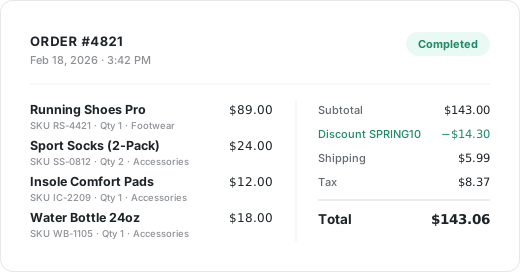
Full order data from CheckoutWC with product details, order values, and item counts, collected and formatted exactly as each platform needs it.

See commerce tracking

Order receipt with detailed commerce data

Custom Event Tracking

Need to track something CheckoutWC doesn't emit on its own? Define a CSS selector or JavaScript event, attach custom values, and target specific pages. Perfect for setting up important conversion events on unique or custom aspects of your WordPress website.

Learn more

Conversion Bridge › Custom Events
Button Click: Get Started
Scroll Depth: 75%
Video Play: Demo

Privacy Friendly

Conversion Bridge respects user consent choices. It integrates with every major consent management platform so CheckoutWC tracking only fires after the visitor approves.

Learn more

Integrations

Your entire stack, connected

WordPress plugins on one side, analytics and ad platforms on the other — Conversion Bridge links them together. Without code or headaches.

67 plugin integrations
21 analytics platforms
+
8 ad platforms

Testimonials

Loved by WordPress professionals

Conversion tracking made easy! Conversion Bridge is super simple to setup, and offers some very useful features. Definitely worth the investment.

Elliot Sowersby
Elliot Sowersby Founder and Developer, RelyWP United Kingdom

The huge painful amount of time and attention to detail it takes to setup conversion tracking with Google Tags for Gravity forms is crazy compared to the near 1 click install of ConvervsionBridge, the plugin will pay for itself in

J
James Persson Unbranded Digital AU

The best analytics solution for WordPress. Never thought anyone would make it this easy to set up conversion tracking/integrate with FB Ads and G Ads in a matter of minutes. 👏

Alex Panagis
Alex Panagis ScaleMath

Conversion Bridge allowed us to replace three different plugins and over 50 lines of janky, conflicting code. Now, when we need to adjust our setup, we go to the CB dashboard and make a change. Easy! Derek is always…

Zack Katz
Zack Katz GravityKit

Conversion Bridge enabled us to centralize our analytics configuration, transforming a hodgepodge of separate implementations into a single hub that is easy to manage and maintain. For anyone looking to simplify their analytics setup while ensuring accuracy and consistency, Conversion

Casey Burridge
Casey Burridge GravityKit

I really just love that I can trust that everything I might eventually need is getting synced back. Never felt confident with the other solutions I've tried 🥪

Ian Misner
Ian Misner KestrelWP

It's been one of the best tools we've rolled out at our agency, huge time saver for us. Keep doing what you're doing 🙌

Richard Henney
Richard Henney

Works perfectly and delivers exactly as promised. The customer service is excellent—quick to respond and incredibly helpful. Highly recommended.

R
Richard

Solid tool and platform to getting analytics. I had some questions about how to see specific pieces of events in GA4 and how to past those to events from Conversion Bridge to GA4 and they knocked it out of the…

Derek Welton
Derek Welton Ironwood Manufacturing

Conversion Bridge has simplified website traffic and conversion tracking. Derek's response time when I have questions or feature requests is incredible. Conversion Bridge is now part of my plugin stack for every WordPress website.

Reuben Hochstetler
Reuben Hochstetler Touchdown Tech

Conversion tracking made easy! Conversion Bridge is super simple to setup, and offers some very useful features. Definitely worth the investment.

Elliot Sowersby
Elliot Sowersby Founder and Developer, RelyWP United Kingdom

The huge painful amount of time and attention to detail it takes to setup conversion tracking with Google Tags for Gravity forms is crazy compared to the near 1 click install of ConvervsionBridge, the plugin will pay for itself in

J
James Persson Unbranded Digital AU

The best analytics solution for WordPress. Never thought anyone would make it this easy to set up conversion tracking/integrate with FB Ads and G Ads in a matter of minutes. 👏

Alex Panagis
Alex Panagis ScaleMath

Conversion Bridge allowed us to replace three different plugins and over 50 lines of janky, conflicting code. Now, when we need to adjust our setup, we go to the CB dashboard and make a change. Easy! Derek is always…

Zack Katz
Zack Katz GravityKit

Conversion Bridge enabled us to centralize our analytics configuration, transforming a hodgepodge of separate implementations into a single hub that is easy to manage and maintain. For anyone looking to simplify their analytics setup while ensuring accuracy and consistency, Conversion

Casey Burridge
Casey Burridge GravityKit

I really just love that I can trust that everything I might eventually need is getting synced back. Never felt confident with the other solutions I've tried 🥪

Ian Misner
Ian Misner KestrelWP

It's been one of the best tools we've rolled out at our agency, huge time saver for us. Keep doing what you're doing 🙌

Richard Henney
Richard Henney

Works perfectly and delivers exactly as promised. The customer service is excellent—quick to respond and incredibly helpful. Highly recommended.

R
Richard

Solid tool and platform to getting analytics. I had some questions about how to see specific pieces of events in GA4 and how to past those to events from Conversion Bridge to GA4 and they knocked it out of the…

Derek Welton
Derek Welton Ironwood Manufacturing

Conversion Bridge has simplified website traffic and conversion tracking. Derek's response time when I have questions or feature requests is incredible. Conversion Bridge is now part of my plugin stack for every WordPress website.

Reuben Hochstetler
Reuben Hochstetler Touchdown Tech

Plans & Pricing

One plugin Every conversion Setup in minutes

Starting at only $79/year, every plan includes all integrations & features

View Plans & Pricing
14-day money back guarantee Premium 1-on-1 support No tag manager needed

CheckoutWC is a premium WooCommerce checkout optimization plugin that replaces the default WooCommerce checkout with a modern, conversion-optimized experience. It features a multi-step checkout flow, a floating side cart, order bumps, and a streamlined design built to reduce cart abandonment and increase completed purchases. Popular among WooCommerce stores that want a better checkout experience, CheckoutWC gives store owners full control over every step between adding a product to the cart and completing payment.

Why Conversion Tracking is Important

Conversion tracking is essential for e-commerce businesses because it reveals exactly which marketing campaigns, traffic sources, and ad creatives drive actual revenue. Without conversion tracking, you cannot calculate return on ad spend, identify where customers drop off in the buying process, or make informed decisions about budget allocation. Tracking conversion events throughout the checkout funnel transforms your checkout data into actionable insights that directly improve your store's profitability.

Why Conversion Tracking for CheckoutWC?

Conversion tracking for CheckoutWC is particularly valuable because the plugin introduces a multi-step checkout process with features like order bumps and a floating side cart that create new conversion opportunities not tracked by standard WooCommerce analytics. Each step in the CheckoutWC flow represents a measurable moment in the customer journey, and conversion tracking for these steps gives you granular visibility into how shoppers progress through your checkout.

For stores using CheckoutWC, conversion tracking provides the data needed to optimize your entire checkout funnel. You can measure how many customers open the side cart, how many begin checkout, where they drop off between shipping and payment steps, which order bumps get accepted, and which coupon codes drive completed purchases. This level of funnel visibility is essential for identifying friction points and maximizing the conversion rate improvements that CheckoutWC is designed to deliver. The integration works alongside the WooCommerce integration, which handles purchase tracking, so you get complete coverage from cart through order confirmation.

Use Cases for CheckoutWC Conversion Tracking

Checkout Funnel Drop-off Analysis: Track each step of the CheckoutWC multi-step checkout to identify exactly where customers abandon the process. Conversion tracking for begin checkout, shipping selection, and payment selection reveals whether customers drop off at the shipping step, the payment step, or somewhere else, allowing you to optimize the specific step that loses the most revenue.

Order Bump Performance Measurement: Track when customers add order bumps to their cart during checkout to measure uptake rates and revenue impact. Conversion tracking for order bump add-to-cart events shows which bumps resonate with customers and which need better positioning, pricing, or product selection.

Side Cart Engagement Tracking: Track when customers open the floating side cart to understand shopping behavior and engagement patterns. Conversion tracking for side cart views helps you measure how effectively your store encourages customers to review their cart and move toward checkout.

Shipping Method Optimization: Track which shipping methods customers select during checkout to understand preferences and their impact on conversion rates. Conversion tracking for shipping selection captures the chosen shipping tier, helping you evaluate whether shipping options, pricing, or free shipping thresholds affect purchase completion.

Payment Method Analysis: Track which payment methods customers choose to understand preferences and optimize your payment offerings. Conversion tracking for payment method selection helps you determine whether adding or removing payment options impacts your checkout conversion rate.

Coupon Campaign Attribution: Track when customers apply coupon codes during checkout to measure the effectiveness of promotional campaigns. Conversion tracking for coupon applications captures the coupon code used, allowing you to attribute checkout engagement back to specific marketing campaigns and discount strategies.

Conversion Events to Track in CheckoutWC

The conversion events tracked for CheckoutWC include:

View Cart: Track when customers open the CheckoutWC floating side cart. Conversion tracking for side cart views measures shopping engagement and helps you understand how many visitors are actively considering a purchase. This event fires each time the side cart is opened, capturing cart total and item details.

Begin Checkout: Track when customers land on the checkout page and the checkout process initializes. This conversion tracking event fires once per checkout session, capturing the cart total, items, and any pre-applied coupons. If the WooCommerce integration already tracks begin checkout, the CheckoutWC event automatically defers to avoid duplicate tracking.

Add Shipping Info: Track when customers select a shipping method during checkout. Conversion tracking for this step captures the chosen shipping tier along with cart details, helping you understand which shipping options customers prefer and how shipping selection affects funnel progression.

Add Payment Info: Track when customers select a payment method and advance to the order review step. This conversion tracking event captures the chosen payment method name and cart details, firing when the customer moves to order review or clicks the Place Order button.

Add Coupon: Track when customers apply a coupon code during checkout. Conversion tracking for coupon applications captures the coupon code used, helping you measure promotional campaign effectiveness and understand which discounts motivate customers to complete their purchase.

Add to Cart: Track when customers accept an order bump during checkout, adding the bump product to their cart. Conversion tracking for order bump additions captures the product name and price, helping you measure order bump performance and optimize your upsell strategy.

Remove from Cart: Track when customers remove an item from their cart during checkout or from the side cart. Conversion tracking for item removals captures the product name and value of the removed item, helping you understand which products customers reconsider and whether pricing or product presentation needs adjustment.

Supported Conversion Tracking Features for CheckoutWC

Full Cart Item Data: Every conversion tracking event includes detailed item-level data pulled from the WooCommerce cart, including product SKU, name, price, quantity, variant information, categories, and brand. This granular data enables accurate enhanced e-commerce reporting across your analytics and ad platforms.

WooCommerce Integration Compatibility: The CheckoutWC integration works alongside the WooCommerce integration, which handles purchase tracking on the order confirmation page. This means you get complete funnel coverage from side cart view through purchase completion without any configuration conflicts. The begin checkout event intelligently defers to WooCommerce if it already tracks that event, preventing duplicate data.

Custom Event Labels: Customize the label for each conversion tracking event to match your reporting needs. The add coupon, add to cart, and remove from cart labels support a %title% placeholder that automatically inserts the coupon code or product name, making it easy to identify specific items and promotions in your analytics dashboards.

Multi-Step Checkout Tracking: Track the complete CheckoutWC multi-step checkout flow with dedicated events for each stage. Shipping and payment events fire based on CheckoutWC's step navigation, ensuring accurate funnel measurement that reflects how customers actually progress through the checkout.

Side Cart and Checkout Page Coverage: Conversion tracking covers both the CheckoutWC floating side cart and the main checkout page. View cart, add to cart, and remove from cart events work in the side cart across your entire site, while checkout-specific events fire on the checkout page, giving you complete coverage of the CheckoutWC experience.