I'm excited to share another big update to Conversion Bridge yet! Version 1.12 brings powerful new ways to track where your visitors come from, connect with more tools, and understand what's working on your WordPress site.
New UTM Reports Dashboard & Link Generator
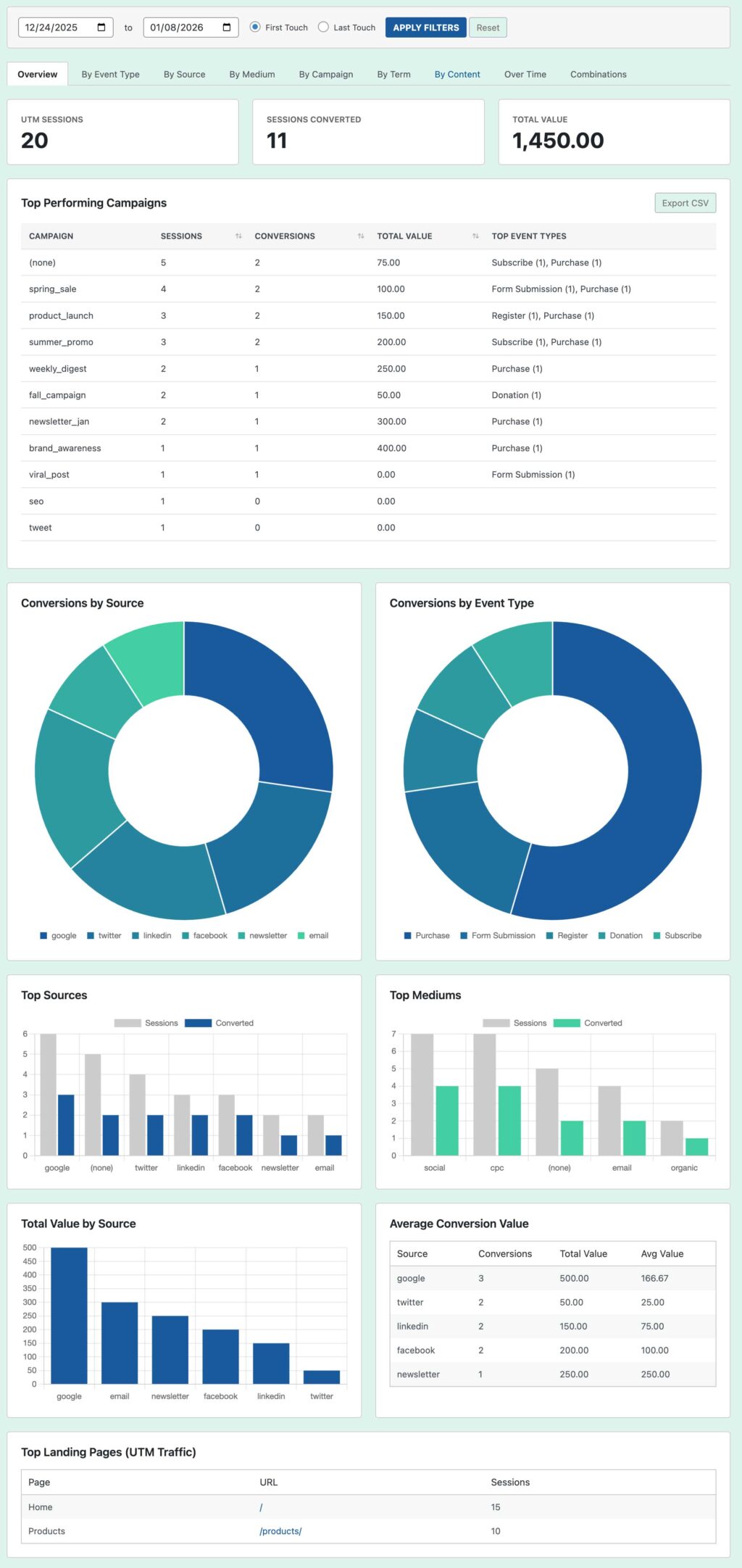
Conversion Bridge has always tracked UTMUTM parameters are tags added to a link that show where traffic comes from and which campaigns lead to real conversions. data with your conversions which gets handled by your analytics platforms as well. But now you can actually see that data in a dedicated reports dashboard.
The new UTM Reports section gives you a clear view of which sources, mediums, and campaigns are driving conversions - all without leaving WordPress. There is even a CSV export tool for all the data as well.
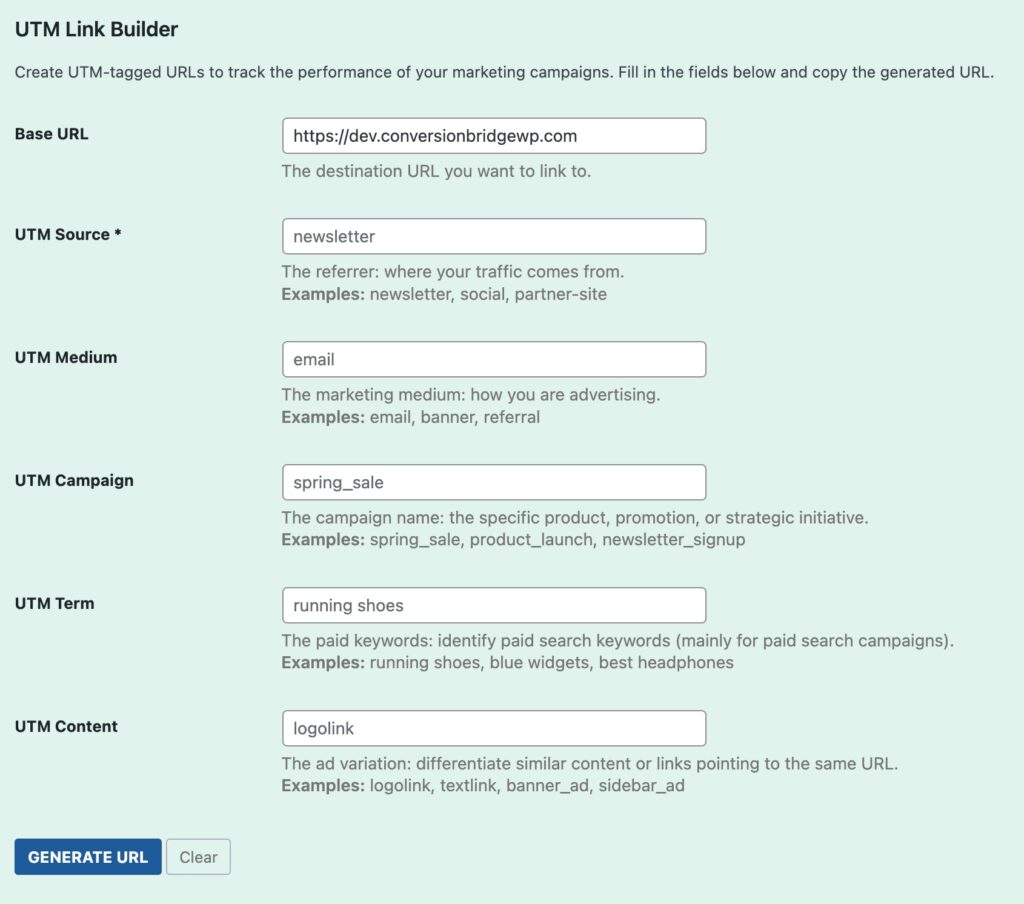
We also added a UTM Link Generator tool right inside the plugin. No more Googling "UTM builder" every time you need to create a trackable link. Just fill in the fields and copy your link.
And if you're using Conversion Journeys, you can now filter journeys by UTM data to see the complete path visitors take from your campaigns to conversion.
Finally, easy answers to questions like "Did that newsletter actually lead to sales?" or "Which Facebook post drove the most signups?"
UTM Reports Tool
UTM Link Builder Tool
7 New Integrations for More Conversion Tracking
We've added support for even more WordPress plugins and services:
E-commerce & Payments
- Freemius - Sell your own WordPress plugins and themes? Now you can track those conversions.
- LatePoint - Appointment booking just got trackable.
Affiliate & Community
- Fluent Affiliate - See when your affiliate program drives results.
- Fluent Community - Track engagement in your community spaces.
Analytics Platforms
- Rybitt Analytics - Another great alternative to big-tech analytics.
Cookie Consent
- WPConsent - Works with this popular consent banner.
- Pressidium Cookie Consent - Another consent option now supported.
Run Multiple Meta Pixels on One Site
This one's been requested a lot! If you manage a site for multiple businesses, run different campaigns, or work with agencies, you can now add multiple Meta (Facebook) pixels to your site.
Each pixel tracks independently, so you can keep your data separate and organized.

Custom Events Just Got Way More Powerful
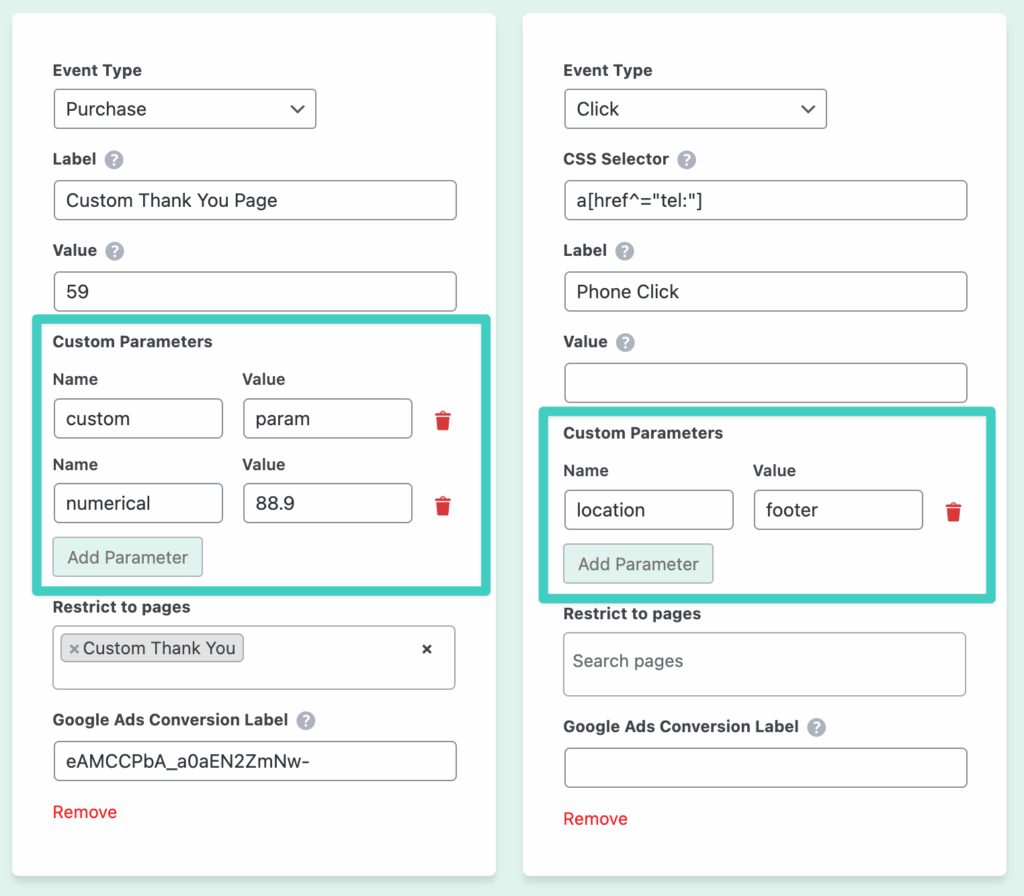
Custom events let you track specific actions on your site - like when someone clicks a button, scrolls to a section, or watches a video.
Now, you can add custom parameters to each event. This means you can include extra details like:
- Which product someone viewed
- What category they were browsing
- Any custom data that matters to your business
This extra info shows up in your analytics, giving you deeper insights.
Never Miss a Conversion with the New Event Queue
Here's a problem you might not know you had: sometimes when a visitor takes an action (like submitting a form) and gets redirected to a thank-you page, the conversion tracking doesn't fire properly.
Our new Event Queue System fixes this. If a conversion can't be tracked on the current page, it automatically saves it and fires on the next page load. No more lost data!
This works automatically - you don't need to do anything to enable it.
More Blocks with Built-In Tracking
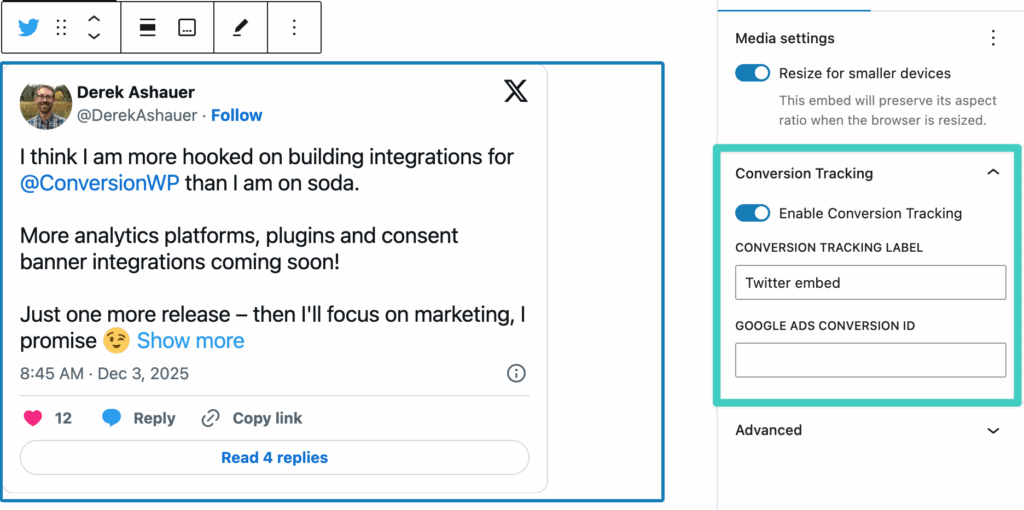
We've expanded which WordPress blocks can have conversion tracking built right in:
- Video blocks - Know when people play your videos
- Audio blocks - Track podcast or music plays
- YouTube embeds - See engagement with embedded videos
- Social embeds - Track clicks on social content
- Site logo and title - See if people click your branding
- Post titles - Track engagement with your content
Just enable tracking on the block and you're set!
Automatic Google Analytics Setup
Conversion Bridge now automatically sets up custom dimensions in your GA4 property when you connect via OAuth and enable properties or user info. No manual setup needed.
When you enable properties like Author, Category, Tags, or User Info, the plugin creates the corresponding EVENT-scoped or USER-scoped custom dimensions in GA4. It tracks what's been created to avoid duplicates and checks for missing dimensions during updates.
This works automatically for OAuth connections. If you're using a manual Measurement ID, connect via OAuth to enable this feature.
Conversion Bridge may prompt you to reconnect your Google Analytics OAuth as previous versions did not ask for enough permissions when previously connecting.
Better Formidable Forms Support
If you use Formidable Forms, you'll love these improvements:
- Enhanced Conversions support - Send customer details (like email) to ad platforms for better matching
- Custom field tracking - Choose which form fields to include in your conversion data to your enabled platforms
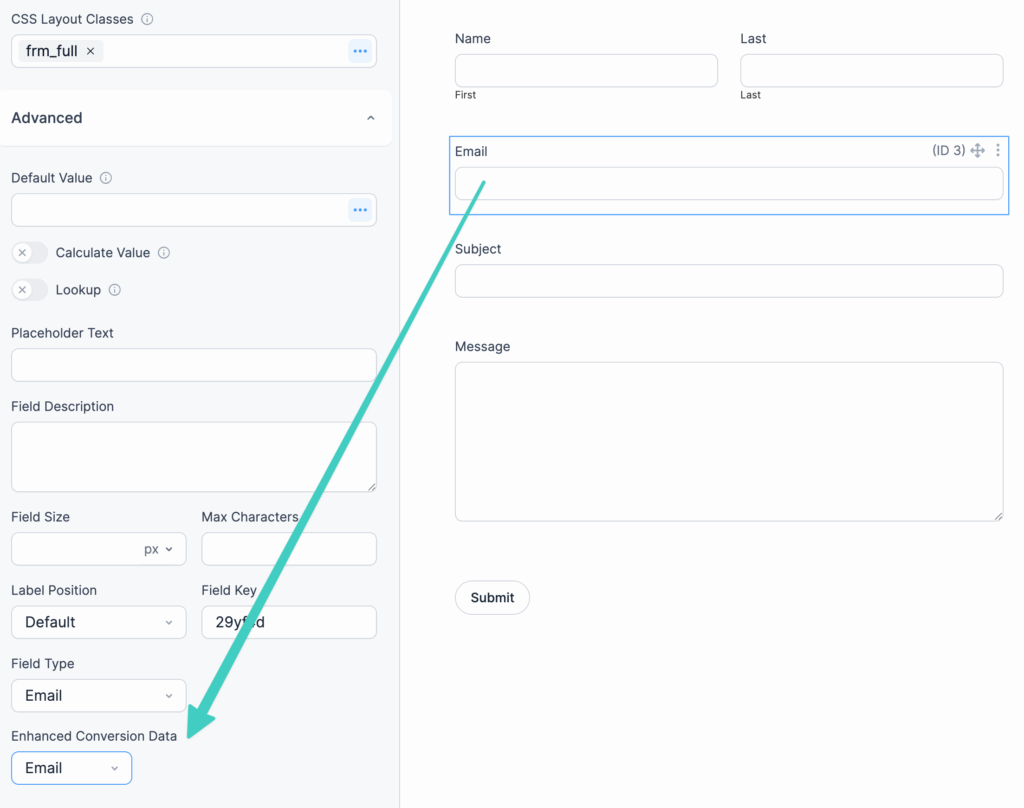
Configure a specific field to be passed as Enhanced Conversion data for Email, First Name, Last Name
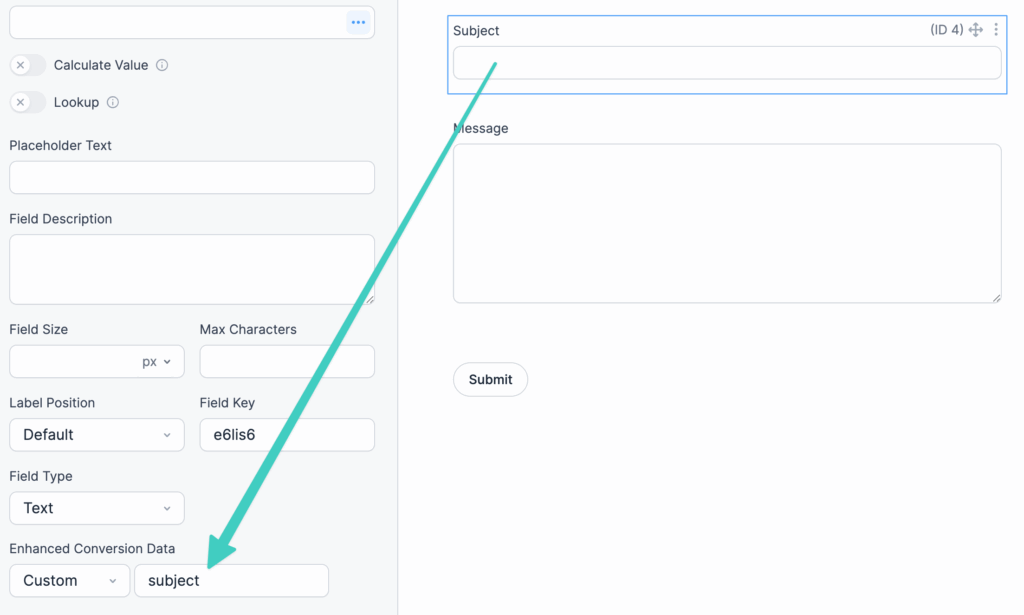
Configure specific field to be passed as custom key/value pair
Smarter Admin Menu for Analytics
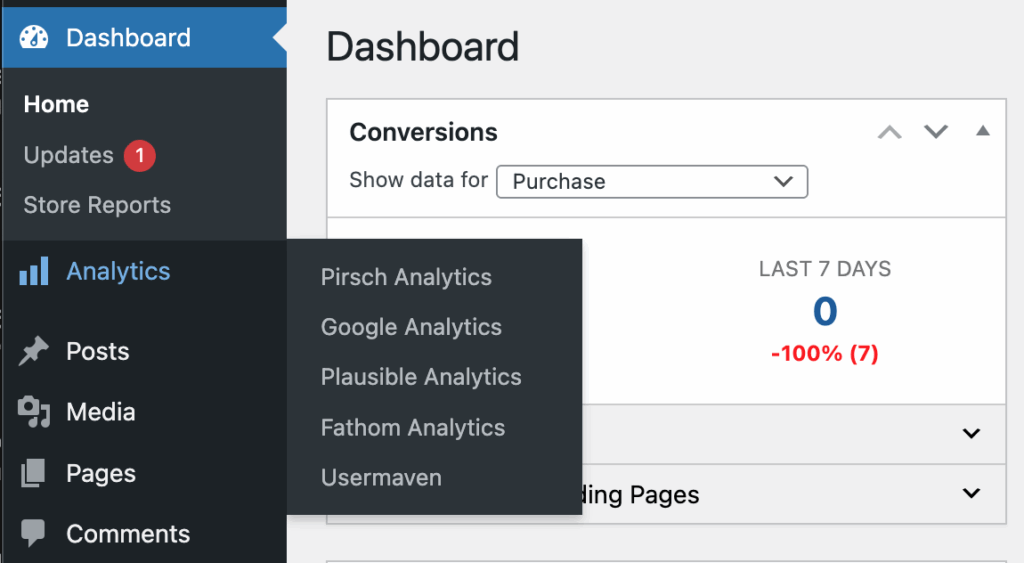
When you enable multiple analytics dashboards (like Pirsch, Plausible, our built-in GA4 dashboard or any of the supported dashboards), they now appear under a single menu with organized sub-menus. Less clutter, easier to find what you need. The main menu item is now renamed to a more generic "Analytics" as well.
Better Security for Your API Key
All your API keys and sensitive credentials are now stored more securely in the database. This follows WordPress security best practices and keeps your data safer.
Small But Helpful Additions
- Comments in your site's code explaining why tracking might not be showing (helpful for debugging)
- Fathom Analytics now has an option to honor "Do Not Track" browser settings
- Easy Digital Downloads and WooCommerce now track "remove from cart" events
- Better logging for troubleshooting update issues
Bug Fixes
We also squashed several bugs in this release:
- Fixed issues with Meta pixel deduplicationDeduplication prevents the same conversion from being counted twice. It keeps your data accurate and is handled automatically by Conversion Bridge.
- Fixed MemberPress subscription tracking with Stripe
- Fixed GA4 number formatting in JavaScript events
- Fixed GA4 settings saving that sometimes disconnected OAuth
- Cleaned up unnecessary logging function calls
How to Update
If you have an active license, you'll see the update available in your WordPress dashboard under Plugins. Just click "Update Now" and you're all set!
New to Conversion Bridge? Get started today and see what your visitors are really doing on your site.