
Conversion tracking for Gravity Forms in Google Analytics
No-code setup of analytics and important conversion events from Gravity Forms in Google Analytics—ready in under a minute.


Why Conversion Bridge
The old way vs. the new way
Without Conversion Bridge
Paste the Google Analytics snippet & hope
Basic pageview data lands in Google Analytics, but Gravity Forms conversion events never fire.
Hand-wire every Gravity Forms event
Write custom JavaScript (or pay a developer) for every form submission, confirmation, and field interaction you want tracked.
A different plugin for every platform
Install one plugin for Google Analytics, another for Google Analytics, another for whatever ad platform you run next—each with its own config, its own quirks, and its own way of reading Gravity Forms.
Discover broken tracking after the fact
Find out weeks later that Gravity Forms conversions never made it to Google Analytics. Rebuild reports, lose attribution.
With Conversion Bridge
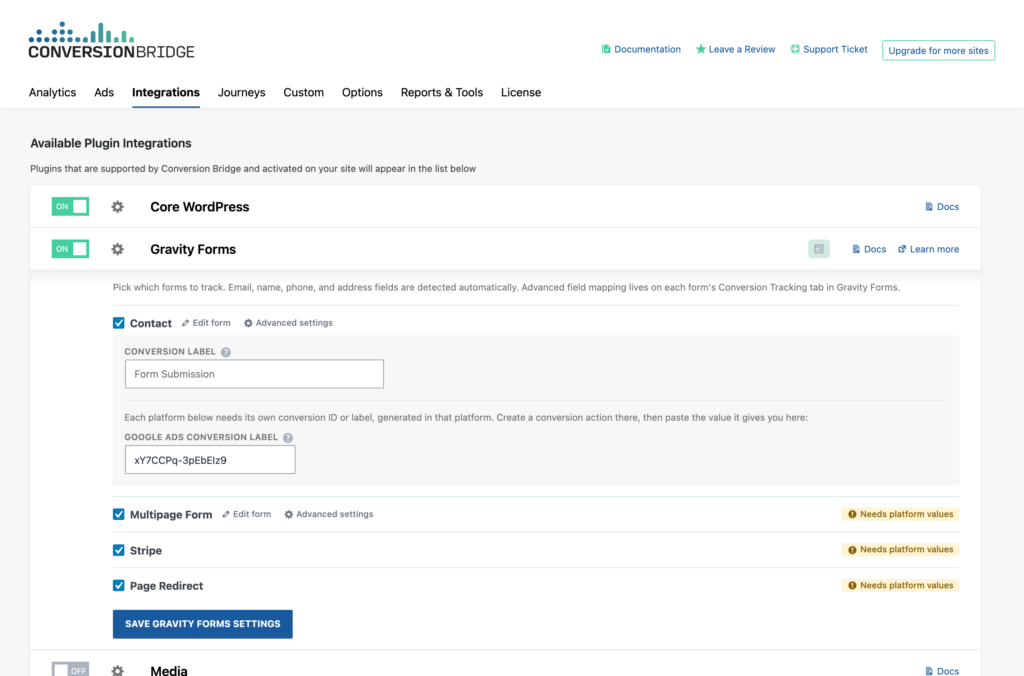
Paste your Google Analytics ID
Drop in your Google Analytics ID. That's the only "code" you touch.
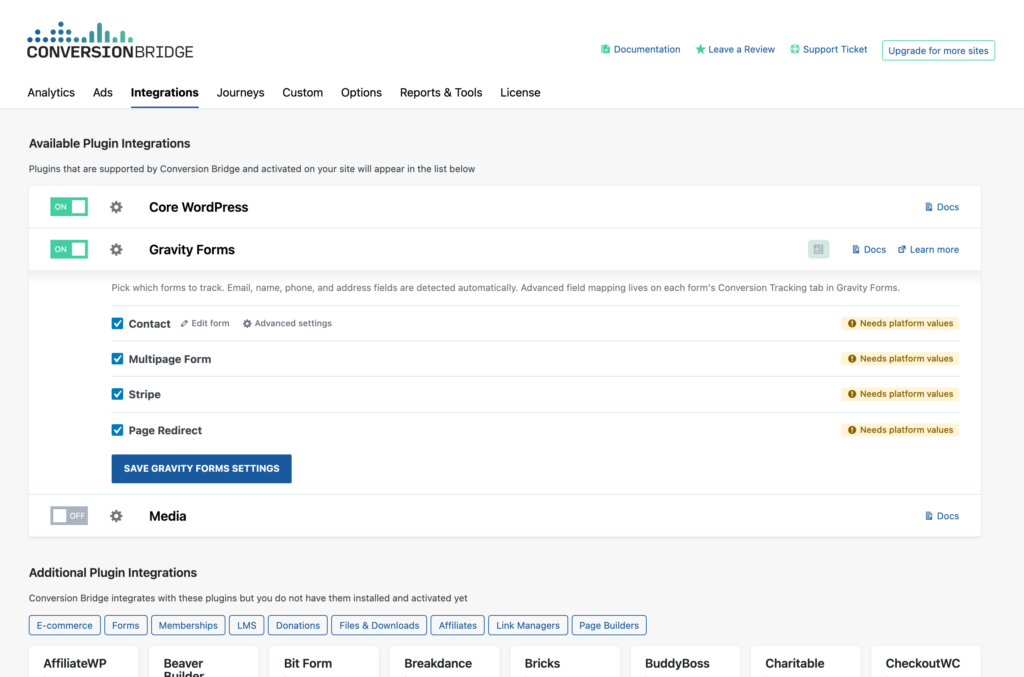
Toggle on Gravity Forms
Flip one switch and Google Analytics starts receiving Gravity Forms conversion data formatted exactly how it expects.
One plugin for every platform
Conversion Bridge sends Gravity Forms events into Google Analytics and every other analytics and ad platform you use — no extra plugins needed.
Live in minutes
No developer, no tag manager. Accurate Gravity Forms conversion tracking in Google Analytics up and running today.
What you can track
Gravity Forms conversions in Google Analytics
Gravity Forms is a WordPress forms plugin. User form submissions with Gravity Forms are tracked in Google Analytics, giving you key insights about how effectively your website turns visitors into leads or customers.
About the tools
The plugin & the platform
About Gravity Forms
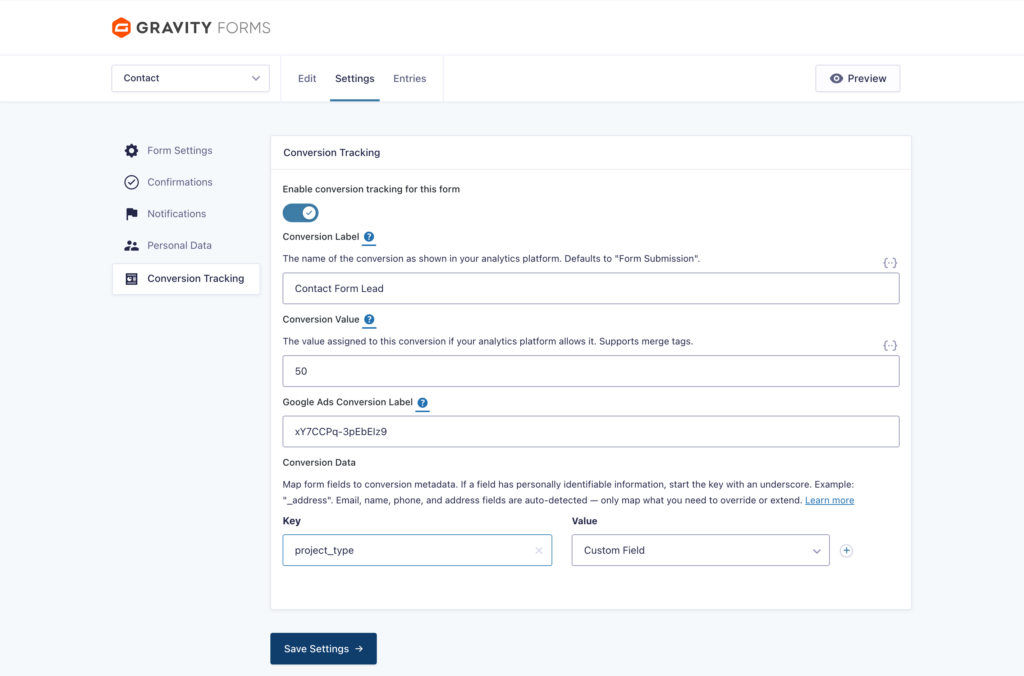
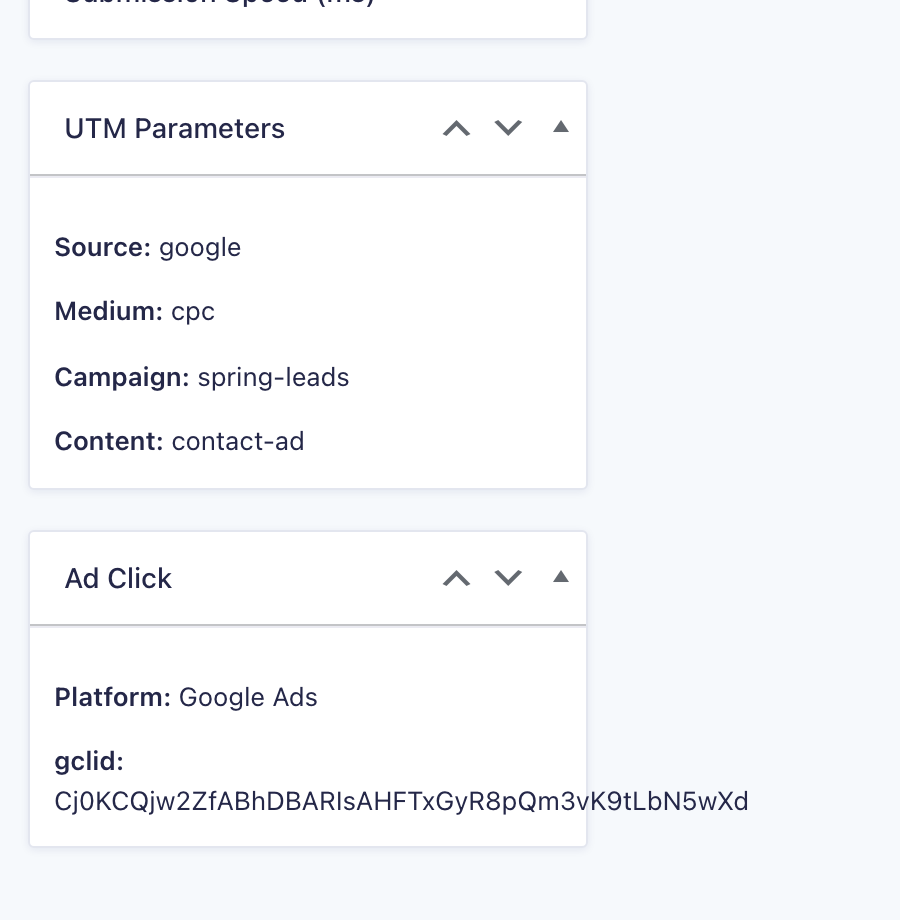
Track Gravity Forms entries as conversions across your analytics and ad platforms, with a toggle per form and name, email, phone, and address detected automatically for enhanced conversions. Every entry also stores the campaign and ad click that earned it, ready for your entries list, exports, feeds, and merge tags.
-
Enhanced conversions ready
Sends hashed first-party customer data (email, phone, name, address) so paid ad platforms like Google Ads and Meta can improve attribution accuracy.

About Google Analytics
Google Analytics 4 is the most widely used analytics platform on the web. Conversion Bridge connects it to WordPress in one click and turns your form submissions, orders and signups into GA4 conversions, with a dashboard in your WordPress admin so you can read the results without opening GA4.
-
E-commerce ready
Full product, cart, and order details sent with every conversion event.
-
Real-time analytics
See conversions land in your reports the moment they happen, no delay.
-
Free trial
Try it before committing to a paid plan.
-
WordPress admin dashboard
Key metrics and reports shown right inside wp-admin without leaving your site.
-
Native Consent Mode
Respects user consent choices automatically to stay compliant with privacy regulations.
-
Multiple sites
Track more than one website from a single account without extra cost per site.
-
Conversion funnels
Build step-by-step funnel reports to see where visitors drop off on the way to converting.
-
Developer API
Programmatic access to your data for custom reports and integrations.
-
Accepts user info
Accepts logged-in user identity alongside events for cross-device and segment reporting.
Platform features
What Google Analytics gives you
When you connect Gravity Forms to Google Analytics through Conversion Bridge, here's what's at your fingertips.
Connect in One Click
Sign in with Google, pick your GA4 property, and the Measurement ID, API access and custom dimensions are set up for you. No pasting code into a theme, no Tag Manager.
Ecommerce Tracking
Purchases, add to carts, checkouts and refunds reach GA4 with order totals, line items, coupons and shipping attached, so your ecommerce reports show real revenue by source.
Google Consent Mode
Works with your cookie banner so GA4 respects what each visitor chose. Google Consent Mode v2 turns on automatically when you pick your consent plugin.
Dashboard in WordPress
A Google Analytics dashboard in your WordPress admin with traffic and conversion events side by side. Filter every card by a conversion event to see which sources and pages actually convert.
Extra Pageview Data
Send author, category, tags, post type, logged-in status, user role and language with every pageview as custom dimensions, created in GA4 for you.
Server-Side Events
Refunds and other server-side events go straight from your server to GA4 through the Measurement Protocol, so the data arrives even when the browser never fires.
Custom Events
Track button clicks, video plays, downloads or anything else on your site as a custom GA4 event with no code.
Privacy Settings
Turn off Google Signals, turn off ad personalization, or enable restricted data processing, each with a checkbox.
Page-by-page data
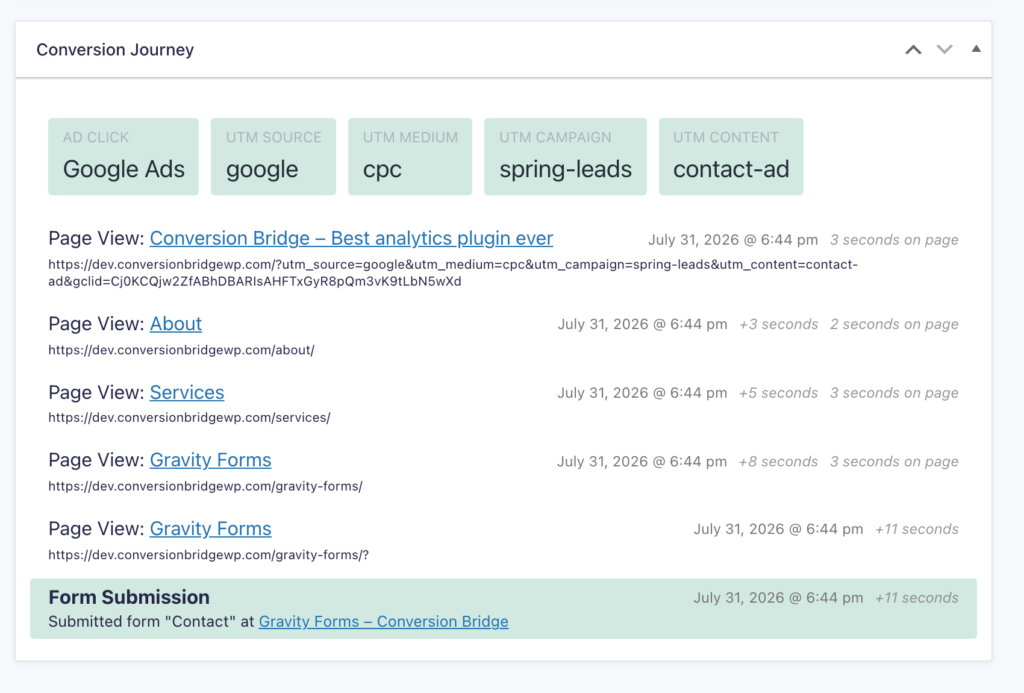
Conversion Journeys for Gravity Forms
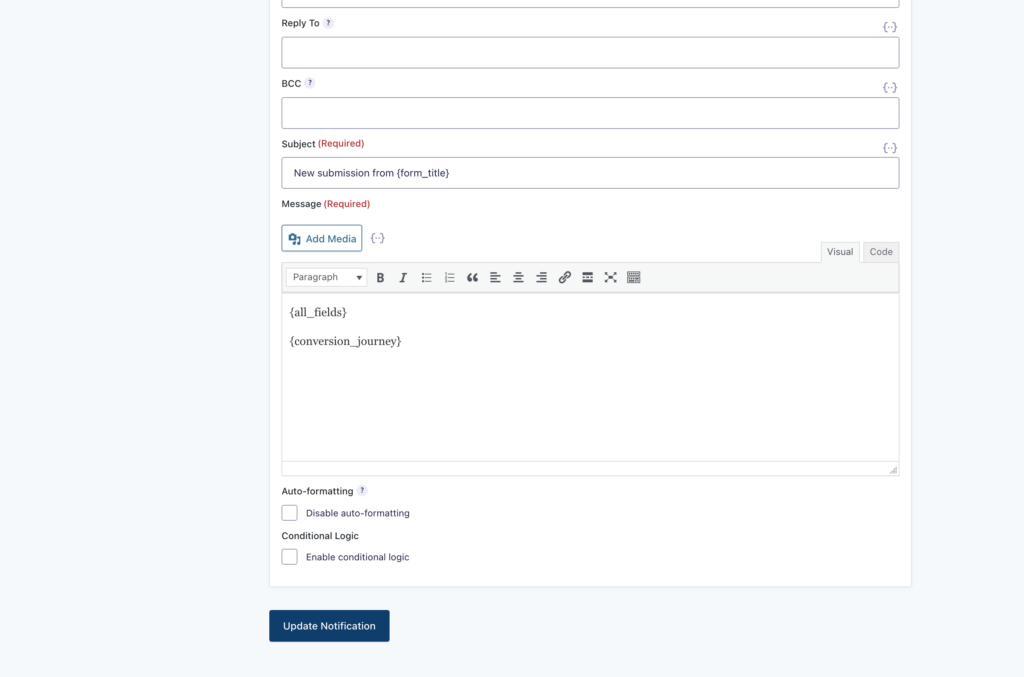
Conversion Bridge records the full page-by-page path every visitor takes before and after a Gravity Forms conversion. See what actually drives results instead of guessing, right inside WordPress.
See it in action
Gravity Forms conversion tracking, step by step




































































































Integrations
Your entire stack, connected
WordPress plugins on one side, analytics and ad platforms on the other — Conversion Bridge links them together. Without code or headaches.
Testimonials
Loved by WordPress professionals
I really just love that I can trust that everything I might eventually need is getting synced back. Never felt confident with the other solutions I've tried 🥪

Prior to discovering Conversion Bridge we battled for almost 12-months with another well-known plugin that was supposed to resolve our Meta tracking issues. Yet, week after week after week, the leads and sales that we were seeing in our payment…
Prior to discovering Conversion Bridge we battled for almost 12-months with another well-known plugin that was supposed to resolve our Meta tracking issues.
Yet, week after week after week, the leads and sales that we were seeing in our payment system did not correlate to the conversions that Meta was showing. The discrepancy was almost catastrophic for our paid advertising campaigns and caused many, many days of lost time and frustration over many months trying to figure out what the problem was, tweaking and changing things, trying to with their support and watching endless YT vids to figure it out, but to no avail.
Then we discovered ConversionBridge. It is no exaggeration to say that this plugin has resolved our tracking issues almost overnight. It took 5 mins to set up with its one-click integrations.
We switched off the old PYS plugin and ran with ConversionBridge for a week. I held my breath during my weekly meeting with our Media Buyer as he checked the stats on Meta against our sales system. We both nearly fell off our chairs when leads and sales on our system matched conversions on Meta.
It has been several months since we switched over to Conversion Bridge and the story is still the same: It has resolved a 12 month battle almost overnight and has certainly resulted in many more sales now that Meta is finally receiving accurate data. I can't recommend it enough and urge anyone using any other 'pixel' plugin to switch to it immediately.
Conversion Bridge has simplified website traffic and conversion tracking. Derek's response time when I have questions or feature requests is incredible. Conversion Bridge is now part of my plugin stack for every WordPress website.

It's been one of the best tools we've rolled out at our agency, huge time saver for us. Keep doing what you're doing 🙌

Conversion tracking made easy! Conversion Bridge is super simple to setup, and offers some very useful features. Definitely worth the investment.

Works perfectly and delivers exactly as promised. The customer service is excellent—quick to respond and incredibly helpful. Highly recommended.
Conversion Bridge enabled us to centralize our analytics configuration, transforming a hodgepodge of separate implementations into a single hub that is easy to manage and maintain. For anyone looking to simplify their analytics setup while ensuring accuracy and consistency, Conversion …
Conversion Bridge enabled us to centralize our analytics configuration, transforming a hodgepodge of separate implementations into a single hub that is easy to manage and maintain. For anyone looking to simplify their analytics setup while ensuring accuracy and consistency, Conversion Bridge is an ideal solution.

Conversion Bridge is a game-changer for anyone serious about optimizing their WordPress site. It seamlessly integrates with all my marketing tools, allowing me to track traffic and conversions effortlessly. The setup was incredibly smooth, and the interface is user-friendly,…
Conversion Bridge is a game-changer for anyone serious about optimizing their WordPress site. It seamlessly integrates with all my marketing tools, allowing me to track traffic and conversions effortlessly. The setup was incredibly smooth, and the interface is user-friendly, making it easy to get up and running in no time. I highly recommend Conversion Bridge to anyone looking to take their WordPress site to the next level!

100% recommend. Conversion Bridge takes the pain out of conversion tracking. I am implementing this on all my client sites. Top-notch support as well!

The plugin was easy to install and setup, and does exactly as promised. And the support to deal with questions has been friendly, prompt and helpful!

I really just love that I can trust that everything I might eventually need is getting synced back. Never felt confident with the other solutions I've tried 🥪
Prior to discovering Conversion Bridge we battled for almost 12-months with another well-known plugin that was supposed to resolve our Meta tracking issues. Yet, week after week after week, the leads and sales that we were seeing in our payment…
Prior to discovering Conversion Bridge we battled for almost 12-months with another well-known plugin that was supposed to resolve our Meta tracking issues.
Yet, week after week after week, the leads and sales that we were seeing in our payment system did not correlate to the conversions that Meta was showing. The discrepancy was almost catastrophic for our paid advertising campaigns and caused many, many days of lost time and frustration over many months trying to figure out what the problem was, tweaking and changing things, trying to with their support and watching endless YT vids to figure it out, but to no avail.
Then we discovered ConversionBridge. It is no exaggeration to say that this plugin has resolved our tracking issues almost overnight. It took 5 mins to set up with its one-click integrations.
We switched off the old PYS plugin and ran with ConversionBridge for a week. I held my breath during my weekly meeting with our Media Buyer as he checked the stats on Meta against our sales system. We both nearly fell off our chairs when leads and sales on our system matched conversions on Meta.
It has been several months since we switched over to Conversion Bridge and the story is still the same: It has resolved a 12 month battle almost overnight and has certainly resulted in many more sales now that Meta is finally receiving accurate data. I can't recommend it enough and urge anyone using any other 'pixel' plugin to switch to it immediately.
Conversion Bridge has simplified website traffic and conversion tracking. Derek's response time when I have questions or feature requests is incredible. Conversion Bridge is now part of my plugin stack for every WordPress website.
It's been one of the best tools we've rolled out at our agency, huge time saver for us. Keep doing what you're doing 🙌
Conversion tracking made easy! Conversion Bridge is super simple to setup, and offers some very useful features. Definitely worth the investment.
Works perfectly and delivers exactly as promised. The customer service is excellent—quick to respond and incredibly helpful. Highly recommended.
Conversion Bridge enabled us to centralize our analytics configuration, transforming a hodgepodge of separate implementations into a single hub that is easy to manage and maintain. For anyone looking to simplify their analytics setup while ensuring accuracy and consistency, Conversion …
Conversion Bridge enabled us to centralize our analytics configuration, transforming a hodgepodge of separate implementations into a single hub that is easy to manage and maintain. For anyone looking to simplify their analytics setup while ensuring accuracy and consistency, Conversion Bridge is an ideal solution.
Conversion Bridge is a game-changer for anyone serious about optimizing their WordPress site. It seamlessly integrates with all my marketing tools, allowing me to track traffic and conversions effortlessly. The setup was incredibly smooth, and the interface is user-friendly,…
Conversion Bridge is a game-changer for anyone serious about optimizing their WordPress site. It seamlessly integrates with all my marketing tools, allowing me to track traffic and conversions effortlessly. The setup was incredibly smooth, and the interface is user-friendly, making it easy to get up and running in no time. I highly recommend Conversion Bridge to anyone looking to take their WordPress site to the next level!
100% recommend. Conversion Bridge takes the pain out of conversion tracking. I am implementing this on all my client sites. Top-notch support as well!
The plugin was easy to install and setup, and does exactly as promised. And the support to deal with questions has been friendly, prompt and helpful!
Plans & Pricing
One plugin Every conversion Setup in minutes
Starting at only $79/year, every plan includes all integrations & features
- 14-day money back guarantee
- Premium 1-on-1 support
- No tag manager needed
Common questions
Yes, Conversion Bridge is a WordPress plugin and only works on WordPress-powered websites.
Yes! I am very proud of the quality and speed of support offered should you run into any issues.
Conversion Bridge supports [integration_count] plugins, [platform_count] analytics platforms, and [ad_platform_count] ad platforms. If what you need is not yet supported, send a request and I will take a look — I am always looking to grow the integration list.
Yes! Agencies are highly encouraged to check out our Agency Partner Program where you can get a free license for your own site and earn money by referring new clients to Conversion Bridge.
Yes, but using GTM will require additional setup and configuration. Conversion Bridge is a much easier way to setup analytics and ad platform conversion tracking.
Conversion Bridge can be considered a GTM replacement — one that is much easier to setup, more accurate in tracking, gives you more insights, and works directly with the analytics platforms, ad platforms and plugins in use on your WordPress website.
Yes! At any time you can upgrade to a pricing plan that includes more sites.
Absolutely. Conversion tracking is not just for ad campaigns — it is how you figure out what is actually working in your business. Without it, you are guessing which pages, emails, blog posts, and organic traffic sources are driving signups and sales.
Conversion Bridge tracks form submissions, memberships, downloads, and purchases across your WordPress site, so you can confidently decide where to spend your time, what content to double down on, and what to cut — whether you ever run a paid ad or not.
Yes. Conversion Bridge integrates with many consent management platforms, so tracking respects visitor consent decisions before anything fires.

Hi, I’m Derek. I’ve been building WordPress plugins for over a decade, and my goal with Conversion Bridge is to make analytics and conversion tracking setup as painless as possible. If the FAQ didn’t cover it — pre-sales, an integration you wish existed, or you’re stuck on setup — send it over. I read every message.
Track Gravity Forms in other analytics platforms
- Conversion tracking for Gravity Forms in Google Analytics
- Conversion tracking for Gravity Forms in Plausible Analytics
- Conversion tracking for Gravity Forms in Fathom Analytics
- Conversion tracking for Gravity Forms in Pirsch Analytics
- Conversion tracking for Gravity Forms in PostHog
- Conversion tracking for Gravity Forms in Usermaven
- Conversion tracking for Gravity Forms in Microsoft Clarity
- Conversion tracking for Gravity Forms in Hotjar
- Conversion tracking for Gravity Forms in Simple Analytics
- Conversion tracking for Gravity Forms in AnalyticsWP
- Conversion tracking for Gravity Forms in Koko Analytics
- Conversion tracking for Gravity Forms in Active Analytics
- Conversion tracking for Gravity Forms in Swetrix
- Conversion tracking for Gravity Forms in Rybbit Analytics
- Conversion tracking for Gravity Forms in Umami
- Conversion tracking for Gravity Forms in Go Squared Analytics
- Conversion tracking for Gravity Forms in Wide Angle Analytics
- Conversion tracking for Gravity Forms in Growify
Track Gravity Forms in ad platforms
- Gravity Forms conversion tracking for Google Ads
- Gravity Forms conversion tracking for Meta Ads
- Gravity Forms conversion tracking for LinkedIn Ads
- Gravity Forms conversion tracking for Microsoft Ads
- Gravity Forms conversion tracking for Pinterest Ads
- Gravity Forms conversion tracking for Reddit Ads
- Gravity Forms conversion tracking for TikTok Ads
- Gravity Forms conversion tracking for X (Twitter) Ads
- Gravity Forms conversion tracking for OpenAI Ads
- Gravity Forms conversion tracking for Snapchat Ads
- Gravity Forms conversion tracking for Awin