
Conversion tracking for WooCommerce
Set up WooCommerce conversion tracking in every analytics and ad platform you use, in minutes. Skip the developer fees, the tag-manager setup, and the hours of trial and error.

 19 analytics platforms
 11 ad platforms
Why Conversion Bridge
The old way vs. the new way
A different plugin for every platform
Install one plugin for Google Analytics, another for Meta Ads, another for whichever platform you add next. Each has its own config and its own way of reading WooCommerce.
Hand-wire every WooCommerce event
Write custom JavaScript (or pay a developer) for every purchase, add-to-cart, and checkout step you want tracked.
Maintain the code forever
Every WooCommerce update risks breaking your tracking. Every new platform means rebuilding your integration from scratch.
Discover broken tracking after the fact
Find out weeks later that WooCommerce conversions never made it to your analytics. Rebuild reports, lose attribution.
One plugin for every platform
Conversion Bridge sends WooCommerce events into Google Analytics, Meta Ads, and every other analytics and ad platform you connect. No extra plugins needed.
Toggle on WooCommerce
Flip one switch and WooCommerce conversions start flowing to every platform, formatted exactly how each one expects.
Attribution that survives cookie loss
Conversion Bridge hashes customer data from WooCommerce and ships it to platforms like Google Ads and Meta for better attribution.
Live in minutes
No developer, no tag manager. Accurate WooCommerce conversion tracking up and running today.
What you can track with WooCommerce
Conversion Bridge captures these events from WooCommerce and sends them to every analytics and ad platform that supports them.
Enhanced Conversions ship hashed first-party customer data to supported platforms automatically for improved attribution.
-
Register
New user registrations to measure funnel growth.
-
Login
User login events to understand account engagement.
-
View Item
Product or content view events for interest signals.
-
Add to Cart
Cart additions with product and value data.
-
Remove from Cart
Cart removals for checkout-funnel analysis.
-
Begin Checkout
Checkout initiation events with cart value.
-
View Cart
Cart view events to measure purchase intent.
-
Purchase
Order data with product details for detailed e-commerce tracking.
-
Purchase Item
Individual line-item detail for each order.
Features
Everything you need for WooCommerce tracking
Page-by-page data
Conversion journeys for WooCommerce
See the page-by-page path visitors take before completing a WooCommerce conversion. Understand what actually drives results instead of guessing.
Campaign data
UTM tracking for WooCommerce
UTM parameters and ad click IDs are saved with every WooCommerce conversion automatically. The campaign is captured when the visitor first arrives and stays with their journey, so it is still there ten pages later or on a return visit, even when the URL has no tags left.
Better attribution with enhanced conversions
Securely hash and send first-party customer data (email, phone, name, address) from WooCommerce to your ad platforms. Their algorithms can then find more real customers and waste less of your budget on clicks that never convert.
Detailed Commerce Data
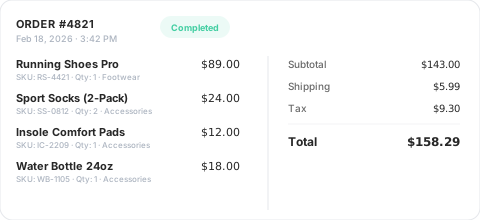
Full order data from WooCommerce with product details, order values, and item counts, collected and formatted exactly as each platform needs it.
Custom Event Tracking
Need to track something WooCommerce doesn't emit on its own? Define a CSS selector or JavaScript event, attach custom values, and target specific pages. Perfect for setting up important conversion events on unique or custom aspects of your WordPress website.
Privacy Friendly
Conversion Bridge respects user consent choices. It integrates with every major consent management platform so WooCommerce tracking only fires after the visitor approves.

































































































Integrations
Your entire stack, connected
WordPress plugins on one side, analytics and ad platforms on the other — Conversion Bridge links them together. Without code or headaches.
 71 plugin integrations
19 analytics platforms
11 ad platforms
71 plugin integrations
19 analytics platforms
11 ad platforms
Testimonials
Loved by WordPress professionals
Conversion Bridge has simplified website traffic and conversion tracking. Derek's response time when I have questions or feature requests is incredible. Conversion Bridge is now part of my plugin stack for every WordPress website.

Conversion Bridge is a game-changer for anyone serious about optimizing their WordPress site. It seamlessly integrates with all my marketing tools, allowing me to track traffic and conversions effortlessly. The setup was incredibly smooth, and the interface is user-friendly,…
Conversion Bridge is a game-changer for anyone serious about optimizing their WordPress site. It seamlessly integrates with all my marketing tools, allowing me to track traffic and conversions effortlessly. The setup was incredibly smooth, and the interface is user-friendly, making it easy to get up and running in no time. I highly recommend Conversion Bridge to anyone looking to take their WordPress site to the next level!


Works perfectly and delivers exactly as promised. The customer service is excellent—quick to respond and incredibly helpful. Highly recommended.
The huge painful amount of time and attention to detail it takes to setup conversion tracking with Google Tags for Gravity forms is crazy compared to the near 1 click install of ConvervsionBridge, the plugin will pay for itself in …
The huge painful amount of time and attention to detail it takes to setup conversion tracking with Google Tags for Gravity forms is crazy compared to the near 1 click install of ConvervsionBridge, the plugin will pay for itself in the first few days vs doing it the old way on time labour alone. Conversion tracking across Google Ads and Meta Advertising has been very reliable and constant updates from the team, they are quick to respond to if you have any queries. The documentation is well written and constantly improved to make the setup process as easy as possible for each integration, streamlining the workflow for myself and the team. Don't hesitate to sign up and support this valuable plugin for anyone running a modern revenue/data focused marketing agency on Wordpress. You will not be disappointed.
Conversion Bridge allowed us to replace three different plugins and over 50 lines of janky, conflicting code. Now, when we need to adjust our setup, we go to the CB dashboard and make a change. Easy! Derek is always…
Conversion Bridge allowed us to replace three different plugins and over 50 lines of janky, conflicting code. Now, when we need to adjust our setup, we go to the CB dashboard and make a change. Easy! Derek is always adding features and keeping on top of the latest trends. It’s great that I no longer need to.
Thanks, Conversion Bridge, for making script management simple!

Conversion Bridge enabled us to centralize our analytics configuration, transforming a hodgepodge of separate implementations into a single hub that is easy to manage and maintain. For anyone looking to simplify their analytics setup while ensuring accuracy and consistency, Conversion …
Conversion Bridge enabled us to centralize our analytics configuration, transforming a hodgepodge of separate implementations into a single hub that is easy to manage and maintain. For anyone looking to simplify their analytics setup while ensuring accuracy and consistency, Conversion Bridge is an ideal solution.

It's been one of the best tools we've rolled out at our agency, huge time saver for us. Keep doing what you're doing 🙌

100% recommend. Conversion Bridge takes the pain out of conversion tracking. I am implementing this on all my client sites. Top-notch support as well!

I really just love that I can trust that everything I might eventually need is getting synced back. Never felt confident with the other solutions I've tried 🥪

Conversion Bridge has simplified website traffic and conversion tracking. Derek's response time when I have questions or feature requests is incredible. Conversion Bridge is now part of my plugin stack for every WordPress website.
Conversion Bridge is a game-changer for anyone serious about optimizing their WordPress site. It seamlessly integrates with all my marketing tools, allowing me to track traffic and conversions effortlessly. The setup was incredibly smooth, and the interface is user-friendly,…
Conversion Bridge is a game-changer for anyone serious about optimizing their WordPress site. It seamlessly integrates with all my marketing tools, allowing me to track traffic and conversions effortlessly. The setup was incredibly smooth, and the interface is user-friendly, making it easy to get up and running in no time. I highly recommend Conversion Bridge to anyone looking to take their WordPress site to the next level!
Works perfectly and delivers exactly as promised. The customer service is excellent—quick to respond and incredibly helpful. Highly recommended.
The huge painful amount of time and attention to detail it takes to setup conversion tracking with Google Tags for Gravity forms is crazy compared to the near 1 click install of ConvervsionBridge, the plugin will pay for itself in …
The huge painful amount of time and attention to detail it takes to setup conversion tracking with Google Tags for Gravity forms is crazy compared to the near 1 click install of ConvervsionBridge, the plugin will pay for itself in the first few days vs doing it the old way on time labour alone. Conversion tracking across Google Ads and Meta Advertising has been very reliable and constant updates from the team, they are quick to respond to if you have any queries. The documentation is well written and constantly improved to make the setup process as easy as possible for each integration, streamlining the workflow for myself and the team. Don't hesitate to sign up and support this valuable plugin for anyone running a modern revenue/data focused marketing agency on Wordpress. You will not be disappointed.
Conversion Bridge allowed us to replace three different plugins and over 50 lines of janky, conflicting code. Now, when we need to adjust our setup, we go to the CB dashboard and make a change. Easy! Derek is always…
Conversion Bridge allowed us to replace three different plugins and over 50 lines of janky, conflicting code. Now, when we need to adjust our setup, we go to the CB dashboard and make a change. Easy! Derek is always adding features and keeping on top of the latest trends. It’s great that I no longer need to.
Thanks, Conversion Bridge, for making script management simple!
Conversion Bridge enabled us to centralize our analytics configuration, transforming a hodgepodge of separate implementations into a single hub that is easy to manage and maintain. For anyone looking to simplify their analytics setup while ensuring accuracy and consistency, Conversion …
Conversion Bridge enabled us to centralize our analytics configuration, transforming a hodgepodge of separate implementations into a single hub that is easy to manage and maintain. For anyone looking to simplify their analytics setup while ensuring accuracy and consistency, Conversion Bridge is an ideal solution.
It's been one of the best tools we've rolled out at our agency, huge time saver for us. Keep doing what you're doing 🙌
100% recommend. Conversion Bridge takes the pain out of conversion tracking. I am implementing this on all my client sites. Top-notch support as well!
I really just love that I can trust that everything I might eventually need is getting synced back. Never felt confident with the other solutions I've tried 🥪
Plans & Pricing
One plugin Every conversion Setup in minutes
Starting at only $79/year, every plan includes all integrations & features
View Plans & Pricing Book demoWooCommerce is the most popular eCommerce plugin in the world, powering millions of online stores across the globe. As a plugin for WordPress, it allows businesses of all sizes to create fully customizable online stores with ease. Its flexibility, scalability, and integration with a vast number of payment gateways and shipping options make it the go-to choice for entrepreneurs, small businesses, and large enterprises alike. With its user-friendly interface and a wealth of extensions, WooCommerce allows store owners to sell physical products, digital goods, subscriptions, and more.
When it comes to improving sales, tracking conversion events is essential. Conversion events are the actions that show a visitor moving toward a purchase, from the first product view to the completed order. Conversion Bridge tracks the full WooCommerce shopping funnel:
- Product Views: See which products get the most attention so you can spot popular items and guide your marketing.
- Add to Cart: Know when shoppers show buying intent, and catch friction when they add items but do not check out.
- Remove from Cart: Track when items get pulled from the cart to surface pricing or product concerns before they cost you sales.
- View Cart: Measure how often shoppers review their cart on the way to checkout.
- Begin Checkout: Know when customers start checkout so you can measure drop-off and tighten your funnel.
- Purchases: The event that matters most. Track completed orders with their value to measure revenue, ROI, and customer acquisition cost.
- Purchased Items: Break each order down by individual product, so you can see your real best sellers, not just top revenue.
- Registrations and Logins: Track new account signups and returning logins to understand how shoppers build a relationship with your store.
Tracking these events is crucial because it allows you to understand customer behavior and identify areas for improvement in your sales funnel. By optimizing each step of the customer journey, you can increase conversions, reduce cart abandonment, and boost overall revenue.
With Conversion Bridge, setting up conversion tracking for WooCommerce has never been easier. The plugin enables seamless integration with WooCommerce and multiple analytics platforms, providing an intuitive setup process for tracking events like product views, add-to-cart actions, checkout starts, and completed purchases. Conversion Bridge simplifies the process by offering pre-built integrations with popular tools like Google Analytics, Google Ads, and more, all with just a few clicks. This means no coding or complex configurations – you can start tracking conversions immediately, making it easier to optimize your WooCommerce store and improve sales.
Running Meta ads for your store? Purchases can also be sent server-side through the Conversions API. See WooCommerce conversion tracking with Meta.
Track WooCommerce in every platform
- WooCommerce conversion tracking for Google Ads
- WooCommerce conversion tracking for Meta Ads
- WooCommerce conversion tracking for LinkedIn Ads
- WooCommerce conversion tracking for Microsoft Ads
- WooCommerce conversion tracking for Pinterest Ads
- WooCommerce conversion tracking for Reddit Ads
- WooCommerce conversion tracking for TikTok Ads
- WooCommerce conversion tracking for X (Twitter) Ads
- WooCommerce conversion tracking for OpenAI Ads
- WooCommerce conversion tracking for Snapchat Ads
- WooCommerce conversion tracking for Awin
- Conversion tracking for WooCommerce in Google Analytics
- Conversion tracking for WooCommerce in Plausible Analytics
- Conversion tracking for WooCommerce in Fathom Analytics
- Conversion tracking for WooCommerce in Pirsch Analytics
- Conversion tracking for WooCommerce in PostHog
- Conversion tracking for WooCommerce in Usermaven
- Conversion tracking for WooCommerce in Microsoft Clarity
- Conversion tracking for WooCommerce in Hotjar
- Conversion tracking for WooCommerce in Simple Analytics
- Conversion tracking for WooCommerce in AnalyticsWP
- Conversion tracking for WooCommerce in Koko Analytics
- Conversion tracking for WooCommerce in Active Analytics
- Conversion tracking for WooCommerce in Swetrix
- Conversion tracking for WooCommerce in Rybbit Analytics
- Conversion tracking for WooCommerce in Umami
- Conversion tracking for WooCommerce in Go Squared Analytics
- Conversion tracking for WooCommerce in Wide Angle Analytics
- Conversion tracking for WooCommerce in Growify