
Analytics Platform
The best WordPress plugin for Google Analytics
Go beyond a basic setup—Conversion Bridge makes it easy to add Google Analytics to your site with advanced conversion tracking from 67 plugins.
 67 plugin integrations

Why Conversion Bridge
The old way vs. the new way
Copy & paste the Google Analytics snippet
Get basic pageview data in Google Analytics, but miss conversions, ecommerce events, and form submissions.
Wire up each event by hand
Write custom JavaScript (or pay a developer) every time you add a form, button, or checkout flow.
Juggle multiple plugins
One plugin for Google Analytics, another for WooCommerce, another for forms. Conflicting settings and duplicate events.
Debug missing data in production
Find out weeks later that purchases never tracked. Rebuild reports, lose revenue attribution.
Paste your Google Analytics ID
Drop in your tracking ID. Done. That's the only "code" you touch.
Toggle on your plugins
WooCommerce, Gravity Forms, MemberPress — flip a switch and Google Analytics gets conversion data formatted exactly how it expects.
Track what actually matters
Purchases, form submits, button clicks, file downloads, video plays — captured accurately the moment they happen.
Up and running in minutes
No developer, no tag manager. A complete Google Analytics setup in minutes.
Features
Comprehensive Google Analytics WordPress Plugin with No-Code Conversion Tracking
Conversion Bridge makes Google Analytics setup simple and helps you go beyond basic page view data to get detailed insights about your website visitors
Advanced Tag Setup
Pasting the basic tracking tag isn’t enough. Conversion Bridge unlocks full Google Analytics power with an advanced, no-code setup.
Ecommerce Tracking
Track every last detail about the items that were purchased in to Google Analytics to give you comprehensive performance data of your store.
Google Consent Mode
Ensure your Google Analytics setup obeys consent and adjusts tracking based on each visitor’s choices.
Analytics in Admin
Actually understand what Google Analytics is collecting with our custom GA4 dashboard in your WordPress admin.
Custom User Data
Include extra pageview attributes like: Author, Category, Tags, Post Type, Role, Language, Logged In status, current membership, and more for additional insights.
Measurement Protocol
Send server-side events to Google Analytics without touching any code. This makes your tracking more reliable by filling in gaps from ad blockers or browser limits.
Custom Event Tracking
Use custom events to handle any unique case on your site and keep your tracking flexible and complete.
Privacy Friendly
Works with your site's cookie popup to follow privacy rules, with support for it's own cookie-free data tracking where you have control over how users are tracked.
Types of Conversions Tracking Events in Google Analytics
If you want to grow your website, setting up conversion tracking in Google Analytics on your WordPress website is essential. It shows what's working, what's not, and how users interact with your content.
Conversion Bridge makes it simple to track important events from any of the 67 plugin integrations and your own custom events into Google Analytics so you have the data to understand what is working for your site.
-
E-Commerce Events
Sends complete product data with conversion events
- Purchases
- Donations
- View Item
- Add to Cart
- Remove from Cart
- View Cart
- Begin Checkout
-
Form events
Better than automatic form tracking, ensure you get accurate tracking & collect form submission values
- Form Submissions
- Submission Values
- Registrations
- Email List Subscribes
-
Other Events
- Button Clicks
- File Downloads
- Enrollments
- Scroll
- Time on Page
- Phone Links
- Search Results
- Video Plays
- Image Clicks
- Popups Opened/Closed
- Custom JavaScript Events
See it in action
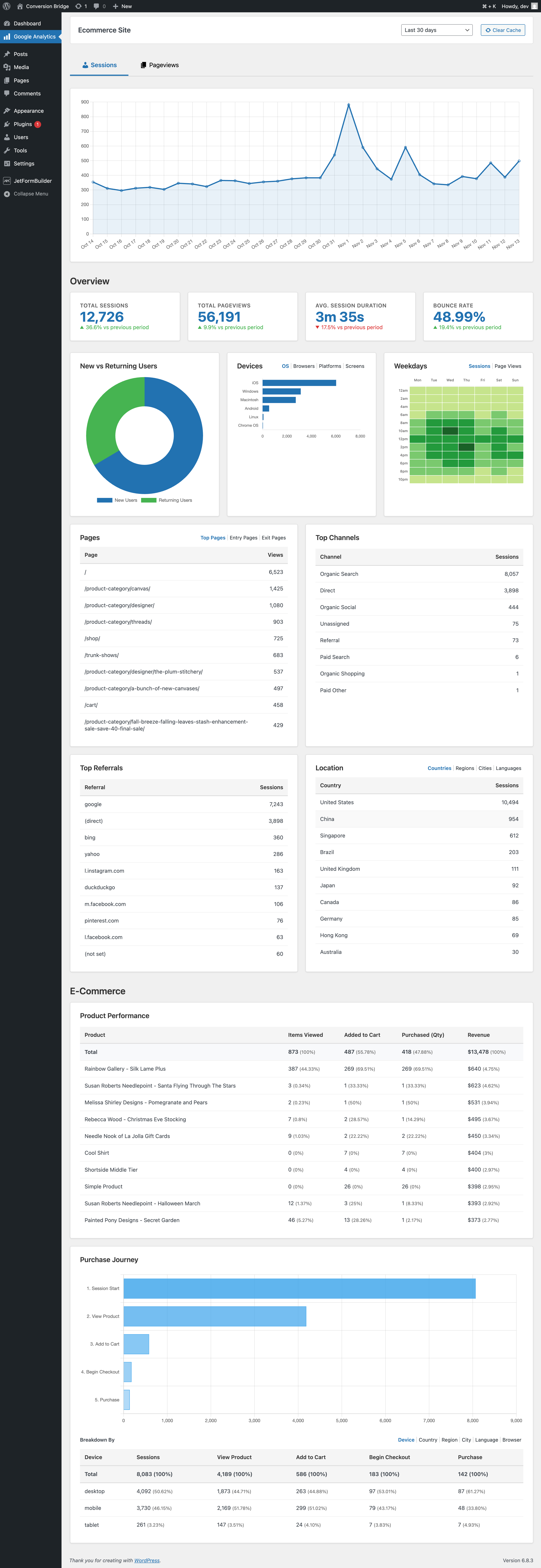
The Google Analytics dashboard
Conversion Bridge ships a custom Google Analytics dashboard right inside your WordPress admin. GA4 is notoriously hard to navigate—ours surfaces the metrics that actually matter and makes the common reports easy to read without digging through menus.
Features
Go beyond Google Analytics
Conversion Bridge does more than just send data to Google Analytics. Here's what else comes in the box.
Plugin Integrations
Track conversions from your WordPress plugins: ecommerce, forms, memberships, donations, and more. No code required.
Analytics Platforms
Set up analytics in minutes, not hours. Conversion Bridge costs less than the developer time it replaces.
Every Type of Conversion
Automatically track purchases, form submissions, button clicks, signups, downloads, and more across all the platforms you connect. No code, no tag manager.
Enhanced Conversions
Securely hash and send first-party customer data (email, phone, name, address) to your ad platforms. Sharper attribution means their algorithms find more real customers and waste less of your budget on clicks that never convert.
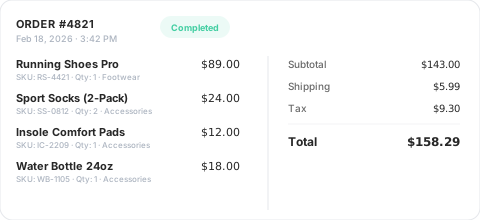
Detailed Commerce Data
Full order data from your ecommerce, membership, donation, and other commerce plugins, collected and formatted exactly as each platform needs it.
No setup required — your commerce plugin is detected automatically and tracked correctly.
Custom Event Tracking
Track unique elements that don't fit an existing integration. Define a CSS selector or JavaScript event, attach custom values, and target specific pages.
Perfect for tracking button clicks, video plays, scroll depth, file downloads, and any other custom interaction on your site.
Page-by-page data
Conversion Journeys
See exactly what your customers did before and after converting, page by page. Understand behavior, improve funnels, and uncover what actually drives results instead of guessing.
Privacy Friendly
Conversion Bridge respects user consent choices. It integrates with every major consent management platform so tracking only fires after the visitor approves.
Tools & Reports
Make the most of your data

Dashboards in Admin
View your key metrics right inside WordPress. Track trends over time, see top converting pages, and understand what's working.
Weekly Email Reports
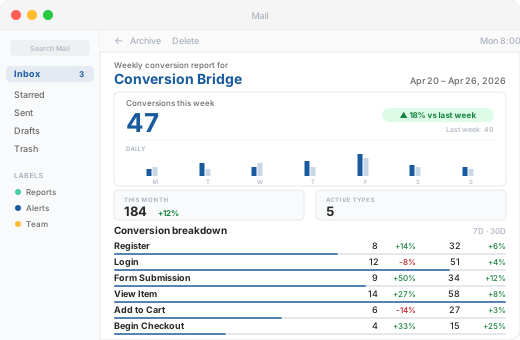
Get a weekly summary of conversions, revenue, and top-performing sources delivered straight to your inbox. Stay informed without logging in.
UTM Tracking & Reports
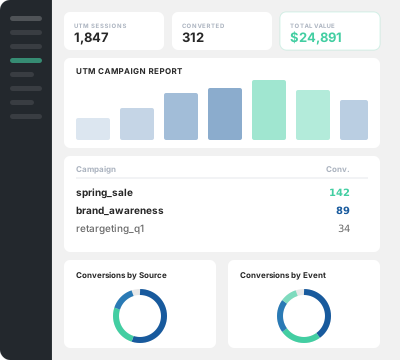
See which campaigns bring buyers, which landing pages convert, and build UTM links directly from your WordPress dashboard.
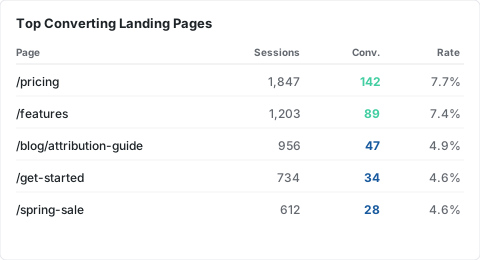
Top Landing Pages
See which pages drive the most conversions, sessions, and revenue so you know where to focus your efforts.
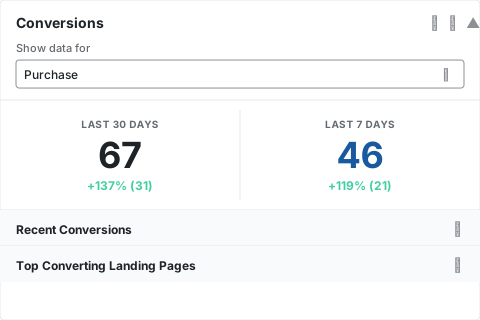
Dashboard Widget
A quick-glance conversion summary right on your WordPress dashboard. See your numbers the moment you log in.
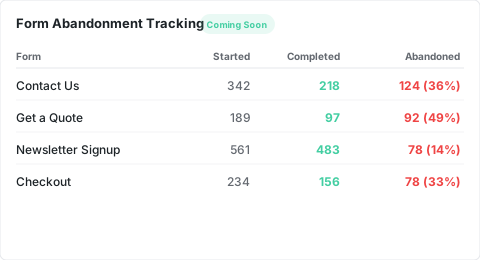
Form Abandonment Tracking Coming Soon
See which forms visitors start but never finish. Identify drop-off points and optimize your forms to capture more leads.





























































































Integrations
Your entire stack, connected
WordPress plugins on one side, analytics and ad platforms on the other — Conversion Bridge links them together. Without code or headaches.
67 plugin integrations
 21 analytics platforms
 8 ad platforms
Testimonials
Loved by WordPress professionals
The huge painful amount of time and attention to detail it takes to setup conversion tracking with Google Tags for Gravity forms is crazy compared to the near 1 click install of ConvervsionBridge, the plugin will pay for itself in the first few days vs doing it the old way on time labour alone. Conversion tracking across Google Ads and Meta Advertising has been very reliable and constant updates from the team, they are quick to respond to if you have any queries. The documentation is well written and constantly improved to make the setup process as easy as possible for each integration, streamlining the workflow for myself and the team. Don't hesitate to sign up and support this valuable plugin for anyone running a modern revenue/data focused marketing agency on Wordpress. You will not be disappointed.
The best analytics solution for WordPress. Never thought anyone would make it this easy to set up conversion tracking/integrate with FB Ads and G Ads in a matter of minutes. 👏

Conversion Bridge allowed us to replace three different plugins and over 50 lines of janky, conflicting code. Now, when we need to adjust our setup, we go to the CB dashboard and make a change. Easy! Derek is always adding features and keeping on top of the latest trends. It’s great that I no longer need to.
Thanks, Conversion Bridge, for making script management simple!

Conversion Bridge enabled us to centralize our analytics configuration, transforming a hodgepodge of separate implementations into a single hub that is easy to manage and maintain. For anyone looking to simplify their analytics setup while ensuring accuracy and consistency, Conversion Bridge is an ideal solution.

I really just love that I can trust that everything I might eventually need is getting synced back. Never felt confident with the other solutions I've tried 🥪

It's been one of the best tools we've rolled out at our agency, huge time saver for us. Keep doing what you're doing 🙌

Works perfectly and delivers exactly as promised. The customer service is excellent—quick to respond and incredibly helpful. Highly recommended.
Solid tool and platform to getting analytics. I had some questions about how to see specific pieces of events in GA4 and how to past those to events from Conversion Bridge to GA4 and they knocked it out of the park. Its nice to have a centralize location for sending data to analytics platforms.

Conversion Bridge has simplified website traffic and conversion tracking. Derek's response time when I have questions or feature requests is incredible. Conversion Bridge is now part of my plugin stack for every WordPress website.


The huge painful amount of time and attention to detail it takes to setup conversion tracking with Google Tags for Gravity forms is crazy compared to the near 1 click install of ConvervsionBridge, the plugin will pay for itself in the first few days vs doing it the old way on time labour alone. Conversion tracking across Google Ads and Meta Advertising has been very reliable and constant updates from the team, they are quick to respond to if you have any queries. The documentation is well written and constantly improved to make the setup process as easy as possible for each integration, streamlining the workflow for myself and the team. Don't hesitate to sign up and support this valuable plugin for anyone running a modern revenue/data focused marketing agency on Wordpress. You will not be disappointed.
The best analytics solution for WordPress. Never thought anyone would make it this easy to set up conversion tracking/integrate with FB Ads and G Ads in a matter of minutes. 👏
Conversion Bridge allowed us to replace three different plugins and over 50 lines of janky, conflicting code. Now, when we need to adjust our setup, we go to the CB dashboard and make a change. Easy! Derek is always adding features and keeping on top of the latest trends. It’s great that I no longer need to.
Thanks, Conversion Bridge, for making script management simple!
Conversion Bridge enabled us to centralize our analytics configuration, transforming a hodgepodge of separate implementations into a single hub that is easy to manage and maintain. For anyone looking to simplify their analytics setup while ensuring accuracy and consistency, Conversion Bridge is an ideal solution.
I really just love that I can trust that everything I might eventually need is getting synced back. Never felt confident with the other solutions I've tried 🥪
It's been one of the best tools we've rolled out at our agency, huge time saver for us. Keep doing what you're doing 🙌
Works perfectly and delivers exactly as promised. The customer service is excellent—quick to respond and incredibly helpful. Highly recommended.
Solid tool and platform to getting analytics. I had some questions about how to see specific pieces of events in GA4 and how to past those to events from Conversion Bridge to GA4 and they knocked it out of the park. Its nice to have a centralize location for sending data to analytics platforms.
Conversion Bridge has simplified website traffic and conversion tracking. Derek's response time when I have questions or feature requests is incredible. Conversion Bridge is now part of my plugin stack for every WordPress website.
Plans & Pricing
One plugin Every conversion Setup in minutes
Starting at only $79/year, every plan includes all integrations & features
View Plans & PricingSide-by-side
Google Analytics vs. other analytics platforms
| Google Analytics | Plausible Analytics | Fathom Analytics | Usermaven | Pirsch Analytics | |
|---|---|---|---|---|---|
| Pricing | Free | $9/mo+ | $15/mo+ | $14/mo+ | $6/mo+ |
| Free Trial | |||||
| Free Tier | |||||
| Real-Time Analytics | |||||
| Advanced E-commerce | |||||
| Heatmaps | |||||
| Session Recordings | |||||
| Conversion Journeys | |||||
| Search Console | |||||
| GDPR-Compatible | |||||
| Cookieless Tracking | |||||
| No Cookie Banner | |||||
| Consent Mode | |||||
| Funnels | |||||
| Custom Extensions | |||||
| Public Dashboards | |||||
| Multiple Sites | |||||
| Custom Domain | |||||
| White Label | |||||
| Developer API | |||||
| Two-Factor Auth | |||||
| Open Source | |||||
| Data Retention | 26 months max | 3-5+ years | Forever | 2 years | Forever |
WordPress Conversion Tracking for Google Analytics
- Conversion tracking for WooCommerce in Google Analytics
- Conversion tracking for Easy Digital Downloads in Google Analytics
- Conversion tracking for WS Form in Google Analytics
- Conversion tracking for LifterLMS in Google Analytics
- Conversion tracking for Fluent Forms in Google Analytics
- Conversion tracking for Gravity Forms in Google Analytics
- Conversion tracking for Formidable Forms in Google Analytics
- Conversion tracking for WP Forms in Google Analytics
- Conversion tracking for Ninja Forms in Google Analytics
- Conversion tracking for Forminator in Google Analytics
- Conversion tracking for Contact Form 7 in Google Analytics
- Conversion tracking for Happy Forms in Google Analytics
- Conversion tracking for Everest Forms in Google Analytics
- Conversion tracking for Calculated Fields Form in Google Analytics
- Conversion tracking for Quill Forms in Google Analytics
- Conversion tracking for Form Maker by 10web in Google Analytics
- Conversion tracking for JetFormBuilder in Google Analytics
- Conversion tracking for Kali Forms in Google Analytics
- Conversion tracking for LearnDash in Google Analytics
- Conversion tracking for Sensei in Google Analytics
- Conversion tracking for Charitable in Google Analytics
- Conversion tracking for BookingPress in Google Analytics
- Conversion tracking for LatePoint in Google Analytics
- Conversion tracking for Simply Schedule Appointments in Google Analytics
- Conversion tracking for Groundhogg in Google Analytics
- Conversion tracking for FluentCRM in Google Analytics
- Conversion tracking for Mailster in Google Analytics
- Conversion tracking for The Newsletter Plugin in Google Analytics
- Conversion tracking for MailPoet in Google Analytics
- Conversion tracking for Mailchimp for WordPress in Google Analytics
- Conversion tracking for weForms in Google Analytics
- Conversion tracking for Popup Builder in Google Analytics
- Conversion tracking for Holler Box in Google Analytics
- Conversion tracking for Thrive Leads in Google Analytics
- Conversion tracking for IceGram in Google Analytics
- Conversion tracking for WP Subscribe Pro in Google Analytics
- Conversion tracking for Restrict Content Pro in Google Analytics
- Conversion tracking for Paid Memberships Pro in Google Analytics
- Conversion tracking for MemberMouse in Google Analytics
- Conversion tracking for MemberPress in Google Analytics
- Conversion tracking for UltimateMember in Google Analytics
- Conversion tracking for Simple Membership in Google Analytics
- Conversion tracking for SureMembers in Google Analytics
- Conversion tracking for SureCart in Google Analytics
- Conversion tracking for Ultimate Membership Pro in Google Analytics
- Conversion tracking for BuddyBoss in Google Analytics
- Conversion tracking for Profile Builder Pro in Google Analytics
- Conversion tracking for Paid Member Subscriptions in Google Analytics
- Conversion tracking for Sunshine Photo Cart in Google Analytics
- Conversion tracking for WP Simple Pay in Google Analytics
- Conversion tracking for ProfilePress in Google Analytics
- Conversion tracking for WP User Frontend in Google Analytics
- Conversion tracking for GiveWP in Google Analytics
- Conversion tracking for Download Monitor in Google Analytics
- Conversion tracking for Tutor LMS in Google Analytics
- Conversion tracking for SliceWP in Google Analytics
- Conversion tracking for Kadence in Google Analytics
- Conversion tracking for ClickWhale in Google Analytics
- Conversion tracking for WordPress Blocks in Google Analytics
- Conversion tracking for AffiliateWP in Google Analytics
- Conversion tracking for Solid Affiliate in Google Analytics
- Conversion tracking for Leaky Paywall in Google Analytics
- Conversion tracking for Bricks Builder in Google Analytics
- Conversion tracking for Document Library Pro in Google Analytics
- Conversion tracking for Beaver Builder in Google Analytics
- Conversion tracking for Elementor in Google Analytics
- Conversion tracking for Divi 4 in Google Analytics
- Conversion tracking for SureForms in Google Analytics
- Conversion tracking for Bricksforge Pro Forms in Google Analytics
- Conversion tracking for Popup Maker in Google Analytics
- Conversion tracking for Hustle by wpmudev in Google Analytics
- Conversion tracking for Greyd Suite in Google Analytics
- Conversion tracking for Breakdance in Google Analytics
- Conversion tracking for Paymattic in Google Analytics
- Conversion tracking for FluentCart in Google Analytics
- Conversion tracking for Freemius in Google Analytics
- Conversion tracking for Fluent Affiliate in Google Analytics
- Conversion tracking for Fluent Community in Google Analytics
- Conversion tracking for CheckoutWC in Google Analytics
- Conversion tracking for Highlight and Share in Google Analytics