You wanted to track conversions on your WordPress site. Maybe see which ad campaigns actually bring in paying customers. Reasonable goal.
So you followed the advice everyone gives: set up Google Tag Manager.
You created an account, opened the interface, and hit a wall of tags, triggers, variables, containers, and data layers. Three hours later, you're watching a YouTube tutorial from 2021 that doesn't match the current interface, and you still can't tell if your purchase tracking is working.
Meanwhile, your ads are running. Money is going out. And you have no idea which clicks are turning into sales.
If that feels familiar, the problem isn't you. It's that someone handed you an enterprise tool for a job that doesn't need one. In this post I'll walk through what GTM actually does, how to tell whether your site needs it, and what to use if it doesn't.
If you'd rather see the two approaches side by side, check out the full Conversion Bridge vs. Google Tag Manager comparison.
What Google Tag Manager Actually Does
Google Tag Manager is a middleman. It sits between your website and the tracking platforms you use (Google Analytics, Google Ads, Meta, etc.) and manages the flow of data between them.
Instead of putting each platform's tracking code directly on your site, you put GTM's code on your site. Then, inside GTM's interface, you configure what data gets sent where.
Three concepts run the whole thing:
- Tags are snippets of code that send data to a specific platform (a GA4 tag, a Google Ads conversion tag, a Meta Pixel tag, etc.)
- Triggers are rules that tell GTM when to fire each tag (on page load, when someone completes a purchase, when a form is submitted, etc.)
- Variables are dynamic values that GTM pulls from the page or from a JavaScript object called the "data layer" (order totals, transaction IDs, product names, etc.)
The data layer is where most people get stuck. It's a JavaScript object on your page that temporarily holds structured information. Your WordPress site needs to push the right data into it. Then GTM needs to be configured to read from it and pass it to the right tags.
That's a lot of layers between "someone bought my product" and "Google Ads knows about it."
What GTM Setup Actually Looks Like
I want to be specific here, because the complexity isn't theoretical. Let me walk through what it takes to set up Google Ads conversion tracking using GTM. This is one of the most common things WordPress site owners need to do.
- Go to Google Ads and create a conversion action
- Choose "Use Google Tag Manager" as the setup method
- Copy the Conversion ID and Conversion Label
- Go to GTM and add Google Tag Manager's code to your site
- Create a new tag in GTM using the Google Ads Conversion Tracking template
- Paste in the Conversion ID and Conversion Label
- Create variables for the conversion value, transaction ID, and currency (these pull from the data layer)
- Make sure your WordPress site is actually pushing purchase data into the data layer (this is its own project)
- Create a trigger that fires on the right data layer event
- Preview and debug to make sure everything works
- Publish the container
That's one platform. If you also want Meta tracking, you're looking at another round: find a community tag template, create a constant variable for your Pixel ID, set up separate tags for each conversion event, map data layer variables to Meta's expected parameters, and test with Meta's Pixel Helper extension.
And if you want server-side tracking (which is increasingly necessary for accurate data), a server-side GTM setup can cost $1,000-$10,000 in setup fees plus $120-150 per month in hosting.
Studies show that 16% of novice GTM users accidentally duplicate tags, leading to double-counted conversions. When something breaks, you have to figure out which layer the problem lives in. Is the data not being pushed to the data layer? Is the trigger misconfigured? Is the tag reading the wrong variable? Each layer adds another place where things go wrong.
Every hour you spend debugging a GTM configuration is an hour your ads are running without accurate conversion data. You're paying for clicks you can't attribute and making budget decisions based on incomplete numbers.
Conversion Bridge adds your ad platform tracking pixels directly to your site and fires conversion events automatically. No tag manager required.
Do You Actually Need a Tag Manager?
GTM was built for a specific scenario: large organizations with dozens of marketing scripts, managed by multiple teams, where deploying code changes requires developer time and release cycles. In that world, giving marketers a way to add and modify tracking without touching the codebase is genuinely valuable.
But that's not how most WordPress sites work.
If you're running a WordPress site with a few analytics and ad platforms, your site already knows when important events happen. Your ecommerce plugin knows when a purchase is completed. Your form plugin knows when a form is submitted. Your membership plugin knows when someone signs up. That data exists in your WordPress environment right now.
The question is whether you need to push that data into a JavaScript data layer, then configure a separate cloud-based tool to read it and pass it along to your tracking platforms. Or whether you can send it directly.
A friend of mine runs a WooCommerce store selling handmade ceramics. She spent two weekends setting up GTM because a marketing blog told her she needed it. When I looked at her setup, she had duplicate purchase events firing to GA4, her Google Ads conversion values were coming through as zero (a data layer mapping issue), and her Meta Pixel wasn't firing at all on the thank-you page. She'd been running Meta ads for three weeks with zero tracked conversions. That's real money burned because the tool was too complex for what she needed.
What to Use Instead If You Don't Need GTM
This is why I built Conversion Bridge. Not because GTM is a bad product, but because it's the wrong tool for what most WordPress site owners are trying to do.
Instead of acting as a middleman, Conversion Bridge connects directly to your tracking platforms and your WordPress plugins. Your site already knows when a purchase happens. Your tracking platform is already loaded on the page. The only missing piece is connecting the two, and that doesn't require an intermediary.
To show what that looks like on a whole site, I timed a full setup on a demo WooCommerce store, starting from uploading the plugin. Purchases, a custom request form, and a button click were tracking in Google Analytics, Plausible, and Meta Ads, following the cookie banner, in 1 minute and 42 seconds without a tag manager anywhere:
That Google Ads conversion tracking setup that took 11 steps in GTM? Here's what it looks like with Conversion Bridge for WooCommerce purchases:
- Enable Google Ads as a platform
- Enable WooCommerce integration
- Paste in your Google Ads Conversion Label
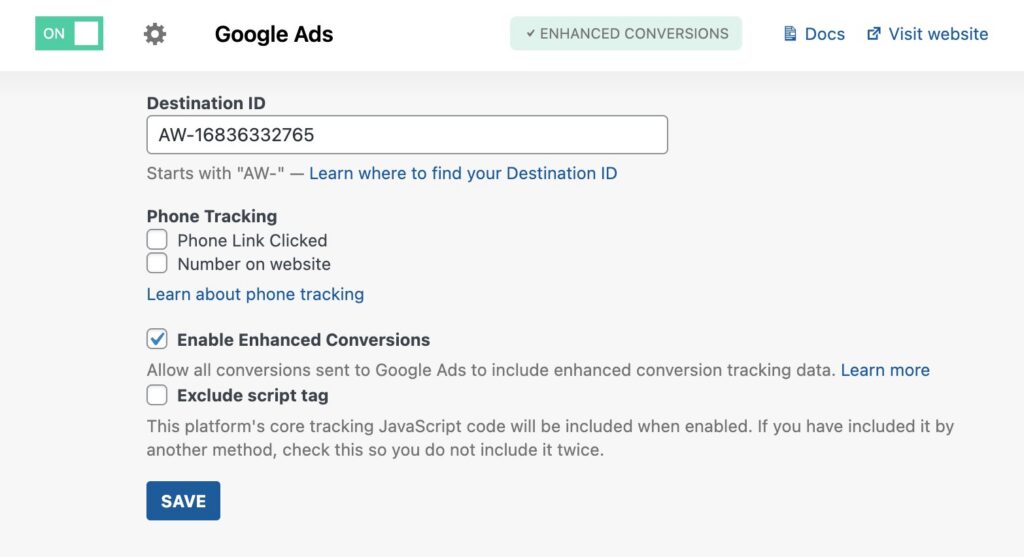
Google Ads setup in Conversion Bridge
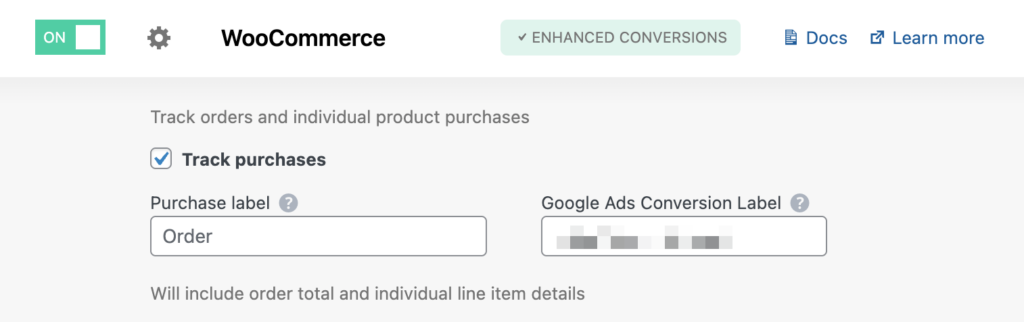
WooCommerce purchase tracking setup in Conversion Bridge
That's it. When someone buys a product, Conversion Bridge tells Google Ads (and Google Analytics, and Meta, and every other platform you've enabled) what happened, how much it was worth, and which transaction it belongs to. You see exactly which ad campaigns bring in actual paying customers, not just clicks.
Conversion Bridge supports 71 WordPress plugin integrations for conversion tracking, from ecommerce and forms to memberships, LMS, donations, and more.
Common Objections
"What about cookie consent?"
GTM's consent handling works at the container level. You either block the entire container or you don't. Getting granular consent per platform inside GTM requires additional configuration.
Conversion Bridge has built-in integrations with 17 cookie consent banner systems (Cookiebot, CookieYes, Complianz, and others). Consent is managed per platform, so analytics can load independently of advertising based on what your visitors have agreed to.
"What about multiple platforms?"
This is where the direct approach pays off. You can enable as many analytics and ad platforms as you want. Every conversion event you configure gets sent to all of them automatically. No setting up separate tags and triggers for each platform inside GTM. Add a new ad platform, check a box, and it starts receiving the same conversion data as everything else.
"What about Conversions APIs?"
Ad platforms are increasingly pushing advertisers toward server-to-server event tracking through their Conversions APIs to improve data accuracy as browsers restrict cookiesA small piece of data stored in a user’s browser that helps websites remember user activity, preferences, or sessions across visits. and client-side tracking. Setting this up through GTM typically means deploying a separate server-side GTM container, which adds hosting costs and configuration complexity.
Conversion Bridge sends conversion events directly to the Conversions APIs for Meta Ads, Pinterest Ads, Reddit Ads, OpenAI Ads, Snapchat Ads, and Awin from your WordPress server. No additional containers or infrastructure needed.
"What about advanced custom tracking?"
This is the one area where GTM still has an edge. If you need to inject arbitrary JavaScript, track custom DOM interactions that no plugin handles, or manage dozens of obscure third-party scripts, GTM gives you that flexibility.
But for the vast majority of WordPress sites, conversion tracking means tracking purchases, form submissions, signups, and similar events that your plugins already handle. You don't need a general-purpose JavaScript injection tool for that.
Already have your analytics platform set up elsewhere? Conversion Bridge can add conversion tracking alongside your existing setup without conflict.
When GTM Still Makes Sense
I want to be straightforward about this. GTM isn't going away, and there are real use cases for it:
- Enterprise sites with 20+ marketing scripts managed by separate teams
- Custom tracking scenarios that require arbitrary JavaScript on specific page elements
- Organizations where marketing teams need to deploy tracking changes without involving developers
If that sounds like your situation, GTM is built for you.
But if you're a WordPress site owner who wants to know which ads and traffic sources bring in actual customers, and you'd rather spend your time running your business than debugging data layer variables, GTM is adding complexity you don't need.
Track Conversions Without the Middleman
Every week without accurate conversion tracking is another week of ad budget decisions based on guesswork. Which campaigns are profitable? Which ones are burning money? Without proper tracking, you're guessing. And guessing gets expensive.
Your WordPress site already has the data. Your plugins know when people buy, sign up, subscribe, and submit forms. The only question is how that data gets to your tracking platforms.
If GTM has been the wall between you and proper conversion tracking, give Conversion Bridge a try. You might find that tracking conversions is a lot less painful when you take the middleman out of it.