
Event Match QualityWhat it means: Event Match Quality is a score that Meta (Facebook) gives to each type of conversion event you send from your website. It measures how well the data you send -- things like email addres... is Meta's scoring system that measures how well the conversion events your site sends can be matched to real people on Facebook and Instagram. The score ranges from 0 to 10, and it directly affects how well Meta can optimize your ad campaigns.
A higher score means Meta can match more of your conversions to actual users, which leads to better audience targeting, more accurate reporting, and lower cost per acquisition. Meta recommends a score of 6 or higher, with 8-10 being ideal.
Here's how to find your score and what to do with it.
Find Your Score in Events Manager
- Go to Meta Events Manager
- Make sure you have the correct ad account selected
- Click Data Sources in the left sidebar
- Select the pixel or dataset connected to your website
- You'll see a list of your tracked events (Purchase, Lead, PageView, etc.)
- Each event shows an Event Match Quality score next to it — either a number (0-10) or a label (Poor, OK, Good, Great)
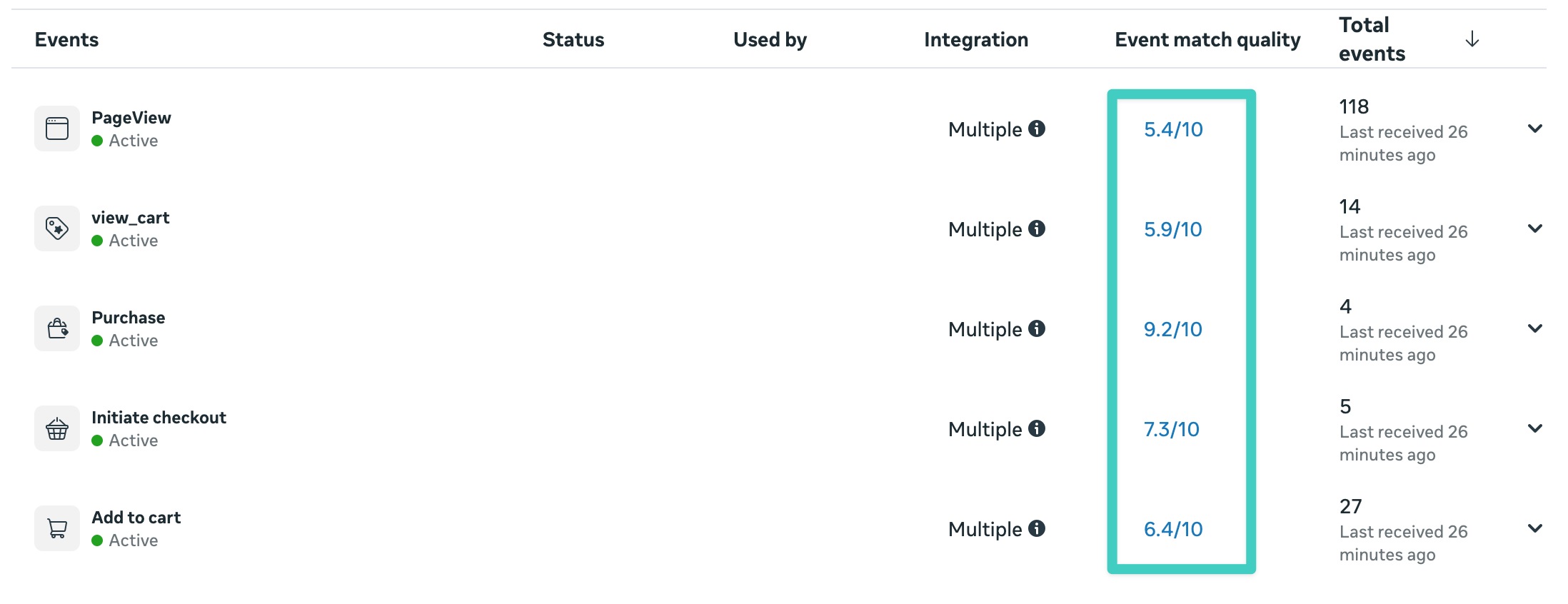
Click on any individual event to see a detailed breakdown of which customer data parameters are being received and how each one contributes to the overall score.
What the Scores Mean
Meta rates each event independently, so your Purchase event might have a different score than your Lead event. In the screenshot above, Purchase scores 9.2 while PageView only scores 5.4. That difference is normal: a purchase carries checkout data like email, name, phone, and address, while a pageview from an anonymous visitor has almost nothing to match on.
- 8-10 (Great): Meta can confidently match most of your conversion events to real users. Your ad optimization and reporting are working at full capacity.
- 6-7 (Good): Matching is solid but there's room for improvement. You may be missing one or two customer data parameters that could push the score higher.
- 3-5 (OK): Meta is struggling to match a significant portion of your events. Your ad optimization is limited, and your reported ROASMeasures how much revenue is earned for every dollar spent on advertising, helping you evaluate the effectiveness of your ad campaigns. is likely lower than reality.
- 0-2 (Poor): Very few events can be matched. Meta's algorithm has almost no signal to work with for optimization. This needs attention.
Scores refresh approximately every 48 hours, so allow time after making changes before checking for improvement.
What Affects the Score
Event Match Quality is determined by the customer data parameters you send with each conversion event. The more parameters you include, the higher the score.
The parameters that matter most, roughly in order of impact:
- Email address — the single most important matching parameter
- Phone number — a strong secondary signal that significantly boosts the score
- First name and last name — helps confirm matches, especially when combined with other data
- City, state, zip code, and country — adds geographic context for better matching accuracy
All customer data is SHA-256 hashed before being sent to Meta, so no personal information leaves your server in plain text.
How to Improve a Low Score
If your score is below 6, the most common reason is that your conversion events are missing customer data parameters. Here's what to check:
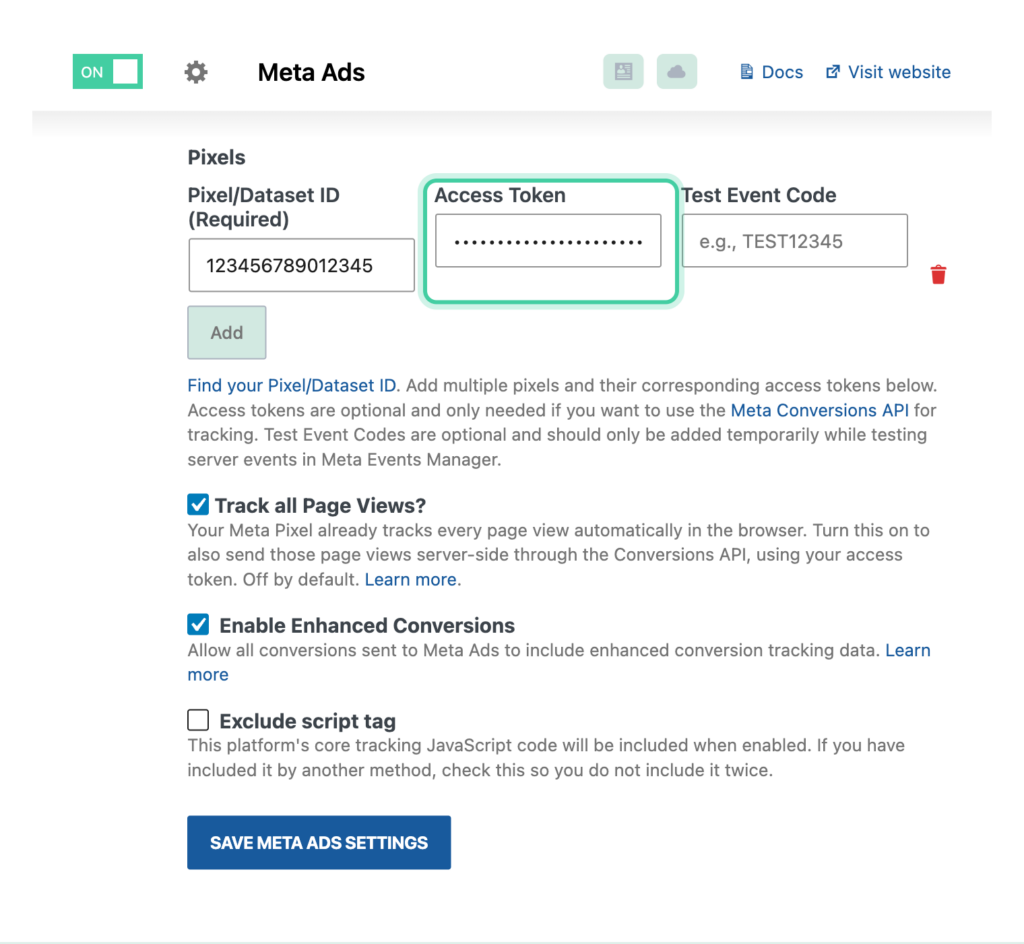
Make sure you're using the Meta Conversions API. Browser-based pixel tracking alone limits what data can be sent. The Conversions API sends events server-side with the full set of customer data. In Conversion Bridge, this requires adding an access token in your Meta Ads settings.
Check that your integrations are collecting the data. Conversion Bridge automatically extracts customer data from your plugin integrations and includes it with every conversion event. For ecommerce plugins, checkout forms already collect email, name, phone, and address. For form plugins, make sure your forms include fields for at least email and name, and ideally phone.
Verify the data is flowing. Go to Settings → Conversion Bridge → Options and turn on Server logging under the Advanced settings, then run a test conversion in a private window. Open the log file back on the Options tab and check that the customer parameters (email, phone, name, address fields) appear in the event payload. Logging works right through a checkout, where a payment gateway redirect would drop anything you were watching in the browser. See How to debug events: Enable logging for more.
For a deeper look at how customer data improves ad performance across all your ad platforms, see the blog post on improving Event Match Quality from WordPress.
Checking on Other Ad Platforms
Meta is the most transparent about match quality scores, but other ad platforms have similar diagnostics:
- Google Ads: Check your conversion actions in the Conversions section. Google shows diagnostics for Enhanced Conversions, including whether customer data is being received and the match rate.
- TikTok: The TikTok Events Manager shows event match rates for Events API events.
- LinkedIn, Pinterest, Microsoft Ads: Each platform provides conversion diagnostics in their respective ad managers showing whether enhanced matching data is being received.
Conversion Bridge sends the same customer data parameters to all connected ad platforms simultaneously, so improving your data quality benefits every platform at once.