Google Analytics in WordPress Admin, New Integrations: Conversion Bridge 1.11
Posted on November 11, 2025
The latest version of Conversion Bridge - version 1.11 - brings a brand-new Google Analytics dashboard right inside WordPress, smarter tracking under the hood, improved privacy tools, and new plugin and analytics platform integrations.
Let’s dig into what’s new and why it matters:

Google Analytics, Now Inside WordPress
I used to be able to tell clients "Login to your Google Analytics account and take a look at your stats." No more instruction needed because it was simple enough to make sense even to novices.
Then GA4 arrived with the most complicated analytics dashboards ever invented. I'm not alone in this sentiment as many people think it's utter trash.
One of the reasons I created Conversion Bridge in the first place was to help people move off GA4 to many of the new alternative options that were now available. In fact, v0.1 purposefully didn't even have GA4 in it! After getting feedback that many people still wanted to use it I added support for it.
Now, in this latest release, I am incredibly excited to say that I think Conversion Bridge is a top - if not the top - Google Analytics WordPress plugin that also works with 19 analytics platforms as well.
The first step was adding an OAuth connection for Google Analytics. Click the connection button, login to your Google account, select your property, and you're connected in seconds.
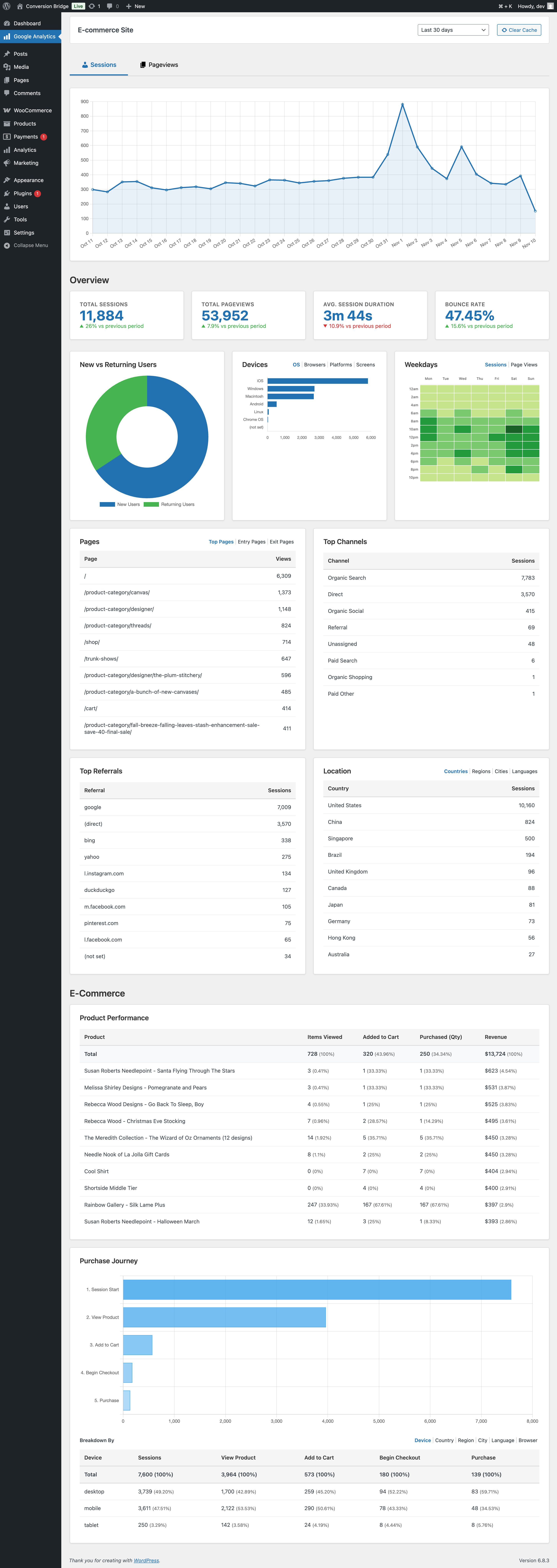
Once connected via OAuth, this gives Conversion Bridge the ability to access your raw data and create a simple, easy to follow Google Analytics dashboard with the most important information within your WordPress admin:
- Sessions and Page Views
- Session Duration
- Bounce RatePercentage of visitors who leave a website after viewing only one page without interacting further.
- New v Returning Users
- Devices (OS, Browsers, Platform, Screens)
- Weekday Heatmaps (Sessions, Page Views)
- Top Pages, Top Entry Pages, Top Exit Pages
- Top Channels
- Top Referrals
- Location (Countries, Regions, Cities, Languages)
- E-commerce top products (Viewed, Add to Cart, Quantity Purchased, Revenue)
- Comprehensive E-commerce FunnelRepresents the step-by-step process users take before completing a conversion, such as making a purchase or signing up. (by device, country, region, city, language, browser)
This brings analytics to where you actually work — your website — making it easier to track results and make smarter decisions without ever leaving WordPress.
New plugin integrations
Conversion Bridge aims to be the most comprehensive analytics plugin in WordPress and continues to grow the list of direct plugin integrations to make it easy for more site owners to setup conversion tracking in minutes. Conversion Bridge now has 61 total plugin integrations!
- Breakdance - Setup click and form submission tracking right in the page builder's native element settings panels.
- FluentCart - Track the entire e-commerce funnel from product view to completing a purchase.
- Paymattic - Track purchase events from custom payment forms.
New analytics platform integrations
Along with plugins, Conversion Bridge wants to allow you to find the best analytics platform for your site and now supports 19 different analytics plugins!
With this release, we feature two WordPress-based analytics plugins:
New cookie banner integrations
Ensuring your analytics and ad platform tracking is compliant with privacy laws is important for Conversion Bridge. Conversion Bridge now supports a total of 7 specific cookie banner plugins!
- WP Legal Pages
- Termly
In addition, there is also support for the WP Consent API - any cookie banner that works with this API will automatically be supported without an explicit integration needed.
Event queue system
For sites using cookie banners, there is a new, optional feature to enable an event queue system which will keep a localStorage copy of events in the user's browser until they give consent. Should a user give consent several pages into their journey, this queue can processed and sent into Conversion Bridge to still get the whole journey recorded.
This is an option for you to decide if you wish to use as the legal considerations around this feature are a "gray area".
This feature works only for Conversion Journeys, not for analytics or ad platforms.
Full Changelog
- New integration! Fluent Cart
- New integration! Paymattic
- New integration! Breakdance
- New integration! Koko Analytics
- New integration! Active Analytics
- New integration! WP Legal Pages (cookie banner)
- New integration! Termly (cookie banner)
- New integration! WP Consent API
- New: Google Analytics - OAuth setup
- New: Google Analytics - Custom analytics dashboard
- New: Google Consent Mode for GA4 and Google Ads
- New: Event queue system in core tracking JS
- Change: GA4 and GTM now technically separate platform integrations so you can enable both
- Change: Weekly email include "No data" message so empty report does not look broken
- Change: Pageviews in Conversion Journey will look for the associated post and use it's name if available instead of meta title
- Change: Do not set from name/email headers in weekly report email so SMTP plugins can override it
- Update: Clarity - Use consentmodev2
- Update: WP Simple Pay - Allow tracking on Thank You redirect page
- Add: Fluent Forms - Per form tracking with option for enhanced conversions
- Add: WooCommerce - Include brand info with line items
- Add: Clarity - Options to set additional properties as tags with the page view (post_type, language, user role, etc)
- Add: Microsoft Ads - Follow consent
- Add: JetFormsBuilder - Pass custom form data + enhanced data
- Add: Kadence Forms - Pass custom form data
- Add: SureCart - Include coupon code in purchase event
- Add: PostHog - option to support new web experiments beta feature flag
- Fix: MemberPress - Track Conversion Journeys
- Fix: MemberPress - Prevent duplicate purchase conversion tracking
- Fix: Clarity - Use selected external ID source when setting "identify" tag
- Fix: JetFormsBuilder - Handle situation where JetForms does not tell us what submission type the form is using
- Fix: Bricks - Handle dynamic URLs even when link type is not set to dynamic
- Fix: Bricks - PHP notice when on 404 error page and no specific post ID is available
- Fix: File Downloads - Issues with file URL in label
- Fix: Improve how JS vars are processed in event args
- Fix: Kadence Enhanced form data on submit